1. Giriş
This manual provides essential information for the safe and efficient installation, operation, and maintenance of your Antec MT-352 Micro ATX Power Supply. Please read this manual thoroughly before installation and retain it for future reference. The Antec MT-352 is a 350W Micro ATX power supply designed for personal computer systems, offering 88% efficiency and compatibility with 110V AC and 220V AC input voltagee.
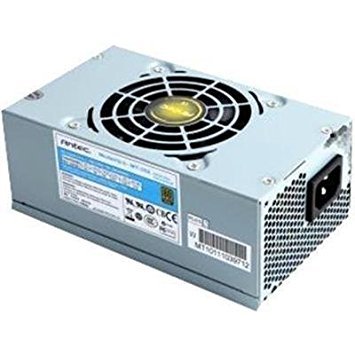
Figure 1: Antec MT-352 Micro ATX Power Supply unit.
2. Güvenlik Bilgileri
Yaralanmaları ve ekipmanınızın hasar görmesini önlemek için her zaman aşağıdaki güvenlik önlemlerine uyun:
- Elektrik Tehlikesi: Güç kaynağı ünitesini açmayın. Yüksek sestages are present inside, even when the system is turned off and unplugged. There are no user-serviceable parts inside.
- Güç Bağlantısının Kesilmesi: Always disconnect the power cord from the wall outlet before installing, removing, or servicing the power supply or any other system components.
- Uygun Topraklama: Ensure your system is properly grounded. Use only the power cord provided with the unit or a suitable replacement that meets local safety standards.
- Havalandırma: Güç kaynağının etrafında yeterli hava akışı sağlayın. Havalandırma açıklıklarını kapatmayın.
- Nem ve Sıcaklık: Do not operate the power supply in high humidity environments or near water. Avoid extreme temperatures.
- Aşırı yükleme: Do not overload the power supply beyond its specified wattage.
3. Paket İçeriği
Verify that all items are present in your Antec MT-352 package:
- Antec MT-352 Micro ATX Power Supply Unit
- AC Güç Kablosu
- Montaj Vidaları
- Kullanım Kılavuzu (bu belge)
4. Kurulum ve Kurulum
Follow these steps carefully to install your Antec MT-352 power supply:
- Hazırlık: Turn off your computer and disconnect the power cord from the wall outlet. Open your computer case. If replacing an existing power supply, disconnect all cables from the old PSU and remove it.
- PSU'nun montajı: Carefully slide the Antec MT-352 into the power supply bay of your Micro ATX case. Ensure the fan faces the correct direction for optimal airflow (typically facing downwards or towards the rear vent, depending on case design). Secure the power supply to the case using the provided mounting screws. (An image showing the PSU being mounted into a case would be helpful here.)
- Anakartı Bağlama:
- 20+4 Pin ATX Connector: Connect the main 20+4 pin ATX power connector to the corresponding socket on your motherboard. Ensure both parts of the connector are securely latched. (An image illustrating the 20+4 pin ATX connector connection would be helpful here.)
- 4-Pin ATX 12V (CPU) Connector: Connect the 4-pin ATX 12V connector to the CPU power socket on your motherboard. This is usually located near the CPU socket. (An image showing the 4-pin ATX 12V connector connection would be helpful here.)
- Çevre Birimlerinin Bağlanması: Connect the SATA power connectors to your hard drives, SSDs, and optical drives. Use the 4-pin Molex connectors for older peripherals or case fans if needed. Ensure all connections are firm. (An image demonstrating SATA and Molex connections would be helpful here.)
- Kablo yönetimi: Hava akışını iyileştirmek ve estetiği artırmak için kabloları düzgün bir şekilde yönlendirin. Gerekirse kablo bağları kullanın.
- Son Kontroller: Tüm bağlantıların güvenli olduğundan emin olmak için iki kez kontrol edin. Bilgisayar kasanızı kapatın.
5. Operasyon
After successful installation, follow these steps to operate your system:
- Gücü bağlayın: Plug the AC power cord into the power supply's AC inlet and then into a grounded wall outlet.
- Güç Açık: Press the power button on your computer case. The system should boot up normally.
- Kapat: To turn off your system, use the operating system's shutdown procedure. For a hard shutdown, press and hold the power button on your case for several seconds. Always ensure the system is fully shut down before disconnecting the power cord.
6. Bakım
Doğru bakım, güç kaynağınızın uzun ömürlü olmasını ve optimum performans göstermesini sağlar:
- Toz Giderimi: Periodically clean the power supply's fan and vents to prevent dust buildup, which can impede airflow and cause overheating. Use compressed air to gently blow dust out of the unit. Ensure the system is powered off and unplugged before cleaning.
- Hava akışı: Ensure that your computer case has good airflow. Avoid placing the computer in enclosed spaces that restrict ventilation.
- Kablo yönetimi: Maintain tidy cable routing to prevent obstruction of airflow within the case.
7. Sorun Giderme
If you encounter issues with your Antec MT-352 power supply, refer to the following common problems and solutions:
| Sorun | Olası Neden | Çözüm |
|---|---|---|
| Sistem açılmıyor. | Gevşek güç kablosu, PSU anahtarı kapalı, arızalı bileşen. | Check AC power cord connection. Ensure PSU switch (if present) is ON. Verify all internal power connectors are secure. Test with a different power outlet. |
| Sistem açılıyor ancak hemen kapanıyor. | Overload, short circuit, overheating, faulty component. | Disconnect non-essential peripherals to check for overload. Inspect for any loose screws or components causing a short. Ensure adequate ventilation. |
| Güç kaynağı ünitesinden alışılmadık sesler geliyor. | Fan obstruction, faulty fan bearing. | Power off and unplug the system. Carefully inspect the fan for obstructions (e.g., loose cables). If noise persists, contact support. |
| System instability or random reboots. | Insufficient power, faulty PSU, other component issues. | Ensure your system's power requirements do not exceed 350W. Check for other faulty components (RAM, GPU). |
If troubleshooting steps do not resolve the issue, contact Antec customer support for further assistance.
8. Özellikler
The following are the technical specifications for the Antec MT-352 Micro ATX Power Supply:
- Modeli: MT-352
- Form Faktörü: Mikro ATX
- Çıkış Watttage: 350 Watt
- Yeterlik: %88
- Giriş Voltage: 110V AC - 220V AC (Minimum Input Voltage: 110 Volts, Maximum Input Voltage: 220 Volt)
- Soğutma Yöntemi: Hava
- Bağlantı Tipi: ATX (20+4 Pin, 4-Pin ATX 12V, SATA, Molex)
- Uyumlu Cihazlar: Kişisel Bilgisayar
- Ürün Ağırlığı: 3.1 Pound (yaklaşık 1.4 kg)
- Üretici: Öntek
- ASIN: B0065OD10G
- İlk Mevcut Tarih: 10 Kasım 2011
9. Garanti ve Destek
Antec ürünleri üretici garantisi kapsamındadır. Garanti şartları ve koşulları için lütfen ürününüzle birlikte verilen garanti kartına bakın veya resmi Antec web sitesini ziyaret edin. webSite. Satın alma belgenizi garanti talepleriniz için saklayın.
For technical support, troubleshooting assistance, or warranty inquiries, please contact Antec customer service through their official website veya ürün ambalajınızda yer alan iletişim bilgileri.
Note: No official product videos were found in the provided data for embedding.


