1. Giriş
Thank you for choosing the Coby SNAPP CAM3002 Mini Camcorder. This compact device is designed for easy video recording and photo capture, offering portability and user-friendly operation. This manual provides detailed instructions to help you set up, operate, and maintain your camcorder effectively.
2. Paket İçeriği
Lütfen paketi aşağıdaki öğeler açısından kontrol edin:
- Coby SNAPP CAM3002 Mini Camcorder
- 2 x AA Alkalin Pil
- TV Connection Cable (RCA/Composite Video Cable)
- Muvee Software (on CD or via download link)
- Kullanım Kılavuzu (bu belge)
3. Camcorder Overview
Familiarize yourself with the main components of your Coby SNAPP CAM3002 Mini Camcorder:
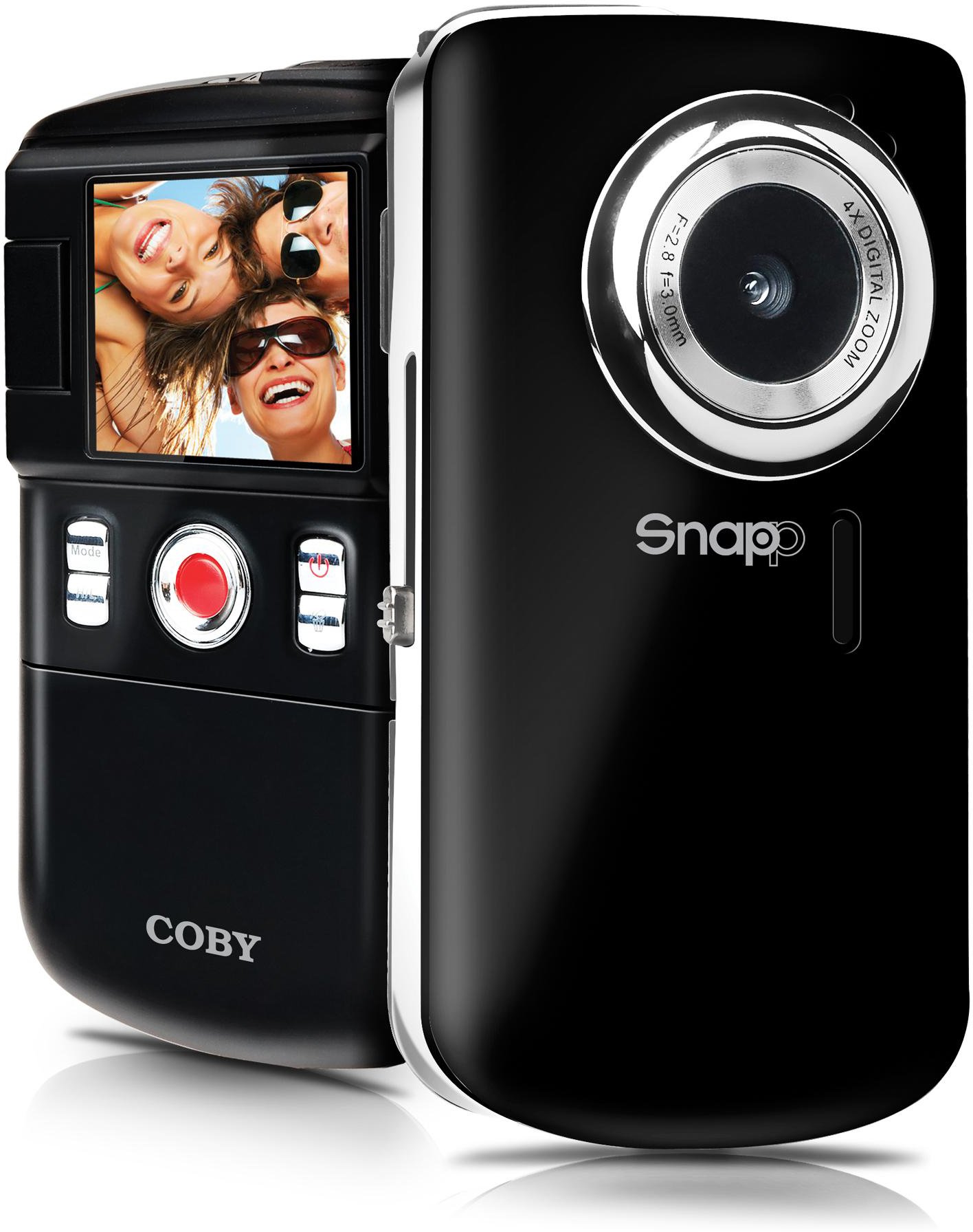
This image displays the front of the Coby SNAPP CAM3002 Mini Camcorder. Visible features include the camera lens, a small microphone opening, and several control buttons on the side, indicating its compact and portable design.
- Kamera Lensi: Video ve fotoğraf çekimi yapar.
- Mikrofon: Video çekimi sırasında sesi kaydeder.
- 1.8 inç LCD Ekran: Displays menus, live view, and playback. This screen can flip out for self-portraits.
- Kontrol Düğmeleri: For power, mode selection, recording, photo capture, and navigation.
- Pil Bölmesi: Holds 2 AA alkaline batteries.
- SD/SDHC Kart Yuvası: For inserting a memory card (up to 16GB).
- Integrated USB Plug: For direct connection to a computer for file transfer and charging (if rechargeable batteries are used).
- TV Çıkış Portu: For connecting to a television using the included cable.
4. Kurulum
4.1. Pillerin Takılması
- Locate the battery compartment cover on the camcorder.
- Kapağı kaydırarak veya kaldırarak açın.
- Bölmenin içinde belirtildiği gibi doğru kutuplara (+/-) dikkat ederek iki (2) adet AA alkalin pil takın.
- Pil bölmesi kapağını sıkıca kapatın.
4.2. Hafıza Kartının Takılması
The camcorder requires an SD or SDHC memory card (up to 16GB) to store videos and photos.
- Locate the SD/SDHC card slot on the camcorder.
- Insert the memory card with the metal contacts facing down (or as indicated by a diagram near the slot) until it clicks into place.
- To remove the card, gently push it in until it clicks, then release, and it will eject slightly.
4.3. Açma/Kapama
- Cihazı açmak için, LCD ekran aydınlanana kadar Güç düğmesini basılı tutun.
- To power off, press and hold the Power button again until the screen turns off. The camcorder may also power off automatically after a period of inactivity to conserve battery life.
5. Video Kameranın Kullanımı
5.1. Mod Seçimi
Use the Mode button to switch between the following functions:
- Video Kayıt Modu: For capturing moving images with sound.
- Fotoğraf Çekme Modu: For taking single photographs.
- Oynatma Modu: yeniden içinviewing recorded videos and photos.
5.2. Video Kaydı
- Switch to Video Recording Mode.
- Frame your subject using the 1.8-inch LCD screen. The screen can be flipped out for self-recording.
- Press the Record/Capture button to start recording. A red indicator or timer will appear on the screen.
- Press the Record/Capture button again to stop recording.
5.3. Fotoğraf Çekmek
- Switch to Still Photo Mode.
- LCD ekranı kullanarak konunuzu çerçeveleyin.
- Press the Record/Capture button to take a photo. The image will be saved to the memory card.
5.4. Oynatma
- Oynatma Moduna geçin.
- Kaydedilmiş videolarınız ve fotoğraflarınız arasında gezinmek için gezinme düğmelerini kullanın.
- Press the Record/Capture button to play a video or view tam ekran bir fotoğraf.
5.5. Televizyona Bağlanma
Yapabilirsiniz view your recorded content on a larger screen using the included TV connection cable.
- Ensure both the camcorder and the television are powered off.
- Connect one end of the TV connection cable to the TV Out port on the camcorder.
- Connect the other end of the cable to the corresponding video (yellow) and audio (white) input jacks on your television.
- Power on the television and select the correct AV input source.
- Power on the camcorder and switch to Playback Mode to view sizin medyanız.
5.6. Aktarma FileBilgisayara s
The camcorder features an integrated USB plug for easy file Aktar.
- Kameranın açık olduğundan emin olun.
- Extend the integrated USB plug from the camcorder.
- Plug the camcorder directly into an available USB port on your computer (Mac or PC).
- Your computer should recognize the camcorder as a removable storage device. You can then access the files (videos and photos) and copy them to your computer.
5.7. Using Muvee Software
The included Muvee software is designed to help you edit your videos and photos, and facilitate uploading them to online platforms.
- Install the Muvee software on your computer using the provided CD or download link.
- Follow the software's on-screen instructions for editing and sharing your media.
6. Bakım
6.1. Temizlik
- Video kameranın dış yüzeyini temizlemek için yumuşak, kuru bir bez kullanın.
- For the lens and LCD screen, use a specialized lens cleaning cloth and solution to avoid scratches.
- Sert kimyasallar veya aşındırıcı temizleyiciler kullanmayın.
6.2. Depolama
- Uzun süre kullanılmadığı zamanlarda, sızıntıyı önlemek için pilleri çıkarın.
- Store the camcorder in a cool, dry place, away from direct sunlight and extreme temperatures.
7. Sorun Giderme
If you encounter issues with your camcorder, refer to the following common problems and solutions:
| Sorun | Olası Çözüm |
|---|---|
| Kamera açılmıyor. | Check if batteries are correctly inserted and fully charged. Replace with fresh AA alkaline batteries if necessary. |
| Poor video or photo quality. | Ensure sufficient lighting in the environment. Hold the camcorder steady during recording/capture. Clean the lens if it appears smudged. |
| Aktarılamıyor files bilgisayara. | Ensure the camcorder is powered on and correctly connected via the integrated USB plug. Try a different USB port on your computer. Verify your computer's operating system recognizes the device. |
| Kısa pil ömrü. | Use fresh, high-quality AA alkaline batteries. Reduce screen brightness if possible (check settings). |
| Hafıza kartı hatası. | Ensure the memory card is correctly inserted. Try reformatting the card (this will erase all data). Try a different compatible SD/SDHC card. |
8. Özellikler
| Özellik | Şartname |
|---|---|
| Model Adı | CAM3002 |
| Görüntülemek | 1.8-inch Full-color LCD Electronic Viewfinder (flips out) |
| Video Çözünürlüğü | 480p (640x480) |
| Still Photo Resolution | 0.3 MP |
| Dijital Zoom | 4x |
| Depolama Ortamı | SD/SDHC Memory Card (up to 16GB) |
| Bağlantı | Integrated Hi-speed USB 2.0 plug, TV Out (RCA) |
| Güç Kaynağı | 2 x AA Alkalin Pil |
| Desteklenen File Biçimler | Video: MP4, Photo: JPEG |
| Özel Özellikler | Built-in speaker, Muvee software included |
9. Garanti ve Destek
Coby products are manufactured to high-quality standards. This product is covered by a limited warranty against defects in materials and workmanship. Please refer to the warranty card included with your purchase for specific terms and conditions.
For technical support or customer service inquiries, please visit the official Coby website or contact their customer support line. Keep your purchase receipt as proof of purchase for warranty claims.


