1. Giriş
This manual provides essential information for the installation, operation, and maintenance of the Johnson Controls TEC2203-3 Non-Programmable Thermostat. This device is designed for controlling heating and cooling systems with 2 Heat and 2 Cool stages, and features a 1SPDFAN (Single Pole Double Throw Fan) control. It serves as a reliable replacement thermostat for compatible HVAC systems.
2. Ürün Bittiview
2.1 Temel Özellikler
- Non-Programmable operation for straightforward temperature control.
- Supports 2 Heat and 2 Cool stages for versatile HVAC system compatibility.
- Integrated 1SPDFAN control.
- Clear digital display for room temperature.
2.2 Bileşenler ve Ekran
The TEC2203-3 thermostat features a user-friendly interface with a digital display and intuitive buttons for control. Refer to the image below for a visual guide to the thermostat's components.
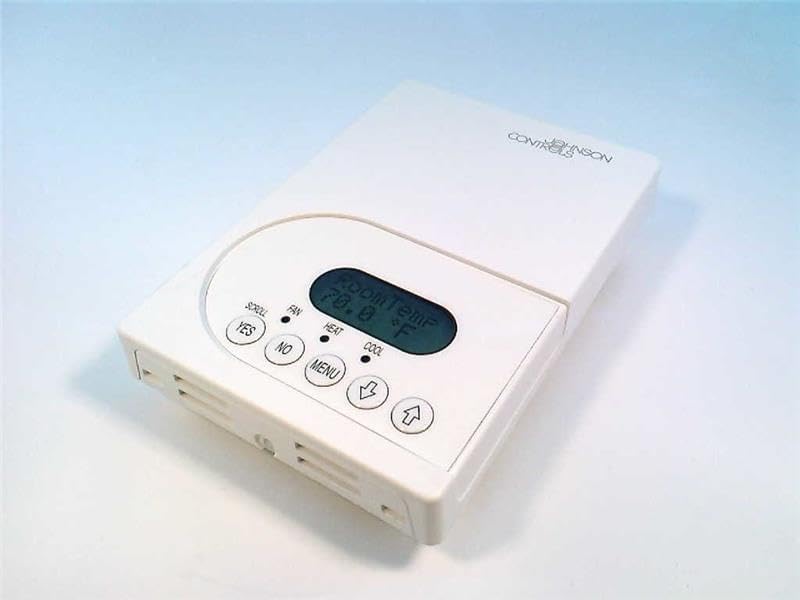
Şekil 1: Ön view of the Johnson Controls TEC2203-3 Thermostat. The image shows the white rectangular thermostat unit with a central digital display indicating "Room Temp 70.0 °F". Below the display are control buttons: "YES", "NO", "MENU", a down arrow, and an up arrow. Indicators for "SCROLL", "FAN", "HEAT", and "COOL" are also visible.
The display shows the current room temperature. Indicators for HEAT and COOL illuminate when the respective modes are active. The FAN indicator shows fan operation. Buttons include:
- YES / NO: Used for confirming or canceling selections in menu options.
- MENÜ: Accesses system settings and operational modes.
- Up Arrow / Down Arrow: Adjusts temperature setpoints and navigates menu options.
3. Kurulum
Installation of the Johnson Controls TEC2203-3 Thermostat should be performed by a qualified HVAC technician. Incorrect installation can lead to system malfunction, property damage, or personal injury. Always ensure power to the HVAC system is turned off at the circuit breaker before beginning any installation work.
3.1 Güvenlik Önlemleri
- Disconnect all power to the heating and cooling system before installation.
- Follow all local electrical codes and ordinances.
- Ensure wiring connections are secure and correct according to the wiring diagram provided with the product packaging (not included in this manual).
4. Kullanım Talimatları
The TEC2203-3 is a non-programmable thermostat, meaning it maintains a set temperature until manually changed.
4.1 Sıcaklığın Ayarlanması
- Ekranda mevcut oda sıcaklığı gösterilir.
- Basın Yukarı Ok or Aşağı Ok button to adjust the desired temperature setpoint.
- The new setpoint will flash briefly and then be saved. The system will then work to reach and maintain this temperature.
4.2 Changing System Mode (Heat/Cool/Off)
- Basın MENÜ düğme.
- Kullanın Yukarı Ok or Aşağı Ok to navigate through the available system modes (e.g., HEAT, COOL, OFF).
- Basmak EVET İstenilen modu seçmek için.
- The corresponding indicator (HEAT or COOL) will illuminate when active.
4.3 Fanın Çalıştırılması
The fan can typically be set to AUTO (runs only when heating or cooling) or ON (runs continuously).
- Basın MENÜ düğme.
- Navigate to the fan settings using the Yukarı Ok or Aşağı Ok.
- Basmak EVET İstediğiniz fan modunu seçmek için
5. Bakım
The Johnson Controls TEC2203-3 Thermostat requires minimal maintenance to ensure optimal performance.
- Temizlik: Termostatın dışını periyodik olarak yumuşak bir bezle silin.amp bezle silin. Aşındırıcı temizleyiciler veya çözücüler kullanmayın.
- Hava akışı: Termostatın havalandırma deliklerinin toz veya döküntülerle tıkanmadığından emin olun, çünkü bu durum sıcaklık algılama doğruluğunu etkileyebilir.
- Profesyonel Kontroller: It is recommended to have your entire HVAC system, including the thermostat, inspected by a professional technician annually.
6. Sorun Giderme
If you experience issues with your TEC2203-3 thermostat, consider the following common troubleshooting steps:
- Ekran/Güç Yok: Check the circuit breaker for your HVAC system. Ensure the thermostat is properly seated on its base.
- Yanlış Sıcaklık Okuması: Ensure the thermostat's vents are clear of obstructions. Avoid placing the thermostat near heat sources (lamps, direct sunlight) or drafts.
- Sistem Yanıt Vermiyor: Verify the system mode (HEAT/COOL/OFF) is correctly selected. Check if the temperature setpoint is above (for heat) or below (for cool) the current room temperature.
- Fan Çalışmıyor: Check the fan mode setting (AUTO/ON). If set to AUTO, the fan will only run when heating or cooling is active.
Bu adımları denedikten sonra sorunlar devam ederse, yardım için yetkili bir HVAC teknisyenine başvurun.
7. Özellikler
| Özellik | Detay |
|---|---|
| Örnek | TEC2203-3 |
| Marka | Johnson Kontrolleri |
| Kontrol Türü | Programlanamayan Termostat |
| Stages | 2 Isıtma / 2 Soğutma |
| Fan Kontrolü | 1SPDFAN |
| Ürün Ağırlığı | 1 Pound |
| ASIN | B004H2XCMU |
8. Garanti ve Destek
For specific warranty information and technical support regarding your Johnson Controls TEC2203-3 Thermostat, please refer to the documentation included with your purchase or contact Johnson Controls directly. Warranty terms and support options may vary based on region and purchase location.