giriiş
The Sharper Image Portable Travel Sound Soother 20 (Model SI601) is designed to provide a relaxing audio environment, assist with sleep, and function as a portable alarm clock. It features 20 digitally-recorded sound environments, an LCD display with time, date, year, and temperature, and a dual-time alarm with snooze. Its compact size and lightweight design make it ideal for travel.

Ön view of the Sharper Image Travel Sound Soother 20 packaging, highlighting key features.
Paket İçeriği
Lütfen paketi aşağıdaki öğeler açısından kontrol edin:
- Sharper Image Portable Travel Sound Soother 20 unit
- Kulaklıklar
- El kayışı
- Yumuşak Seyahat Çantası

The Sharper Image Travel Sound Soother 20 unit and accessories as packaged.
Ürün Bittiview
The device features a backlit LCD display and front-mounted controls for easy access.

Close-up of the product display and controls, as shown on the packaging.
Kontroller ve Ekran:
- GÖRÜNTÜLE Düğmesi: Toggles backlight, changes temperature unit (°F/°C).
- MOD Düğmesi: Used to set time, date, and alarm.
- ZAMANLAYICI Düğmesi: Otomatik kapanma zamanlayıcısını ayarlar.
- VOL- / VOL+ Düğmeleri: Sesi ayarlar.
- Soother Buttons (Up/Down Arrows): Selects sound environments.
- LCD Ekran: Displays time, date, year, temperature, and selected sound.
Kurmak
Pil Montajı:
- Ünitenin arkasındaki pil bölmesini bulun.
- Pil bölmesinin kapağını açın.
- 3 adet AA pil (dahil değildir) takın ve kutupların doğru (+/-) olduğundan emin olun.
- Pil bölmesi kapağını sıkıca kapatın.
Note: For optimal performance, use fresh alkaline batteries. Remove batteries if the unit will not be used for an extended period.
Kullanım Talimatları
Saat ve Tarih Ayarı:
- Basılı tutun MOD Zaman göstergesi yanıp sönene kadar düğmeye basın.
- Kullanın cilt Ve HACİM+ Saati ayarlamak için düğmelere basın. MOD onaylamak için.
- Repeat the process to set minutes, year, month, and day.
- Basmak MOD Ayar modundan çıkmak için tekrar tuşuna basın.
Alarmı Ayarlama:
- Basın MOD button repeatedly until the alarm time is displayed.
- Basılı tutun MOD Alarm saati yanıp sönene kadar düğmeye basın.
- Kullanın cilt Ve HACİM+ Alarm saatini ayarlamak için düğmelere basın. MOD onaylamak için.
- Repeat to set alarm minutes.
- Basmak MOD to select alarm type (buzzer or sound soother).
- Basmak MOD Alarm ayarları modundan çıkmak için tekrar tıklayın.
- Alarmı etkinleştirmek/devre dışı bırakmak için, MOD button until the alarm icon appears/disappears.
Note: The alarm features a ramp-up volume and a snooze function. When the alarm sounds, press any button to activate snooze for a short period, or press the MOD alarmı kapatmak için düğme.
Using the Sound Soother:
- Basın Soother Up or Soother Down arrow buttons to cycle through the 20 available sound environments.
- Kullanın cilt Ve HACİM+ Oynatma ses seviyesini ayarlamak için düğmeler.
Available Sound Environments:
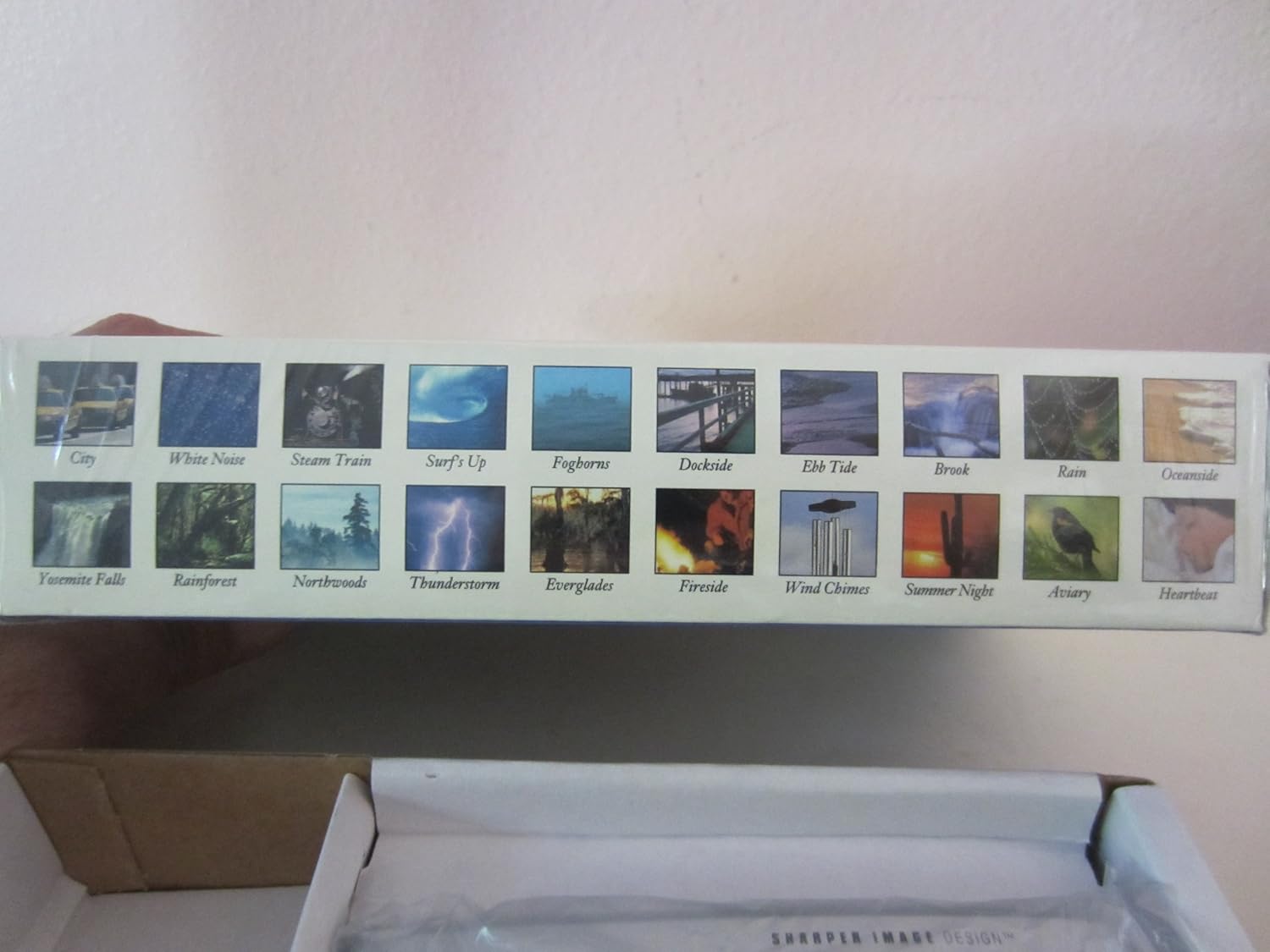
Visual representation of the 20 sound environments available on the device.
- Şehir
- Beyaz Gürültü
- Buharlı Tren
- Surf's Up
- Sis düdükleri
- Rıhtım kenarı
- Çekilme Gelgiti
- Dere
- Yağmur
- Okyanus kenarı
- Yosemite Falls
- Yağmur ormanı
- Northwoods
- Fırtına
- Everglades
- Şömine başı
- Rüzgar Çanları
- Yaz Gecesi
- Kuşhane
- Kalp atışı
Zamanlayıcıyı Kullanma:
The unit features an auto-shutoff timer with settings from 15 to 120 minutes.
- While a sound environment is playing, press the ZAMANLAYICI düğmesine tekrar tekrar basın.
- The display will show the selected timer duration (e.g., 15, 30, 60, 90, 120 minutes).
- Ünite seçilen süre sonunda otomatik olarak kapanacaktır.
Sıcaklık Göstergesi:
The LCD displays the ambient temperature.
- Fahrenheit (°F) ve Celsius (°C) arasında geçiş yapmak için tuşuna basın. GÖRÜNTÜLEMEK düğme.
Bakım
Temizlik:
- Cihazı yumuşak, kuru bir bezle silin.
- Aşındırıcı temizleyiciler veya çözücüler kullanmayınız.
- Avoid exposing the unit to excessive moisture.
Pil Değişimi:
When the display dims or the unit functions erratically, it is time to replace the batteries. Follow the battery installation steps outlined in the Setup section.
Sorun giderme
| Sorun | Çözüm |
|---|---|
| Ünite açılmıyor. | Pillerin kutuplarını kontrol edin. Yeni AA pillerle değiştirin. |
| Ekran soluk veya boş. | Replace batteries. Ensure batteries are correctly inserted. |
| Sound is distorted or too low/high. | Sesi ayarlamak için cilt Ve HACİM+ buttons. Ensure earbuds are properly connected if used. |
| Alarm çalmıyor. | Alarmın etkinleştirildiğinden emin olun (ekranda alarm simgesi görünmelidir). Alarm zamanı ayarlarını kontrol edin. |
Özellikler
- Modeli: SI601
- Güç Kaynağı: 3 x AA pil (dahil değildir)
- Boyutlar: Approximately 4 7/8" (W) x 2 3/4" (H) x 1 1/3" (D)
- Ağırlık: Approximately 6 oz (without batteries)
- Görüntülemek: Arka aydınlatmalı LCD
- Sound Environments: 20 digitally-recorded sounds
- Zamanlayıcı: 15, 30, 60, 90, 120 minutes auto-shutoff
- Özellikler: Dual-time alarm clock, thermometer (°F/°C), date, year display
Garanti ve Destek
For warranty information or technical support, please refer to the warranty card included with your product or contact Sharper Image customer service directly. Keep your purchase receipt as proof of purchase.
Daha fazla yardım için lütfen resmi Sharper Image sayfasını ziyaret edin websiteyi ziyaret edin veya müşteri destek hattıyla iletişime geçin.


