1. Ürün Bittiview
The Janome Embroidery Machine Foot P is a replacement presser foot designed specifically for Janome embroidery machines. This foot is essential for proper fabric handling and stitch formation during embroidery operations, ensuring precise and high-quality results.
Uyumlu Modeller: This embroidery foot is compatible with a range of Janome embroidery machine models, including:
- MC300e
- MC350e
- MC5000
- MC8000
- MC9000
- MC10000
- MC10001
- MC11000
- MC11000se
- MC5700
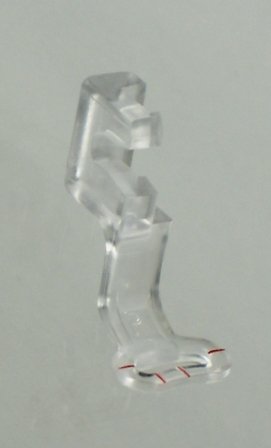
Image 1.1: The Janome Embroidery Machine Foot P. This image shows the clear plastic presser foot with a metal attachment point, designed for embroidery tasks.
2. Kurulum ve Kurulum
Proper installation of the Embroidery Foot P is crucial for optimal performance. Always ensure your machine is turned off before changing presser feet.
- Turn Off Machine: Power off your Janome embroidery machine and unplug it from the electrical outlet for safety.
- İğneyi ve baskı ayağını kaldırın: Use the handwheel to raise the needle to its highest position. Raise the presser foot lever.
- Remove Existing Foot (if applicable): If another presser foot is attached, locate the presser foot release lever or button at the back of the presser foot holder. Press it to release the current foot.
- Attach Embroidery Foot P: Position the Embroidery Foot P so that the pin on the foot aligns with the groove on the presser foot holder. Lower the presser foot lever slowly until the foot snaps into place. Ensure it is securely attached.
- Kurulumu Doğrulayın: Gently try to move the foot to confirm it is firmly seated and does not wobble.
- Güç Açık: Plug in and power on your machine.
3. Kullanım Talimatları
The Embroidery Foot P is designed for free-motion embroidery and darning, allowing the fabric to move freely under the needle while preventing skipped stitches. This foot does not apply pressure to the fabric in the same way a standard presser foot does, which is essential for embroidery.
- Hooping Fabric: Always hoop your fabric securely with appropriate stabilizer before beginning embroidery. The foot works in conjunction with the hoop to control fabric movement.
- Lowering the Feed Dogs: For most embroidery operations, the machine's feed dogs should be lowered. Refer to your specific Janome machine's manual for instructions on how to lower the feed dogs.
- İğne Konumu: Ensure the needle is correctly installed and suitable for your fabric and thread type.
- Starting Embroidery: Begin stitching slowly to ensure the thread tension is correct and the foot is functioning properly. The foot will move up and down with the needle, allowing the fabric to be moved freely by the embroidery unit.
- İzleme: Continuously monitor the embroidery process to prevent thread breaks, fabric bunching, or damage to the foot.
4. Bakım ve Özen
To ensure the longevity and proper function of your Embroidery Foot P, follow these maintenance guidelines:
- Temizlik: Periodically clean the foot with a soft, dry cloth to remove any lint or thread residue. Avoid using harsh chemicals or abrasive materials.
- Depolamak: Store the foot in a protective case or a designated compartment in your sewing machine accessory box to prevent damage, especially if it is made of plastic.
- Denetleme: Before each use, inspect the foot for any signs of wear, cracks, or warping. A damaged foot can affect stitch quality and potentially harm your machine or fabric.
- İşleme: Handle the foot with care. Dropping it or applying excessive force can cause it to break, particularly if it is a plastic component.
5. Sorun Giderme
| Sorun | Olası Neden | Çözüm |
|---|---|---|
| Foot does not attach securely. | Incorrect alignment; debris in holder; incompatible machine model. | Ensure the pin on the foot is correctly aligned with the holder's groove. Clean the holder. Verify your machine model is listed as compatible. |
| Stitches are uneven or skipped. | Improper hooping; incorrect needle; damaged foot; feed dogs not lowered. | Re-hoop fabric tightly. Check needle type and condition. Inspect foot for damage. Ensure feed dogs are lowered for embroidery. |
| Foot breaks or cracks easily. | Accidental impact; material fatigue; manufacturing defect. | Handle with care. If the foot is plastic, it may be more susceptible to breakage than metal alternatives. Replace the foot if damaged. |
| Foot appears warped. | Manufacturing defect; exposure to heat. | If newly purchased, contact the seller for a replacement. Store away from direct heat sources. |
6. Ürün Özellikleri
| Özellik | Detay |
|---|---|
| Model Numarası | 43230-103502 |
| Ürün Boyutları | 4.7 x 2 x 0.5 inç |
| Ürün Ağırlığı | 0.32 ons |
| Malzeme | Metal (Note: Some versions or user experiences may refer to plastic construction.) |
| Üretici | Janome |
| UPC | 732212182945 |
| Uyumluluk | Janome MC300e, 350e, 5000, 8000, 9000, 10000, 10001, 11000, 11000se, 5700 |
7. Garanti ve Destek
For specific warranty information regarding your Janome Embroidery Machine Foot P, please refer to the documentation provided with your original purchase or contact Janome customer support directly. Warranty terms may vary based on region and retailer.
If you encounter issues not covered in this manual or require further assistance, please visit the official Janome website or contact their customer service department. Provide your product model number (43230-103502) and machine model for efficient support.
Janome Official Webalan: www.janome.com


