giriiş
The Casio SA-76 44-Key Mini Personal Keyboard is designed for beginners, offering an intuitive and engaging musical experience. Its compact size and user-friendly interface make it suitable for young musicians and those new to keyboard playing. This manual provides essential information for setting up, operating, and maintaining your SA-76 keyboard.
The keyboard features an easy-to-read LCD display that shows important data such as tone, rhythm, song number, metronome, tempo, and the note being played. With dedicated buttons for Piano and Organ sounds, switching between instrument voices is quick and simple. The 44 mini keys and 5 percussion pads are designed for comfortable play, especially for smaller hands, making it an excellent introduction to the world of keyboard music.
Temel Özellikler
- 44 mini-sized keys for comfortable play.
- 5 percussion pads for rhythmic exploration.
- 100 built-in tones to explore various instrument sounds.
- 50 rhythm patterns to accompany your playing.
- Simple tone selection with dedicated PIANO and ORGAN buttons.
- Melody on/off lesson function for practice.
- Easy-to-read LCD display for clear information.
- Built-in speakers with 1.6 Watts output.
- Headphones jack (3.5mm) for private practice.
- Portable design, can be powered by batteries (6 AA, not included) or an optional AC adapter.
Kurmak
1. Üniteye Güç Verme
The Casio SA-76 can be powered by either an optional AC adapter or batteries.
- AC Adaptör (İsteğe bağlı): Connect a compatible 9V DC AC adapter (not included) to the DC 9V jack on the rear panel of the keyboard. Plug the adapter into a standard wall outlet.
- Piller: The keyboard requires 6 AA-size batteries (not included).
2. Pil Kurulumu
- Klavyenin kapalı olduğundan emin olun.
- Klavyenin alt kısmındaki pil bölmesi kapağını bulun.
- Kapağı kaydırarak açın.
- Insert 6 AA-size batteries, ensuring correct polarity (+/-) as indicated inside the compartment.
- Pil bölmesi kapağını güvenli bir şekilde yerine takın.
3. Attaching the Music Stand
The included music stand can be inserted into the slots on the top panel of the keyboard to hold sheet music or a tablet.
Kullanım Talimatları
1. Güç Açma/Kapatma
- To turn on the keyboard, press and hold the GÜÇ button until the LCD display lights up.
- To turn off the keyboard, press and hold the GÜÇ Ekran kapanana kadar tekrar düğmesine basın.
2. Sesi Ayarlama
Kullanın SES + Ve HACİM - buttons located next to the power button to increase or decrease the overall sound volume.
3. Ton Seçimi
The SA-76 offers 100 different tones. You can select them using the dedicated buttons or the rotary dial.
- Basın PİYANO or ORGAN button for quick access to these common sounds.
- To select other tones, rotate the TON dial to browse through the available options displayed on the LCD.
4. Playing Rhythms
The keyboard includes 50 rhythm patterns.
- Döndür RİTİM dial to select a desired rhythm pattern.
- Basın BAŞLAT/DURDUR button to begin or end the rhythm playback.
- Tempoyu aşağıdaki yöntemle ayarlayın. TEMPO + Ve TEMPO - düğmeler.
5. Dahili Şarkıları Çalma
The SA-76 features 10 built-in songs for listening or practicing with the melody on/off function.
- Döndür ŞARKI BANKASI dial to select a song.
- Basın OYNAT/DURDUR Şarkıyı başlatmak veya durdurmak için düğme.
- Kullanın MELODY ON/OFF button to mute or unmute the melody part of the song, allowing you to play along.
6. Sustain Function
Etkinleştir SÜRDÜRMEK function to make notes linger longer after the key is released, similar to a piano's sustain pedal.
- Basın SÜRDÜRMEK button to toggle the effect on or off.
7. Percussion Pads
The 5 percussion pads allow you to add drum sounds to your performance. Simply press a pad to trigger a percussion sound.
8. Kulaklık Kullanmak
For private practice, connect 3.5mm stereo headphones to the TELEFONLAR / ÇIKIŞ jack on the rear panel. This will mute the built-in speakers.
Ürün Bittiview
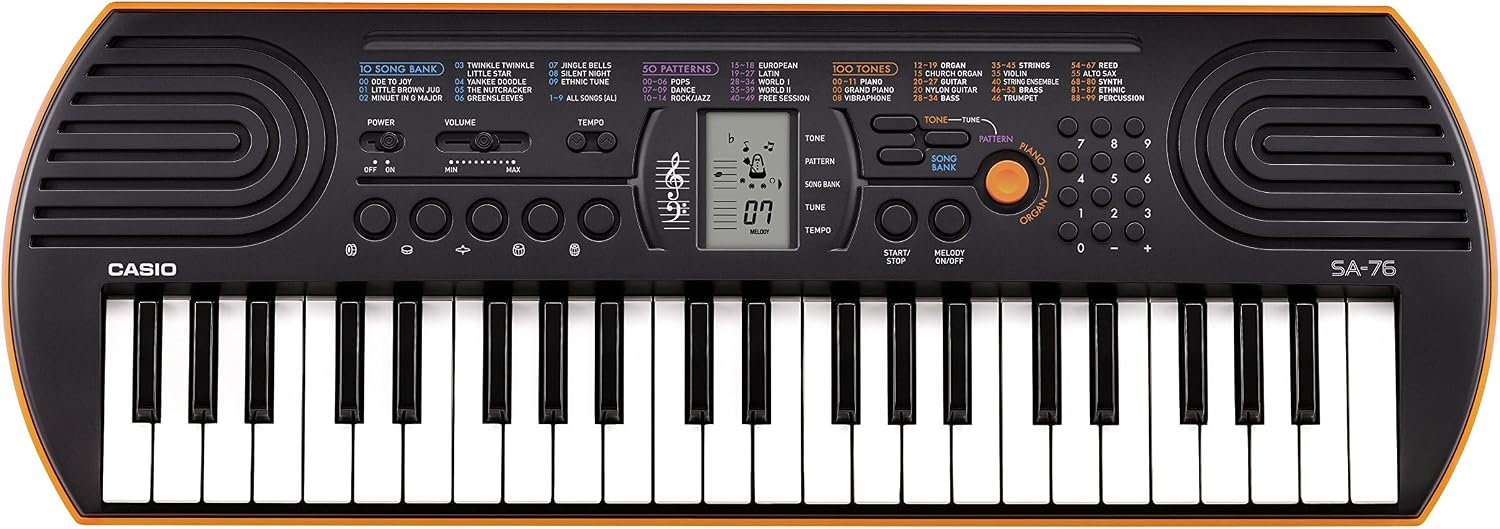
Figure 1: Casio SA-76 44-Key Mini Personal Keyboard. This image shows the overall design of the orange Casio SA-76 keyboard with its 44 mini keys and control panel.

Figure 2: Close-up of the control panel. This image provides a detailed view of the LCD display, tone/rhythm/song dials, volume buttons, and other function buttons on the Casio SA-76.

Figure 3: Diagram highlighting key features. This image illustrates various components of the Casio SA-76, including the 44 mini keys, drum pads, built-in speakers, and easy-to-use controls.

Figure 4: Casio SA-76 product dimensions. This image shows the physical measurements of the keyboard: 23.8 inches (W) x 8.3 inches (D) x 2.24 inches (H).
Bakım
- Temizlik: Wipe the keyboard with a soft, dry cloth. Avoid using abrasive cleaners, waxes, or solvents, as these can damage the finish.
- Depolamak: Klavyeyi serin, kuru ve doğrudan güneş ışığından, aşırı sıcaklıklardan ve yüksek nemden uzak bir yerde saklayın. Uzun süre saklayacaksanız, sızıntıyı önlemek için pilleri çıkarın.
- İşleme: Klavyeyi düşürmekten veya sert darbelere maruz bırakmaktan kaçının. Üzerine ağır nesneler koymayın.
Sorun giderme
| Sorun | Olası Neden | Çözüm |
|---|---|---|
| Güç yok | Batteries are dead or incorrectly installed; AC adapter not connected or faulty. | Replace batteries or check polarity. Ensure AC adapter is securely connected and functional. |
| Ses yok | Volume is too low; headphones are connected; speakers are muted. | Increase volume. Disconnect headphones. Check if any mute function is active. |
| Tuşlar yanıt vermiyor | Keyboard may be in a specific mode (e.g., lesson mode with melody off) or requires a reset. | Check current mode settings. Turn the keyboard off and on again to reset. |
Özellikler
| Özellik | Detay |
|---|---|
| Anahtar Sayısı | 44 mini-sized keys |
| Tonlar | 100 |
| Ritimler | 50 |
| Şarkılar | 10 |
| Perküsyon Pedleri | 5 |
| Konuşmacılar | 2 x 1.2 W (Amp Output: 1.6 Watts) |
| Kulaklık girişi | 3.5 mm stereo mini jak |
| Güç Kaynağı | 6 AA batteries or optional AC adapter (DC 9V) |
| Boyutlar (G x D x Y) | 23.8" x 8.3" x 2.24" (60.45 cm x 21.08 cm x 5.69 cm) |
| Ürün Ağırlığı | 3.08 pound (1.4 kg) |
Garanti ve Destek
For warranty information or technical support, please refer to the documentation included with your product or visit the official Casio website. Herhangi bir garanti talebi için satın alma belgeniz olarak satın alma makbuzunuzu saklayın.


