giriiş
This manual provides comprehensive instructions for the setup, operation, maintenance, and troubleshooting of your Logitech M510 Wireless Mouse. Designed for comfort and efficiency, the M510 offers precise control and convenient features for your computing needs.
The Logitech M510 is a comfortable wireless computer mouse featuring a USB Unifying Receiver, back/forward buttons, and side-to-side scrolling. It operates on 2 AA batteries and is compatible with Personal Computers and Macbooks running operating systems like Windows 10.
Paket İçeriği
- Logitech M510 Kablosuz Fare
- Logitech Unifying Alıcı
- 2 adet AA pil (önceden takılı veya dahil)
Kurmak
1. Pil Kurulumu
The Logitech M510 mouse requires two AA batteries for operation. These are typically included with your purchase. If not already installed, follow these steps:
- Farenin alt tarafındaki pil bölmesi kapağını bulun.
- Bölmeyi açmak için kapağı kaydırın veya kaldırın.
- İki adet AA pil takın ve pozitif (+) ve negatif (-) kutupların bölmenin içindeki göstergelerle doğru şekilde hizalandığından emin olun.
- Pil bölmesi kapağını sıkıca kapatın.
2. Birleştirici Alıcının Bağlanması
The Logitech M510 uses a Logitech Unifying Receiver for wireless connectivity. This small USB receiver allows you to connect multiple compatible Logitech devices to your computer using a single USB port.
- Locate the Logitech Unifying Receiver. It is often stored inside the battery compartment of the mouse for safekeeping during transport.
- Plug the Unifying Receiver into an available USB port on your computer (desktop, laptop, or Macbook).
- Your computer should automatically detect the receiver and install the necessary drivers. This may take a few moments.
- Once the drivers are installed, the mouse should be ready for use. If not, ensure the mouse's power switch (if present) is in the 'ON' position.

Resim: Yukarıdan aşağıya view of the Logitech M510 Wireless Mouse alongside its compact USB Unifying Receiver.
Fareyi Çalıştırma
The Logitech M510 Wireless Mouse is designed for intuitive use with several programmable buttons and comfortable ergonomics.
Temel Fonksiyonlar
- Sol Tıklama Düğmesi: Öğeleri seçmek ve açmak için kullanılan ana düğme. files, and interacting with software.
- Sağ Tıklama Düğmesi: Bağlam menülerine ve ek seçeneklere erişim için ikincil düğme.
- Kaydırma tekerleği: Belgeler arasında yukarı veya aşağı kaydırın ve web pages. The scroll wheel also functions as a middle-click button.
- Side-to-Side Scrolling: Tilt the scroll wheel left or right to scroll horizontally in applications that support this feature.
Advanced Features (Programmable Buttons)
The M510 features two thumb buttons (back/forward) on the left side, which can be customized using Logitech Options software (available for download from the Logitech website). By default, these buttons perform browser navigation functions.
- Geri Düğmesi: Navigates back in web tarayıcılar veya file kaşifler.
- İleri Düğmesi: İleriye doğru gezinir web tarayıcılar veya file kaşifler.
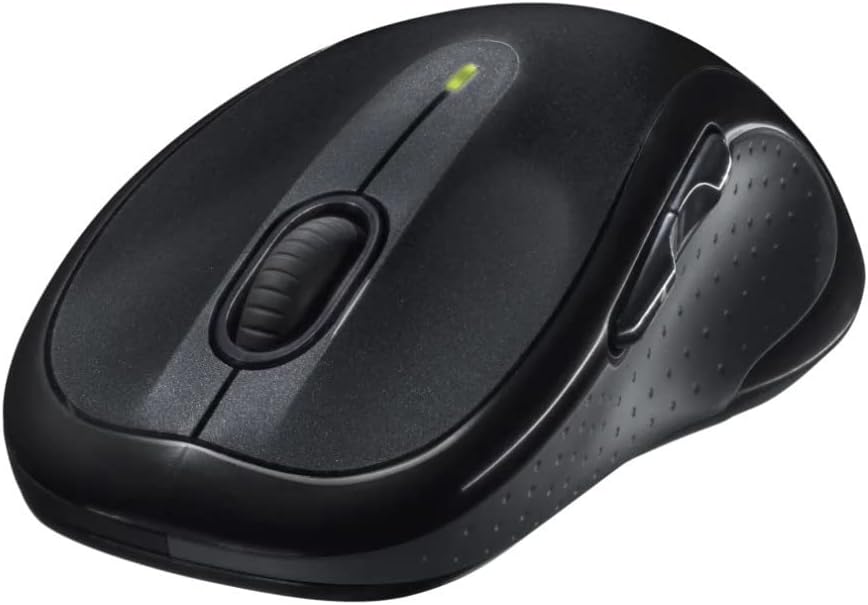
Resim: Açısal view of the Logitech M510 Wireless Mouse, highlighting its ergonomic shape and side buttons.
Bakım
Farenizi Temizleme
To ensure optimal performance and hygiene, regularly clean your Logitech M510 mouse:
- Disconnect the mouse from your computer by removing the Unifying Receiver.
- Hafifçe yumuşak, tüy bırakmayan bir bez kullanın.ampened with water or a mild cleaning solution (e.g., isopropyl alcohol) to wipe down the surface of the mouse.
- For crevices and around buttons, use a cotton swab or a soft brush.
- Avoid getting liquid into the internal components or the optical sensor.
- Allow the mouse to dry completely before re-connecting.
Pil Değişimi
The Logitech M510 has an average battery life of 18 months. When the battery indicator light (if present) flashes or mouse performance degrades, it's time to replace the batteries.
- Alt kısımda bulunan güç düğmesini kullanarak fareyi kapatın.
- Pil bölmesinin kapağını açın.
- Eski AA pilleri çıkarın.
- Insert two new AA batteries, observing the correct polarity (+/-).
- Pil bölmesinin kapağını kapatın.
- Turn the mouse back on.
Sorun giderme
| Sorun | Olası Neden | Çözüm |
|---|---|---|
| Fare yanıt vermiyor | Low or dead batteries; Unifying Receiver not connected; Mouse power off; Driver issue. | Replace batteries; Ensure Unifying Receiver is securely plugged into a USB port; Turn mouse power switch to 'ON'; Reinstall Logitech Options software or check device manager for driver issues. |
| Lagging or erratic cursor movement | Interference; Dirty optical sensor; Mouse used on unsuitable surface; Low battery. | Move mouse closer to receiver; Clear obstructions; Clean optical sensor; Use a mouse pad or suitable surface; Replace batteries. |
| Yan düğmeler çalışmıyor. | Software not installed or configured; Application does not support custom buttons. | Download and install Logitech Options software from the official Logitech website to customize button functions. Ensure the application you are using supports these functions. |
| Unifying Receiver not recognized | Faulty USB port; Driver issue. | Try a different USB port; Restart your computer; Download and install the Logitech Unifying Software to re-pair the mouse with the receiver. |
Özellikler
| Özellik | Detay |
|---|---|
| Marka | Logitech |
| Model Numarası | 910-001822 |
| Seri | M510 |
| Bağlantı Teknolojisi | Radio Frequency, USB (via Unifying Receiver) |
| Hareket Algılama Teknolojisi | Lazer |
| Renk | Koyu Gri |
| Ürün Ağırlığı | 4.6 ons (yaklaşık 130 gram) |
| Ürün Boyutları (UxGxY) | 4.38 x 2.5 x 1.75 inç (yaklaşık 11.13 x 6.35 x 4.45 cm) |
| Güç Kaynağı | Pil ile çalışır |
| Piller Gerekli | 2 adet AA pil (dahil) |
| Ortalama Pil Ömrü | 18 ay |
| Donanım Platformu | Personal Computer, Macbook |
| İşletim Sistemi Uyumluluğu | Windows 10 (and likely earlier versions, macOS) |
| Özel Özellikler | Battery Life Indicator, Power Saving Mode, Programmable Buttons, Wireless |
| İlk Mevcut Tarih | 7 Haziran 2010 |

Resim: Yukarıdan aşağıya view of the Logitech M510 Wireless Mouse showing its approximate dimensions (4.4" length, 2.5" width).
Garanti ve Destek
Garanti Bilgileri
Logitech products typically come with a limited hardware warranty. For specific warranty terms and conditions applicable to your Logitech M510 Wireless Mouse, please refer to the warranty card included with your product or visit the official Logitech webalan.
Müşteri Desteği
For further assistance, technical support, or to download the latest software (such as Logitech Options or Unifying Software), please visit the official Logitech support webalan:
Ayrıca onların sitelerinde yararlı kaynaklar, sıkça sorulan sorular ve topluluk forumları da bulabilirsiniz. webalan.


