1. Giriş
The Polk Audio SWA500 Power Amplifier is engineered to provide dedicated power for Polk Audio CSW Series built-in subwoofers. This Class D digital amplifier delivers 500 watts into 4 ohms, ensuring robust and distortion-free bass performance. Its design prioritizes long-term reliability and efficient operation. This manual provides essential information for the safe and effective installation, operation, and maintenance of your SWA500 ampcankurtaran.
2. Önemli Güvenlik Talimatları
- Cihazı çalıştırmadan önce bu talimatları dikkatlice okuyun. ampcankurtaran.
- Bu talimatları ileride başvurmak üzere saklayın.
- Ürün üzerindeki ve bu kılavuzdaki tüm uyarılara dikkat edin.
- Follow all instructions for safe use and installation.
- Bu cihazı su veya nem yakınında kullanmayın.
- Sadece kuru bezle temizleyin.
- Havalandırma açıklıklarını kapatmayın. Üreticinin talimatlarına uygun şekilde kurulum yapın.
- Radyatörler, kalorifer ızgaraları, sobalar veya diğer cihazlar (dahil) gibi herhangi bir ısı kaynağının yakınına kurmayın. amp(ısı üreten)
- Polarize veya topraklama tipi fişin güvenlik amacını bozmayın. Polarize fişin biri diğerinden daha geniş iki bıçağı vardır. Topraklama tipi fişin iki bıçağı ve üçüncü bir topraklama ucu vardır. Geniş bıçak veya üçüncü uç sizin güvenliğiniz için sağlanmıştır. Sağlanan fiş prizinize uymuyorsa, eski prizin değiştirilmesi için bir elektrikçiye danışın.
- Güç kablosunun, özellikle fişlerde, prizlerde ve cihazdan çıktığı noktalarda üzerine basılmasını veya sıkışmasını önleyin.
- Sadece üretici tarafından belirtilen aparatları/aksesuarları kullanın.
- Yıldırımlı havalarda veya uzun süre kullanılmayacaksa bu cihazın fişini çekin.
- Tüm servisleri kalifiye servis personeline yaptırın. Cihaz herhangi bir şekilde hasar gördüğünde, örneğin güç kaynağı kablosu veya fişi hasar gördüğünde, cihaza sıvı döküldüğünde veya içine nesneler düştüğünde, cihaz yağmura veya neme maruz kaldığında, normal şekilde çalışmadığında veya düşürüldüğünde servis gereklidir.
UYARI: Yangın veya elektrik çarpması riskini azaltmak için bu cihazı yağmura veya neme maruz bırakmayın.
3. Kurulum ve Bağlantılar
Herhangi bir bağlantı kurmadan önce şunlardan emin olun: amplifier is powered off and unplugged from the AC outlet. The SWA500 is designed to power up to two Polk Audio CSW Series subwoofers of the same model.
3.1. SPEX Circuit Card Installation
The SWA500 amplifier utilizes SPEX circuit cards to optimize its performance for specific CSW subwoofer models. Ensure the correct SPEX card for your subwoofer model is inserted into the designated slot on the rear panel of the amplifier. These cards provide custom frequency shaping for optimal bass response.
3.2. Arka Panel Bağlantıları
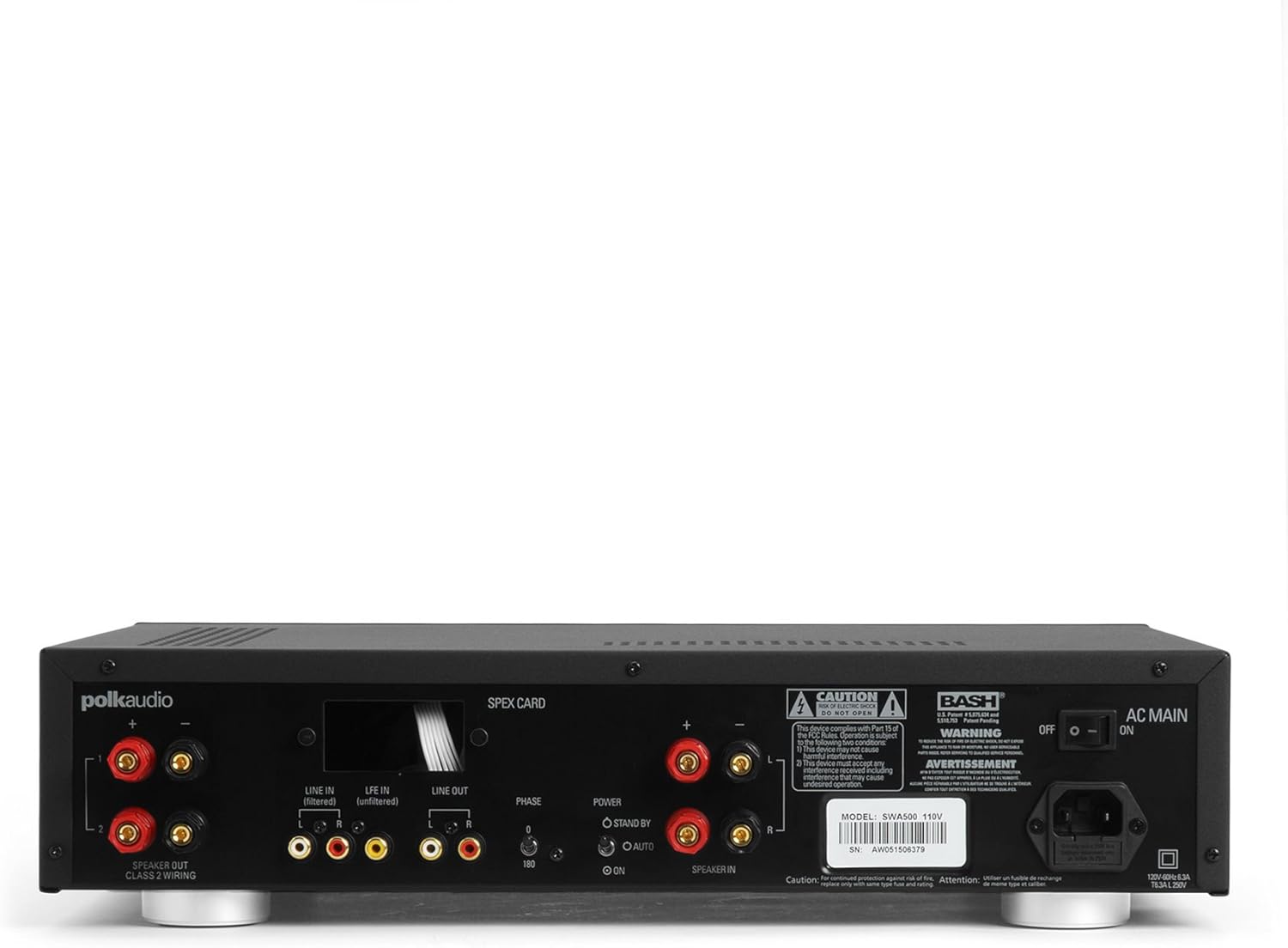
Figure 1: Rear panel of the SWA500 amplifier, illustrating various connection points including Line In, Line Out, Speaker Out, SPEX Card slot, Phase switch, Power mode switch, and AC Main input.
- Line In (Filtered/Unfiltered): Connect your audio source (e.g., AV receiver's subwoofer output) to the appropriate Line In jacks using RCA cables. The "Filtered" input applies a low-pass filter, while "Unfiltered" bypasses it, useful if your source provides its own filtered signal.
- Hat Çıkışı: These RCA outputs can be used to pass the audio signal to another ampyükseltici veya cihaz.
- Hoparlör çıkışı: Connect your Polk Audio CSW subwoofer(s) to these terminals using appropriate speaker wire. Ensure correct polarity (+ to + and - to -). The SWA500 supports Class 2 wiring.
- Faz Anahtarı: Adjust this switch (0° or 180°) to optimize the subwoofer's phase with your main speakers for seamless sound integration.
- Güç Modu Anahtarı: Select between "ON" (always on), "AUTO" (turns on when an audio signal is detected), or "STANDBY" (low power mode, awaiting signal).
- Ana AC: Connect the supplied power cord to this input and then to a suitable AC power outlet.
4. Operasyon
Once all connections are made and the amplifier is plugged in, you can begin operating your SWA500.
4.1. Ön Panel Kontrolleri

Figure 2: Front panel of the SWA500 amplifier, featuring the Power button, Protection indicator, Low Pass Filter control, and Volume control.
- Güç Düğmesi: çevirmek için basın ampAmplifikatör açık veya kapalı. Cihaz açık olduğunda güç gösterge ışığı yanacaktır.
- Koruma Göstergesi: This light illuminates if the amplifier enters protection mode due to overheating or an electrical fault. If this occurs, turn off the amplifier, check connections, and allow it to cool before restarting.
- Low Pass Filter (80Hz - 120Hz): This knob adjusts the upper frequency limit of the subwoofer's output. Adjust this to blend the subwoofer's sound seamlessly with your main speakers. Start with a setting around 80Hz and adjust by ear.
- Volume (Min - Max): This knob controls the overall output level of the subwoofer. Adjust to achieve the desired bass intensity relative to your main speakers.
4.2. Initial Sound Adjustment
Begin with the Low Pass Filter set to a mid-point (e.g., 100Hz) and the Volume knob at a low setting. Play a familiar piece of music or movie scene. Gradually increase the Volume until the bass is noticeable but not overpowering. Then, fine-tune the Low Pass Filter and Phase switch to achieve the most natural and integrated sound with your main speakers. The goal is for the subwoofer to enhance the low frequencies without drawing attention to its location.
5. Bakım
- Temizlik: Disconnect the power cord before cleaning. Use a soft, dry cloth to wipe the exterior surfaces of the ampDaha yüksek kaliteli bir ürün. Sıvı temizleyiciler veya aerosol spreyler kullanmayın.
- Havalandırma: Havalandırma açıklıklarının açık olduğundan emin olun. amplifier are not blocked. Proper airflow is crucial for preventing overheating and maintaining long-term reliability.
- Depolamak: Eğer depolanıyorsa amplifier for an extended period, unplug it from the power outlet and store it in a cool, dry place, away from direct sunlight and extreme temperatures.
6. Sorun Giderme
If you experience issues with your SWA500 amplifier, consult the following troubleshooting guide:
| Sorun | Olası Neden | Çözüm |
|---|---|---|
| Güç gösterge ışığı yok | Power cord not connected; AC outlet not active; Power switch off. | Ensure power cord is securely connected. Check AC outlet with another device. Press the front panel power button. |
| Subwoofer'dan ses gelmiyor | Incorrect input connection; Speaker wires loose or incorrect polarity; Volume too low; SPEX card missing or incorrect; Amplifier in standby/auto mode without signal. | Verify RCA input connections. Check speaker wire connections and polarity. Increase volume. Ensure correct SPEX card is installed. Set Power Mode switch to "ON" for testing. |
| Distorted or poor quality sound | Volume too high; Incorrect Low Pass Filter setting; Phase mismatch; Damaged speaker wire or subwoofer. | Reduce volume. Adjust Low Pass Filter. Toggle Phase switch (0°/180°). Inspect speaker wires and subwoofer for damage. |
| Protection indicator illuminated | Overheating; Short circuit in speaker wiring; Amplifer hatası. | Kapamak amplifier and allow to cool. Check speaker wiring for shorts. If problem persists, contact customer support. |
7. Özellikler
- Modeli: SWA500
- Güç Çıkışı: 500 ohm'a 4 watt
- Ampkaldırıcı Türü: D Sınıfı Dijital
- Uyumluluk: Designed for Polk Audio CSW Series built-in subwoofers (requires specific SPEX circuit card)
- Alçak geçiş filtresi: Adjustable (Front Panel)
- Ses Kontrolü: Adjustable (Front Panel)
- Faz Kontrolü: 0°/180° (Rear Panel)
- Güç Modları: ON, AUTO, STANDBY (Rear Panel)
- Ürün Ölçüleri: 1 x 1 x 1 inches (approximate, as per provided data)
- Ürün Ağırlığı: 12.25 pound
- Üretici: Polk Audio
- İlk Mevcut Tarih: 18 Nisan 2005
8. Garanti ve Destek
For specific warranty information, please refer to the warranty card included with your product or visit the official Polk Audio webSite. Satın alma fişinizi, garanti talepleriniz için satın alma belgeniz olarak saklayın.
If you require technical assistance or have questions not covered in this manual, please contact Polk Audio customer support. Contact information can typically be found on the official Polk Audio websitenizde veya ürün ambalajınızda yer almalıdır.
Polk Audio Resmi Webalan: www.polkaudio.com


