giriiş
The Brookstone Cool It Personal Fan is a portable, battery-powered device designed to provide personal cooling. Its compact size and flexible blades make it suitable for various environments, offering an adjustable airflow for comfort.
Temel özellikler şunlardır:
- Portable design for personal use anywhere.
- Adjustable fan speed for customized airflow.
- Flexible, finger-safe blades for enhanced safety.
- Includes a lanyard for hands-free carrying.
- 4 adet AA pil ile çalışır (piller dahil değildir).
Kurmak
1. Pil Kurulumu
The Brookstone Cool It Personal Fan requires 4 AA batteries for operation. Batteries are not included with the product.
- Locate the battery compartment cover on the back of the fan handle.
- Bölmeyi açmak için kapağı yavaşça kaydırın veya açın.
- 4 adet AA pili, bölmenin içinde gösterildiği gibi doğru kutuplara (+ ve -) dikkat ederek yerleştirin.
- Pil bölmesi kapağını yerine takın ve iyice kapandığından emin olun.

Resim: Yan view of the fan, illustrating the general area for battery access.
2. Kordon Eki
A lanyard is included for convenient, hands-free carrying.
- Locate the small loop or attachment point at the top of the fan handle.
- Thread the lanyard through this loop and secure it according to the lanyard's design.
Kullanım Talimatları
Güç Açma/Kapatma ve Hız Ayarı
The fan features a variable speed control for customized airflow.
- To turn the fan on, rotate the control dial, typically located on the handle, clockwise.
- Continue rotating the dial clockwise to increase the fan speed.
- To decrease the fan speed, rotate the dial counter-clockwise.
- To turn the fan off, rotate the dial fully counter-clockwise until it clicks into the 'off' position.

Resim: Ön view of the fan, highlighting the fan blades and the control dial on the handle.
Entegre Standın Kullanımı
The fan includes a small integrated stand for tabletop use.
- Locate the stand mechanism on the bottom or side of the fan handle.
- Extend or unfold the stand until it locks into position, allowing the fan to sit upright on a flat surface.
- Ensure the fan is stable before use.
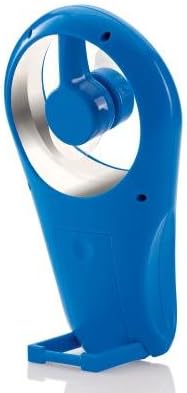
Resim: Yan view of the fan with its integrated stand extended for tabletop use.
Bakım
Temizlik
To maintain optimal performance and appearance, clean the fan periodically.
- Ensure the fan is turned off and batteries are removed before cleaning.
- Dış yüzeyleri yumuşak, damp bezle silin. Aşındırıcı temizleyiciler veya çözücüler kullanmayın.
- The flexible blades can be gently wiped if dust accumulates. Avoid bending them excessively.
- Fanı suya veya başka bir sıvıya daldırmayın.
Pil Değişimi
Replace batteries when the fan's performance diminishes or it stops working.
- Kurulum bölümünde belirtilen pil takma adımlarını izleyin.
- Always replace all 4 AA batteries at the same time with new ones.
- Eski ve yeni pilleri veya farklı pil türlerini karıştırmayın.
- Kullanılmış pilleri yerel düzenlemelere uygun şekilde sorumlu bir şekilde atın.
Sorun giderme
| Sorun | Olası Neden | Çözüm |
|---|---|---|
| Fan çalışmıyor. | Piller bitmiş veya yanlış takılmış. | Pillerin kutuplarını kontrol edin. Yeni AA pillerle değiştirin. |
| Low airflow or weak fan speed. | Batteries are low. Speed dial is set too low. | Replace batteries. Rotate the control dial clockwise to increase speed. |
| Vantilatör alışılmadık bir ses çıkarıyor. | Obstruction near blades. Loose battery cover. | Ensure no foreign objects are near the blades. Check if battery cover is secure. |
Özellikler
- Marka: Brookstone
- Model Adı: Cool It
- Ürün Model Numarası: 883594041181
- Güç Kaynağı: Pil ile çalışır
- Piller: 4 x AA (dahil değildir)
- Kontrol Yöntemi: Variable Dial Control
- Özel Özellikler: Portable, Flexible Blades, Integrated Stand
- Dahil Bileşenler: Kordon
- Ürün Ölçüleri: 4 x 2 x 7 inç (U x G x Y)
- Ürün Ağırlığı: 8 ons (piller hariç)
- İç/Dış Mekan Kullanımı: Dış mekan
Garanti ve Destek
Warranty information for the Brookstone Cool It Personal Fan is not provided within this manual. For details regarding warranty coverage, product support, or service inquiries, please refer to the official Brookstone websiteye gidin veya doğrudan müşteri hizmetleriyle iletişime geçin.
You may find additional information and contact options on the Amazon'daki Brookstone Mağazası.


