1. Giriş
The Antec TruePower TPQ-1200 is a high-performance 1200-watt power supply designed for demanding computer systems. It features an 80 PLUS Silver certification, indicating high energy efficiency, and provides stable power delivery through its six +12V rails. This manual provides essential information for the safe installation, operation, and maintenance of your TPQ-1200 power supply.
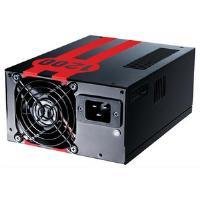
Image 1.1: The Antec TruePower TPQ-1200 Power Supply unit, showcasing its design and modular connectors.
2. Güvenlik Bilgileri
Please read and understand all safety instructions before installing or operating the power supply. Failure to do so may result in personal injury or damage to your equipment.
- Güç kaynağını takmadan, çıkarmadan veya temizlemeden önce daima güç kablosunu duvar prizinden çıkarın.
- Bu güç kaynağı yalnızca kişisel bilgisayarlarda kullanılmak üzere tasarlanmıştır. Başka bir amaçla kullanmayın.
- Güç kaynağını açmayınasing. Yüksek hacimtages are present inside, and there are no user-serviceable parts. Opening the casing, garantiyi geçersiz kılacaktır.
- Bilgisayar sisteminizin doğru şekilde topraklanmasını sağlayın.
- Güç kaynağını yüksek nemli veya aşırı sıcaklık ortamlarında çalıştırmaktan kaçının.
- Keep the power supply away from liquids and sources of heat.
3. Paket İçeriği
Paketinizin aşağıdaki öğeleri içerdiğini doğrulayın:
- Antec TruePower TPQ-1200 Power Supply Unit
- Modular Cable Set (PCIe, SATA, Molex, Floppy)
- AC Güç Kablosu
- Montaj Vidaları
- Kullanım Kılavuzu (bu belge)
If any items are missing or damaged, please contact your retailer or Antec customer support.
4. Özellikler
The Antec TruePower TPQ-1200 power supply offers advanced features for reliable and efficient performance:
- 1200 Watt Sürekli Güç: Sağlar ample power for high-end gaming and workstation systems.
- 80 PLUS Silver Certified: %88'ya varan verimlilik sağlayarak ısı üretimini ve işletme maliyetlerini azaltır.
- Six +12V Rails: Delivers stable and clean power to critical components.
- Advanced Cable Management: Semi-modular design allows for cleaner builds and improved airflow.
- PowerCache High Performance Capacitors: Enhances stability and transient response.
- Ultra-Quiet Pulse Width Modulation (PWM) Fan: Provides efficient cooling with minimal noise.
- Industrial Grade Protection Circuitry: Aşırı Akım Koruması (OCP) ve Aşırı Voltaj Koruması (OCP) içerir.tage Koruma (OVP), Hacim Altındatage Protection (UVP), Short Circuit Protection (SCP), Over Power Protection (OPP), and Over Temperature Protection (OTP).
5. Kurulum ve Kurulum
Follow these steps carefully to install your Antec TruePower TPQ-1200 power supply.
5.1 Kurulum Öncesi Kontrol Listesi
- Ensure your computer case supports an ATX power supply.
- Gerekli aletleri toplayın: Yıldız tornavida.
- Unplug your computer from the wall outlet and discharge any residual power by pressing the power button.
5.2 Güç Kaynağının Montajı
- Carefully place the power supply into the designated PSU bay in your computer case. Ensure the fan is oriented correctly (typically facing down for bottom-mounted PSUs, or according to case design for top-mounted).
- Güç kaynağındaki vida deliklerini kasadaki vida delikleriyle hizalayın.
- Secure the power supply using the provided mounting screws. Do not overtighten.
5.3 Güç Kablolarını Bağlama
Connect the necessary cables to your motherboard and components. The TPQ-1200 features both fixed and modular cables.
- 24-Pin ATX Motherboard Power: Connect the main 24-pin connector to the corresponding port on your motherboard. Ensure it clicks into place.
- 8-Pin EPS12V (CPU) Power: Connect the 8-pin (or 4+4 pin) EPS12V connector to the CPU power port on your motherboard.
- PCIe (Graphics Card) Power: For graphics cards requiring additional power, connect the appropriate 6-pin or 6+2 pin PCIe modular cables from the power supply to your graphics card(s).
- SATA Gücü: Connect SATA modular cables to your SATA hard drives, SSDs, and optical drives.
- Molex (Peripheral) Power: Use Molex modular cables for older peripherals or case fans that require this connector type.
- Kablo yönetimi: Route cables neatly behind the motherboard tray or in other designated areas of your case to improve airflow and aesthetics.
5.4 İlk Güç Açma
- Tüm bağlantıların güvenli olduğundan emin olun.
- AC güç kablosunu güç kaynağına ve ardından topraklı bir duvar prizine bağlayın.
- Güç kaynağının arkasındaki güç anahtarını 'AÇIK' (I) konumuna getirin.
- Bilgisayarınızı açın.
6. Kullanım Talimatları
The Antec TruePower TPQ-1200 is designed for continuous operation within its specified limits. Ensure adequate ventilation around your computer case to prevent overheating. The intelligent PWM fan will adjust its speed based on the power supply's temperature to maintain optimal cooling and noise levels.
Always shut down your computer properly through the operating system before turning off the power supply switch or unplugging the AC cord.
7. Bakım
Düzenli bakım, güç kaynağınızın uzun ömürlü olmasını ve en iyi performansı göstermesini sağlar.
- Toz Temizleme: Periodically (e.g., every 6-12 months), disconnect the power supply from the wall outlet and use compressed air to gently clean dust from the fan grille and ventilation openings. Do not open the power supply casing.
- Kablo Denetimi: Occasionally check all power cable connections to ensure they are secure and free from damage.
8. Sorun Giderme
Güç kaynağınızla ilgili sorunlarla karşılaşırsanız, aşağıdaki sorun giderme kılavuzuna bakın:
| Sorun | Olası Neden | Çözüm |
|---|---|---|
| Bilgisayar açılmıyor. | AC power cord not connected or loose. Power supply switch is OFF. Faulty power supply. | Ensure AC cord is firmly connected. Flip PSU switch to 'ON' (I). Test with another power supply if possible. |
| Sistem açılıyor ancak hemen kapanıyor. | Overload, short circuit, or overheating. | Check for short circuits (e.g., loose screws). Ensure adequate ventilation. Disconnect non-essential components to check for overload. |
| System instability or random reboots. | Insufficient power, faulty component, or power supply issue. | Verify all power connectors are secure. Ensure total system wattage does not exceed PSU capacity. Test components individually if possible. |
| Güç kaynağı ünitesinden yüksek fan sesi geliyor. | Dust accumulation, fan malfunction, or high load. | Clean dust from the fan grille. If noise persists and is excessive, contact support. |
If troubleshooting steps do not resolve the issue, contact Antec customer support for further assistance.
9. Özellikler
Detailed technical specifications for the Antec TruePower TPQ-1200 power supply:
- Model Adı: TruePower TPQ-1200
- Çıkış Watttage: 1200 Watt
- Form Faktörü: ATX12V
- Bağlantı Tipi: ATX
- Yeterlik: 80 PLUS Silver Certified
- Soğutma Yöntemi: Air (PWM Fan)
- Hayran Sayısı: 1
- Uyumlu Cihazlar: Kişisel Bilgisayar
- Ürün Ağırlığı: 4.96 pound (2.25 kg)
- Paket Boyutları: 12.91 x 9.84 x 5.59 inç (32.8 x 25 x 14.2 cm)
- İlk Mevcut Tarih: 17 Nisan 2012
10. Garanti ve Destek
Garanti bilgileri ve teknik destek için lütfen resmi Antec web sitesine başvurun. webSite üzerinden bilgi alabilir veya doğrudan müşteri hizmetleriyle iletişime geçebilirsiniz. Garanti şartları ve koşulları bölgeye ve satın alma tarihine göre değişiklik gösterebilir.
Antec Resmi Webalan: www.antec.com