1. Giriş ve Üzeriview
The Mitel 5312 IP Phone is a versatile and user-friendly communication device designed for modern office environments. It features a full-duplex handsfree speakerphone, a multi-line backlit display, and programmable feature keys, providing intuitive access to advanced call handling and converged applications supported by Mitel's IP communication platforms.
This manual provides comprehensive instructions for setting up, operating, maintaining, and troubleshooting your Mitel 5312 IP Phone, ensuring optimal performance and user experience.
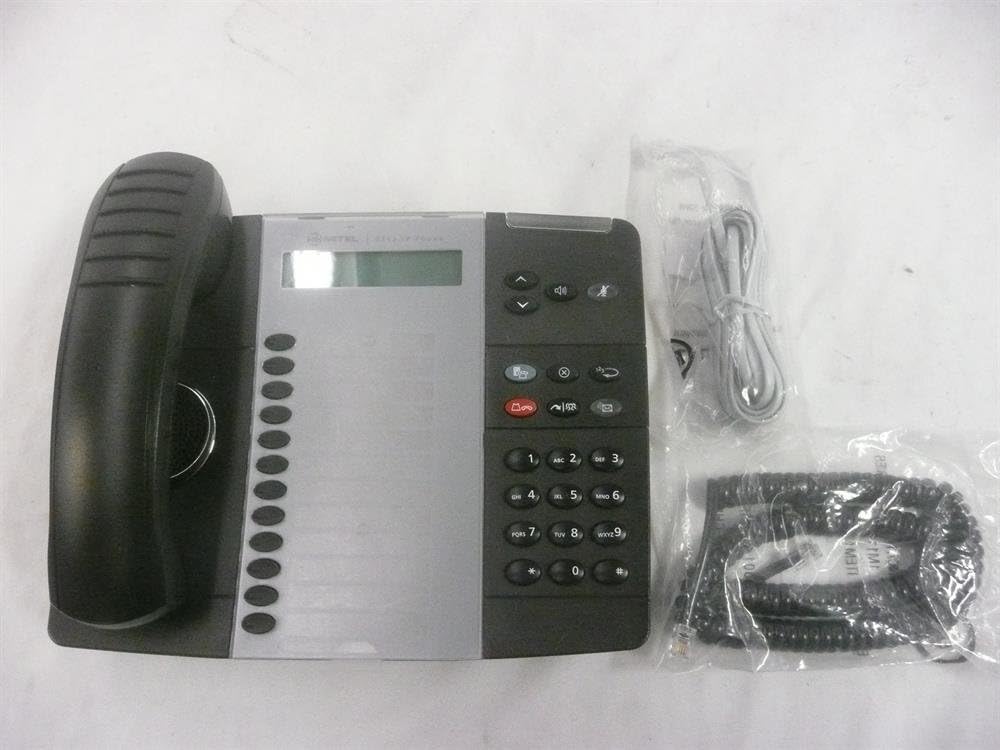
Figure 1: Mitel 5312 IP Phone with included accessories.
2. Temel Özellikler
- Görüntülemek: Two-line by 20-character white, backlit, graphics display with contrast control and auto-dimming.
- Programlanabilir Tuşlar: Twelve multi-function keys with dual-color LED indicators for speed dialing, line appearances, and feature access.
- Fonksiyon Tuşları: Dedicated keys for Hold, Menu, Message, Speaker, Mute, Transfer/Conference, Redial, and Cancel.
- Hoparlör: Full duplex handsfree speakerphone operation.
- Özelleştirme: Browser-based desktop user tool programming for easy access to telephone system features.
3. Kurulum Kılavuzu
3.1 Paket İçeriği
Başlamadan önce tüm bileşenlerin mevcut olduğundan emin olun:
- Mitel 5312 IP Telefon ünitesi
- Telefon ve spiral kablo
- Ethernet kablosu
- Güç adaptörü (Power over Ethernet - PoE kullanılmıyorsa)
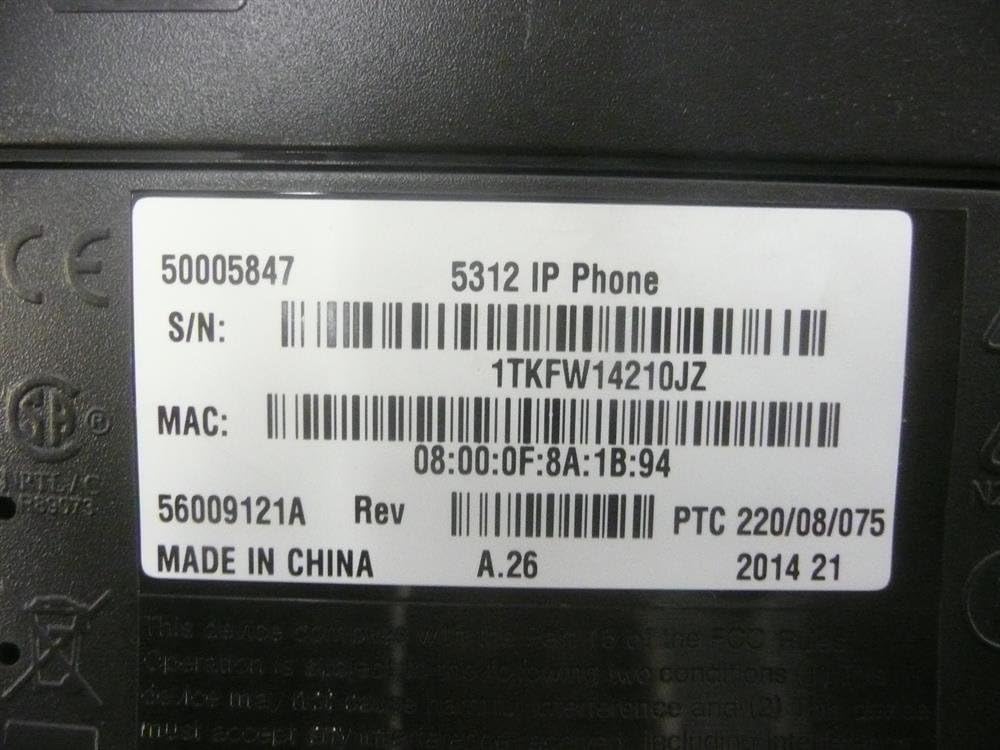
Figure 2: Mitel 5312 IP Phone and its primary accessories.
3.2 Telefonun Bağlanması
- Telefonu bağlayın: Sarmal kablonun bir ucunu ahizeye, diğer ucunu ise telefon tabanındaki ahize girişine takın.
- Ağa bağlan:
- Power over Ethernet (PoE) kullanıyorsanız, Ethernet kablosunun bir ucunu telefonun LAN portuna, diğer ucunu ise PoE özellikli bir ağ anahtarına veya yönlendiriciye bağlayın.
- If not using PoE, connect one end of the Ethernet cable to the LAN port on the phone and the other end to your network switch/router. Then, connect the power adapter to the phone's power port and plug it into a power outlet.
- İsteğe bağlı bilgisayar bağlantısı: Telefonunuzu bir bilgisayara bağlamak isterseniz, bilgisayarınızdan telefonunuzdaki PC portuna bir Ethernet kablosu takın.
- İlk Başlatma: The phone will power on and begin its boot-up sequence. This may take a few moments as it obtains network configuration and registers with your IP communications platform.
4. Kullanım Talimatları
4.1 Temel Çağrı Fonksiyonları
- Arama yapmak: Lift the handset, press a line key, or press the Speaker button. Dial the number.
- Bir Aramayı Cevaplama: Lift the handset, press the flashing line key, or press the Speaker button.
- Aramayı Bitirme: Replace the handset, or press the Speaker button if using speakerphone.
- Tutmak: Bir arama sırasında tuşuna basın. Tutmak key. To retrieve, press the flashing line key.
- Sesini kapatmak: Basın Sesini kapatmak Görüşme sırasında mikrofonunuzu kapatmak için bu tuşa basın. Sesi açmak için tekrar basın.
- Hoparlör: Basın Konuşmacı key to activate or deactivate the speakerphone.
4.2 Gelişmiş Özellik
- transferi: Bir arama sırasında tuşuna basın. Transfer/Conference key. Dial the transfer destination, then press Transfer/Conference again to complete (blind transfer) or wait for an answer and announce the call (supervised transfer).
- Konferans: Bir arama sırasında tuşuna basın. Transfer/Conference key. Dial the number of the third party. Once connected, press Transfer/Conference Tüm partilere tekrar katılmak için.
- Tekrar arama: Basın Yeniden En son aranan numarayı aramak için tuş.
- Message Access: Basın Mesaj Sesli mesajlarınıza erişmek için tuş.
- Programlanabilir Tuşlar: The twelve programmable keys can be configured for speed dialing, line appearances, or quick access to system features. Consult your system administrator for specific programming details.
5. Bakım
Proper care and maintenance will extend the life of your Mitel 5312 IP Phone.
- Temizlik: Yumuşak, hafif sert bir bez kullanınamp cloth to clean the phone's surface. Avoid abrasive cleaners, solvents, or strong chemicals. Do not spray liquids directly onto the phone.
- Çevre: Keep the phone in a dry environment, away from direct sunlight, excessive heat, or extreme cold. Ensure proper ventilation.
- İşleme: Handle the phone and its components with care. Avoid dropping the handset or pulling excessively on cords.
6. Sorun Giderme
Bu bölümde, Mitel 5312 IP Telefonunuzla karşılaşabileceğiniz yaygın sorunlar ele alınmaktadır.
| Sorun | Olası Neden | Çözüm |
|---|---|---|
| No dial tone / Phone not registering | Network cable disconnected, no power (if not PoE), incorrect network configuration, server issue. | Check Ethernet cable connection. Ensure power adapter is plugged in (if applicable). Verify network settings with your IT administrator. Restart the phone by unplugging and replugging the power/Ethernet cable. |
| Ekran boş veya okunamıyor. | No power, display settings, hardware fault. | Check power connection. Adjust display contrast (if available). If the issue persists, contact support. |
| Arayan kişiyi duyamıyorum / Arayan kişi beni duyamıyor | Volume too low, Mute activated, faulty handset/speakerphone, network quality. | Adjust volume. Check if Mute is active. Try speakerphone or handset to isolate the issue. Check network connection quality. |
If you continue to experience issues, please contact your IT support or Mitel customer service. Be prepared to provide the model number and serial number of your device.
7. Özellikler
Detailed technical specifications for the Mitel 5312 IP Phone (Model: 50005847).
| Özellik | Detay |
|---|---|
| Model Numarası | 50005847 |
| Marka | Mitel |
| Ürün Ağırlığı | 3 pound |
| Renk | Siyah, Gümüş |
| Telefon Türü | fitilli |
| Malzeme | Plastik |
| Güç Kaynağı | Kablolu Elektrik |
| Çevirici Türü | Tek Tuş Takımı |
| Yanıtlama Sistemi Türü | Dijital |
| Uyumlu Cihazlar | Mitel's IP communications platforms, VoIP services, PSTN networks |
| Konferans Görüşmesi Yeteneği | Temel |
| İlk Mevcut Tarih | 4 Ağustos 2009 |

Figure 3: Product label with identification details.
Extracted details from label:
Seri numarası: 1TKFW14210JZ, FSABV9236
MAC Adresi: 08:00:0F:8A:1B:94, 08-00-0F-3B-E5-DA
Revizyon: A.26, A.2
8. Destek ve Garanti
For technical assistance, troubleshooting beyond this manual, or warranty inquiries, please contact Mitel customer support or your authorized Mitel reseller.
When contacting support, please have your product model number (50005847) and serial number ready. The serial number can be found on the label at the bottom of your phone unit (refer to Figure 3).
Information regarding protection plans and return policies may be available from your point of purchase.


