giriiş
This manual provides detailed instructions for the proper use and maintenance of your Royal DM2070 Electronic Organizer. Please read this manual thoroughly before operating the device to ensure safe and efficient use. Keep this manual for future reference.
Güvenlik Bilgileri
- Cihazı aşırı sıcaklıklara, doğrudan güneş ışığına veya yüksek neme maruz bırakmayın.
- Cihazı düşürmekten veya güçlü darbelere maruz bırakmaktan kaçının.
- Cihazı kendiniz sökmeye veya onarmaya çalışmayın. Tüm bakım işlemlerini yetkili personele yaptırın.
- Cihazınızı su ve diğer sıvılardan uzak tutunuz.
- Değiştirme işlemi için yalnızca belirtilen pil tipini kullanın.
Paket İçeriği
Paketinizde tüm öğelerin mevcut olduğundan emin olun:
- Royal DM2070 Electronic Organizer
- Stylus (if applicable)
- Hızlı Başlangıç Kılavuzu
- Garanti Kartı
Kurmak
1. Pil Kurulumu
The Royal DM2070 requires batteries for operation. Follow these steps to install them:
- Cihazın arkasındaki pil bölmesi kapağını bulun.
- Bölmeyi açmak için kapağı kaydırın veya kaldırın.
- Insert the required batteries, ensuring correct polarity (+ and -) as indicated inside the compartment.
- Pil bölmesi kapağını güvenli bir şekilde yerine takın.
2. İlk Açılış ve Ayarlar
After installing batteries, power on your device and configure basic settings:
- Basılı tutun GÜÇ Ekran aydınlanana kadar düğmeye basın.
- The device may prompt you to set the date and time. Use the navigation buttons or stylus to enter the correct information.
- İlk kurulumu tamamlamak için ayarlarınızı onaylayın.
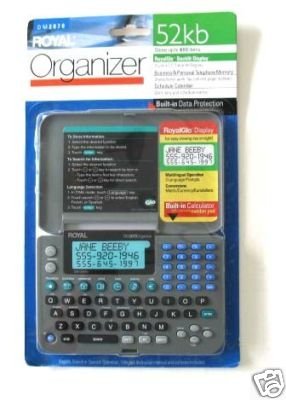
Image: Royal DM2070 Electronic Organizer. This image displays the device's front view, highlighting its screen and keypad, essential for navigation and data entry.
Kullanım Talimatları
1. Gezinme
The DM2070 features a keypad and potentially a stylus for navigation. Use the arrow keys to move between menu options and press GİRMEK or a designated selection button to confirm.
2. Entering Data
To enter information such as contacts, appointments, or notes:
- Navigate to the desired application (e.g., 'Contacts', 'Calendar', 'Notes').
- Select 'New Entry' or a similar option.
- Use the alphanumeric keypad to input text. Some models may offer an on-screen keyboard via stylus.
- Save your entry before exiting the application.
3. Uygulamaları Kullanma
The DM2070 includes various applications:
- Takvim: View daily, weekly, or monthly schedules. Add and edit appointments.
- İletişim: Store names, phone numbers, addresses, and email information.
- Notlar: Create and manage text notes or memos.
- Hesaplama: Temel aritmetik hesaplamaları yapın.
- Döviz Kurları: Convert between different currencies (requires manual update of exchange rates on some models).
Bakım
1. Cihazın Temizlenmesi
To keep your DM2070 in optimal condition:
- Ekranı silin ve casinYumuşak, kuru ve tüy bırakmayan bir bezle silin.
- İnatçı izler için, hafifçe dampen the cloth with water; avoid harsh chemicals or abrasive cleaners.
- Ensure no moisture enters openings.
2. Pil Bakımı
- Pil seviyesi düşük göstergesi göründüğünde pilleri derhal değiştirin.
- Cihazınızı uzun süre kullanmayacaksanız pil sızıntısını önlemek için pilleri çıkarın.
Sorun giderme
If you encounter issues with your Royal DM2070, refer to the following common solutions:
| Sorun | Olası Neden | Çözüm |
|---|---|---|
| Cihaz açılmıyor. | Piller bitmiş veya yanlış takılmış. | Pilleri yenileriyle değiştirin, kutupların doğru olmasına dikkat edin. |
| Ekran boş veya donmuş. | Yazılım hatası veya düşük pil. | Try a soft reset (refer to Quick Start Guide for specific button combination) or replace batteries. |
| Data loss. | Battery depletion or improper shutdown. | Ensure batteries are fresh. Always save data before powering off. |
| Tuş takımı tepkisiz. | Dust/debris under keys or internal issue. | Clean keypad gently. If problem persists, contact support. |
Özellikler
Key technical specifications for the Royal DM2070 Electronic Organizer:
| Özellik | Detay |
|---|---|
| Marka | ASİL |
| Model Numarası | DM2070 |
| Kapak Malzemesi | Deri |
| Biçim | Organizatör |
| Ürün Ağırlığı | 181 gr |
| Ürün Boyutları (LxWxY) | 24.4 x 14.5 x 1 Santimetre |
| Hedef Kitle | Yetişkin |
Garanti ve Destek
The Royal DM2070 Electronic Organizer comes with a standard manufacturer's warranty. Please refer to the warranty card included in your package for specific terms and conditions. For technical support, service, or inquiries, please contact Royal customer service through the contact information provided on the warranty card or the official Royal webalan.


