1. Giriş
The Marshall Acoustic Soloist AS50D is a 50-watt acoustic guitar amplifier designed to provide clear and expressive amplification for acoustic instruments and vocals. It features two independent channels, digital chorus, and reverb effects, making it suitable for various performance and practice environments. This manual provides essential information for the proper setup, operation, and maintenance of your AS50D ampcankurtaran.
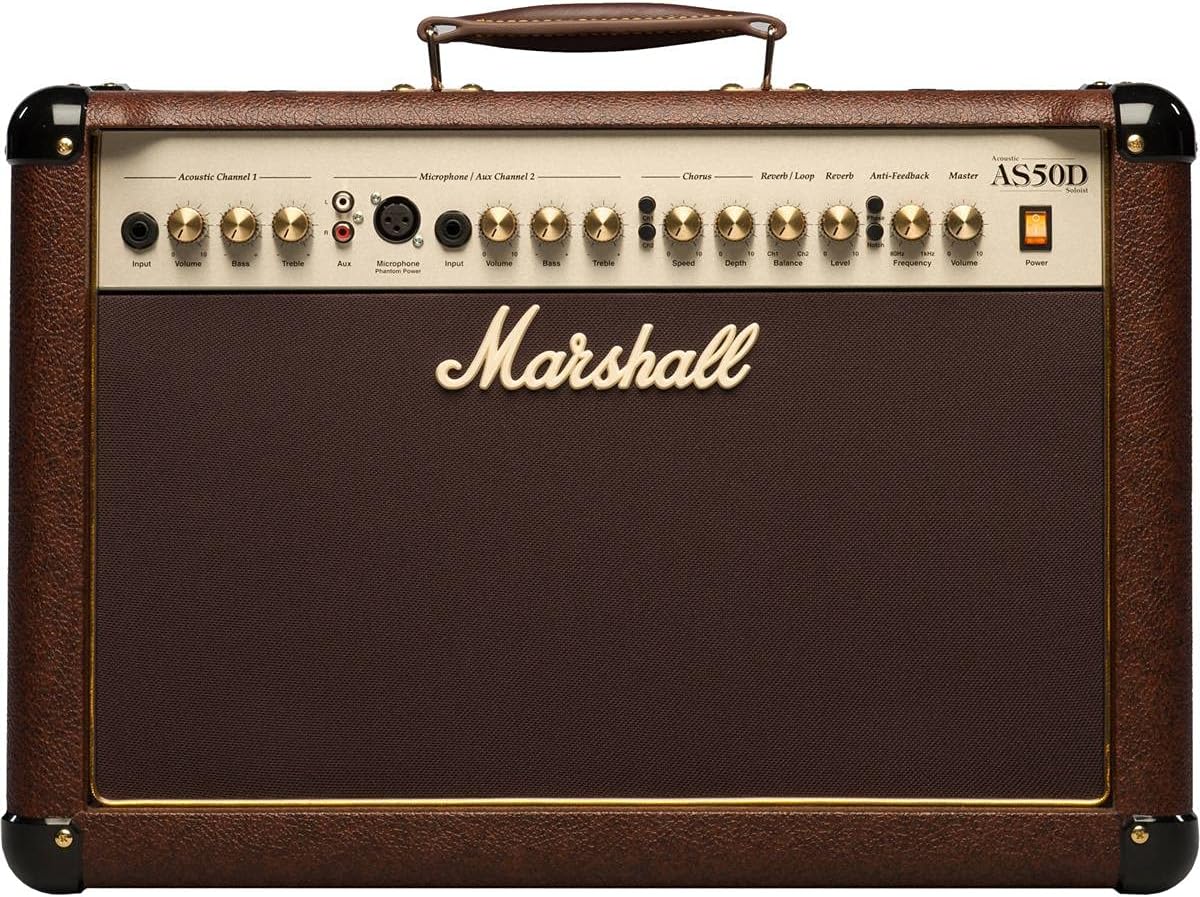
Resim 1.1: Ön view of the Marshall AS50D Acoustic Soloist Amplifier, showcasing its control panel and speaker grille.
2. Kurulum
- Paketin açılması: Dikkatlice çıkarın ampÜrünü ambalajından çıkarın. İlerideki taşıma veya depolama için tüm ambalaj malzemelerini saklayın.
- Atama: Yerleştir ampKaldırma cihazını sabit ve düz bir yüzeye yerleştirin. Aşırı ısınmayı önlemek için cihazın etrafında yeterli havalandırma olduğundan emin olun. Isı kaynaklarının yakınına veya doğrudan güneş ışığına maruz kalacak şekilde yerleştirmekten kaçının.
- Güç Bağlantısı: Sağlamak amplifier's power switch is in the 'OFF' position. Connect the supplied power cord to the amplifier's IEC inlet on the rear panel and then to a suitable grounded AC power outlet. The AS50D operates on 220-240V ~ 50Hz or 120V ~ 60Hz depending on the region.
- İlk Bağlantılar:
- For acoustic guitars or other instruments, connect a standard 1/4" (6.35mm) instrument cable from your instrument to the 'Input' jack of 'Acoustic Channel 1'.
- For microphones, connect an XLR cable from your microphone to the 'Microphone Input' of 'Microphone / Aux Channel 2'.
- For external audio devices like MP3 players or drum machines, connect them to the 'Aux Input' RCA phono jacks on 'Microphone / Aux Channel 2'.
- Güç Açık: Once all connections are secure, switch the amplifier's power switch to the 'ON' position. The power indicator light will illuminate.
3. Kullanım Talimatları
The AS50D features a comprehensive control panel designed for intuitive operation. Familiarize yourself with each section:
3.1. Acoustic Channel 1
- Giriş: 1/4" (6.35mm) jack for connecting acoustic instruments.
- Hacim: 1. kanalın genel çıkış seviyesini kontrol eder.
- Bas: Adjusts the low-frequency response of Channel 1.
- tiz: Adjusts the high-frequency response of Channel 1.
3.2. Microphone / Aux Channel 2
- Mikrofon Girişi: XLR input for connecting condenser or dynamic microphones.
- Hayali güç: Switch to activate +48V phantom power for condenser microphones. Ensure microphone is connected before activating.
- Input (Aux): 1/4" (6.35mm) jack for connecting instruments.
- Hacim: 2. kanalın genel çıkış seviyesini kontrol eder.
- Bas: Adjusts the low-frequency response of Channel 2.
- tiz: Adjusts the high-frequency response of Channel 2.
- yardımcı: Stereo RCA phono inputs for connecting external audio devices (e.g., MP3 players).
3.3. Effects Section
- Chorus Speed: Adjusts the rate of the digital chorus effect.
- Chorus Depth: Adjusts the intensity of the digital chorus effect.
- Reverb / Loop Balance: Blends the dry signal with the effects loop return signal.
- Reverb / Loop Level: Controls the overall level of the effects loop and reverb.
- Yankı Seviyesi: Controls the intensity of the digital reverb effect.
3.4. Ana Bölüm
- Anti-Feedback Notch: Activates the notch filter to reduce feedback.
- Anti-Feedback Frequency: Adjusts the frequency range targeted by the notch filter. Rotate to find and eliminate problematic feedback frequencies.
- Ana ses: Genel çıkış hacmini kontrol eder ampcankurtaran.
- Güç: Ana güç şalteri ampcankurtaran.
3.5. Arka Panel Bağlantıları

Resim 3.5.1: Arka view of the Marshall AS50D Acoustic Soloist Amplifier, showing the power input, footswitch, DI out, and effects loop connections.
- Ayak pedalı: Efektleri kontrol etmek için isteğe bağlı bir ayak pedalı girişi.
- D.I. Out: XLR output for direct connection to a mixing console or recording device.
- Effects Loop Send: Output to send signal to external effects processors.
- Effects Loop Return: Input to receive signal from external effects processors.
4. Bakım
- Temizlik: Bağlantıyı kesin amplifier from power before cleaning. Use a soft, dry cloth to wipe down the exterior. Do not use abrasive cleaners or solvents.
- Depolamak: Sakla amplifier in a dry, temperate environment, away from extreme temperatures and humidity. If possible, use a protective cover to prevent dust accumulation.
- Toplu taşıma: Taşırken amplifier, ensure it is powered off and disconnected. Use the integrated handle for carrying.
- Servis: Refer all servicing to qualified service personnel. Do not attempt to open the ampkaldırıcı şasi.
5. Sorun Giderme
- Güç Yok:
- Güç kablosunun her iki prize de sağlam bir şekilde bağlı olup olmadığını kontrol edin. ampAmplifikatör ve duvar prizi.
- Duvar prizinin çalışır durumda olduğunu doğrulayın.
- Sağlamak amplifier's power switch is in the 'ON' position.
- Ses Yok:
- Check all instrument and microphone cables for secure connections and proper functionality.
- Ensure the 'Volume' controls for the active channel and the 'Master Volume' are turned up.
- Verify that your instrument or microphone is working correctly.
- Distortion at High Volumes:
- Reduce the 'Volume' control for the active channel or the 'Master Volume'.
- Ensure your input signal is not too strong. Adjust the output level of your instrument if possible.
- Check the quality of your instrument cables; faulty cables can introduce noise and distortion.
- Geri Bildirim (Uğultu Sesi):
- Engage the 'Anti-Feedback Notch' switch.
- Slowly rotate the 'Anti-Feedback Frequency' knob to find and eliminate the problematic frequency.
- Reduce the 'Volume' of the affected channel or the 'Master Volume'.
- Move further away from the amplifier or change your position relative to the speakers.
6. Özellikler
| Özellik | Şartname |
|---|---|
| Model Numarası | M-AS50D-U |
| Çıkış Watttage | 50 Watt |
| Konuşmacı Sayısı | 2 |
| Hoparlör Boyutu | 8-inch woofers (x2) |
| Kanallar | 2 (Acoustic, Microphone/Aux) |
| Etkileri | Digital Chorus, Digital Reverb |
| Girişler | 1/4" Jack, XLR, Stereo RCA |
| Çıktılar | D.I. Out (XLR), Effects Loop Send/Return |
| Hayali güç | +48V (değiştirilebilir) |
| Geribildirim Karşıtı | Notch Filter with Frequency Control |
| Ürün Ağırlığı | 35.3 pound (16 kg) |
| Ürün Boyutları | 21.34 x 10.28 x 16.38 inç (54.2 x 26.1 x 41.6 cm) |
| Malzeme Türü | Metal |
| Güç Kaynağı | Kablolu Elektrik |
7. Garanti ve Destek
This Marshall amplifier is covered by a manufacturer's warranty. Please refer to the warranty card included with your product for specific terms and conditions, including coverage duration and limitations. For technical support, service, or warranty claims, please contact your authorized Marshall dealer or visit the official Marshall Amplifikasyon webBölgenizdeki iletişim bilgileri için siteyi ziyaret edin.
Retain your proof of purchase for warranty validation.


