giriiş
The Samson Rubicon R5a Active Ribbon Studio Monitors are designed to provide accurate and natural sound reproduction for professional audio environments. This manual provides essential information for the proper setup, operation, and maintenance of your R5a monitors.
Each R5a monitor features a bi-amplified design, delivering 50 watts to a 5-inch inverted cone low-frequency driver and 25 watts to a 2-inch Velocity Ribbon high-frequency transducer. The monitors are housed in a shelf-ported wood enclosure and offer balanced 1/4-inch and XLR input connections. A 4-segment high-frequency lift control allows for precise adjustment of the ribbon tweeter output.
Önemli Güvenlik Talimatları
Please read these instructions carefully before operating your Samson Rubicon R5a monitors. Keep this manual for future reference.
- Güç Kaynağı: Connect the unit only to a power supply of the type described in this operating instruction or marked on the unit.
- Havalandırma: Havalandırma açıklıklarını kapatmayın. Üreticinin talimatlarına uygun şekilde kurulum yapın.
- Sıcaklık: Radyatörler, kalorifer ızgaraları, sobalar veya diğer cihazlar (dahil) gibi herhangi bir ısı kaynağının yakınına kurmayın. amp(ısı üreten)
- Su ve Nem: Bu cihazı suyun yakınında kullanmayınız.
- Temizlik: Sadece kuru bezle temizleyin.
- Servis: Tüm servisleri kalifiye servis personeline yaptırın. Cihaz herhangi bir şekilde hasar gördüğünde, örneğin güç kaynağı kablosu veya fişi hasar gördüğünde, cihaza sıvı döküldüğünde veya içine nesneler düştüğünde, cihaz yağmura veya neme maruz kaldığında, normal şekilde çalışmadığında veya düşürüldüğünde servis gereklidir.
Paket İçeriği
Paketinizin aşağıdaki öğeleri içerdiğini doğrulayın:
- Samson Rubicon R5a Active Ribbon Studio Monitors (Pair)
- Güç Kabloları (2)
- Kullanım Kılavuzu (bu belge)
Kurmak
Atama
Proper placement of your studio monitors is crucial for accurate sound reproduction. Position the monitors to form an equilateral triangle with your listening position. The tweeters should be at ear level. Avoid placing monitors directly against walls or in corners, as this can exaggerate bass frequencies.
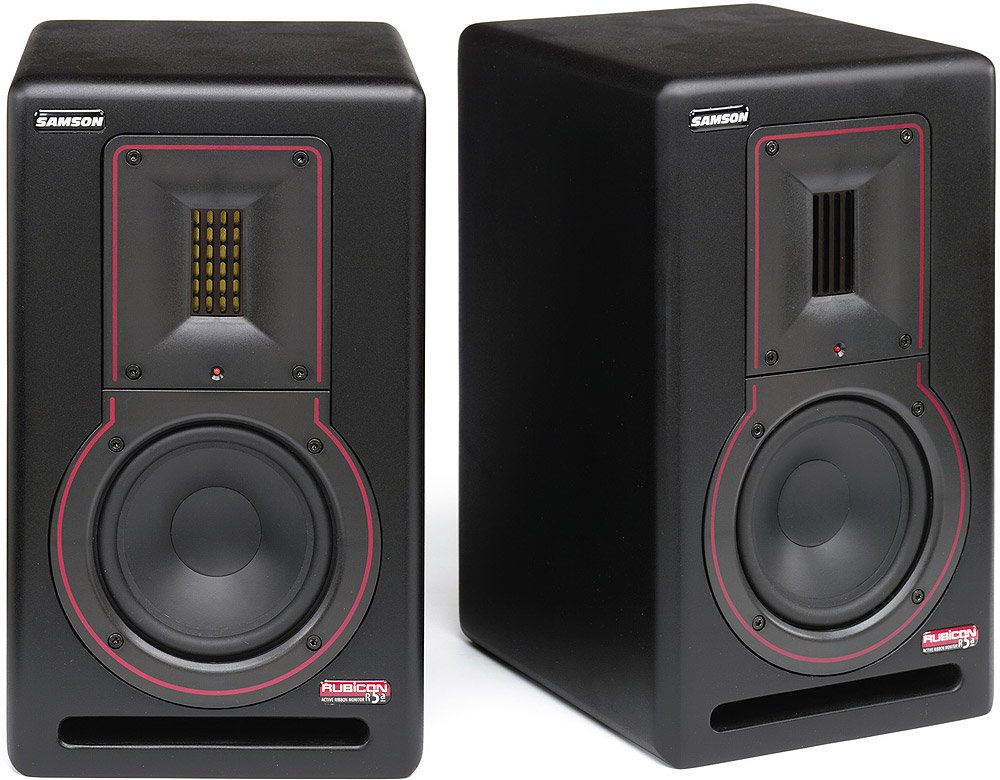
Resim: Ön view of a Samson Rubicon R5a Active Ribbon Studio Monitor. It shows the 5-inch woofer, the 2-inch ribbon tweeter, and the Samson logo.
Bağlantılar
The Rubicon R5a monitors offer balanced 1/4-inch and XLR input connections. Use high-quality shielded cables to connect your audio source (e.g., audio interface, mixer) to the monitors.
- Ensure both the monitors and your audio source are powered off before making any connections.
- Connect the audio output from your source to the XLR or 1/4-inch input on each R5a monitor.
- Connect the supplied power cables to the IEC power inlets on the rear of each monitor and then to a suitable AC power outlet.
- Once all connections are secure, you can proceed to power on your equipment. It is recommended to power on your audio source first, then the monitors. When powering off, turn off the monitors first, then the audio source.
Kullanım Talimatları
Güç Açık/Kapalı
Locate the power switch on the rear panel of each monitor. Flip the switch to the "ON" position to power on the monitor. An indicator light on the front panel will illuminate. To power off, flip the switch to the "OFF" position.
Ses Kontrolü
Each R5a monitor has a volume control knob on the rear panel. Start with the volume set to a low level before playing audio. Gradually increase the volume to your desired listening level. It is generally recommended to control the overall system volume from your audio source (e.g., audio interface, mixer) and use the monitor's volume control for fine-tuning or balancing.
High-Frequency Lift Control
The R5a monitors feature a 4-segment high-frequency lift control. This allows you to adjust the output level of the ribbon tweeter to compensate for room acoustics or personal preference. Experiment with the different settings to find the optimal balance for your listening environment.
The settings typically include:
- 0dB: Düz cevap.
- +2 dB: Slight boost in high frequencies.
- +4 dB: Moderate boost in high frequencies.
- -2 dB: Slight cut in high frequencies.
Bakım
To ensure the longevity and optimal performance of your Samson Rubicon R5a monitors, follow these maintenance guidelines:
- Temizlik: Dust the monitors regularly with a soft, dry cloth. Do not use liquid cleaners or solvents, as these can damage the finish or internal components.
- Havalandırma: Ensure that the ventilation openings on the rear of the monitors are not obstructed. Adequate airflow is essential to prevent overheating.
- Depolamak: If storing the monitors for an extended period, keep them in a dry, temperature-controlled environment, ideally in their original packaging or a protective case.
- Aşırı Yüklemeden Kaçının: Do not operate the monitors at excessively high volumes for prolonged periods, as this can cause damage to the drivers.
Sorun giderme
| Sorun | Olası Neden | Çözüm |
|---|---|---|
| No sound from monitor. |
|
|
| Bozuk ses. |
|
|
| Hum or buzz. |
|
|
If the problem persists after trying these solutions, please contact Samson customer support or a qualified service technician.
Özellikler
| Özellik | Detay |
|---|---|
| Model Adı | Rubicon R5a |
| Hoparlör Tipi | Active Ribbon Studio Monitor |
| Düşük Frekanslı Sürücü | 5-inch inverted cone |
| Yüksek Frekans Dönüştürücü | 2-inch Velocity Ribbon |
| LF Ampkaldırıcı Güç | 50 Watt |
| HF Ampkaldırıcı Güç | 25 Watt |
| Toplam Çıkış Gücü | 75 Watt (Bi-amped) |
| Bağlantı Teknolojisi | XLR, 1/4-inch (balanced) |
| Güç Kaynağı | Kablolu Elektrik |
| Muhafaza Türü | Shelf-ported wood enclosure |
| High-Frequency Control | 4-segment lift control |
| UPC | 809164005148 |
Garanti Bilgileri
Samson Technologies warrants its products to be free from defects in materials and workmanship for a period of one (1) year from the date of original purchase. This warranty is non-transferable and applies only to the original purchaser.
This warranty does not cover damage resulting from accident, misuse, abuse, alteration, or unauthorized service. For full warranty terms and conditions, please refer to the official Samson website veya müşteri desteği ile iletişime geçin.
Müşteri Desteği
For technical support, service, or warranty inquiries, please contact Samson Customer Service:
- Webalan: www.samsontech.com/support
- Telefon: Refer to the Samson webbölgesel iletişim numaraları için site.
- Adres: Samson Technologies Corp., 278-B Duffy Ave, Hicksville, NY 11801, USA
When contacting support, please have your product model (Rubicon R5a) and serial number available.


