giriiş
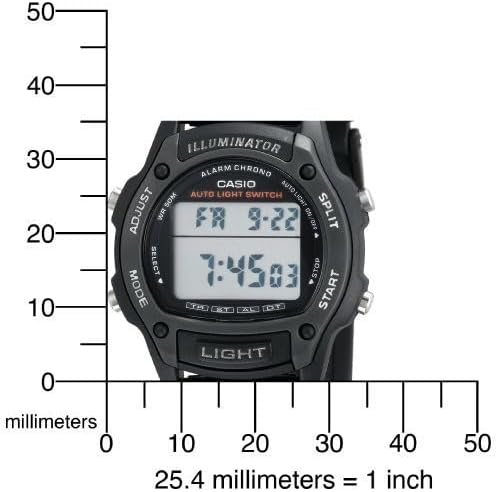
This manual provides detailed instructions for the setup, operation, maintenance, and troubleshooting of your Casio W93H-1AV Multifunction Sport Watch. Designed for durability and functionality, this digital watch is water-resistant and features a resin case, polyurethane band, and mineral dial window. It includes a digital display with day and date calendars, and a quartz movement for precise timekeeping.

Kurmak
İlk Saat ve Tarih Ayarı
- Zaman tutma modunda, basılı tutun. AYARLAMAK button (top left) until the seconds digits start to flash. This indicates the setting mode.
- Basın MOD button (bottom left) to cycle through the settings: Seconds → Hour → Minutes → Year → Month → Day.
- Kullanın BAŞLANGIÇ button (bottom right) to increase the flashing value. Use the BÖLÜNMÜŞ button (top right) to decrease the flashing value (for time and date settings).
- Tüm ayarlar yapıldıktan sonra, AYARLAMAK Ayar modundan çıkmak için tekrar tuşuna basın.
12/24 Saat Formatı
Zaman İşleyişi Modunda tuşuna basın. 12/24 SAAT button (top left, labeled ADJUST) to toggle between 12-hour and 24-hour time formats.

Unboxing and Initial Overview
Video 1: Kutudan çıkarma ve ilk izlenimlerview of the Casio W93H-1AV watch, demonstrating its appearance and basic functions right out of the box.
Kullanım Talimatları
Mod Navigasyonu
Basın MOD button (bottom left) to cycle through the different modes: Timekeeping, Stopwatch, Alarm, and Dual Time.
Işık Fonksiyonu
Basın IŞIK button (bottom center) to illuminate the display for easy viewing in low-light conditions. The watch features an Auto EL Backlight with Afterglow.
Kronometre Modu
- Kronometre Moduna geçmek için aşağıdaki adımları izleyin. MOD düğme.
- Basmak BAŞLANGIÇ (bottom right) to begin timing.
- Basmak BÖLÜNMÜŞ (top right) to record lap times without stopping the main timer.
- Basmak BAŞLANGIÇ again to pause the timer. Press BAŞLANGIÇ devam etmek için.
- Basmak AYARLAMAK (top left) to reset the stopwatch to zero.
Alarm Modu
- Alarm Moduna geçmek için aşağıdaki adımları izleyin. MOD düğme.
- Basın AYARLAMAK Alarm zamanı rakamları yanıp sönene kadar düğmesine basın.
- Kullanın MOD Saat ve dakika ayarları arasında seçim yapmak için düğmeye basın.
- Kullanın BAŞLANGIÇ Alarm saatini ayarlamak için düğmeye basın.
- Basmak AYARLAMAK Onaylamak ve çıkmak için.
- Basmak BAŞLANGIÇ to toggle the alarm on/off. An alarm indicator will appear on the display when active.
İkili Zaman Modu
This mode allows you to keep track of a second time zone. Navigate to the Dual Time Mode using the MOD düğme. basın ve basılı tutun AYARLAMAK to enter setting mode, then use BAŞLANGIÇ Ve MOD to set the second time zone.
Bakım
Pil Değişimi
The Casio W93H-1AV uses one Lithium Metal battery (CR1616). To replace the battery, carefully remove the four screws on the stainless steel back cover using a small screwdriver. Replace the battery, ensuring correct polarity, and then reattach the back cover securely. It is recommended to have the water resistance seal checked by a professional after battery replacement to maintain its integrity.
Suya Dayanıklı Bakım
This watch is water resistant to 165 feet (50 meters). This means it is suitable for short periods of recreational swimming, but not for diving or snorkeling. Avoid operating buttons while the watch is wet or submerged to prevent water intrusion.
Temizlik
Saatinizi düzenli olarak yumuşak ve kuru bir bezle temizleyin. İnatçı kirler için hafifçe kurulayın.amp Bez kullanılabilir ve ardından kurutulabilir. Sert kimyasallar veya aşındırıcı temizleyiciler kullanmaktan kaçının.
Sorun giderme
- Ekran boş veya loş: Pil zayıflamış veya tamamen bitmiş olabilir. "Pil Değiştirme" bölümüne bakın.
- Zaman yanlış: Ensure the time and date settings are correctly configured as per the "Initial Time and Date Setting" section. Check if the 12/24 hour format is set as desired.
- Işık fonksiyonu çalışmıyor: This could indicate a low battery. If the battery has been recently replaced and the issue persists, contact customer support.
- Düğmeler tepkisiz: Ensure the watch is not in a locked mode (if applicable, though this model does not feature a lock). If the watch is wet, dry it thoroughly before attempting to use buttons. If the issue persists, a reset may be necessary.
- To perform a full reset: In some cases, removing and reinserting the battery can perform a hard reset. Note that this will erase all settings, and you will need to reconfigure the time and date.
Özellikler
| Özellik | Şartname |
|---|---|
| Model Numarası | W93H-1AV (930102) |
| Görüntü Türü | Dijital |
| Hareket | Japon Kuvarsı |
| Suya Dayanıklılık | 165 Ayak (50 Metre) |
| Kasa Malzemesi | Reçine |
| Bant Malzemesi | Reçine |
| Pil Türü | 1 Lityum Metal (CR1616) |
| Kasa Çapı | 36 Milimetre |
| Kasa Kalınlığı | 10 Milimetre |
| Ürün Ağırlığı | 95 Gram |

Garanti ve Destek
Üretici Garantisi
This Casio watch is covered by a manufacturer's warranty. Please refer to the warranty card included with your purchase for specific terms, conditions, and duration. Keep your proof of purchase for warranty claims.
Müşteri Desteği
Daha fazla yardım, teknik destek veya servis talebi için lütfen resmi Casio web sitesini ziyaret edin. webSiteyi ziyaret edebilir veya müşteri hizmetleri departmanıyla iletişime geçebilirsiniz. Ayrıca şu adresi de ziyaret edebilirsiniz: Amazon'da Casio Mağazası Ürün bilgileri ve kaynaklar için.
Casio Brand Overview
Video 2: A brief brand video from Casio, highlighting their commitment to innovation and quality in timepieces.


