1. Giriş
This manual provides comprehensive instructions for the safe and efficient use of your Logisys PS480D 480W ATX Power Supply. Please read this manual thoroughly before installation and operation to ensure proper functionality and to prevent damage to the unit or other components.

Figure 1: Logisys PS480D 480W ATX Power Supply, front view with cables bundled.
2. Güvenlik Bilgileri
UYARI: Güç kaynakları yüksek voltaj içerir.tage bileşenleri. Güç kaynağını açmayın.asing. İçerisinde kullanıcının müdahale edebileceği herhangi bir parça bulunmamaktadır.
- Kurulum veya bakım öncesinde güç kaynağının AC prizinden çıkarıldığından emin olun.
- Always ground yourself to prevent electrostatic discharge (ESD) when handling internal computer components.
- Güç kaynağını ıslak veya kuru ortamlarda çalıştırmayın.amp koşullar.
- Aşırı ısınmayı önlemek için güç kaynağı çevresinde uygun havalandırma olduğundan emin olun.
- Yalnızca birlikte verilen güç kablolarını ve konektörlerini kullanın.
3. Ürün Özellikleri
The Logisys PS480D is a 480W ATX power supply designed for personal computers. Key features include:
- Yüksek Verimlilik
- Low Noise & Ripple
- Aşırı Hacimtage Koruma
- Kısa Devre Koruması
- Built-in EMI Filter
- Insulation Resistance 100MΩ min.
- Complies with FCC part 15J class B 115VAC operation and CISPR 22 230 VAC operation.
- Meets UL 1950, CSA 22.2 LEVEL 3 Requirement.
- 100% Burn-in test / Vibration test / Hi-pot test / Leakage current test.
- MTBF above 100,000 hours at 25 °C.

Figure 2: Rear panel of the power supply with fan, AC inlet, and power switch.
4. Kurulum ve Kurulum
Follow these steps to install the Logisys PS480D power supply into your computer system.
- Hazırlık: Ensure your computer is completely powered off and unplugged from the wall outlet. Open your computer case according to its manufacturer's instructions.
- Eski güç kaynağını çıkarın (varsa): Disconnect all cables from the old power supply to the motherboard, drives, and other components. Unscrew and remove the old power supply from the case.
- Install New Power Supply: Carefully place the Logisys PS480D into the power supply bay of your computer case. Secure it with screws.
- Ana güç kaynağına bağlayın: Connect the 20+4 pin ATX mainboard connector to your motherboard. If your motherboard uses a 20-pin connector, detach the 4-pin section. If it uses a 24-pin connector, connect both sections.
- CPU Güç Bağlantısı: Connect the 4-pin +12V power connector to the corresponding port on your motherboard.
- Çevre Birimlerine Güç Bağlayın:
- Use the 4-pin standard drive connectors for HDDs and CD/DVD-ROM drives.
- Use the 4-pin 3.5" FDD or ZIP connectors for floppy disk drives or similar devices.
- Use the Serial ATA (SATA) connectors for SATA hard drives and SSDs.
- Kablo yönetimi: Route cables neatly to ensure proper airflow within the case.
- Davayı Kapat: Tüm bağlantılar güvenli hale geldikten sonra bilgisayar kasasını kapatın.
- AC Gücünü Bağlayın: Plug the AC power cord into the power supply's AC inlet and then into a wall outlet.
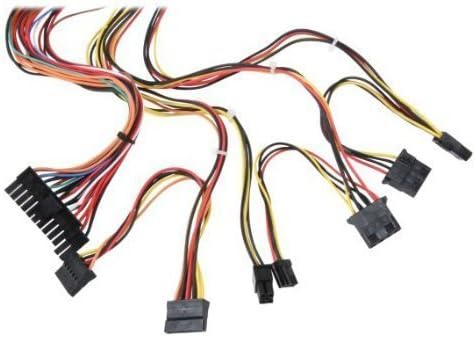
Şekil 3: Üzeriview of power supply connectors.

Figure 4: Power supply dimensions and included AC power cord.
5. Kullanım Talimatları
After successful installation, you can power on your computer.
- Ensure the power switch on the rear of the power supply (Figure 2) is in the "ON" (I) position.
- Bilgisayarınızın kasasının üzerindeki güç düğmesine basın.
- The power supply will provide stable power to your system components.
- To power off, shut down your operating system normally. For complete power disconnection, switch the power supply to the "OFF" (O) position and unplug the AC cord.
6. Bakım
Düzenli bakım, güç kaynağınızın uzun ömürlü olmasını ve en iyi performansı göstermesini sağlar.
- Temizlik: Periodically clean dust from the power supply's fan and vents using compressed air. Ensure the power supply is unplugged before cleaning.
- Hava akışı: Ensure that the computer case has adequate airflow and that the power supply's fan is not obstructed.
- Kablo Bütünlüğü: Periodically check all power cables for secure connections and signs of wear or damage.
7. Sorun Giderme
Güç kaynağınızla ilgili sorunlarla karşılaşırsanız, aşağıdaki genel sorun giderme adımlarına bakın:
- Güç Yok:
- AC güç kablosunun hem güç kaynağına hem de duvar prizine sağlam bir şekilde takılı olup olmadığını kontrol edin.
- Ensure the power switch on the rear of the power supply is in the "ON" (I) position.
- Duvar prizinin çalışır durumda olduğunu başka bir cihaz takarak doğrulayın.
- Check all internal power connections (20/24-pin ATX, 4-pin +12V, peripheral connectors) are firmly seated.
- Sistem Kararsızlığı/Rastgele Kapanmalar:
- This could indicate an overloaded or failing power supply. Ensure your system's power requirements do not exceed the PS480D's 480W capacity.
- Yeterli havalandırmanın olduğundan ve güç kaynağı fanının döndüğünden emin olun. Aşırı ısınma kararsızlığa neden olabilir.
- Alışılmadık Gürültü:
- A loud fan noise might indicate dust buildup or a failing fan bearing. Clean the fan as described in the Maintenance section.
If problems persist after attempting these steps, contact Logisys customer support or a qualified technician.
8. Özellikler
| Özellik | Şartname |
|---|---|
| Marka | Mantıksal Sistemler |
| Model Numarası | PS480D |
| Çıkış Watttage | 480 Watt |
| Form Faktörü | ATX |
| Boyutlar (UxGxY) | 6" U x 5.5" G x 3.25" Y (15.24 x 13.97 x 8.25 cm) |
| Ürün Ağırlığı | 2.06 pound (0.93 kg) |
| Anakart Bağlantısı | 1x 20+4 Pin ATX |
| CPU Güç Konektörü | 1x 4 Pin +12V |
| Standard Drive Connectors | 4x 4 Pin (Molex) |
| FDD/ZIP Connectors | 1x 4 Pin 3.5" |
| Seri ATA Konnektörleri | 1x SATA |
| Soğutma Yöntemi | Hava |
| Korumalar | Aşırı Hacimtage Koruma, Kısa Devre Koruması |
| Sertifikalar | FCC part 15J class B, CISPR 22, UL 1950, CSA 22.2 LEVEL 3 |
9. Garanti ve Destek
For warranty information, technical support, or service inquiries, please refer to the official Logisys webSite üzerinden veya müşteri hizmetleri departmanıyla iletişime geçin. Satın alma belgenizi saklayın.

