1. Giriş
Welcome to the user manual for your new Singing Machine SMVG-620 CD+G Karaoke System. This system is designed to provide hours of entertainment with its CD+G playback capabilities, built-in camera, 5.5-inch monitor, and AM/FM radio. Please read this manual thoroughly before operating your unit to ensure proper use and to maximize your enjoyment.
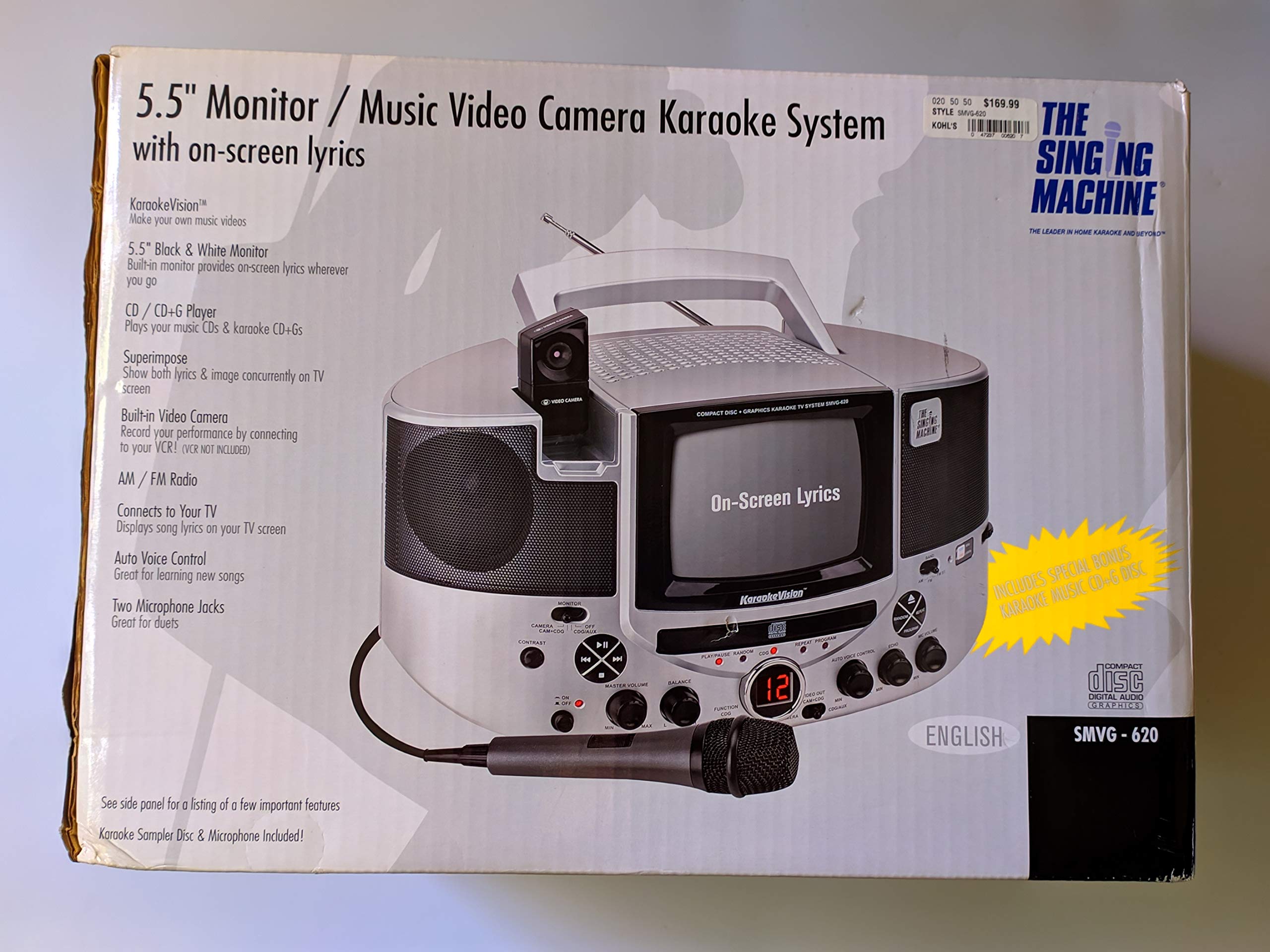
Şekil 1.1: The Singing Machine SMVG-620 CD+G Karaoke System.
For optimal performance and safety, always follow the instructions and warnings provided.
2. Önemli Güvenlik Bilgileri
- Talimatları okuyun: Cihaz çalıştırılmadan önce tüm güvenlik ve çalıştırma talimatları okunmalıdır.
- Talimatları Saklayın: Güvenlik ve kullanım talimatları ileride başvurmak üzere saklanmalıdır.
- Uyarıları Dikkate Alın: Cihazın üzerinde ve kullanım kılavuzunda yer alan tüm uyarılara uyulmalıdır.
- Talimatları izleyin: Tüm kullanım ve işletme talimatlarına uyulmalıdır.
- Su ve Nem: Bu cihazı suyun yakınında kullanmayınız.
- Temizlik: Sadece kuru bezle temizleyin.
- Havalandırma: Havalandırma açıklıklarını kapatmayın. Üreticinin talimatlarına uygun şekilde kurulum yapın.
- Sıcaklık: Radyatörler, kalorifer ızgaraları, sobalar veya diğer cihazlar (dahil) gibi herhangi bir ısı kaynağının yakınına kurmayın. amp(ısı üreten)
- Güç Kablosu Koruması: Güç kablosunun, özellikle fişlerde, prizlerde ve cihazdan çıktığı noktalarda üzerine basılmasını veya sıkışmasını önleyin.
- Ekler/Aksesuarlar: Sadece üretici tarafından belirtilen aparatları/aksesuarları kullanın.
- Yıldırım: Yıldırımlı havalarda veya uzun süre kullanılmayacaksa bu cihazın fişini çekin.
- Servis: Tüm servis işlemleri için kalifiye servis personeline başvurun. Cihaz herhangi bir şekilde hasar gördüğünde servis gereklidir.
3. Paket İçeriği
Carefully unpack your Singing Machine SMVG-620 system and ensure all items listed below are present and in good condition.
- SMVG-620 CD+G Karaoke System
- Bir (1) Mikrofon
- Sampler CD+G Disc
- Audio/Video RCA Cables
- AC Güç Adaptörü
- Kullanım Kılavuzu

Şekil 3.1: Contents of the box, including the microphone, RCA cables, and the instruction manual.
4. Ürün Bittiview
Familiarize yourself with the various parts and controls of your SMVG-620 Karaoke System.

Şekil 4.1: Arka view of the product packaging highlighting key features and components of the SMVG-620 system.
Temel Özellikler:
- 5.5" Black & White Monitor: For on-screen lyrics from CD+G discs.
- Built-in Color Camera: Allows you to see yourself on the monitor or connected TV.
- Dual Microphone Jacks: Connect two microphones for duets (one microphone included).
- AM/FM Radyo: En sevdiğiniz radyo istasyonlarını dinleyin.
- CD+G Oynatıcı: Plays standard audio CDs and CD+Graphics discs.
- Otomatik Ses Kontrolü (AVC): Helps maintain vocal balance by automatically reducing the main vocal track when you sing.
- Yankı Kontrolü: Adds depth and resonance to your voice.
- Professional Style Microphone: For clear vocal pickup.
- Ses/Video Çıkışı: Connects to your TV for larger screen display and enhanced audio.
5. Kurulum
5.1 Güç Bağlantısı
- Cihazın sağlam ve düz bir yüzeye yerleştirildiğinden emin olun.
- Connect the AC power adapter to the DC IN jack on the back of the SMVG-620 unit.
- Plug the other end of the AC power adapter into a standard wall outlet (AC 120V ~ 60Hz).
5.2 Televizyona Bağlanma
İle view lyrics on a larger screen and enhance audio, connect the SMVG-620 to your television using the supplied Audio/Video RCA cables.
- Locate the AUDIO OUT (white and red) and VIDEO OUT (yellow) jacks on the back of the SMVG-620.
- Connect the white plug of the RCA cable to the white AUDIO OUT jack on the karaoke system and to the white AUDIO IN jack on your TV.
- Connect the red plug of the RCA cable to the red AUDIO OUT jack on the karaoke system and to the red AUDIO IN jack on your TV.
- Connect the yellow plug of the RCA cable to the yellow VIDEO OUT jack on the karaoke system and to the yellow VIDEO IN jack on your TV.
- Turn on your TV and select the correct A/V input source (e.g., AV1, Video 1) that corresponds to the jacks you used.
5.3 Mikrofon Bağlantısı
Plug the microphone into either the MIC 1 or MIC 2 jack on the front of the SMVG-620 unit.
6. Operasyon
6.1 Açma/Kapatma
Basın GÜÇ button located on the front panel to turn the unit ON or OFF.
6.2 CD+G Oynatma
- Open the CD compartment door and carefully place a CD+G disc (or standard audio CD) onto the spindle with the label side facing up. Close the door.
- Seçme CD + G mode using the FUNCTION selector.
- Basın OYNAT/DURDUR oynatmayı başlatmak için düğmesine basın.
- Ayarla ANA SES Düğmeyi istediğiniz dinleme seviyesine ayarlayın.
- Kullanın ATLAMAK düğmeler (<< or >>Parçalar arasında gezinmek için.
- Duraklatmak için tuşuna basın OYNAT/DURDUR Tekrar. Devam etmek için tekrar basın.
- Çalmayı durdurmak için DURMAK düğme.
6.3 Mikrofon Kullanımı
- Ensure the microphone is connected to a MIC jack.
- Ayarla MİKROFON SESİ Mikrofonun çıkış seviyesini kontrol etmek için kullanılan düğme.
- Çevir YANKI Sesinize yankı efekti eklemek için düğme.
- The OTOMATİK SES KONTROLÜ (AVC) switch can be toggled ON/OFF. When ON, the original vocal track on a CD+G disc will be reduced when you sing into the microphone.
6.4 AM/FM Radyo
- Seçme AM or FM mode using the FUNCTION selector.
- Daha iyi sinyal alımı için FM antenini uzatın.
- Çevir AYARLAMA İstediğiniz radyo istasyonunu seçmek için düğmeyi kullanın.
- Ayarla ANA SES topuz.
6.5 Kamera Fonksiyonu
The built-in camera allows you to display your image on the 5.5-inch monitor or a connected TV.
- Ensure the unit is powered on and connected to a TV if you wish to use an external display.
- The camera feed will automatically display when the unit is in CD+G or Video mode, or when no other video source is active.
7. Bakım
7.1 Ünitenin Temizlenmesi
- Temizlemeden önce daima ünitenin fişini elektrik prizinden çekin.
- Dış yüzeyleri temizlemek için yumuşak ve kuru bir bez kullanın.
- Cilaya zarar verebileceğinden aşındırıcı temizleyiciler, cilalar veya çözücüler kullanmayın.
- CD merceği için özel bir CD mercek temizleme diski kullanın.
7.2 CD Bakımı
- CD'leri kenarlarından tutarak çalınabilir yüzeye parmak izi bulaşmasını önleyin.
- Keep discs in their cases when not in use to prevent scratches.
- Diskleri yumuşak, tüy bırakmayan bir bezle, merkezden dışa doğru silerek temizleyin.
8. Sorun Giderme
If you encounter any issues with your SMVG-620, please refer to the following common problems and solutions.
| Sorun | Olası Neden | Çözüm |
|---|---|---|
| Güç yok | Güç kablosu düzgün bağlanmamış. | AC adaptörünün cihaza ve çalışan bir duvar prizine güvenli bir şekilde takılı olduğundan emin olun. |
| Hoparlörlerden ses gelmiyor | Master Volume is too low. Yanlış işlev modu seçildi. | Increase the MASTER VOLUME. Select the correct FUNCTION (CD+G, AM, FM). |
| mikrofondan ses gelmiyor | Mikrofon bağlı değil. MIC VOLUME is too low. Mikrofon anahtarı KAPALI konumda. | Plug microphone into MIC 1 or MIC 2 jack. Increase the MIC VOLUME. Ensure microphone switch is ON. |
| No video on TV / No lyrics | RCA kabloları doğru şekilde bağlanmamış. Yanlış TV girişi seçildi. Not a CD+G disc. | Check all RCA cable connections (yellow for video). Select the correct A/V input on your TV. Ensure you are playing a CD+G disc for lyrics. |
| CD atlama | Disk kirli veya çizilmiş. Ünite dengesiz bir yüzey üzerindedir. | Diski temizleyin veya başka bir disk deneyin. Place the unit on a stable, vibration-free surface. |
9. Özellikler
| Model Numarası | SMVG-620 (SIN SMVG620) |
| Güç Kaynağı | AC 120V ~ 60Hz (via AC Adapter) |
| İzlemek | 5.5-inch Black & White |
| Konuşmacı Sayısı | 2 |
| Uyumlu Cihazlar | Televizyon |
| Medya Türü | CD, CD+G |
| Ürün Boyutları (UxGxY) | 35.8 x 20.8 x 19.3 cm (14.1 x 8.2 x 7.6 inç) |
| Ürün Ağırlığı | 3.9 kg (8.6 lbs) |
10. Garanti ve Destek
For warranty information and customer support, please refer to the warranty card included with your product or contact The Singing Machine directly. You may also consult your retailer for details regarding their return and warranty policies.
Üretici: ŞARKI MAKİNASI