1. Giriş
This manual provides comprehensive instructions for the setup, operation, maintenance, and troubleshooting of your COBY CR-A78 AM/FM Digital Alarm Clock with Time Projector. Please read this manual thoroughly before using the device to ensure proper function and to maximize your user experience. Keep this manual for future reference.
2. Ürün Bittiview
The COBY CR-A78 is a versatile digital alarm clock featuring an AM/FM radio tuner and a unique time projection function. It is designed to provide reliable timekeeping, alarm functions, and radio entertainment, with the added convenience of projecting the current time onto a wall or ceiling.
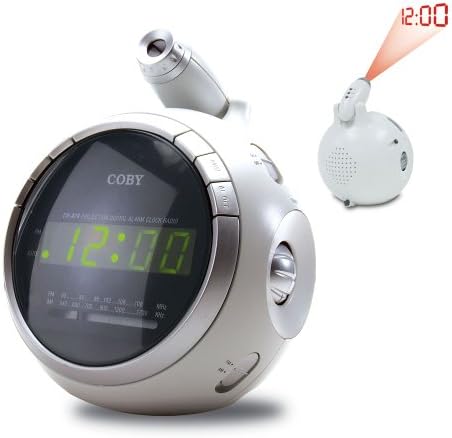
Resim 2.1: Ön view of the COBY CR-A78 digital alarm clock, showing the green LED display and the adjustable time projector. An inset image illustrates the time '12:00' being projected onto a surface.
3. Özellikler
- AM/FM Digital Tuner: En sevdiğiniz radyo istasyonlarını dinlemek için.
- Large Green LED Display: Provides clear visibility of the time.
- Integrated Time Projector: Projects the current time onto a wall or ceiling for easy viewIng.
- Çift Alarm Fonksiyonu: Farklı uyandırma saatleri için iki bağımsız alarm kurun.
- Erteleme İşlevi: Allows for a temporary pause of the alarm.
- Uyku Zamanlayıcısı: Otomatik kapanma özelliğiyle müzik eşliğinde uykuya dalın.
- Pil Yedekleme: Elektrik kesintisi sırasında zaman ve alarm ayarlarını korur.tages (requires 9V battery, not included).
4. Paket İçeriği
- COBY CR-A78 AM/FM Digital Alarm Clock
- AC Güç Adaptörü
- Kullanım Kılavuzu (bu belge)
5. Kurulum
5.1. Güç Bağlantısı
- Insert the small end of the AC power adapter into the DC IN jack located on the back of the unit.
- Plug the other end of the AC power adapter into a standard wall outlet (AC 120V, 60Hz).
- The unit will power on, and the display will flash, indicating it is ready for time setting.
5.2. Pil Yedekleme Kurulumu
A 9-volt battery (not included) can be installed to provide backup power for the clock and alarm settings during a power interruption.
- Cihazın alt kısmında bulunan pil bölmesi kapağını bulun.
- Remove the cover by sliding it off.
- Connect a 9-volt battery to the battery connector inside the compartment, observing polarity (+ and -).
- Place the battery into the compartment and replace the cover securely.
6. Kullanım Talimatları
6.1. Saati Ayarlama
- Basılı tutun SAAT AYARI Saat haneleri yanıp sönmeye başlayana kadar düğmesine basın.
- Basın SAAT Saati ayarlamak için düğmeye art arda basın. Doğru AM/PM ayarı için PM göstergesini gözlemleyin.
- Basın DAKİKA Dakikayı ayarlamak için düğmeye art arda basın.
- Basın SAAT AYARI Zaman ayarı modundan çıkmak ve onaylamak için tekrar düğmeye basın.
6.2. Alarmı Ayarlama
The CR-A78 features two independent alarms, Alarm 1 and Alarm 2.
- Basılı tutun ALARM 1 TAKIMI (veya ALARM 2 TAKIMIAlarm saati rakamları yanıp sönene kadar ) düğmesine basın.
- Basın SAAT İstediğiniz alarm saatini ayarlamak için düğmeye basın.
- Basın DAKİKA İstediğiniz alarm dakikasını ayarlamak için düğmesine basın.
- Basın ALARM 1 TAKIMI (veya ALARM 2 TAKIMI) button again to confirm the alarm time.
- Alarmı etkinleştirmek için kaydırın. ALARM 1 AÇIK/KAPALI (veya ALARM 2 AÇIK/KAPALI) switch to the 'ON' position. Select 'BUZZER' for a beeping alarm or 'RADIO' to wake to the radio.
6.3. Erteleme Fonksiyonunu Kullanma
Alarm çaldığında, düğmesine basın. UYUKLAMA button. The alarm will temporarily stop and sound again after approximately 9 minutes. To turn off the alarm completely, press the ALARM AÇIK / KAPALI switch to 'OFF'.
6.4. Radyo Kullanımı (AM/FM)
- Basın RADYO AÇIK/KAPALI radyoyu açmak için düğmesine basın.
- Kaydırın Sabah/FM switch to select the desired band.
- Döndür AYARLAMA İstediğiniz istasyonu bulmak için düğmeyi çevirin.
- kullanarak ses seviyesini ayarlayın. HACİM topuz.
- Radyoyu kapatmak için tuşuna basın. RADYO AÇIK/KAPALI Tekrar düğmeye basın.
6.5. Using the Time Projector
- Cihazın üst kısmında bulunan projektör merceğini bulun.
- Basın PROJEKTÖR AÇIK/KAPALI button to activate the time projection.
- Rotate the projector lens to adjust the focus of the projected time.
- Adjust the angle of the projector arm to direct the time onto your desired surface (wall or ceiling).
- Basın PROJEKTÖR AÇIK/KAPALI button again to turn off the projection.
7. Bakım
- Temizlik: Cihazın dış yüzeyini temizlemek için yumuşak, kuru bir bez kullanın. Aşındırıcı temizleyiciler veya çözücüler kullanmayın.
- Lens Bakımı: Gently wipe the projector lens with a soft, lint-free cloth if it becomes dusty.
- Atama: Cihazı, doğrudan güneş ışığından, ısı kaynaklarından ve aşırı nemden uzak, sabit ve düz bir yüzeye yerleştirin.
- Pil Değişimi: Replace the 9-volt backup battery annually or if the unit experiences frequent power outages to ensure continuous backup functionality.
8. Sorun Giderme
| Sorun | Olası Neden | Çözüm |
|---|---|---|
| Ünite açılmıyor. | AC adaptörü düzgün bağlanmamış. | AC adaptörünün cihaza ve çalışan bir duvar prizine güvenli bir şekilde takılı olduğundan emin olun. |
| Alarm çalmıyor. | Alarm etkinleştirilmemiş veya yanlış ayarlanmış. | Verify the alarm time is set correctly and the ALARM ON/OFF switch is in the 'ON' position (BUZZER or RADIO). |
| Radyo alımı zayıf. | Antenna not extended or unit too close to interference. | Extend the FM wire antenna fully. For AM, rotate the unit for best reception. Move away from other electronic devices. |
| Tahmin edilen zaman belirsizdir. | Projector focus not adjusted. | Rotate the projector lens to adjust the focus until the time is clear. |
| Elektrik kesintisi sonrasında saat/ayarlar kayboldu.tage. | Yedek pil bitmiş veya takılı değil. | Install a fresh 9-volt battery or replace the existing one. |
9. Özellikler
| Özellik | Şartname |
|---|---|
| Marka | Koby'nin |
| Örnek | CR-A78 |
| Görüntü Türü | Dijital LED (Yeşil) |
| Radyo Tuner | AM/FM Analog |
| Güç Kaynağı | AC 120V, 60Hz |
| Pil Yedekleme | 1 adet 9V pil (dahil değildir) |
| Ürün Boyutları (U x G x Y) | 12.7 x 10.16 x 15.24 cm (5 x 4 x 6 inç) |
| Ürün Ağırlığı | 567 gr (1.25 lb) |
| Renk | Gümüş |
10. Garanti ve Destek
For warranty information or technical support, please refer to the documentation provided at the time of purchase or contact Coby customer service. Keep your purchase receipt as proof of purchase for any warranty claims.


