1. Giriş
Thank you for choosing the Escali Primo Digital Food Scale. This manual provides essential information for the proper setup, operation, and maintenance of your new scale. Designed for accuracy and ease of use, the Escali Primo is ideal for various kitchen tasks, including food preparation, baking, and portion control.
The Escali Primo Digital Food Scale features a simple two-button operation, a sealed control panel for easy cleaning, and an automatic shut-off function to conserve battery life. It measures weights up to 11 lb (5,000 g) with precision.

Image: Escali Primo Digital Food Scale, Metallic.
2. Ürün Bileşenleri
The Escali Primo Digital Food Scale consists of the following main components:
- Tartım Platformu: The surface where items are placed for measurement.
- Dijital gösterge: Shows weight readings and unit indicators.
- On/Tare/Off Button: Used to power the scale on/off and activate the tare function.
- Unit (g/oz) Button: Used to switch between measurement units (grams, ounces, pounds:ounces).
- Pil Bölmesi: Located on the underside, holds two AA batteries.
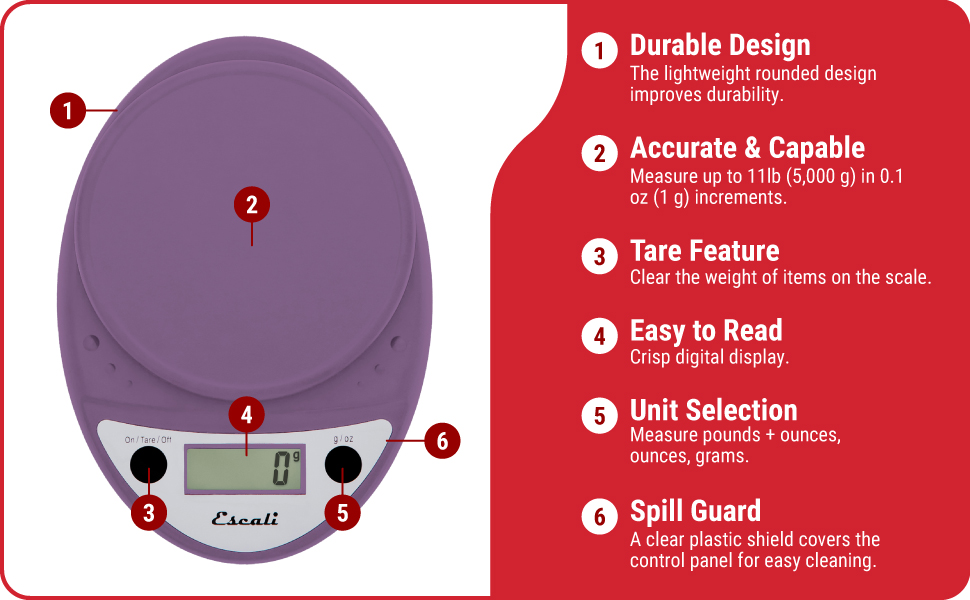
Image: Key features of the Escali Primo Digital Food Scale.
3. Kurulum
3.1 Pil Kurulumu
- Terazinin alt tarafında bulunan pil yuvasını bulun.
- Pil bölmesinin kapağını açın.
- Bölmenin içinde gösterildiği gibi kutupların (+/-) doğru olmasına dikkat ederek iki adet AA pil takın.
- Pil bölmesi kapağını sıkıca kapatın.
3.2 İlk Yerleştirme
Place the scale on a flat, stable, and level surface. Avoid placing it on soft or uneven surfaces, which can affect accuracy.
4. Kullanım Talimatları
4.1 Güç Açma/Kapatma
- Açmak İçin: Basın On/Tare/Off button. The display will show "0" when ready.
- Kapatmak İçin: Basılı tutun On/Tare/Off button for approximately 3 seconds. The scale will also automatically shut off after four minutes of inactivity to conserve battery life.
4.2 Birim Seçimi
To change the unit of measurement (grams, ounces, pounds:ounces), press the g/oz button while the scale is on. The display will cycle through the available units.

Image: Display and unit selection button.
4.3 Dara İşlevi
The tare function allows you to subtract the weight of a container or to measure multiple ingredients consecutively.
- Tartım platformuna boş bir kap yerleştirin. Ekranda ağırlığı görülecektir.
- Basın On/Tare/Off düğmeye basın. Ekran "0" değerine sıfırlanacaktır.
- Malzemenizi kaba ekleyin. Ekranda sadece malzemenin ağırlığı gösterilecektir.
- Repeat the tare process for additional ingredients if needed.

Image: Using the scale for portion control with meal prep.
4.4 Malzemelerin Tartılması
Once the scale is on and set to your desired unit, simply place the item(s) to be weighed directly onto the weighing platform or into a tared container. The weight will be displayed instantly.

Image: Weighing ingredients for baking.
5. Bakım
5.1 Temizlik
The sealed control panel and rounded design make the Escali Primo scale easy to clean. Wipe the scale with a damp bez. Teraziyi suya batırmayın veya aşındırıcı temizleyiciler kullanmayın.
5.2 Depolama
Store the scale in a dry place at room temperature. Avoid placing heavy objects on the scale when not in use, as this may affect its calibration over time.
6. Sorun Giderme
| Sorun | Olası Neden | Çözüm |
|---|---|---|
| Ölçek açılmıyor | Piller bitmiş veya yanlış takılmış. | Pilleri yeni AA pillerle değiştirin, kutupların doğru olmasına dikkat edin. |
| Yanlış okumalar | Scale not on a flat, stable surface; scale overloaded; debris under platform. | Place scale on a firm, level surface. Ensure weight does not exceed 11 lb (5000 g). Clean any debris from under the platform. |
| Ekranda "Err" yazıyor | Ölçek aşırı yüklendi. | Remove items from the scale. Ensure total weight is within the 11 lb (5000 g) capacity. |
| Automatic shut-off too soon | Normal operation (4 minutes of inactivity). | This is a battery-saving feature. Press the On/Tare/Off button to restart. |
7. Özellikler
- Modeli: P115
- Kapasite: 11 libre (5,000 g)
- artışlar: 0.05 ons (1 gr)
- Ölçü Birimleri: oz, lb:oz, g
- Güç: 2 adet AA pil (dahil)
- Ürün Ölçüleri: 8.5 x 6 x 1.5 inç (yaklaşık)
- Görüntüleme Türü: Dijital LED
- Özel Özellikler: Auto Shut Off, Tare Function, Sealed Control Panel
8. Garanti Bilgileri
The Escali Primo Digital Food Scale comes with a Ömür Boyu Garanti. For detailed warranty terms and conditions, please refer to the official Escali website veya müşteri desteği ile iletişime geçin.
9. Müşteri Desteği
For further assistance, product information, or support, please visit the official Escali webSiteyi ziyaret edin veya müşteri hizmetleri departmanıyla iletişime geçin. İletişim bilgileri genellikle ürün ambalajında veya üreticinin web sitesinde bulunabilir. webalan.
Daha fazla bilgi ve destek için şu adresi ziyaret edebilirsiniz: Escali Store on Amazon.


