1. Giriş
This manual provides essential instructions for the safe and efficient operation, setup, and maintenance of your Ohaus ES50R ES Industrial Bench Scale. The Ohaus ES50R is designed for industrial weighing applications, offering a capacity of 50 kg (110 lb) with a readability of 20 g (0.05 lb). Please read this manual thoroughly before using the scale to ensure proper functionality and to prevent damage.
2. Güvenlik Bilgileri
Her zaman aşağıdaki güvenlik önlemlerine uyun:
- Tartıyı maksimum kapasitesi olan 50 kg'ın (110 lb) üzerinde aşırı yüklemeyin.
- Ensure the scale is placed on a stable, level surface to achieve accurate readings.
- Operate the scale only with the specified 120 V power supply.
- Teraziyi aşırı sıcaklıklara, neme veya doğrudan güneş ışığına maruz bırakmaktan kaçının.
- Teraziyi suya veya başka sıvılara daldırmayın.
- Keep the scale clean and free from dust and debris.
- Only qualified personnel should perform repairs or maintenance beyond routine cleaning.
3. Paket İçeriği
Paketi açtığınızda tüm bileşenlerin mevcut olduğundan emin olun:
- Ohaus ES50R ES Industrial Bench Scale unit
- Power Adapter (for 120 V operation)
- Kullanım Kılavuzu (bu belge)
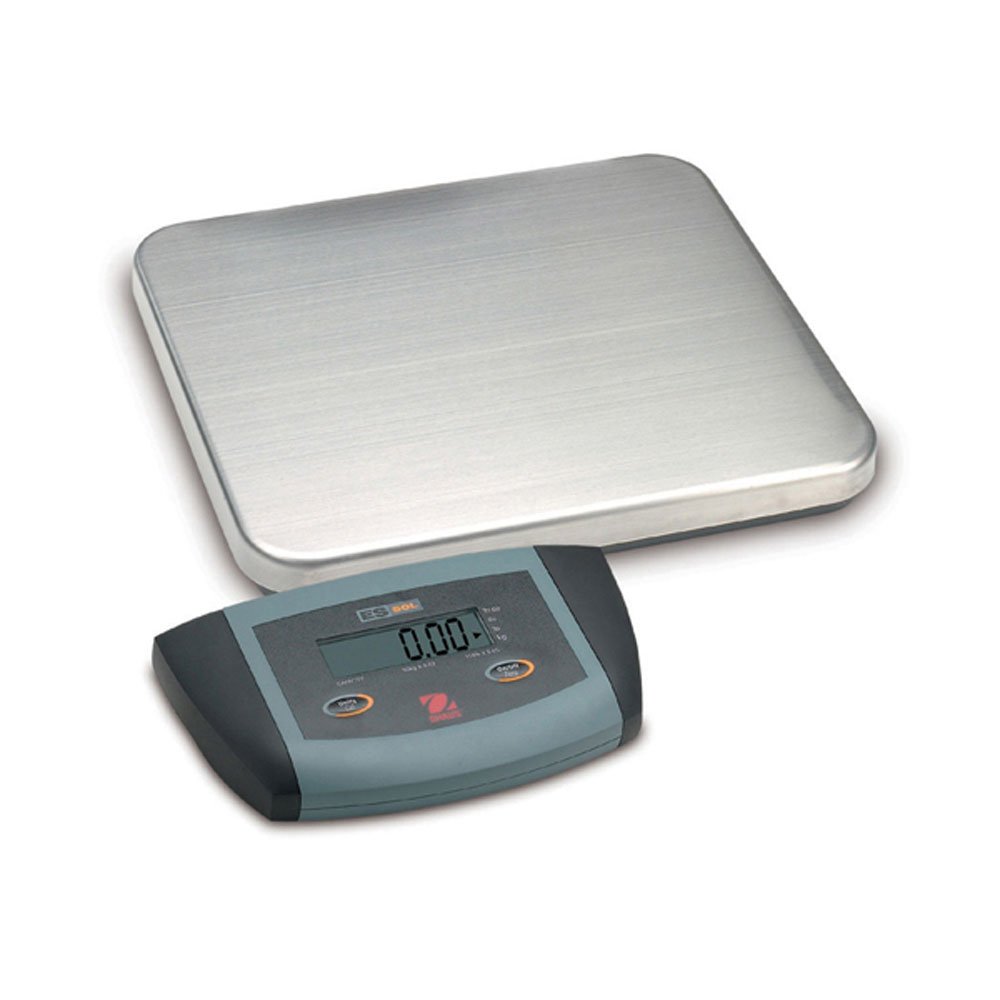
Şekil 1: Ohaus ES50R ES Industrial Bench Scale. This image shows the complete bench scale unit, including the weighing platform and the display unit.
4. Kurulum
- Paketin açılması: Tüm bileşenleri ambalajından dikkatlice çıkarın. Ambalajı, ilerideki taşıma veya depolama için saklayın.
- Atama: Place the scale on a firm, level, and stable surface, free from vibrations, drafts, and rapid temperature changes. Ensure adequate space around the scale for safe operation.
- Güç Bağlantısı: Connect the power adapter to the scale's power input port. Plug the adapter into a standard 120 V AC power outlet.
- İlk Güç Açma: Basın AÇIK/KAPALI button to power on the scale. The display will perform a self-test and then show "0.00" or "0.0".
- Seviyelendirme: If your scale includes adjustable feet, rotate them until the bubble in the spirit level (if present) is centered.
5. Kullanım Talimatları
5.1 Temel Tartım
- Ensure the scale is powered on and the display shows "0.00" or "0.0".
- Place the item to be weighed gently in the center of the weighing platform.
- Wait for the display to stabilize. The stable weight reading will be shown on the large LCD display.
- Öğeyi platformdan kaldırın. Ekran sıfıra dönmelidir.
5.2 Dara İşlevi
The tare function allows you to subtract the weight of a container, so only the net weight of the contents is displayed.
- Tartım platformuna boş bir kap yerleştirin.
- Basın DARA button. The display will reset to "0.00" or "0.0", indicating the container's weight has been tared.
- Tartılacak malzemeyi kaba ekleyin. Ekran, malzemenin net ağırlığını gösterecektir.
- Boşluğu temizlemek için kabı platformdan çıkarın ve tuşuna basın. DARA Tekrar düğmeye basın.
5.3 Özel Özellikler
- Otomatik Kapanma: The scale is equipped with an auto shut-off feature to conserve power. If no activity is detected for a set period, the scale will automatically turn off.
- Büyük Ekran: The LCD display provides clear and easy-to-read weight indications.
- Manuel Kapatma: To manually turn off the scale, press and hold the AÇIK/KAPALI ekran kapanana kadar düğmesine basın.
6. Bakım
6.1 Temizlik
Terazi cihazınızın doğruluğunu korumak ve ömrünü uzatmak için:
- Disconnect the scale from the power supply before cleaning.
- Ölçek yüzeylerini ad ile silin.amp bez ve yumuşak bir deterjanla temizleyin.
- Aşındırıcı temizleyiciler, çözücüler veya sert kimyasallar kullanmayın.
- Ensure no liquid enters the scale's internal components.
- Temizledikten sonra kireci iyice kurulayın.
6.2 Kalibrasyon
Regular calibration ensures the accuracy of your scale. Refer to the full technical manual or contact Ohaus customer support for detailed calibration procedures. Calibration typically requires certified weights.
7. Sorun Giderme
| Sorun | Olası Neden | Çözüm |
|---|---|---|
| Terazi açılmıyor. | Güç kaynağı yok; güç adaptörü arızalı. | Check power connection and outlet. Ensure power adapter is functioning correctly. |
| Hatalı okumalar. | Scale not level; unstable surface; overload; calibration required. | Ensure scale is level and on a stable surface. Do not exceed capacity. Perform calibration if necessary. |
| Ekranda "Err" veya hata kodu görünüyor. | Overload; internal malfunction. | Remove weight from platform. If error persists, power cycle the scale. If still present, contact customer support. |
| Auto shut-off too soon/not at all. | Auto shut-off settings. | Refer to the full technical manual for adjusting auto shut-off settings, if available. |
8. Özellikler
| Özellik | Detay |
|---|---|
| Örnek | ES50R |
| Marka | Ev |
| Kapasite | 50 kg / 110 lb |
| Okunabilirlik | 20 gr / 0.05 lb |
| Görüntü Türü | LCD (Large Display) |
| Özel Özellikler | Auto Shut Off, Manual Shutdown |
| Form Faktörü | Tezgah Ölçeği |
| Güç Kaynağı | 120 V AC (via adapter) |
| Ürün Boyutları | 15 x 13 x 5.5 inç |
| Ürün Ağırlığı | 9.64 pound |
| Üretici | COLE-PARMER |
9. Garanti
The Ohaus ES50R ES Industrial Bench Scale comes with a 1 yıllık garanti from the date of purchase. This warranty covers defects in materials and workmanship under normal use. It does not cover damage resulting from misuse, accident, unauthorized modification, or operation outside the specified environmental and electrical limits. For warranty claims, please retain your proof of purchase and contact Ohaus customer support.
10. Müşteri Desteği
For technical assistance, service, or to inquire about replacement parts, please contact Ohaus customer support. Visit the official Ohaus webEn güncel iletişim bilgileri ve ek kaynaklar için bu siteyi ziyaret edin.
Not: Always provide your product model number (ES50R) and serial number (if applicable) when contacting support.


