giriiş
Corel Paint Shop Pro X is a comprehensive software solution designed for photo editing, organizing, and creative graphic design. This manual provides detailed instructions to help users effectively utilize the software's features, from basic image corrections to advanced artistic enhancements and photo management.
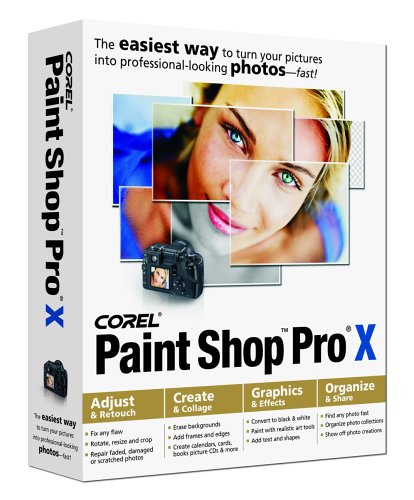
Image: Corel Paint Shop Pro X software packaging. This image displays the product box, indicating the software version and brand.
Kurulum ve Yükleme
To begin using Corel Paint Shop Pro X, follow these installation steps:
- Insert the CD-ROM: Place the Corel Paint Shop Pro X installation CD into your computer's CD-ROM drive.
- Launch Setup: The setup program should start automatically. If it does not, navigate to the CD-ROM drive in 'My Computer' or 'This PC' and double-click on the 'setup.exe' file.
- Ekrandaki Komutları Takip Edin: Adhere to the instructions provided by the installation wizard. This will guide you through accepting the license agreement, choosing an installation directory, and entering your product key. The product key is typically found on the CD sleeve or in the included instruction booklet.
- Kurulumu Tamamla: Once the installation is complete, you may be prompted to restart your computer. It is recommended to do so to ensure all components are properly configured.
For detailed system requirements, refer to the instruction booklet included with your software package. Ensure your operating system meets the minimum specifications for optimal performance.
Kullanım Talimatları
Corel Paint Shop Pro X offers a wide array of tools for photo manipulation and graphic creation. This section outlines key functionalities.
Basic Photo Adjustments
- Rotate, Resize, and Crop: Access these tools from the main toolbar or the 'Image' menu to adjust photo orientation, dimensions, and composition.
- Akıllı Fotoğraf Düzeltme: This feature automatically corrects color, exposure, and lighting issues. Activate it with a single click, then fine-tune suggested corrections as needed.
- One Step Noise Removal: Reduces digital noise in photos.
- One Step Purple Fringe Removal: Corrects chromatic aberration, often seen as purple outlines in high-contrast areas.
- Red-Eye Remover: Utilizes a one-click solution for red-eye correction in both human and pet photos. An advanced option is available for precise adjustments.
Enhancement and Retouching
- Makeover Tools: A suite of tools for retouching portraits, including options to remove blemishes, whiten teeth, apply a suntan effect, and reduce wrinkles.
- Clone Tool and Object Remover: Use these tools to eliminate unwanted distractions or objects from your photos by sampling and painting over areas.
- Adjust Perspective and Straighten: Correct skewed or crooked images to achieve a balanced composition.
- Restore Old Photos: Tools like Scratch Remover, Fade Correction, Hand-tinting brushes, and High-pass Sharpen are available to repair and revitalize damaged or aged photographs.
Creative Effects and Graphic Design
- Picture Frames and Photo Edges: Apply decorative borders to your images.
- Picture Tubes: Add pre-designed art elements to your projects.
- Text Tool: Insert vertical or horizontal text, or make text follow a custom path.
- Art Media Tools: Transform photos into paintings using brushes that simulate oil, chalk, pastel, and other artistic mediums. Includes a trace option and various brush/canvas types.
- Shape Tools: Utilize the Symmetric Shape Tool, Pen Tool, and Preset Shapes to add arrows, talk bubbles, stars, and other geometric or custom shapes.
- Black & White Filters: Convert color photos to black and white with options like B&W Infrared Filter and B&W Conversion Filter.
- Special Effects Filters: Access over 500 filters for lighting effects, color pencil, emboss, and more.
- Warp Brush: Create caricatures and distorted effects by dragging the mouse across image areas.
- Blur Effects: Apply professional blur effects such as Gaussian, Motion, and Radial Blur.
Photo Organization and Sharing (Corel Photo Album 6 - Standard Edition)
Corel Photo Album 6, included with Paint Shop Pro X, facilitates efficient photo management and sharing.
- Photo Downloader: Automatically downloads and rotates photos when a camera is connected.
- Photo Finder: Organizes your photo collection by date.
- Photo Trays: A virtual to-do list for managing photos, such as reminding you to email or print.
- Organization by Keywords: Categorize photos using keywords for quick searching and retrieval.
- Paylaşım Seçenekleri: Create slide shows, email photos (automatically resized), or burn photos to a CD.
- Proje Oluşturma: Design greeting cards, e-cards, scrapbook pages, collages, calendars, magazine covers, and award certificates using templates.
- Print Layouts: Print multiple images on a single sheet of paper.
Bakım
To ensure the longevity and optimal performance of Corel Paint Shop Pro X, consider the following maintenance practices:
- İşletim sistemini güncel tutun: Ensure your computer's operating system is regularly updated to maintain compatibility and security.
- Backup Your Work: Regularly back up your image files and project work to prevent data loss.
- Disk Alanı Yönetimi: Ensure sufficient free disk space for temporary files and program operations.
- Yazılım Güncellemeleri: Check the Corel website periodically for any available software patches or updates for Paint Shop Pro X.
Sorun giderme
If you encounter issues while using Corel Paint Shop Pro X, consider these troubleshooting steps:
- Refer to Instruction Booklet: The included instruction booklet contains detailed troubleshooting guides and solutions for common problems.
- Sistem Gereksinimlerini Kontrol Edin: Verify that your computer meets the minimum system requirements for the software. Inadequate hardware can lead to performance issues.
- Slow Loading Times: If the program loads slowly, ensure your system has adequate RAM and a fast processor. Close unnecessary background applications.
- Yeniden yükleme: If software malfunctions persist, consider uninstalling and then reinstalling the program. Ensure you have your product key readily available.
- Destek Ekibiyle İletişime Geçin: If problems cannot be resolved, contact Corel customer support for assistance.
Özellikler
| Özellik | Detay |
|---|---|
| Ürün Model Numarası | PSPXENGPC |
| Dil | İngilizce |
| Üretici | Korel |
| İlk Mevcut Tarih | 6 Eylül 2005 |
| Paket Boyutları | 9.6 x 8 x 2.2 inç |
| Ürün Ağırlığı | 10.4 ons |
Garanti Bilgileri
Warranty details for Corel Paint Shop Pro X are typically provided within the product packaging or the official instruction booklet. For specific terms and conditions, please refer to these documents or visit the official Corel webalan.
Destek
For technical assistance, product registration, or further inquiries regarding Corel Paint Shop Pro X, please visit the official Corel support website or consult the contact information provided in your product documentation.


