1. Giriş
This manual provides detailed instructions for the safe and effective use of your Canon PowerShot S2 IS digital camera. Please read this manual thoroughly before using the camera and keep it in a safe place for future reference. The Canon PowerShot S2 IS is a 5.0-megapixel digital camera featuring a 12x optical image-stabilized zoom lens, designed for capturing high-quality still images and VGA video with stereo sound.
2. Güvenlik Bilgileri
- Pil Güvenliği: Use only specified AA-size alkaline or NiMH rechargeable batteries. Do not mix old and new batteries, or different types of batteries. Remove batteries if the camera will not be used for an extended period.
- Su ve Nem: This camera is not waterproof. Do not expose it to rain, moisture, or immerse it in water.
- İşleme: Avoid dropping the camera or subjecting it to strong impacts. Do not attempt to disassemble or modify the camera.
- Çalışma Ortamı: Do not use or store the camera in extremely hot, cold, or humid environments. Avoid direct sunlight for prolonged periods.
- Flash Kullanımı: Do not use the flash too close to people's eyes, especially children, as it may impair eyesight.
3. Kurulum
3.1 Paketin açılması
Tüm ürünleri ambalajından dikkatlice çıkarın. Aşağıdaki bileşenlerin mevcut olduğundan emin olun:
- Canon PowerShot S2 IS camera body
- Neck strap NS-DC3
- AA-size Alkaline batteries (x4)
- Stereo video cable STV-250N
- Interface cable IFC-400PCU
- SD memory card SDC-16MB
- Dijital Kamera Çözümü CD-ROM'u
- Lens kapağı
3.2 Pil Kurulumu
The Canon PowerShot S2 IS operates on four AA-size batteries. Open the battery compartment cover, located on the bottom of the camera. Insert the four AA batteries according to the polarity indicators (+/-) inside the compartment. Close the cover securely.
3.3 SD Kart Kurulumu
Locate the SD card slot, typically next to the battery compartment or on the side of the camera. Insert the provided SD memory card (SDC-16MB) into the slot with the label facing the correct direction until it clicks into place. To remove, press the card gently to release it.
3.4 Boyun Askısının Takılması
Thread the neck strap (NS-DC3) through the strap mounts on the camera body as shown in the diagram. Ensure it is securely fastened to prevent accidental drops.

Şekil 3.4.1: Ön view of the Canon PowerShot S2 IS camera with the neck strap attached and lens cap on.
3.5 İlk Açılış ve Tarih/Saat Ayarı
After installing batteries and the SD card, press the power button to turn on the camera. The first time you power on, you may be prompted to set the date and time. Use the directional buttons and the SET/OK button to adjust the date and time settings on the LCD screen. Confirm your selections to proceed.
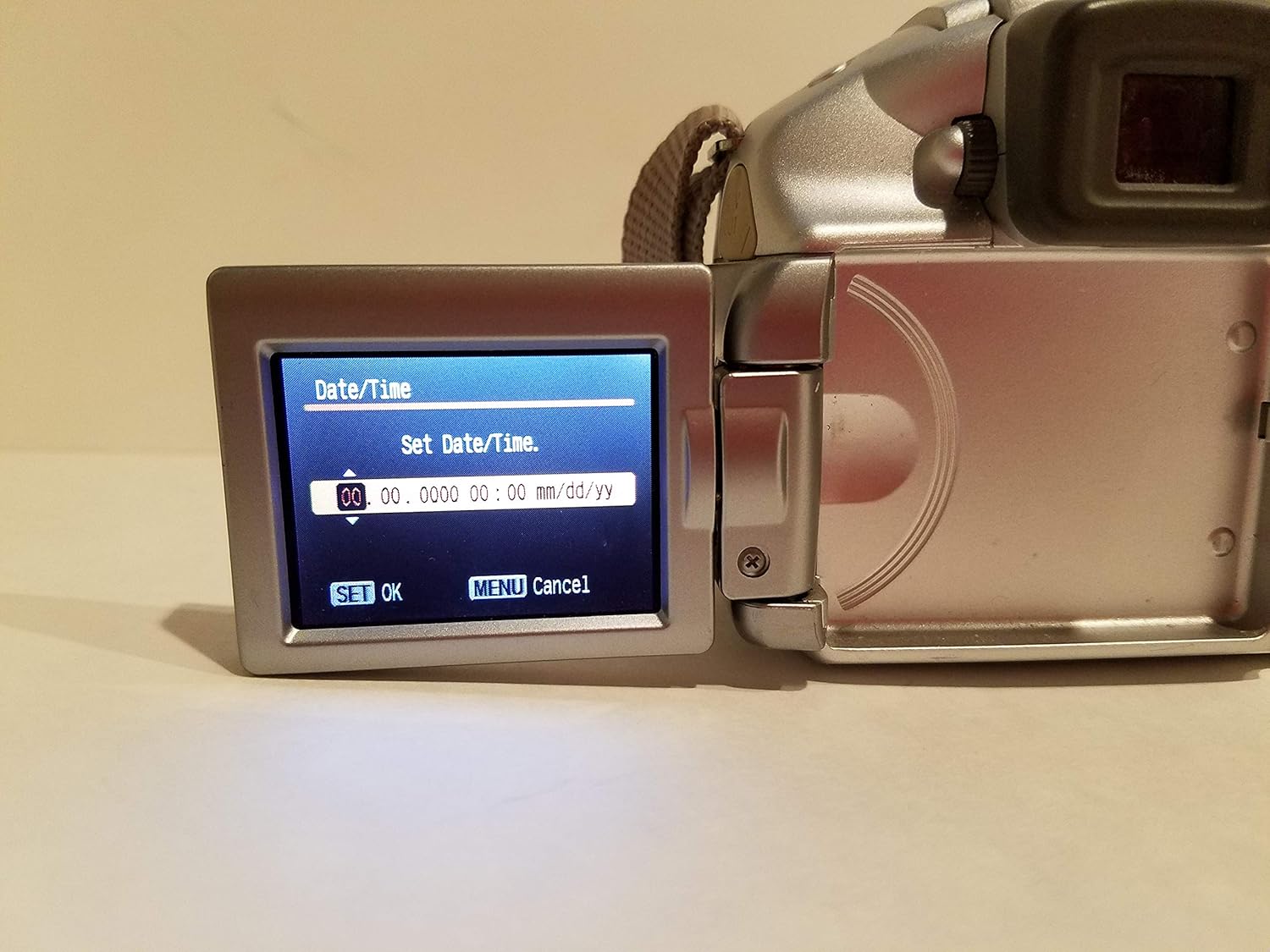
Figure 3.5.1: The camera's vari-angle LCD screen displaying the "Set Date/Time" menu, showing fields for year, month, day, hour, and minute. The "SET OK" and "MENU Cancel" options are visible at the bottom.
4. Kameranın Çalıştırılması
4.1 Kamera Kontrolleriview
Familiarize yourself with the main controls on the camera body. The rear panel features the vari-angle LCD, a control dial, and various function buttons for navigation and settings adjustment.

Şekil 4.1.1: Arka view of the Canon PowerShot S2 IS camera, showing the closed vari-angle LCD, the electronic viewfinder, and control buttons including FUNC, JUMP, SET, MENU, and DISP.
4.2 Temel Fotoğrafçılık
- Açma: Basın GÜÇ button. The lens will extend, and the LCD will activate.
- Selecting a Shooting Mode: Use the mode dial (usually on the top of the camera) to select your desired shooting mode, such as OTOMATİK for general use, MANZARAveya diğer SAHNE modları.
- Odaklanma: Point the camera at your subject. Half-press the shutter button to activate autofocus. The camera will focus on the subject, and a green frame will appear on the LCD when focus is achieved. The camera uses TTL (Lens İçinden) Ve FlexiZone autofocus technologies.
- Yakınlaştırma: Use the zoom lever (typically around the shutter button) to adjust the 12x optik yakınlaştırma. The camera also features a 4x dijital yakınlaştırma daha uzun erişim için.
- Görüntü Sabitleme: kamera özellikleri Optik Görüntü Sabitleme (IS) to reduce blur caused by camera shake, especially at longer zoom settings. This function operates automatically.
- Flash Kullanımı: The built-in flash can be set to Otomatik, On, veya Kapalı via the camera's menu or a dedicated flash button. For low-light conditions, the flash will automatically pop up if set to Auto.
- Fotoğraf Çekmek: Once focused, fully press the shutter button to capture the image.
- ReviewGörseller: Basın OYNAMAK (Genellikle üçgen simgesiyle gösterilen) düğmeye view your captured photos and videos on the 1.8-inch vari-angle LCD display.

Şekil 4.2.1: Ön view of the Canon PowerShot S2 IS camera with the built-in flash popped up, ready for use in low-light conditions.
4.3 Video Kaydı
The PowerShot S2 IS can record VGA (480p) video at 30 frames per second with stereo sound.
- Starting/Stopping Video: Switch the mode dial to the movie mode icon (usually a film camera symbol). Press the shutter button to start recording, and press it again to stop.
- MovieSnap Feature: While recording a movie, you can press the shutter button to capture a full 5.0-megapixel still image without interrupting the video recording.
- Ses Özellikleri: The camera records in stereo and includes an adjustable microphone level setting and a wind filter option for improved sound quality.
- Zoom and Focus during Video: Digital zooming and manual focus adjustments are possible during movie recording.
4.4 Gelişmiş Ayarlar
Access the camera's menu system using the MENÜ button to adjust advanced settings:
- Maruz Kalma Kontrolü: Manual exposure control is available for experienced users.
- Beyaz Dengesi: Adjust white balance settings to match lighting conditions (e.g., Flash torch).
- ISO Hassasiyeti: Select ISO settings from Otomatik, 50, 100, 200, 400 to control light sensitivity.
- Otomatik Zamanlayıcı: Set a delay before the shutter fires, useful for self-portraits or group shots.
- Devamlı atış: The camera supports continuous shooting at up to Saniyede 30 kare.
5. Bilgisayara Bağlanma ve Yazdırma
5.1 Bilgisayara Bağlanma
Görüntüleri ve videoları bilgisayarınıza aktarmak için:
- Kameranın kapalı olduğundan emin olun.
- Connect the camera to your computer using the supplied interface cable IFC-400PCU. The camera supports USB 2.0 Yüksek Hızlı for fast data transfer.
- Kamerayı açın. Bilgisayarınız kamerayı çıkarılabilir bir depolama aygıtı olarak tanımalıdır.
- Kurulum Dijital Kamera Çözümü CD-ROM'u software if prompted or if you wish to use Canon's proprietary software for image management.
5.2 Direct Printing
The PowerShot S2 IS is compatible with Canon Direct Printing. You can print directly from the camera to a compatible Canon printer without a computer.
- Connect the camera to a compatible Canon Direct Printer using the supplied USB cable.
- Fotoğraf makinesinin LCD ekranındaki yönergeleri izleyerek görüntüleri ve yazdırma ayarlarını seçin.
6. Bakım
6.1 Kamerayı Temizleme
- Kamera Gövdesi: Kamera gövdesini silmek için yumuşak ve kuru bir bez kullanın. İnatçı kirler için hafifçe silin.ampen the cloth with water and then wipe dry. Do not use organic solvents like alcohol or paint thinner.
- Mercek: Gently remove dust with a blower brush. For smudges, use a lens cleaning cloth specifically designed for optical surfaces. Avoid touching the lens with your fingers.
- LCD Ekran: Wipe gently with a soft, dry cloth. Avoid pressing hard on the screen.
6.2 Pil Bakımı
- Always remove batteries when the camera is not in use for extended periods to prevent leakage.
- Pilleri serin ve kuru bir yerde saklayın.
- If using rechargeable NiMH batteries, follow the manufacturer's instructions for charging and care.
6.3 Depolama
When storing the camera for a long time, remove the batteries and SD card. Store the camera in a cool, dry, well-ventilated area, away from dust and direct sunlight. Use a desiccant if storing in a humid environment.
7. Sorun Giderme
| Sorun | Olası Neden / Çözüm |
|---|---|
| Kamera açılmıyor. |
|
| "Black screen" or display issues. |
|
| Görüntüler bulanık. |
|
| Flaş çalışmıyor. |
|
| Cannot record video or take more photos. |
|
8. Özellikler
| Özellik | Detay |
|---|---|
| Model Adı | Canon PowerShot S2 IS |
| Model Numarası | 9883A019 |
| Foto Sensör Çözünürlüğü | 5.0 Megapiksel |
| Optik Yakınlaştırma | 12x |
| Dijital Zoom | 4x |
| Görüntü Sabitleme | Optik |
| Lens Türü | 36-432mm zoom lens (35mm equivalent) |
| Ekran Boyutu | 1.8 İnç (Değişken Açılı LCD) |
| Video Çözünürlüğü | 480p (VGA) at 30 FPS |
| Ses Girişi | Mikrofon (Stereo) |
| Desteklenen File Biçim | JPEG (Stills), AVI (Video) |
| Depolama Ortamı | SD/MMC kartı |
| Bağlantı | USB 2.0 Yüksek Hızlı |
| Güç Kaynağı | 4x AA-size batteries |
| Ürün Ağırlığı | 1.1 Pound |
| Renk | Gümüş |
9. Garanti ve Destek
For information regarding your product's warranty, please refer to the warranty card included in your product packaging or visit the official Canon website. For technical support, service, or to inquire about replacement parts, please contact Canon customer service through their official channels. Keep your purchase receipt as proof of purchase for warranty claims.
Daha fazla bilgi ve destek kaynaklarına şu adresten ulaşabilirsiniz: Amazon'daki Canon Mağazası.


