giriiş
This manual provides essential instructions for the safe and efficient operation of your NEC VT670 Value LCD Video Projector. Please read this manual thoroughly before using the projector and keep it for future reference. The NEC VT670 is designed for clear image projection with a native resolution of 1024 x 768 and a brightness of up to 2,100 ANSI lumens.
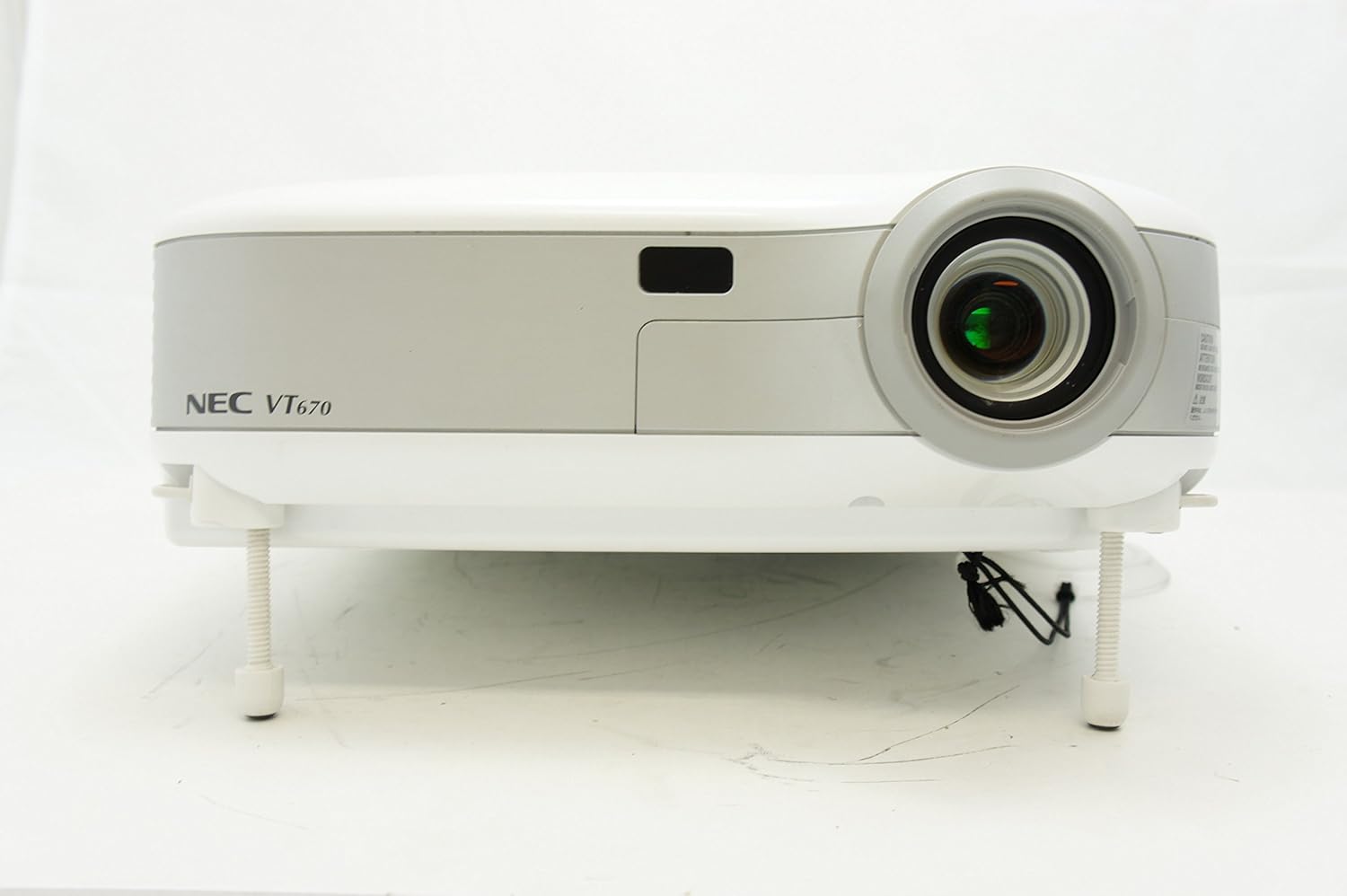
Şekil 1: Ön view of the NEC VT670 projector, showing the lens and front panel.
Kurmak
Follow these steps to set up your NEC VT670 projector:
- Atama: Position the projector on a stable, flat surface or mount it according to the instructions for your specific mounting solution. Ensure adequate ventilation around the unit. The projector is designed for tabletop mounting.
- Güç Bağlantısı: Projektörün güç kablosunu güç girişine ve ardından topraklı bir elektrik prizine bağlayın.
- Kaynak Bağlantısı: Connect your video source (e.g., computer, DVD player) to the appropriate input port on the projector. The VT670 supports VGA (D-Sub), S-Video, and composite video inputs. Use the color-coded connections for ease of setup.
- Kablo Bağlantıları: Ensure all necessary cables, such as the VGA cable for computer input, are securely connected to both the projector and the source device.
- Ses Bağlantısı: If your source provides audio, connect it to the projector's audio input ports. The projector features built-in speakers.
- İlk Güç Açma: Projeksiyon cihazını veya uzaktan kumandadaki güç düğmesine basarak cihazı açın.

Şekil 2: Rear panel of the NEC VT670 projector, illustrating various input and output ports including VGA, S-Video, and audio connections.

Şekil 3: Example of a VGA cable (left) and a power cable (right) used for connecting the projector.
Kullanım Talimatları
This section details the basic operation of your projector.
Güç Açık/Kapalı
- Açmak için, düğmesine basın. GÜÇ button once. The power indicator will illuminate.
- Kapatmak için tuşuna basın GÜÇ button twice. The projector will enter a cooling cycle before shutting down completely.
Giriş Kaynağı Seçimi
- Kullanın GİRİŞ or dedicated source buttons (e.g., BİLGİSAYAR 1, VİDEO) on the control panel or remote to cycle through available input sources.

Şekil 4: Top control panel of the NEC VT670 projector, showing power, input selection, and navigation buttons.
Odak ve Yakınlaştırma Ayarı
- Ayarla ODAK ring on the lens until the image is sharp and clear.
- Kullanın Yakınlaştır lever on the lens to adjust the image size to fit your screen.
Menüde Gezinme
- Basın MENÜ button to access the on-screen display (OSD) menu.
- Ok tuşlarını kullanın (UP, AŞAĞI, SOL, SAĞ) to navigate through menu options.
- Basmak GİRMEK or SEÇME Bir seçimi onaylamak için
- Basmak EXIT or MENÜ again to close the OSD menu.
Bakım
Düzenli bakım, projektörünüzün en iyi performansı göstermesini sağlar ve kullanım ömrünü uzatır.
Lamp Yenisiyle değiştirme
projektör lamp Sınırlı bir ömrü vardır. Lamp Gösterge ışığı yanarsa veya görüntü soluklaşırsa, lamp Değiştirilmesi gerekebilir. Ayrıntılı bilgi için servis kılavuzuna bakın.amp Değiştirme işlemleri. Değiştirme işlemine başlamadan önce projektörün tamamen soğumasını bekleyin.amp yenisiyle değiştirme.
Hava Filtresi Temizliği
Dust accumulation on the air filter can reduce cooling efficiency and affect projector performance. Clean the air filter regularly (e.g., every 100 hours of operation) by removing it and gently brushing off dust or using a vacuum cleaner. Replace the filter if it is damaged.
Lens Temizliği
Projeksiyon merceğini, optik yüzeyler için özel olarak tasarlanmış, yumuşak ve tüy bırakmayan bir bezle nazikçe silin. Aşındırıcı temizleyiciler veya aşırı güç kullanmayın.
Sorun giderme
Bu bölümde karşılaşabileceğiniz yaygın sorunlara çözümler sunulmaktadır.
| Sorun | Olası Neden | Çözüm |
|---|---|---|
| Resim görüntülenmiyor |
|
|
| Görüntü bulanık |
|
|
| Ses yok |
|
|
Özellikler
Key technical specifications for the NEC VT670 Value LCD Video Projector:
- Model Adı: VT670
- Görüntüleme Türü: LCD
- Yerel Çözünürlük: 1024x768 (XGA)
- Maksimum Parlaklık: 2,100 ANSI lümen
- Kontrast Oranı: 400:1
- Bağlantı Teknolojisi: VGA (D-Sub), S-Video, Composite Video
- Donanım Bağlantısı: D-Sub, VGA
- Maksimum Görüntü Boyutu: 300 inç
- Form Faktörü: Taşınabilir
- Montaj Tipi: Masa Üstü Montaj
- Denetleyici Tipi: Düğme Kontrolü
- Ürün Ağırlığı: 9.2 Pound
- Ek Özellikler: Dahili hoparlörler
- Desteklenen Sinyaller: PC, NTSC, PAL, SECAM, HDTV
Garanti Bilgileri
The NEC VT670 Value LCD Video Projector comes with a 2 yıllık garanti. This warranty covers defects in materials and workmanship under normal use. For specific terms and conditions, please refer to the warranty card included with your product or contact NEC customer support.
Destek
For further assistance, technical support, or service inquiries regarding your NEC VT670 projector, please visit the official NEC website or contact their customer service department. Keep your product model number (VT670) and serial number ready when contacting support.
Çevrimiçi Kaynaklar: www.nec.com


