giriiş
The Samson S-Mix is a compact 5-channel mixer designed for various audio applications. It integrates essential mixer functionalities into a small form factor, making it suitable for setups requiring multiple audio inputs and a single stereo output. This manual provides detailed instructions for the proper setup, operation, and maintenance of your S-Mix mixer.
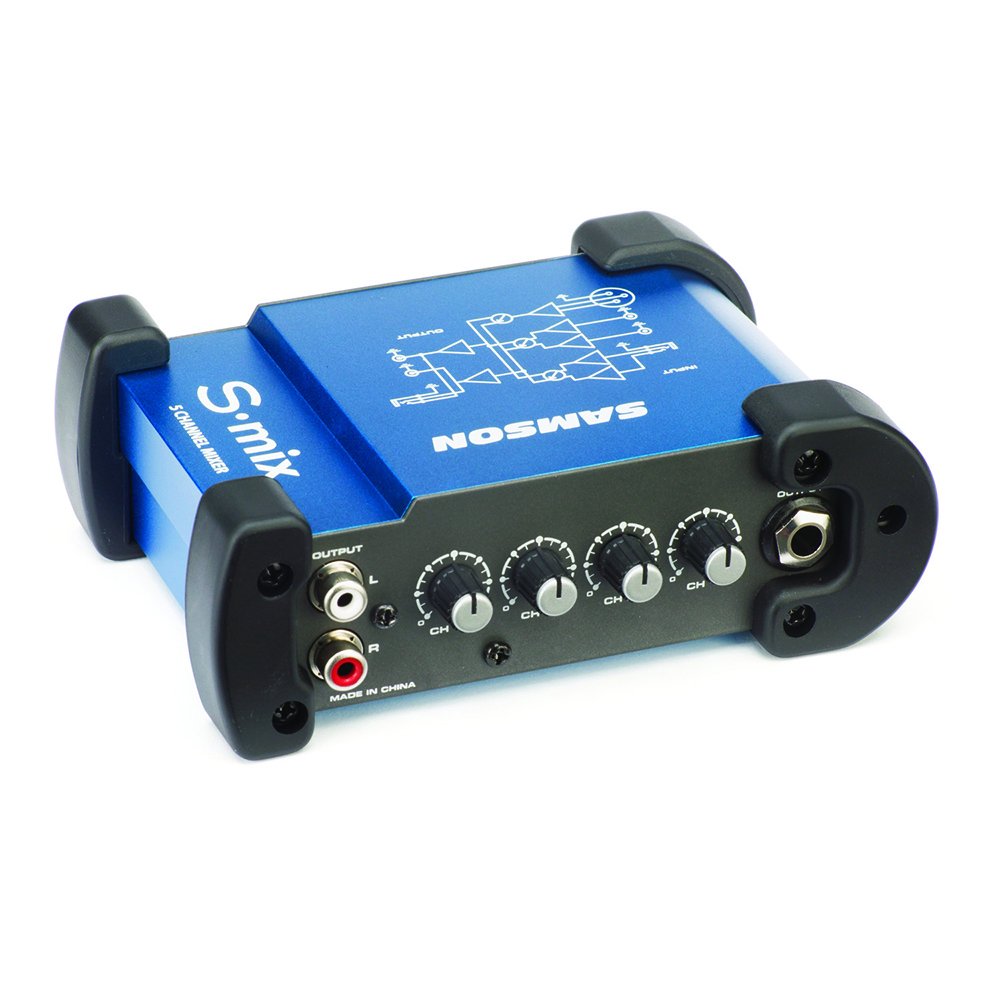
Image: Samson S-Mix 5-Channel Compact Mixer. This image displays the compact mixer with its various input and output jacks, along with the individual volume control knobs for each channel.
Kurmak
Follow these steps to correctly set up your Samson S-Mix compact mixer:
- Güç Bağlantısı: Connect the supplied 18V AC power adapter to the DC input jack on the S-Mix. Plug the adapter into a standard electrical outlet. Ensure the power source matches the adapter's specifications.
- Mikrofon Girişi: For a balanced microphone, connect an XLR cable from your microphone to the XLR input on the S-Mix. If using a condenser microphone, ensure phantom power is enabled (refer to the device's specific instructions if an external phantom power source is required, as the S-Mix provides phantom power directly). Adjust the microphone's volume using its dedicated control knob.
- Satır Girişleri: Connect line-level devices (e.g., instruments, audio players) to the two 1/4-inch Super-Z high impedance line inputs. Use standard 1/4-inch TS or TRS cables. Adjust the volume for these inputs using their respective control knobs.
- Stereo RCA Input: For stereo audio sources (e.g., CD players, media players), connect RCA cables to the stereo RCA input jacks. Adjust the volume using the dedicated stereo channel control.
- Çıkış Bağlantısı: Connect the 1/4-inch stereo outputs of the S-Mix to your amplifier, powered speakers, or recording device using 1/4-inch TS or TRS cables. Ensure the output device is powered off before making connections.
- Başlangıç Ses Seviyesi Ayarları: Before powering on, set all volume controls on the S-Mix to their minimum position. Gradually increase volumes after all connections are made and devices are powered on.
Kullanım Talimatları
The Samson S-Mix provides intuitive controls for managing your audio signals:
- Individual Volume Controls: Each input channel (microphone, line 1, line 2, stereo RCA) has its own rotary volume knob. Rotate clockwise to increase volume and counter-clockwise to decrease it.
- Master Output Level: While the S-Mix does not feature a single master output knob, the overall output level is a sum of the individual channel volumes. Adjust each channel's volume to achieve the desired mix and overall output level for your connected amplifier veya kayıt cihazı.
- Hayali güç: The XLR microphone input provides phantom power for condenser microphones. No separate switch is required; it is always active when a microphone is connected to the XLR input.
- Sinyal İzleme: Listen to the output through your connected speakers or headphones to monitor the audio mix. Adjust individual channel volumes as needed to balance the sound.
Bakım
Proper maintenance ensures the longevity and optimal performance of your S-Mix mixer:
- Temizlik: Use a soft, dry cloth to clean the exterior of the mixer. Avoid using abrasive cleaners, solvents, or waxes, as these can damage the finish and internal components.
- Depolamak: Kullanılmadığı zamanlarda mikseri serin, kuru ve doğrudan güneş ışığından, aşırı sıcaklıklardan ve yüksek nemden uzak bir yerde saklayın.
- İşleme: Handle the mixer with care. Avoid dropping it or subjecting it to strong impacts, which can damage internal circuitry.
- Güç Adaptörü: Always use the original power adapter supplied with the unit. Using an incorrect adapter can cause damage or malfunction.
Sorun giderme
If you encounter issues with your Samson S-Mix, refer to the following troubleshooting guide:
| Sorun | Olası Neden | Çözüm |
|---|---|---|
| Ses çıkışı yok |
|
|
| Bozuk ses |
|
|
| uğultu veya gürültü |
|
|
Özellikler
Technical specifications for the Samson S-Mix 5-Channel Compact Mixer:
- Modeli: SASMIX
- Kanal Sayısı: 5
- Girişler: 1 x XLR (balanced microphone with phantom power), 2 x 1/4-inch (Super-Z high impedance line), 1 x Stereo RCA (L/R)
- Çıktılar: 2 x 1/4-inch (stereo)
- Güç Kaynağı: Kablolu Elektrik
- Cilttage: 18 Volt
- Ürün Ağırlığı: 1.5 pound (0.68 kg)
- Ürün Ölçüleri: 9.75 x 7.25 x 2.75 inç (24.77 x 18.42 x 6.99 cm)
- Bağlantı Teknolojisi: XLR, 1/4-inch, RCA
Garanti Bilgileri
Samson products are designed and manufactured to high quality standards. For specific warranty terms and conditions applicable to your S-Mix mixer, please refer to the warranty card included with your product or visit the official Samson website. Warranty coverage typically includes defects in materials and workmanship under normal use for a specified period from the date of purchase.
Destek
For technical assistance, product inquiries, or service requests, please contact Samson customer support. You can find contact information, FAQs, and additional resources on the official Samson webalan:
Samson Technologies Official Webalan: www.samsontech.com
Please have your product model (SASMIX) and serial number ready when contacting support.