1. Giriş
This manual provides essential information for the proper setup, operation, and maintenance of your Coby DVD-527 5.1 Channel Progressive Scan DVD Player. Please read this manual thoroughly before using the device to ensure optimal performance and safety. The Coby DVD-527 features a super-slim design, 5.1 channel audio output, and progressive scan video output for enhanced picture quality on compatible televisions.
2. Güvenlik Bilgileri
- Güç Kaynağı: Güç kaynağının ses seviyesiyle eşleştiğinden emin oluntagÜnite üzerinde belirtilen gereksinimler.
- Havalandırma: Havalandırma açıklıklarını kapatmayın. Aşırı ısınmayı önlemek için ünitenin etrafında yeterli hava akışı sağlayacak boşluk bırakın.
- Nem: Cihazı yağmura, neme veya aşırı rutubete maruz bırakmayın.
- Temizlik: Unplug the unit from the power outlet before cleaning. Use a soft, dry cloth.
- Servis: Bu ürüne kendiniz servis vermeye çalışmayın. Tüm servis işlemleri için kalifiye servis personeline başvurun.
3. Paket İçeriği
Paketin içinde tüm öğelerin mevcut olduğundan emin olun:
- Coby DVD-527 DVD Player
- Tam İşlevli Uzaktan Kumanda
- AV Kablosu
- Kullanım Kılavuzu (bu belge)
- Garanti Bilgileri
4. Ürün Bittiview
The Coby DVD-527 DVD Player and its accompanying remote control are designed for ease of use and integration into your home entertainment system.
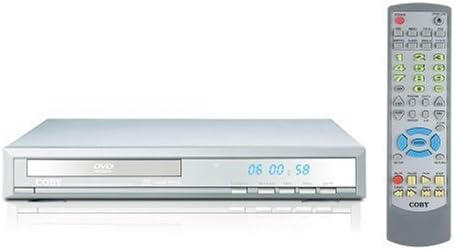
Şekil 1: Coby DVD-527 DVD Player (left) and its full-function remote control (right). The DVD player features a slim profile with a disc tray, display screen, and control buttons on the front panel. The remote control includes various buttons for playback, navigation, and special features.
Ön Panel Kontrolleri
The front panel typically includes the disc tray, power button, play/pause, stop, and eject buttons, along with a digital display showing playback time or status.
Arka Panel Bağlantıları
The rear panel houses various audio and video output ports for connecting to your television and audio system.
Uzaktan kumanda
The included remote control provides full functionality for operating the DVD player from a distance, including power, playback controls, menu navigation, volume, and special features.
5. Kurulum
5.1 Televizyona Bağlanma
Choose one of the following video connection methods:
- Component Video Output (Progressive Scan): For the highest quality picture on HD-capable televisions, connect the Y, Pb, and Pr component video outputs from the DVD player to the corresponding inputs on your TV using component video cables.
- RCA Video Çıkışı: Connect the yellow RCA video output from the DVD player to the video input on your TV using an RCA video cable.
- S-Video Çıkışı: Connect the S-Video output from the DVD player to the S-Video input on your TV using an S-Video cable.
5.2 Ses Sistemine Bağlantı
Choose one of the following audio connection methods:
- 5.1 Dolby Digital Output: For surround sound, connect the 5.1 channel audio outputs (Front Left, Front Right, Center, Surround Left, Surround Right, Subwoofer) from the DVD player to the corresponding inputs on your 5.1 channel receiver or ampcankurtaran.
- Koaksiyel Dijital Ses Çıkışı: Connect the coaxial digital audio output from the DVD player to the coaxial digital audio input on your receiver or amplifier using a coaxial digital audio cable.
- Optik Dijital Ses Çıkışı: Connect the optical digital audio output from the DVD player to the optical digital audio input on your receiver or amplifier using an optical digital audio cable.
- Analog Ses Çıkışı: Connect the red and white RCA analog audio outputs from the DVD player to the corresponding audio inputs on your TV or stereo system using an RCA audio cable.
5.3 Güç Bağlantısı
After all audio and video connections are made, plug the DVD player's power cord into a standard AC power outlet.
6. Kullanım Talimatları
6.1 Temel Disk Oynatma
- Turn on your television and select the correct input source for the DVD player.
- Press the Power button on the DVD player or remote control to turn on the unit.
- Press the Eject button (▲) on the front panel or remote to open the disc tray.
- Place a compatible disc (DVD, CD, CD-R/RW, MP3) gently into the disc tray with the label side facing up.
- Press the Eject button (▲) again to close the disc tray. The player will begin reading the disc.
- Oynatma otomatik olarak başlamalıdır. Disk menüsü görünürse, uzaktan kumandadaki gezinme düğmelerini kullanarak istediğiniz seçeneği belirleyin ve Enter tuşuna basın.
- Use the Play (▶), Pause (▐▐), Stop (■), Fast Forward (►►), and Rewind (◄◄) buttons on the remote for playback control.
6.2 Özel Özellikler
- Ekran Görüntüsü: Press the OSD button on the remote to view playback information on your screen.
- Zoom İşlemi: Use the Zoom button to magnify a portion of the picture.
- Çoklu ViewAçılar: For discs that support it, press the Angle button to switch between different camera angles.
- Altyazılar: Press the Subtitle button to select available subtitle languages.
- Parental Lock Control: Access the setup menu to configure parental control settings, restricting playback of certain content based on rating.
6.3 Sistem Ayarları
Press the Setup button on the remote to access the system menu. Here you can adjust video settings (e.g., aspect ratio, progressive scan mode), audio settings, language preferences, and parental control options. Refer to the on-screen menu for detailed navigation.
7. Bakım
7.1 Ünitenin Temizlenmesi
DVD oynatıcının dış yüzeyini yumuşak, kuru bir bezle silin. Yüzey kaplamasına veya iç bileşenlerine zarar verebileceğinden sıvı temizleyiciler veya aerosol spreyler kullanmayın.
7.2 Disk Bakımı
Handle discs by their edges. Keep discs clean and free of scratches. Store discs in their cases when not in use to prevent dust and damage.
8. Sorun Giderme
If you encounter problems with your DVD player, refer to the following common issues and solutions:
- Güç Yok:
• Ensure the power cord is securely plugged into both the DVD player and a working electrical outlet.
• Check if the power outlet is functional by plugging in another device. - Hiçbir resmi:
• Verify that the video cables are correctly connected between the DVD player and the TV.
• Ensure your TV is set to the correct input source (e.g., AV1, Component, HDMI).
• Check the TV's picture settings. - Ses Yok:
• Confirm that audio cables are properly connected to your TV or audio system.
• Check the volume level on both the DVD player and your TV/audio system.
• Ensure your TV/audio system is set to the correct audio input.
• If using digital audio, verify the audio settings in the DVD player's setup menu. - Disk Çalınmıyor / Disk Hatası:
• Ensure the disc is clean and free of scratches or smudges.
• Make sure the disc is inserted correctly with the label side facing up.
• Verify that the disc format is compatible with the player (DVD, CD, CD-R/RW, MP3). - Uzaktan Kumanda Çalışmıyor:
• Check and replace the batteries in the remote control.
• Ensure there are no obstructions between the remote and the DVD player's sensor.
• Point the remote directly at the DVD player.
9. Özellikler
| Örnek | DVD-527 |
| Marka | Koby'nin |
| Boyutlar (G x D x Y) | 11 x 10 x 2 inç (yaklaşık) |
| Ağırlık | 7 pound (yaklaşık) |
| Medya Türü Uyumluluğu | DVD, CD, CD-R/RW, MP3 |
| Video Çıkışı | Component Video (Y, Pb, Pr), RCA Video, S-Video |
| Ses Çıkışı | 5.1 Channel Dolby Digital, Coaxial Digital, Optical Digital, Analog RCA (L/R) |
| Özel Özellikler | Progressive Scan, Multiple Subtitles, Multiple Viewing Angles, On-Screen Display, Zoom Operation, Parental Lock Control |
| Video Uyumluluğu | NTSC/PAL Sistemi |
10. Garanti ve Destek
This product is covered by a limited manufacturer's warranty. Please refer to the warranty information card included in your package for specific terms and conditions, including the warranty period and coverage details. Keep your purchase receipt as proof of purchase.
For technical assistance or customer support, please refer to the contact information provided in your warranty documentation or visit the official Coby website for the most current support resources.


