giriiş
This manual provides essential information for the safe and efficient operation of your Thomson TM 9850 Radio. Please read it thoroughly before using the device and keep it for future reference.
Güvenlik Bilgileri
- Yangın veya elektrik çarpmasını önlemek için üniteyi yağmura veya neme maruz bırakmayın.
- Havalandırma açıklıklarını kapatmayın. Uygun hava akışı için ünitenin etrafında yeterli boşluk olduğundan emin olun.
- Lütfen yalnızca bu cihaz için belirtilen güç kaynağını kullanın.
- C'yi açmayınasing. Tüm servis işlemlerini yetkili personele yaptırın.
- Cihazı doğrudan güneş ışığından, ısı kaynaklarından ve güçlü manyetik alanlardan uzak tutun.
Ürün Bittiview
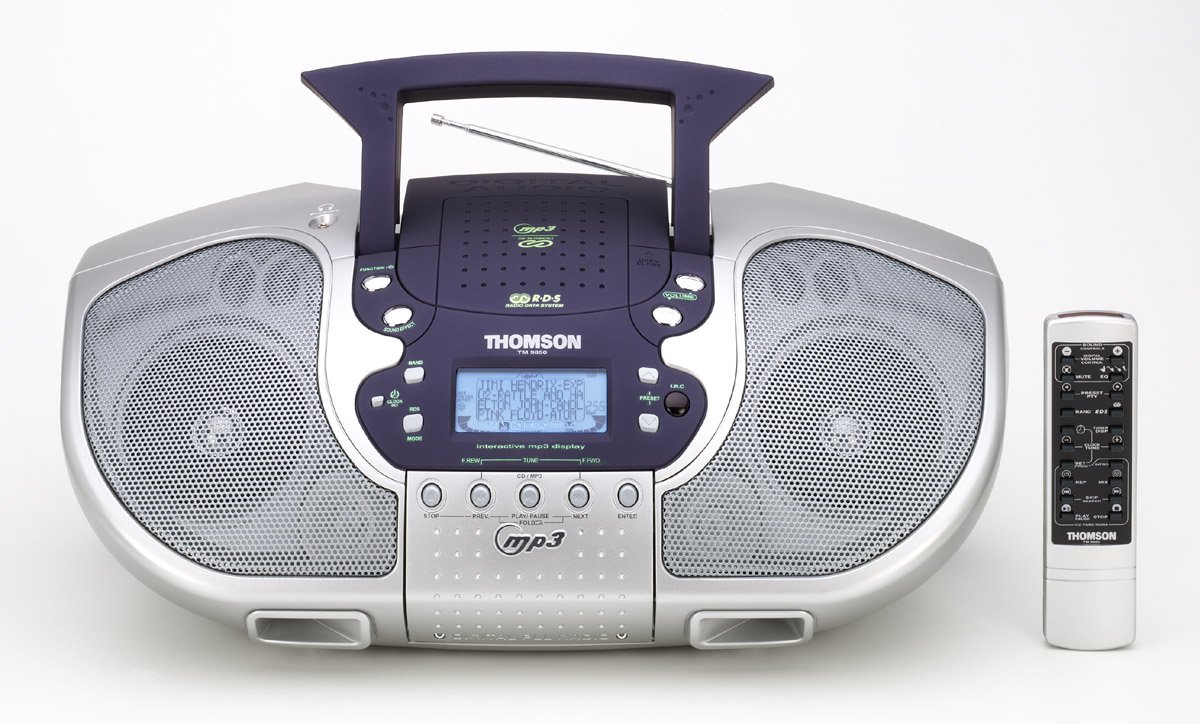
Şekil 1: Ön view of the Thomson TM 9850 Radio with its accompanying remote control. The radio features dual speakers, a central control panel with an LCD display, and a top-mounted handle and telescopic antenna. The remote control is slender and white with various function buttons.
The Thomson TM 9850 is a portable radio designed for versatile audio playback. It features an integrated CD/MP3 player, an FM/AM radio tuner, and a clear LCD display for easy navigation. The unit also includes a remote control for convenient operation from a distance.
Kurmak
Güç Bağlantısı
- Cihazın sağlam ve düz bir yüzeye yerleştirildiğinden emin olun.
- AC güç kablosunu cihazın arkasındaki AC IN girişine bağlayın.
- AC güç kablosunun diğer ucunu standart bir duvar prizine takın (AC 230V ~ 50Hz).
- Alternatively, for portable use, insert 8 x "C" size batteries (not included) into the battery compartment located on the bottom of the unit, observing correct polarity.
Anten Ayarı
- For FM reception, extend the telescopic antenna fully. Adjust its position for optimal signal reception.
- For AM reception, the unit has a built-in ferrite bar antenna. Rotate the unit itself for best reception.
Kullanım Talimatları
Temel İşlemler
- Güç Açma/Kapatma: Basın GÜÇ Üniteyi açmak veya kapatmak için düğmesine basın.
- Ses Kontrolü: Döndür HACİM Sesi artırmak için düğmeyi saat yönünde, azaltmak içinse saat yönünün tersine çevirin.
- İşlev Seçimi: Basın İŞLEV button to switch between CD/MP3, FM, and AM modes.
Radyo Operasyonu (FM/AM)
- Select FM or AM mode using the İŞLEV düğme.
- Basın BANT button to select the desired frequency band (FM or AM).
- Kullanın AYAR +/- buttons to manually tune to a station. Press and hold for automatic scanning.
- To store a preset station: Tune to the desired station, press PROGRAM, sonra kullanın ÖN AYAR +/- Önceden ayarlanmış bir sayı seçmek için basın. PROGRAM Tekrar onaylamak için.
- To recall a preset station: Press ÖN AYAR +/- to cycle through stored stations.
CD/MP3 Çalma
- CD bölmesinin kapağını açın.
- CD veya MP3 CD'sini etiket yüzü yukarı bakacak şekilde yerleştirin.
- CD bölmesi kapağını kapatın.
- Select CD/MP3 mode using the İŞLEV button. The display will show "READING" then the total number of tracks/folders.
- Basmak OYNAT/DURDUR to start playback. Press again to pause.
- Basmak SONRAKİ to skip to the next track/file. Basmak ÖNCEKİ Geçerli parçanın veya önceki parçanın başına gitmek için.
- Basmak DURMAK oynatmayı durdurmak için.
- For MP3 CDs, use KLASÖR +/- buttons to navigate between folders.
Bakım
- Temizlik: Üniteyi yumuşak ve kuru bir bezle silin. Aşındırıcı temizleyiciler veya çözücüler kullanmayın.
- CD Lens Bakımı: If the CD lens gets dirty, use a commercially available CD lens cleaner. Do not touch the lens.
- Depolamak: If not using the unit for an extended period, remove the batteries and store it in a cool, dry place.
Sorun giderme
| Sorun | Olası Neden | Çözüm |
|---|---|---|
| Güç yok | Güç kablosu bağlı değil; piller bitmiş veya yanlış takılmış. | Check power cord connection; Replace batteries or ensure correct polarity. |
| Ses yok | Volume too low; Mute function activated. | Increase volume; Deactivate mute. |
| Zayıf radyo alımı | Anten uzatılmamış/ayarlanmamış; Sinyal zayıf. | Extend and adjust telescopic antenna (FM); Rotate unit (AM); Try moving the unit to a different location. |
| CD/MP3 not playing | Disc inserted incorrectly; Disc dirty or scratched; Incorrect function mode. | Insert disc with label side up; Clean or replace disc; Select CD/MP3 function mode. |
Özellikler
- Modeli: TM 9850
- Güç Kaynağı: AC 230V ~ 50Hz or 8 x "C" size batteries (UM-2)
- Frekans Aralığı: FM 87.5 - 108 MHz, AM 522 - 1620 kHz
- Desteklenen Disk Biçimleri: CD, CD-R/RW, MP3-CD
- Ses Çıkışı: Stereo
- Boyutlar (G x Y x D): (Approximate, based on typical boombox size) 400mm x 200mm x 250mm
- Ağırlık: (Approximate, based on typical boombox weight) 2.5 kilo
Not: Teknik özellikler, iyileştirme amacıyla önceden haber verilmeksizin değiştirilebilir.
Garanti ve Destek
This Thomson TM 9850 Radio comes with a standard manufacturer's warranty. Please refer to the warranty card included in the original packaging for detailed terms and conditions. For technical support, service, or inquiries, please contact Thomson customer service through their official webSiteye veya satın alma işleminizle birlikte verilen iletişim bilgilerine.
For the latest information and support resources, please visit the official Thomson webalan: www.thomsonconsumer.com


