giriiş
This manual provides comprehensive instructions for the setup, operation, and maintenance of your VTech t2451 2.4 GHz Analog Cordless Phone with Answering System and Caller ID. Please read this manual thoroughly before using your new phone system to ensure proper functionality and to take full advantage özelliklerinden.
Key features of your VTech t2451 include:
- 2.4 GHz analog reception for clear communication.
- Digital answering system with 3 mailboxes and 15 minutes of recording time.
- 50 name/number phonebook directory for easy contact management.
- 99 name/number Caller ID history to review cevapsız aramalar.
- Headset compatibility (2.5 mm jack) for hands-free operation.
- Hold function, page/handset locator, and selectable ring tones.
- Wall-mountable design for flexible placement.
Kurmak
Follow these steps to set up your VTech t2451 cordless phone system.
- Paketin açılması: Carefully remove all components from the packaging. Ensure you have the cordless handset, base unit, AC power adapter, telephone line cord, and battery pack.
- Pil Montajı: Open the battery compartment on the back of the cordless handset. Connect the battery pack connector to the jack inside the compartment, ensuring correct polarity. Place the battery pack into the compartment and close the cover.
- Ana Ünitenin Bağlanması:
- Connect one end of the telephone line cord to the TEL LINE jack on the base unit and the other end to a telephone wall jack.
- Connect the small end of the AC power adapter to the DC IN 9V jack on the base unit. Plug the large end of the AC power adapter into a standard electrical outlet.
- Ahizeyi Şarj Etme: Place the cordless handset in the base unit's charging cradle. The charge indicator on the handset should illuminate, indicating that the battery is charging. Allow the handset to charge for at least 12 hours before initial use.
- Duvara Montaj (Opsiyonel): The base unit is designed to be wall-mountable. Refer to the included wall-mount bracket and instructions for secure installation.
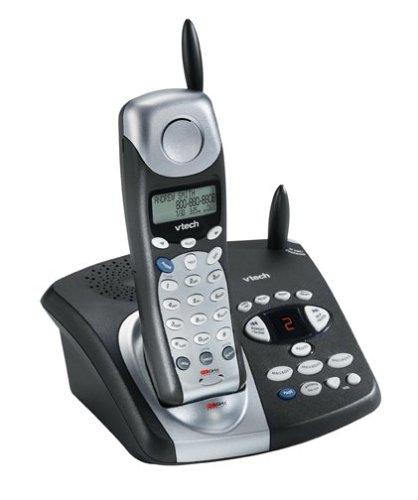
Image: The VTech t2451 cordless phone system, showing the black base unit with the silver and black handset docked in its charging cradle. The base unit features an integrated digital answering system with controls and a display.
Kullanım Talimatları
Çağrı Yapma ve Alma
- Telefon çağrısı yapmak: Basın KONUŞMAK button, wait for a dial tone, then dial the phone number.
- Bir Çağrı Almak İçin: Telefon çaldığında, tuşuna basın KONUŞMAK button or any key on the keypad (Any Key Answer).
- Aramayı Bitirmek İçin: Basın SON button or place the handset back in the base unit.
- Tutma İşlevi: Bir arama sırasında tuşuna basın. TUTMAK button to place the call on hold. Press KONUŞMAK Aramayı sürdürmek için tekrar tuşuna basın.
Dijital Cevaplama Sistemi
Your phone system includes a digital answering system with 3 mailboxes and 15 minutes of recording time.
- Mesajları Oynat: Basın OYNAMAK button on the base unit to listen to new messages.
- Giden Mesaj Kaydı (OGM): Follow the voice prompts to record a personalized outgoing message.
- Mailbox Management: The system supports up to 3 distinct mailboxes. Refer to the detailed instructions in the full user guide for setting up and accessing individual mailboxes.
Arayan Kimliği ve Telefon Rehberi
- Arayan Kimliği: When subscribed to Caller ID service, the handset display will show the caller's name and number. Press the CID yeniden düğmeview the 99-name/number Caller ID history.
- Telefon Rehberi Dizini: Store up to 50 names and numbers in the phonebook. Use the navigation buttons to scroll through entries and the MENÜ/SEÇİM button to add or edit entries.
Diğer Fonksiyonlar
- Page/Handset Locator: Basın SAYFA button on the base unit to locate a misplaced handset.
- Ringer Tones: Customize your phone's ringer by selecting from various available tones. Refer to the handset settings menu.
- Kulaklık Kullanımı: Connect a 2.5 mm compatible headset to the headset jack on the side of the handset for hands-free communication.
Bakım
Proper care ensures the longevity of your VTech t2451 phone system.
- Temizlik: Telefonu ve taban ünitesini yumuşak bir bezle temizleyin.amp bez. Sert kimyasallar veya aşındırıcı temizleyiciler kullanmayın.
- Pil Bakım:
- Cihazın şarjının dolu kalması için kullanılmadığı zamanlarda daima şarj ünitesine geri yerleştirin.
- Telefon uzun süre kullanılmayacaksa, pilini cihazdan çıkarın.
- Replace the battery when its performance significantly degrades. Use only the specified replacement battery pack.
- Çevresel Koşullar: Telefonu aşırı sıcaklıklara, doğrudan güneş ışığına veya neme maruz bırakmaktan kaçının.
Sorun giderme
If you experience issues with your VTech t2451, try these common troubleshooting steps.
| Sorun | Çözüm |
|---|---|
| Çevir sesi yok. |
|
| Zayıf alım veya statik. |
|
| Telefon şarj olmuyor. |
|
| Cevaplama sistemi mesajları kaydetmiyor. |
|
Özellikler
| Özellik | Detay |
|---|---|
| Marka | VTech |
| Model Numarası | T2451 |
| Telefon Türü | Kablosuz |
| Sıklık | 2.4 GHz Analog |
| Yanıtlama Sistemi Türü | Dijital |
| Kayıt Kapasitesi | 15 dakikadır. |
| Mailboxes | 3 |
| Telefon Rehberi | 50 isim/numara |
| Arayan Kimliği Hafızası | 99 isim/numara |
| Kulaklık Uyumluluğu | 2.5 mm jak |
| Güç Kaynağı | Kablolu Elektrik |
| Ürün Boyutları | 7.1 x 8.5 x 5.1 inç |
| Ürün Ağırlığı | 2.19 pound |
| Üretici | V teknoloji |
Garanti ve Destek
For warranty information, please refer to the warranty card included with your product packaging or visit the official VTech website. VTech provides customer support for product inquiries, technical assistance, and service. Contact information can typically be found on the VTech websitede veya ürünün orijinal dokümanlarında yer almaktadır.
Üretici: VTech


