1. Giriş
Bu kılavuz, aşağıdakiler için kapsamlı talimatlar sağlar: Koss SB40 Computer Headset with Microphone. Designed for clear communication and immersive audio, this headset is suitable for various computer applications, including gaming and voice calls. Please read this manual thoroughly to ensure proper setup, operation, and maintenance of your device.
2. Güvenlik Bilgileri
To prevent damage to the headset or personal injury, please observe the following safety guidelines:
- Kulaklığı aşırı sıcaklıklara, neme veya doğrudan güneş ışığına maruz bırakmaktan kaçının.
- Do not disassemble or attempt to repair the headset yourself. Refer all servicing to qualified personnel.
- Keep the headset away from water or other liquids.
- Adjust volume to a comfortable level to prevent hearing damage during prolonged use.
3. Paket İçeriği
Paketin içinde tüm öğelerin mevcut olduğundan emin olun:
- Koss SB40 Computer Headset with Microphone
- Kullanım Kılavuzu (bu belge)

Şekil 1: Ön view of the Koss SB40 Computer Headset, showing the over-ear design and attached microphone boom.
4. Kurulum
4.1 Kulaklığın Bağlanması
The Koss SB40 headset features a dual-entry cable design with two 3.5mm plugs for separate audio and microphone connections:
- Bulun 3.5 mm TRS fişi (Tip-Ring-Sleeve) for headphone audio. Insert this plug into your computer's headphone jack (typically marked with a headphone icon or green color).
- Bulun 3.5mm TS fişi (Tip-Sleeve) for the microphone. Insert this plug into your computer's microphone input jack (typically marked with a microphone icon or pink color).

Şekil 2: The Koss SB40 headset showing its dual 3.5mm audio and microphone plugs for connection to a computer.
4.2 Microphone Configuration (Windows PC)
For optimal microphone performance on a Windows PC, especially with Realtek audio drivers, consider adjusting the following settings:
- After connecting the headset, the Realtek audio manager may automatically open. If not, access it through your system tray or Control Panel.
- Şuraya gidin: Mikrofon sekmesi.
- Olanak vermek Gürültü Bastırma to reduce background noise.
- Olanak vermek Akustik Yankı Giderme to prevent echoes during calls.
- Ayarla Mikrofon Güçlendirme. Click the microphone icon next to the volume slider and increase the boost to +10 dB for clearer voice pickup.
- Additionally, configure microphone settings within your communication applications (e.g., Steam, Zoom, Skype) for push-to-talk or specific mute options.
5. Kullanım Talimatları
5.1 Ses Oynatma
The SB40 headset delivers a frequency response of 20 to 20 kHz, an impedance of 120 ohms, and a sensitivity of 96 dB SPL, ensuring clear and dynamic sound reproduction. Adjust the audio volume using your computer's system volume controls or within individual applications.
5.2 Mikrofon Kullanımı
The integrated noise-cancelling microphone is designed to minimize ambient background noise, focusing on your voice for clear communication. Position the microphone boom approximately 1-2 inches from your mouth for optimal voice pickup.
5.3 Konfor ve Uygunluk
The headset features large, closed leatherette earcups that comfortably surround the ear, providing maximum sound isolation and reducing external noise. The adjustable headband ensures a secure and comfortable fit for extended periods of use.
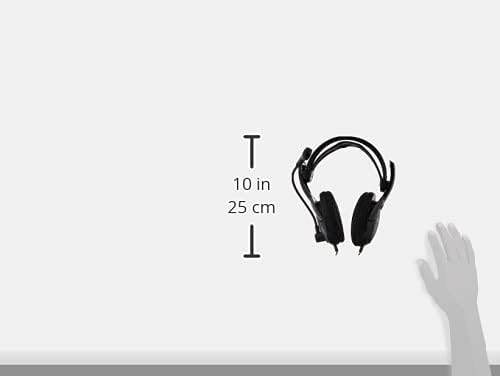
Şekil 3: Taraf view of the Koss SB40 headset illustrating its dimensions, which contribute to its lightweight and comfortable design.
6. Bakım
To maintain the performance and longevity of your Koss SB40 headset:
- Clean the earcups and headband with a soft, dry cloth. Do not use harsh chemicals or abrasive cleaners.
- Store the headset in a clean, dry place when not in use.
- Avoid pulling on the cables excessively to prevent internal damage.
7. Sorun Giderme
7.1 Ses Çıkışı Yok
- Ensure the 3.5mm TRS audio plug is fully inserted into the correct headphone jack on your computer.
- Check your computer's volume settings and ensure they are not muted or set too low.
- Verify that the correct audio output device is selected in your operating system's sound settings.
7.2 Mikrofon Çalışmıyor
- Confirm the 3.5mm TS microphone plug is fully inserted into the correct microphone input jack.
- Check your computer's microphone settings and ensure the microphone is not muted and input levels are adequate. Refer to Section 4.2 for detailed PC microphone configuration.
- Verify that the correct microphone input device is selected in your operating system's sound settings and within your communication applications.
7.3 Bozuk Ses
- Reduce the volume level on your computer or application.
- Ses kaynağının iyi kalitede olduğundan emin olun.
- The headset is designed for low total harmonic distortion (less than 0.2%), so persistent distortion may indicate an issue with the audio source or connection.
8. Özellikler
| Özellik | Şartname |
| Frekans Tepkisi | 20 Hz - 20 kHz |
| Empedans | 120 ohm |
| Hassasiyet | 96 dB SPL |
| Toplam Harmonik Bozulma | %0.2'den az |
| Bağlantı | Wired (Dual 3.5mm plugs: TS for mic, TRS for headphone) |
| Mikrofon | Gürültü önleyici |
| Kulak Yerleşimi | Kulak Üstü |
| Malzeme | Plastic, Leatherette earcups |
| Renk | Siyah |
| Ürün Boyutları | 4 x 7.06 x 9.19 inç |
| Ürün Ağırlığı | 0.023 ons (yaklaşık 0.66 gram) |
9. Ürün Bittiview Video
Görsel bir inceleme içinview of the Koss SB40 Computer Headset, please watch the following video:
Video 1: Resmi bir ürün tanıtım videosu.asing the key features and design of the Koss SB40 Computer Headset with Microphone.
10. Garanti Bilgileri
The Koss SB40 Computer Headset is covered under the Koss Stereophones Limited Lifetime Warranty. For detailed information regarding warranty terms, conditions, and claims, please refer to the official Koss website or contact Koss customer support.
11. Destek
If you require further assistance, have questions, or encounter issues not covered in this manual, please contact Koss customer support through their official webÜrün ambalajınızda bulunan site veya iletişim bilgileri.


