1. Giriş
This manual provides detailed instructions for the proper use and care of your RCA CC6393 VHS-C AutoShot Camcorder. Please read this manual thoroughly before operating the device to ensure optimal performance and longevity. The RCA CC6393 is designed for recording video onto VHS-C tapes and capturing still images, offering a compact and user-friendly experience.
2. Ürün Bittiview ve Özellikler
The RCA CC6393 VHS-C AutoShot Camcorder combines ease of use with versatile recording capabilities. Key features include:
- VHS-C Format: Records onto compact VHS-C tapes, which can be played back in any standard VHS VCR using the included cassette adapter.
- Kompakt ve Hafif Tasarım: Weighing approximately 1.9 pounds, it is highly portable for travel and everyday use.
- 3-inch LCD ColorView Ekran: A rotatable (270 degrees) color monitor allows for easy framing and playback.
- AutoShot Feature: Automatically adjusts focus and exposure to available light for simplified recording.
- Steady Pix Image Stabilization: Minimizes camera shake, particularly useful when zooming or recording while moving.
- Digital Still Camera Capability: Capture still images and transfer them to a PC using the included cable and software (compatible with Windows 95/98).
- Yakınlaştır: Features 16x optical zoom and 400x digital zoom for capturing distant subjects.
- Creative Recording Modes: Includes fade-in/out, wide-format 16:9 mode, animation mode, and time-lapse recording.

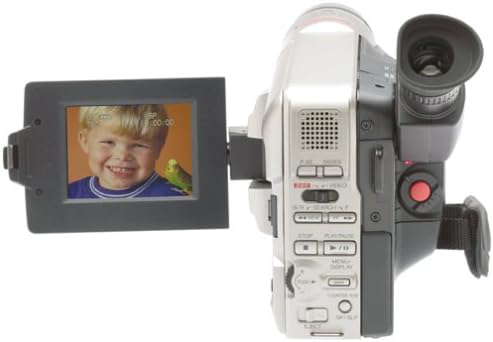
Resim 2.1: Ön view of the RCA CC6393 camcorder with its LCD screen open, displaying an image.
3. Paket İçeriği
Paketinizde aşağıdaki tüm öğelerin bulunduğunu doğrulayın:
- RCA CC6393 VHS-C AutoShot Camcorder
- Şarj edilebilir pil
- AC Adapter and Charger
- Omuz askısı
- VHS-C Cassette Adapter
- Cassette Adapter Battery
- Clock Cell
- Software CD-ROM (for still image transfer)
- PC Connection Cable (USB)
- Kullanım Kılavuzu (bu belge)

Image 3.1: Included accessories for the RCA CC6393 camcorder, featuring the VHS-C cassette adapter, AC adapter/charger, software CD, and shoulder strap.
4. Kurulum
4.1 Pilin Şarj Edilmesi
- Connect the AC adapter to the camcorder's DC input jack.
- AC adaptörünü standart bir elektrik prizine takın.
- Allow the battery to charge fully before first use. The charging indicator light will typically show the charging status.
4.2 Pili Takma
- Open the battery compartment cover on the camcorder.
- Insert the charged battery pack, ensuring it clicks into place securely.
- Pil bölmesinin kapağını kapatın.
4.3 Inserting a VHS-C Tape
- Kaset bölmesinin kapağını açın.
- Insert a VHS-C tape with the window facing outwards, ensuring it is correctly oriented.
- Gently close the tape compartment cover until it latches.

Resim 4.1: Sağ taraf view of the RCA CC6393 camcorder, highlighting the tape compartment and various control buttons.
5. Kullanım Talimatları
5.1 Temel Kayıt
- Kamerayı açın.
- Open the LCD ColorView screen or use the viewçekiminizi çerçevelemek için bulucu.
- The AutoShot feature will automatically adjust focus and exposure.
- Basın Kayıt Kaydı başlatmak için düğmeye basın. Durdurmak için tekrar basın.
5.2 LCD Monitörün Kullanımı
The 3-inch LCD monitor can rotate 270 degrees, allowing for flexible viewing angles during recording and playback. Adjust it to your preferred position for comfortable operation.
5.3 Yakınlaştırma İşlevi
Use the zoom controls (typically a rocker switch) to zoom in (telephoto) or zoom out (wide-angle) on your subject. The Steady Pix feature helps stabilize images during zooming.
5.4 Special Recording Modes
- Fade-in/Fade-out: Adds professional transitions to your recordings. Consult the on-screen menu or dedicated buttons for activation.
- Wide-format 16:9 Mode: Records video in a widescreen aspect ratio.
- Animation Mode: Creates the illusion of movement by recording a series of slightly different poses.
- Hızlandırılmış Kayıt: Programs the camcorder to record at preset time intervals, ideal for observing subtle changes over time (e.g., plant growth, cloud formations).
- Five-second Recording: An option for quick scene transitions.
5.5 Oynatma
To play back your recordings:
- Video kamerayı oynatma moduna geçirin.
- Use the playback controls (Play, Stop, Pause, Fast Forward, Rewind) to navigate your tape.
- Playback options include visual search, stop-action pause, time counter, tracking, and time base corrector.
5.6 Digital Still Camera Function
The camcorder can capture still images. To transfer these images to a PC:
- Connect the camcorder to your PC using the provided PC connection cable (USB).
- Install the included software CD-ROM on your Windows 95 or 98 operating system.
- Follow the software instructions to transfer and manage your still images.
Resim 5.1: Arka view of the RCA CC6393 camcorder, displaying the control panel and battery compartment.
6. Bakım
6.1 Video Kameranın Temizlenmesi
- Video kameranın dış yüzeyini temizlemek için yumuşak, kuru bir bez kullanın.
- Lens için özel bir lens temizleme bezi ve solüsyonu kullanın. Lense parmaklarınızla dokunmaktan kaçının.
- Sert kimyasallar veya aşındırıcı temizleyiciler kullanmayın.
6.2 Pil Bakımı
- Kullanılmadığı zaman pili serin ve kuru bir yerde saklayın.
- Pilinizin ömrünü uzatmak için sık sık tamamen boşaltmaktan kaçının.
- If the camcorder will not be used for an extended period, remove the battery.
7. Sorun Giderme
If you encounter issues with your camcorder, refer to the following common problems and solutions:
- Güç Yok: Ensure the battery is charged and correctly inserted, or connect the AC adapter.
- Cannot Record: Check if a tape is inserted correctly and if the tape's write-protect tab is not engaged. Ensure sufficient battery power.
- Kötü Görüntü Kalitesi: Clean the camcorder lens. Ensure adequate lighting for your recording environment. If playing back, ensure the tape heads are clean (professional cleaning may be required).
- Still Images Not Transferring: Verify the PC connection cable is securely connected to both the camcorder and the computer. Ensure the software is correctly installed and compatible with your operating system (Windows 95/98).
- LCD Ekranı Görüntülenmiyor: Check if the screen is properly opened and rotated. Ensure the camcorder is powered on.
For persistent issues, please contact RCA customer support.
8. Özellikler
| Özellik | Şartname |
|---|---|
| Model Numarası | 1001B3 |
| Kayıt Biçimi | VHS-C |
| LCD Ekran Boyutu | 3 Inches (ColorView) |
| Optik Yakınlaştırma | 16x |
| Dijital Zoom | 400x |
| Görüntü Sabitleme | Steady Pix |
| Still Camera Capability | Evet |
| Bağlantı | USB (PC bağlantısı için) |
| Ağırlık | Approx. 1.9 pounds (camcorder only) |
| Güç Kaynağı | Rechargeable Battery, AC Adapter |
9. Garanti ve Destek
For warranty information and customer support, please refer to the warranty card included with your product or visit the official RCA website. Herhangi bir garanti talebi için satın alma belgeniz olarak satın alma makbuzunuzu saklayın.
For technical assistance or service inquiries, please contact RCA customer service through their official channels.


