Proscend Manuals & User Guides
Based in Taiwan since 1999, Proscend specializes in mission-critical industrial networking, IoT connectivity solutions, and intelligent network management systems.
About Proscend manuals on Manuals.plus
Proscend İletişim A.Ş., established in 1999 and headquartered in Taiwan, is a leading provider of industrial-grade networking and connectivity solutions. The company focuses on mission-critical communications for the Internet of Things (IoT) and Industrial IoT (IIoT) sectors. Proscend's product portfolio includes industrial cellular routers, Long Reach Power over Ethernet (PoE) extenders, managed Ethernet switches, and SHDSL modems designed to withstand harsh environments.
With over two decades of experience, Proscend delivers reliable and secure data transmission solutions for diverse applications, including electric vehicle charging networks, transportation, surveillance, and utility infrastructure. Their solutions are often paired with intelligent cloud-based network management platforms to ensure seamless remote monitoring and control. The company provides global support to ensure robust connectivity for deployments of any scale.
Proscend manuals
En son kılavuzlar manuals+ Bu marka için derlendi.
PROSCEND 850X-28,850X-28I Yönetilen Anahtar Kurulum Kılavuzu
Proscend 850G-12I Endüstriyel 12 Portlu GbE Yönetilen Anahtar Kurulum Kılavuzu
PROSCEND M331-IG Endüstriyel 4G LTE IoT Ağ Geçidi Endüstriyel 5G Hücresel Yönlendirici Kurulum Kılavuzu
PROSCEND M357-5G Endüstriyel Hücresel Yönlendirici Kurulum Kılavuzu
PROSCEND 850G-10PI Endüstriyel Ethernet Anahtarı Kurulum Kılavuzu
PROSCEND 850G-6PI Endüstriyel 6 Bağlantı Noktalı GbE Yönetilen PoE Anahtarı Endüstriyel 5G Hücresel Yönlendirici Kurulum Kılavuzu
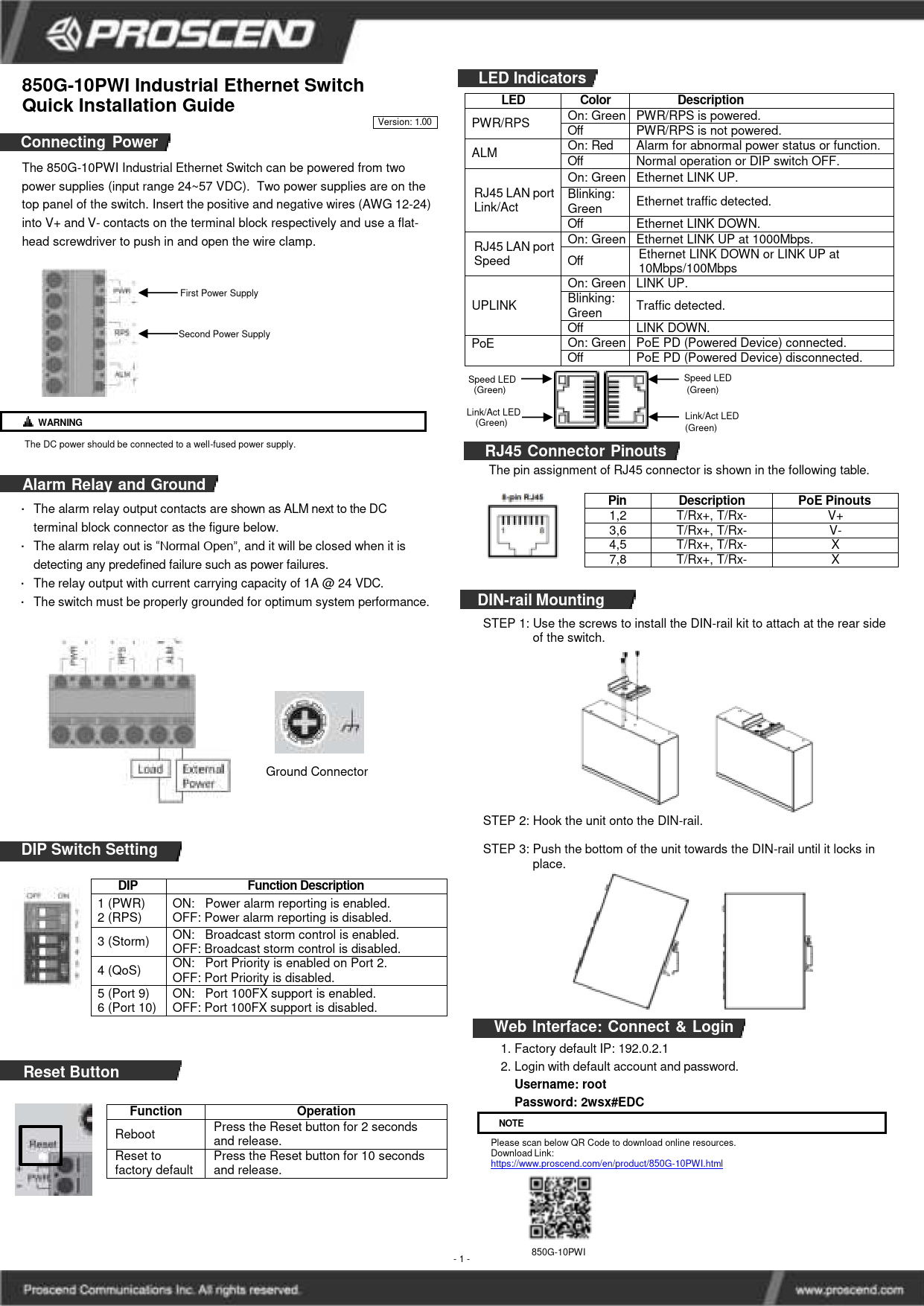
PROSCEND 850G-10PWI Endüstriyel Ethernet Switch Kurulum Kılavuzu
PROSCEND 850G-10I Endüstriyel Ethernet Switch Kurulum Kılavuzu
PROSCEND 850G-12PI Endüstriyel Ethernet Anahtarları Kurulum Kılavuzu
PROSCEND M331 Industrial Cellular Router Quick Installation Guide
PROSCEND M351-5G Endüstriyel Hücresel Yönlendirici Hızlı Kurulum Kılavuzu
PROSCEND 850G Serisi Endüstriyel Ethernet Anahtarları Hızlı Kurulum Kılavuzu
PROSCEND 850X-28 ve 850X-28I Yönetilen Anahtar Hızlı Kurulum Kılavuzu
PROSCEND 850G-10PWI Endüstriyel Ethernet Anahtarı Hızlı Kurulum Kılavuzu
PROSCEND 850G-6PI Endüstriyel Ethernet Anahtarı Hızlı Kurulum Kılavuzu
PROSCEND 850G-10I Endüstriyel Ethernet Anahtarı Hızlı Kurulum Kılavuzu
Proscend M330 Serisi Endüstriyel Hücresel Yönlendirici Hızlı Kurulum Kılavuzu
Proscend 701EPI/101EPI ve 701CPI/101CPI Ethernet Genişleticiler Hızlı Kurulum Kılavuzu
Proscend M331 Endüstriyel Hücresel Yönlendirici Hızlı Kurulum Kılavuzu
Proscend support FAQ
Bu markanın kullanım kılavuzları, kaydı ve desteği hakkında sık sorulan sorular.
-
What are the default login credentials for Proscend devices?
For many Proscend devices like the M351 router or 850G switch series, the default username is 'root' and the default password is '2wsx#EDC'. Always refer to your specific model's manual to confirm.
-
How do I reset my Proscend router to factory defaults?
Typically, you can reset the device by pressing and holding the Reset button for more than 5 seconds (sometimes up to 10 seconds depending on the model) until the system resets.
-
What does the ALM LED indicate on Proscend switches?
A red ALM (Alarm) LED usually indicates a system failure, such as overheating or an abnormal voltage input. On some models with dual power inputs, it may signal that one of the power supplies is down.
-
How do I insert the SIM card into a Proscend industrial router?
Ensure the power is off. Remove the metal protective cover with a screwdriver. Insert the SIM card into the designated slot with the cut-off edge facing the correct direction (refer to the slot diagram), then push lightly until it locks into place.