
1. Giriş
Thank you for choosing the Aigostar Gx-5555 Ceiling Fan with Light. This product combines a powerful ceiling fan with an integrated LED light, offering both comfort and illumination for your living space. It features a silent DC motor, five durable ABS blades, and a sleek black metal design. The light offers adjustable color temperature and brightness, while the fan provides six speed settings and a convenient timer function. This manual provides essential information for safe installation, operation, and maintenance of your new ceiling fan.
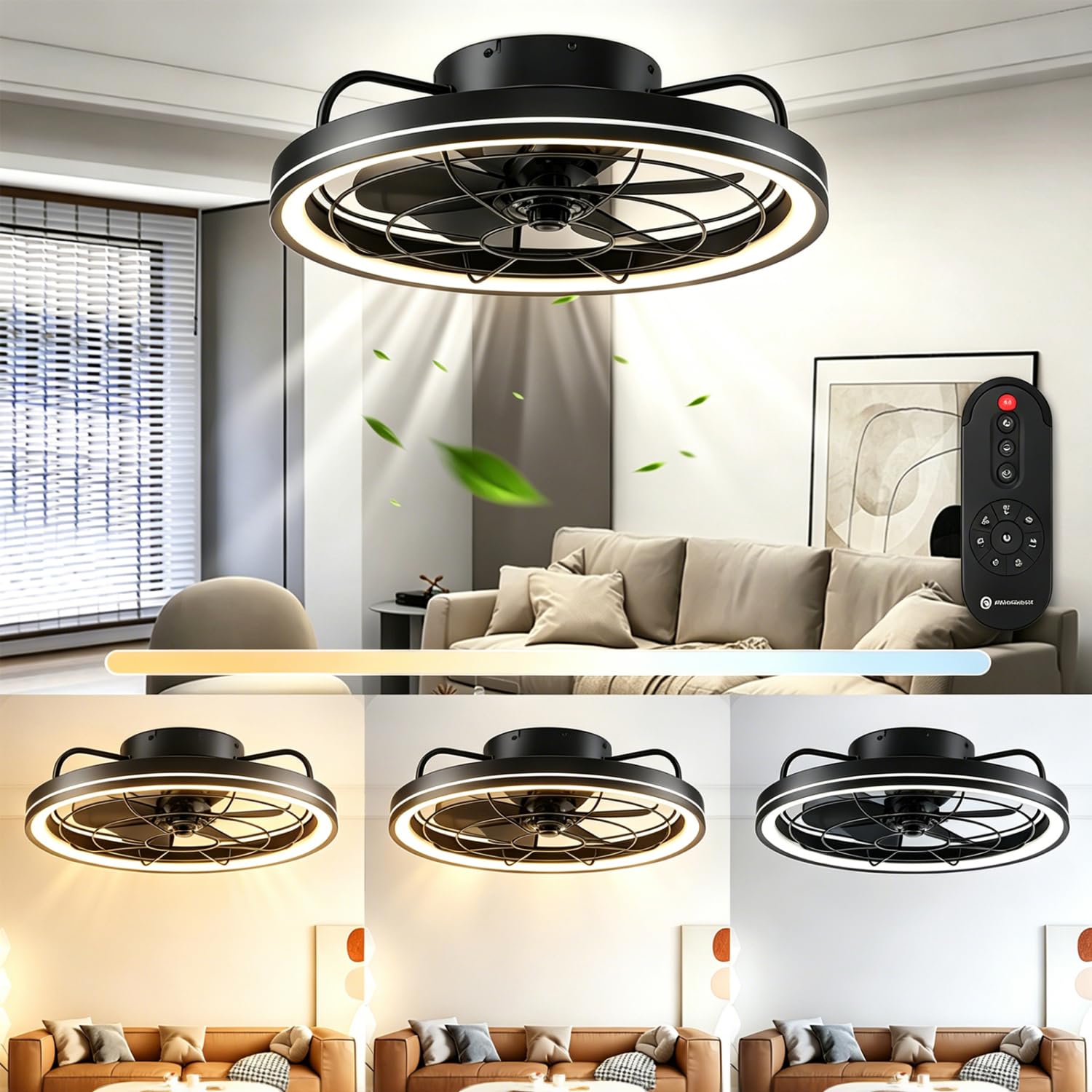
Şekil 1: Üzeriview of the Aigostar Gx-5555 Ceiling Fan with Light.
2. Güvenlik Talimatları
Lütfen kurulum ve kullanımdan önce tüm güvenlik talimatlarını dikkatlice okuyun. Bu kılavuzu ileride başvurmak üzere saklayın.
- Kurulum, temizlik veya bakım işlemlerinden önce güç kaynağının bağlantısının kesildiğinden emin olun.
- Kurulum, yerel kablolama yönetmeliklerine uygun olarak kalifiye bir elektrikçi tarafından yapılmalıdır.
- The mounting structure must be capable of supporting the weight of the fan (approximately 4.05 kg).
- Fan çalışırken fan kanatlarının arasına herhangi bir cisim sokmayın.
- Keep children away from the fan during operation.
- d'de fanı kullanmayınamp veya ıslak yerler.
- Only use the provided remote control for operation.
3. Paket İçeriği
Paketi açtığınızda tüm bileşenlerin mevcut ve hasarsız olduğundan emin olun.
- Aigostar Ceiling Fan Unit
- Uzaktan kumanda
- Kullanım Kılavuzu
4. Özellikler
| Özellik | Şartname |
|---|---|
| Model Numarası | Gx-5555 |
| Boyutlar (U x G x Y) | 48x48x15.5 cm |
| Ağırlık | 4.05 kilo |
| Güç (Işık) | 40W |
| Güç (Fan) | 20W |
| Işık Akısı | 4400LM |
| Renk Sıcaklığı | 2700K-6500K (Ayarlanabilir) |
| Parlaklık | %10-100 (Ayarlanabilir) |
| Fan Hızları | 6 Seviye |
| Zamanlayıcı Fonksiyonu | 1/2/4 Saat |
| Motor Tipi | DC Motor (Silent) |
| Bıçaklar | 5 ABS Bıçak |
| Cilttage | 230 V (AC) |
| Kontrol Yöntemi | Uzaktan kumanda |
| Montaj Tipi | Tavan Montajı |
| Sertifikalar | CE, RoHS |
5. Kurulum ve Kurulum
Installation should only be performed by a qualified professional to ensure safety and proper functionality. Always disconnect power at the circuit breaker before beginning any installation work.
5.1 Paketin açılması
Carefully remove all components from the packaging. Inspect for any damage during transit. Retain packaging for future transport or returns.
5.2 Montaj Yeri
Choose a ceiling location that can safely support the fan's weight and allows for adequate clearance around the blades. The fan has a diameter of 480mm and a height of 155mm.

Şekil 2: Kurulum planlaması için ürün boyutları.
5.3 Wiring and Assembly
Follow the detailed wiring diagrams and assembly instructions provided in the separate installation guide included with your product. Ensure all electrical connections are secure and comply with local electrical codes. After wiring, securely attach the fan unit to the ceiling mount.
6. Kullanım Talimatları
The Aigostar Gx-5555 Ceiling Fan with Light is operated using the included remote control. Ensure batteries are correctly inserted into the remote.
6.1 Aydınlatma Fonksiyonları
Use the remote control to adjust the light settings:
- Renk Sıcaklığı Ayarı: Cycle through warm white (2700K), neutral white (4500K), and cool white (6500K) to suit your preference.
- Parlaklık Ayarı: Işık yoğunluğunu %10 ile %100 arasında ayarlayın.
- The light features a memory function, retaining the last setting when turned off and on again.

Figure 3: Adjustable color temperature and brightness settings.
6.2 Fan Fonksiyonları
Control the fan speed and direction with the remote:
- Hız Ayarı: Select from 6 fan speeds. Lower speeds (1-2) are ideal for sleeping, medium speeds (3-4) for daily activities, and higher speeds (5-6) for increased air circulation.

Figure 4: Fan speed settings for various comfort levels.
- Sessiz Çalışma: The DC motor ensures quiet operation, minimizing disturbance, especially during sleep.

Figure 5: The fan's quiet operation for undisturbed rest.
- Ters Dönüş: The fan can rotate clockwise for downward airflow (ideal for cooling in summer) or counter-clockwise for upward airflow (to circulate warm air in winter). Refer to the remote control for the specific button to change rotation direction.
6.3 Zamanlayıcı İşlevi
Set the fan and/or light to automatically turn off after a specified period:
- Press the timer button on the remote to select 1, 2, or 4 hours.
- Note: Pressing any other button after setting the timer will cancel the timer function.

Figure 6: Remote control displaying the timer function.
7. Bakım
Düzenli bakım, tavan vantilatörünüzün optimum performans göstermesini ve uzun ömürlü olmasını sağlar.
- Temizlik: Temizlemeden önce daima elektriği kesin. Yumuşak bir bez kullanın.amp Fan gövdesini ve kanatlarını silmek için bir bez kullanın. Aşındırıcı temizleyiciler veya çözücüler kullanmayın.
- Bıçak Denetimi: Periodically check the fan blades for any dust buildup or damage.
- Sıkılık: Ensure all screws and connections remain tight.
8. Sorun Giderme
Sorunlarla karşılaşırsanız aşağıdaki yaygın sorunlara ve çözümlere bakın:
| Sorun | Olası Neden | Çözüm |
|---|---|---|
| Fan çalışmıyor | Güç kaynağı yok; Uzaktan kumanda pili zayıf/bitmiş; Kablolama yanlış. | Check circuit breaker; Replace remote batteries; Consult a qualified electrician to check wiring. |
| Işık yanmıyor | No power supply; Light component fault. | Check circuit breaker; Contact customer support if light component is faulty. |
| Uzaktan kumanda çalışmıyor | Batteries incorrectly inserted or dead; Remote not paired (if applicable). | Check battery orientation and replace if necessary; Refer to remote pairing instructions in the full manual. |
| Fan sallanıyor | Gevşek montaj vidaları; Dengesiz bıçaklar. | Ensure all mounting screws are tight; Check for balanced blades and re-tighten if necessary. |
Bu çözümleri denedikten sonra sorun devam ederse, lütfen Aigostar müşteri desteğiyle iletişime geçin.
9. Garanti ve Destek
Aigostar products are designed and manufactured to the highest quality standards. This product comes with a standard manufacturer's warranty. For detailed warranty information, please refer to the warranty card included in your package or visit the official Aigostar webalan.
For technical support, replacement parts, or any other inquiries, please contact Aigostar customer service through the contact information provided on our website or in your product documentation. Please have your model number (Gx-5555) and purchase date ready when contacting support.