
1. Giriş
Thank you for choosing the FLEXISPOT CylineX Pro Electric Standing Desk Frame. This manual provides essential information for the safe and efficient assembly, operation, and maintenance of your new adjustable height desk. Please read these instructions carefully before use and retain them for future reference.
The CylineX Pro features a robust dual-motor system, a user-friendly piano-style control panel, and a wide height adjustment range to support a healthy and productive workspace.
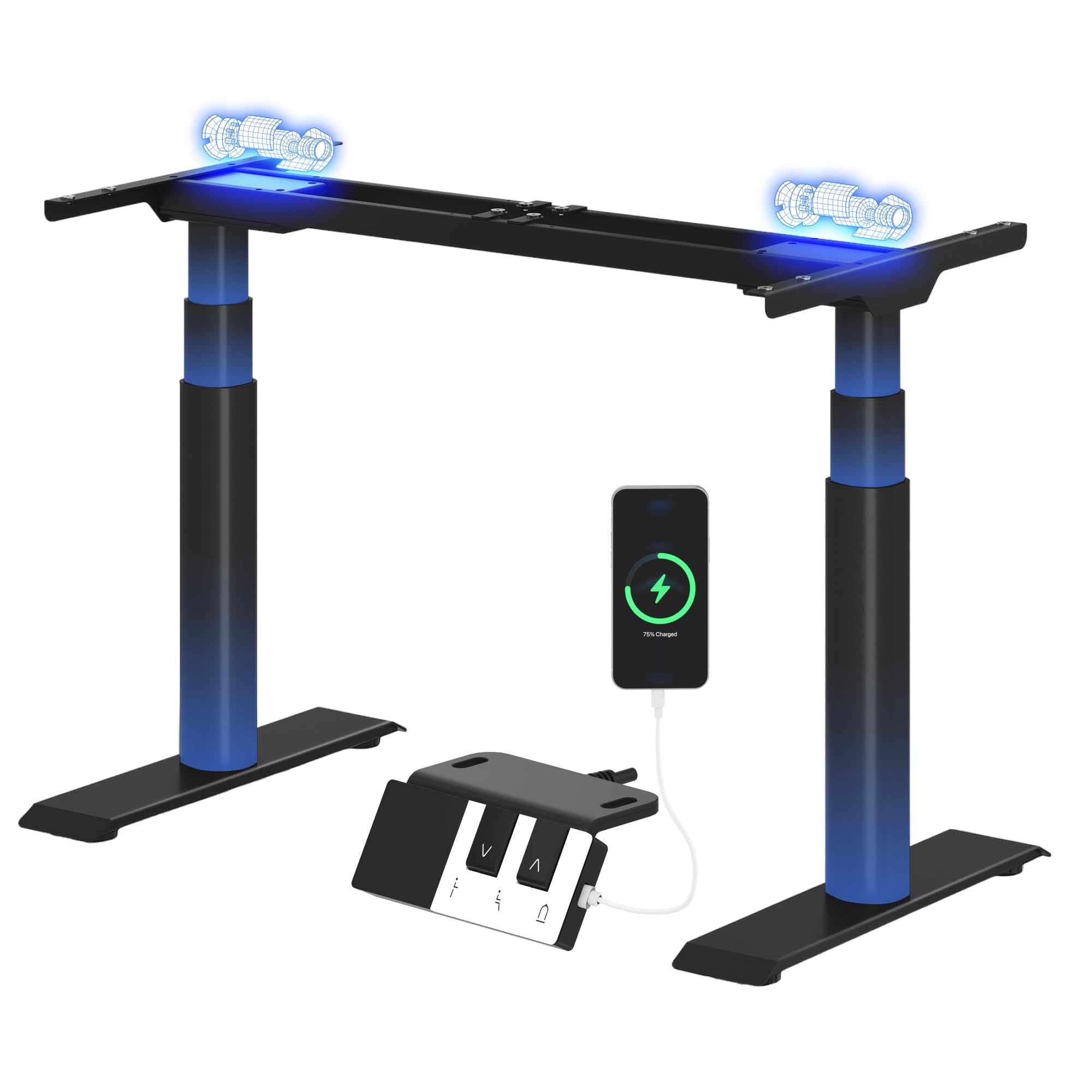
Image: The FLEXISPOT CylineX Pro Electric Standing Desk Frame with a black tabletop in a home office environment.
2. Güvenlik Bilgileri
Güvenli çalışmayı sağlamak ve yaralanma veya hasarı önlemek için lütfen aşağıdaki güvenlik önlemlerine uyun:
- Kullanmadan önce tüm bileşenlerin güvenli bir şekilde sabitlendiğinden emin olun.
- Çalışma sırasında çocukları ve evcil hayvanları masadan uzak tutun.
- Hareketli parçaların yakınına ellerinizi veya başka nesneler koymayın.
- Avoid overloading the desk beyond its specified weight capacity.
- Masa çerçevesi üzerine oturmayın veya basmayın.
- Temizlik veya bakımdan önce gücü kesin.
- Yalnızca verilen güç adaptörünü ve aksesuarları kullanın.
- If any unusual noise, smell, or malfunction occurs, immediately unplug the desk and contact customer support.
- The anti-collision system is designed to prevent damage, but users should still exercise caution during height adjustments.

Image: The integrated anti-collision system provides safer movement by automatically reversing if an obstacle is detected.
3. Montaj Talimatları
The FLEXISPOT CylineX Pro desk frame is designed for straightforward assembly. It typically takes about 20 minutes to assemble. Please ensure you have received all packages, as the desk frame may be shipped in multiple boxes.
3.1 Paket İçeriği
Verify that all parts listed in the included user manual are present before beginning assembly. Contact customer support if any parts are missing or damaged.
3.2 Adım Adım Montaj
- Bileşenleri Paketinden Çıkarın: Çizilmeleri önlemek için tüm parçaları ambalajından dikkatlice çıkarın ve yumuşak, temiz bir yüzeye serin.
- Çapraz çubuğu monte edin: Connect the two halves of the crossbar (if applicable) and secure them according to the detailed instructions in your physical manual.
- Attach Lifting Columns: Securely attach the lifting columns (legs) to the assembled crossbar.
- Ayakları Takın: Attach the foot supports to the bottom of each lifting column.
- Connect Control Box: Mount the control box to the designated area on the frame and connect the motor cables and power cable.
- Kontrol Panelini Ekleyin: Mount the piano-style control panel to the desired location on the desk frame or tabletop.
- Mount Tabletop: Carefully place your chosen tabletop onto the assembled frame. Ensure it is centered and aligned, then secure it using the provided screws.
- Kablo yönetimi: Organize and secure all cables using the included cable ties or management accessories.

Image: Components of the desk frame laid out, illustrating the ease of assembly.
4. Kullanım Talimatları
The CylineX Pro features an intuitive piano-style control panel for easy height adjustment and personalized settings.

Image: The piano-style control panel offers simple and intuitive control with memory functions, sit/stand reminder, child lock, and a USB port.
4.1 Temel Yükseklik Ayarı
- Basın Yukarı (^) masayı kaldırmak için düğmeye basın.
- Basın Aşağı (v) masayı indirmek için düğmeye basın.
- Release the button to stop the desk at the desired height.
4.2 Hafıza Ön Ayarlarını Belirleme
The control panel allows you to save up to three preferred height settings:
- Yukarı/Aşağı tuşlarını kullanarak masayı istediğiniz yüksekliğe ayarlayın.
- Basın "M" button (Memory) followed by one of the numbered preset buttons (1, 2, or 3). The display will show "S-" followed by the number to confirm the setting is saved.
- To recall a saved height, simply press the corresponding numbered preset button.
4.3 Sit/Stand Reminder
Activate the sit/stand reminder to prompt you to change positions at regular intervals:
- Basın Zamanlayıcı button (often depicted as a clock icon) to cycle through reminder intervals (e.g., 30, 45, 60 minutes).
- The desk will beep or vibrate when it's time to change position.
4.4 Çocuk Kilidi İşlevi
Yanlışlıkla ayar yapılmasını önlemek için çocuk kilidini etkinleştirin:
- Basılı tutun Kilit button (often depicted as a padlock icon) for a few seconds until "LOC" appears on the display.
- To unlock, press and hold the Lock button again until "LOC" disappears.
4.5 USB Şarj Portu
The control panel includes a USB port for convenient charging of your mobile devices.
5. Bakım
Regular maintenance ensures the longevity and optimal performance of your FLEXISPOT CylineX Pro desk frame.
- Temizlik: Masa çerçevesini yumuşak bir bezle silin.amp cloth. Avoid abrasive cleaners or solvents that could damage the finish. Ensure no liquid enters the electrical components.
- Kablo yönetimi: Periodically check and tidy up cables to prevent tangling or damage, which could interfere with desk movement.
- Bağlantı Elemanı Kontrolü: Every few months, check all screws and bolts to ensure they are tight. Re-tighten if necessary.
- Yağlama: The lifting columns are pre-lubricated and generally do not require additional lubrication. If you notice any unusual friction, contact customer support.
6. Sorun Giderme
If you encounter any issues with your desk, please refer to the following common troubleshooting steps:
| Sorun | Olası Neden | Çözüm |
|---|---|---|
| Desk does not move / No power | Power cable disconnected, power outlet issue, control box malfunction. | Check power connections. Ensure the outlet is working. Try a different outlet. If still no power, contact support. |
| Desk moves unevenly or stops | Overload, obstruction, uneven weight distribution, synchronization issue. | Reduce weight on the desk. Check for obstructions. Ensure weight is evenly distributed. Perform a reset (see below). |
| Error code displayed (e.g., E01, E02) | Motor fault, sensor issue, overheating. | Refer to your physical manual for specific error code meanings. Often, a reset or power cycle can resolve temporary errors. If persistent, contact support. |
| Anti-collision system triggers too easily/not at all | Sensitivity setting, obstruction. | Check for obstructions. Consult your physical manual for instructions on adjusting anti-collision sensitivity. |
| Olağandışı gürültü veya koku | İç parça sorunu, motor zorlanması. | Immediately unplug the desk. Do not use. Contact FLEXISPOT customer support. |
6.1 Sıfırlama Prosedürü
A reset can often resolve minor operational issues. The exact procedure may vary slightly, but a common method is:
- Basılı tutun Aşağı (v) button until the desk reaches its lowest position and then slightly rises and lowers again.
- Alternatively, some models require holding the "M" düğme ve Aşağı (v) button simultaneously, or a specific combination of buttons. Refer to your physical manual for the precise reset sequence for your CylineX Pro model.
7. Özellikler
Key technical specifications for the FLEXISPOT CylineX Pro Electric Standing Desk Frame:

Image: Detailed dimensions and performance specifications of the CylineX Pro desk frame.
| Özellik | Şartname |
|---|---|
| Örnek | CylineX Pro |
| Yükseklik Ayar Aralığı | 60 cm - 125 cm (23.6" - 49.2") |
| Kaldırma Hızı | 35 mm/s |
| Statik Yük Kapasitesi | 200 kg'a (440 lbs) kadar |
| Dynamic Load Capacity | 160 kg'a (352 lbs) kadar |
| Motor Tipi | Çift Motor Sistemi |
| Gürültü Seviyesi | 50 dB'den az |
| Bekleme Güç Tüketimi | 0.5 W'tan az |
| Compatible Tabletop Width | 120 cm - 200 cm (47.2" - 78.7") |
| Compatible Tabletop Depth | 60 cm - 80 cm (23.6" - 31.5") |
| Kontrol Paneli | Piano-style with Memory Presets, Sit/Stand Reminder, Child Lock, USB Charging Port |
| Güvenlik Özellikleri | Çarpışma önleme sistemi |

Image: The desk's robust construction supports a maximum static load of 200 kg and a dynamic load of 160 kg.
8. Garanti ve Destek
FLEXISPOT is committed to providing high-quality products and excellent customer service.
8.1 Garanti Bilgileri
The FLEXISPOT CylineX Pro desk frame comes with a 10 yıllık garanti. This warranty covers defects in materials and workmanship under normal use. Please retain your proof of purchase for warranty claims. For full warranty terms and conditions, please refer to the official FLEXISPOT website veya müşteri hizmetleriyle iletişime geçin.
8.2 Müşteri Desteği
If you have any questions, require assistance with assembly, or encounter any issues not covered in this manual, please do not hesitate to contact FLEXISPOT customer support. Our team is available to help you.
- Çevrimiçi destek: Visit the official FLEXISPOT webSSS, destek makaleleri ve iletişim formları için site.
- E-posta Desteği: Refer to your purchase documentation for the appropriate email address.
- Telefon Desteği: Check the FLEXISPOT webbölgesel iletişim numaraları için site.