
Canavar S380
Monster S380 Bluetooth Hoparlör Kullanım Kılavuzu
Modeli: S380
giriiş
Thank you for choosing the Monster S380 Bluetooth Speaker. This manual provides essential information for setting up, operating, and maintaining your speaker. Please read it carefully before use to ensure optimal performance and longevity of your device.
The Monster S380 is a portable Bluetooth speaker designed to deliver powerful audio with clarity and deep bass. Key features include:
- Pure Monster Sound & 40W Powerful Audio: Experience room-filling sound with rich bass and clear highs.
- Advanced Bluetooth 6.0 & TWS Pairing: Enjoy stable wireless connectivity and the option to pair two S380 speakers for immersive stereo sound.
- 20H Long Playback & Portable Design: Extended battery life for all-day music and a convenient lanyard for portability.
- IPX6 Waterproof & Multi-Input Interfaces: Designed to withstand splashes and rain, with versatile connectivity options including AUX and TF card.
- Built-in Mic & Handsfree Calling: Integrated microphone for clear hands-free calls with noise-cancellation.
Kutuda Neler Var?
Lütfen paket içeriğini kontrol ederek tüm öğelerin mevcut olduğundan emin olun:
- Monster S380 Bluetooth Speaker ×1
- USB-C Şarj Kablosu ×1
- AUX-in Cable ×1
- Taşınabilir Halat ×1
- Hızlı Başlangıç Kılavuzu ×1

Image: Contents of the Monster S380 package.
Ürün Bittiview
Kontrol Düğmeleri

Image: Monster S380 control button functions.
- Mod Değiştirme (M): Press to cycle through Bluetooth, AUX, and TF Card modes.
- Play/Pause (►►): Sesi çalmak veya duraklatmak için basın.
- Power On/Off (▮): Hoparlörü açmak veya kapatmak için basılı tutun.
- Volume - / Previous Song (-): Press to decrease volume. Press and hold for the previous song.
- Volume + / Next Song (+): Press to increase volume. Press and hold for the next song.
Giriş/Çıkış Portları
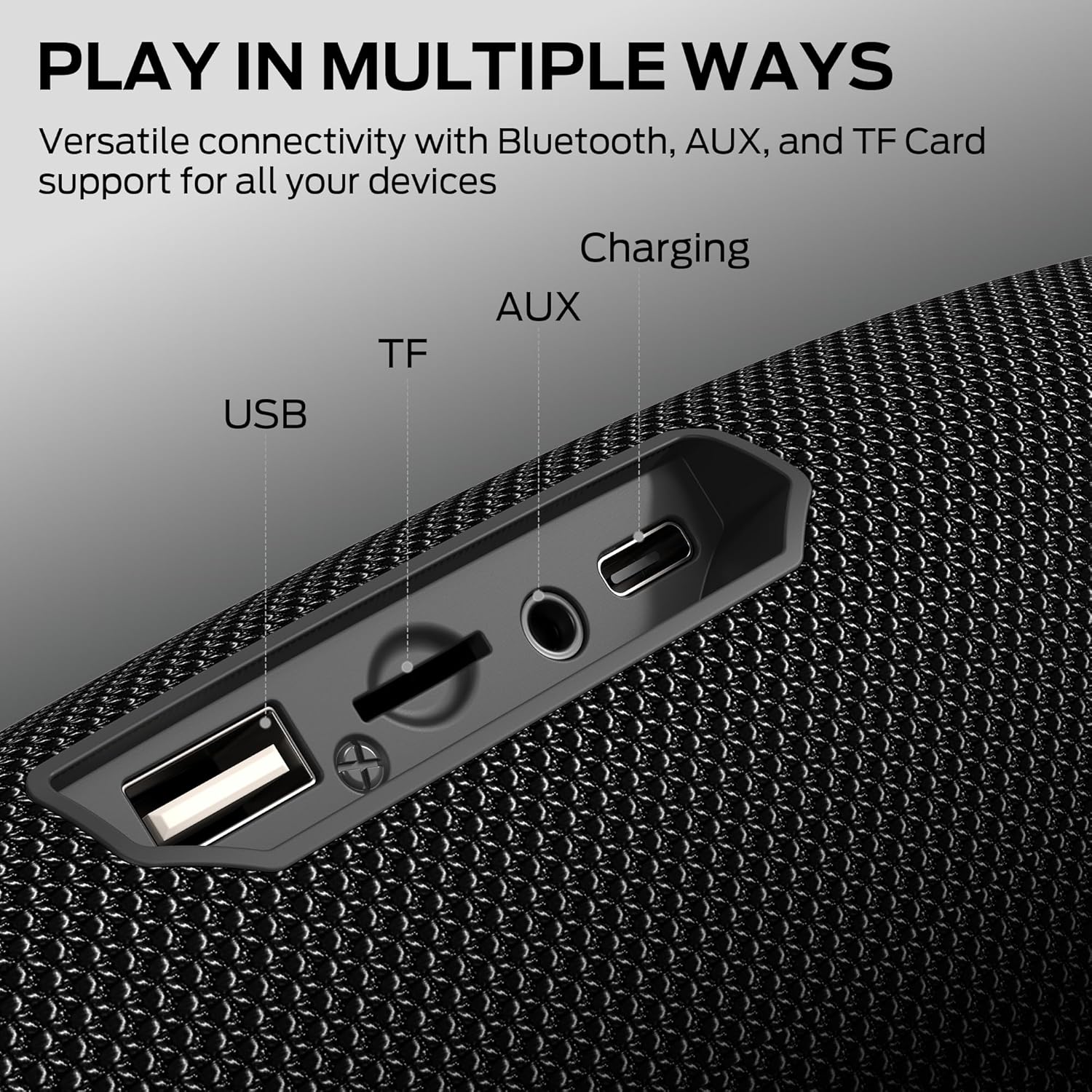
Image: Multi-input interfaces on the Monster S380 speaker.
- USB Bağlantı Noktası: USB bellekten oynatma için.
- TF Kart Girişi: TF (MicroSD) kart oynatma için.
- AUX Girişi: Harici ses cihazlarını 3.5 mm ses kablosuyla bağlamak için.
- USB-C Şarj Portu: Hoparlörü şarj etmek için.
Kurmak
1. Hoparlörü Şarj Etme
Before first use, fully charge the speaker. Connect the provided USB-C charging cable to the speaker's USB-C port and the other end to a USB power adapter (not included) or a computer's USB port. The charging indicator will show the charging status and turn off when fully charged.
2. Açma/Kapama
Press and hold the Power button (▮) for approximately 2-3 seconds to turn the speaker on or off. A sound prompt will indicate the power status.
Kullanım Talimatları
1. Bluetooth Eşleştirme

Image: Monster S380 with Bluetooth 6.0 indication.
- Hoparlörü açın. Otomatik olarak Bluetooth eşleştirme moduna geçecektir; bu durum yanıp sönen bir LED ışıkla belirtilir.
- Cihazınızda (akıllı telefon, tablet vb.) Bluetooth özelliğini etkinleştirin.
- Arama "Monster S380" in your device's Bluetooth list and select it to connect.
- Bağlantı kurulduktan sonra LED ışığı yanıp sönmeyi durduracak ve bir onay sesi duyacaksınız.
2. Gerçek Kablosuz Stereo (TWS) Eşleştirme
TWS allows you to pair two Monster S380 speakers for a stereo sound experience.

Image: Two Monster S380 speakers paired for TWS connection.
- Her iki S380 hoparlörün de açık olduğundan ve herhangi bir Bluetooth cihazına bağlı olmadığından emin olun.
- On one speaker (this will be the primary speaker), press and hold the Play/Pause button (►►) for 3 seconds until you hear a TWS pairing prompt.
- The two speakers will automatically search for and connect to each other. Once paired, you will hear a confirmation sound, and the LED on the primary speaker will flash slowly, while the secondary speaker's LED will be solid.
- Şimdi, "Bluetooth Eşleştirme" bölümünde açıklandığı gibi cihazınızı Bluetooth aracılığıyla ana hoparlöre bağlayın.
3. AUX Giriş Modu
AUX girişini kullanmak için:
- 3.5 mm AUX kablosunun bir ucunu hoparlörün AUX portuna, diğer ucunu ise ses cihazınızın kulaklık girişine bağlayın.
- Press the Mode button (M) on the speaker until it enters AUX mode.
- Ses artık bağlı cihazınızın hoparlöründen çalınacaktır.
4. TF Kart Oynatma
To play music from a TF (MicroSD) card:
- Bir TF kartı takın (içinde müzik olan). files) hoparlör üzerindeki TF kart yuvasına.
- The speaker will automatically switch to TF card mode, or you can press the Mode button (M) to select it.
- Music will begin playing from the TF card.
5. Eller Serbest Arama
Bluetooth ile bağlandığında, hoparlör eller serbest görüşme için kullanılabilir:
- Cevap Çağrısı: Press the Play/Pause button (►►) once to answer an incoming call.
- Çağrı Sonu: Press the Play/Pause button (►►) once during a call to end it.
- Çağrıyı Reddet: Press and hold the Play/Pause button (►►) for 2 seconds to reject an incoming call.
Bakım
To ensure the longevity and optimal performance of your Monster S380 speaker, follow these maintenance guidelines:
- Temizlik: Hoparlörü yumuşak bir bezle silin.amp Bez kullanın. Aşındırıcı temizleyiciler, alkol veya kimyasal çözücüler kullanmayın.
- Suya Dayanıklılık: The speaker is IPX6 waterproof, meaning it can resist high-pressure water jets. However, it is not designed for submersion. Ensure the port cover is securely closed when exposed to water.
- Depolamak: Hoparlörü serin, kuru ve doğrudan güneş ışığından ve aşırı sıcaklıklardan uzak bir yerde saklayın.
- Pil Bakım: Pil ömrünü korumak için, uzun süre kullanılmasa bile hoparlörü düzenli olarak şarj edin. Pili sık sık tamamen boşaltmaktan kaçının.
- Etkilerden Kaçının: Hoparlörü düşürmeyin veya sert darbelere maruz bırakmayın, çünkü bu iç bileşenlere zarar verebilir.
Sorun giderme
If you encounter issues with your Monster S380 speaker, refer to the following common problems and solutions:
| Sorun | Olası Neden | Çözüm |
|---|---|---|
| Hoparlör açılmıyor | Düşük pil; Güç düğmesine doğru basılmamış | Hoparlörü tamamen şarj edin; Güç düğmesini 2-3 saniye basılı tutun. |
| Ses yok | Ses çok düşük; Yanlış giriş modu; Cihaz bağlı değil | Increase speaker and device volume; Press Mode button to select correct input; Re-pair Bluetooth device. |
| Bluetooth connection unstable or fails | Speaker too far from device; Interference; Device Bluetooth issue | Move speaker closer to device (within 33 feet); Avoid obstacles; Restart speaker and device Bluetooth. |
| TWS eşleştirmesi başarısız | Hoparlörler zaten başka cihazlara bağlı; Yanlış eşleştirme prosedürü | Her iki hoparlörün de diğer cihazlardan bağlantısının kesildiğinden emin olun; TWS eşleştirme adımlarını dikkatlice izleyin. |
| AUX/TF kartı çalışmıyor | Incorrect mode; Cable/card issue; File format desteklenmiyor | Press Mode button to select AUX/TF mode; Check cable connection/TF card insertion; Ensure audio files desteklenen bir formattadır. |
Özellikler
| Özellik | Detay |
|---|---|
| Model Numarası | MS62153 |
| Hoparlör Maksimum Çıkış Gücü | 40 Watt |
| Bağlantı Teknolojisi | Yardımcı, Bluetooth, USB |
| Kablosuz Teknoloji | Bluetooth 6.0 |
| Bluetooth Menzili | 33 Feet'e (10 metre) kadar |
| Ses Çıkışı Modu | Stereo |
| Su Geçirmezlik Derecesi | IPX6 |
| Pilin Ortalama Ömrü | 20 Saat |
| Güç Kaynağı | Pil ile çalışır |
| Kontrol Yöntemi | Basmalı Düğme |
| Ürün Boyutları | 21x8x8 cm |
| Ürün Ağırlığı | 880 gr |
| Muhafaza Malzemesi | Plastik |
| Uyumlu Cihazlar | Bluetooth-enabled devices (smartphones, tablets, MP3 players, TVs, laptops) |
Garanti ve Destek
Garanti Bilgileri
The Monster S380 Bluetooth Speaker comes with a 180 günlük sınırlı garanti Satın alma tarihinden itibaren geçerlidir. Bu garanti, normal kullanım koşullarında üretim hatalarını ve işçilik kusurlarını kapsar. Yanlış kullanım, kazalar, yetkisiz değişiklikler veya normal aşınma ve yıpranmadan kaynaklanan hasarları kapsamaz.
Garanti talepleri için lütfen satın alma belgenizi saklayın.
Müşteri Desteği
For technical assistance, warranty claims, or any questions regarding your Monster S380 speaker, please contact Monster customer support through their official webÜrünün satın alındığı site veya perakendeci.
Ask a question about this manual
Ask about setup, troubleshooting, compatibility, parts, safety, or missing instructions. Manuals+ will review the question and use this page’s manual context to help answer it.