
1. Üzeriview
The Philips TAZ2200 is a versatile portable sound machine designed for enjoying various audio formats. It features a top-loading CD player, a front-loading cassette player, FM radio, Bluetooth 6.0 connectivity, USB playback, and a 3.5mm audio input. Equipped with dynamic bass boost and 6W stereo speakers, it delivers rich sound. The unit can be powered by AC mains or batteries and includes a carrying handle for portability.
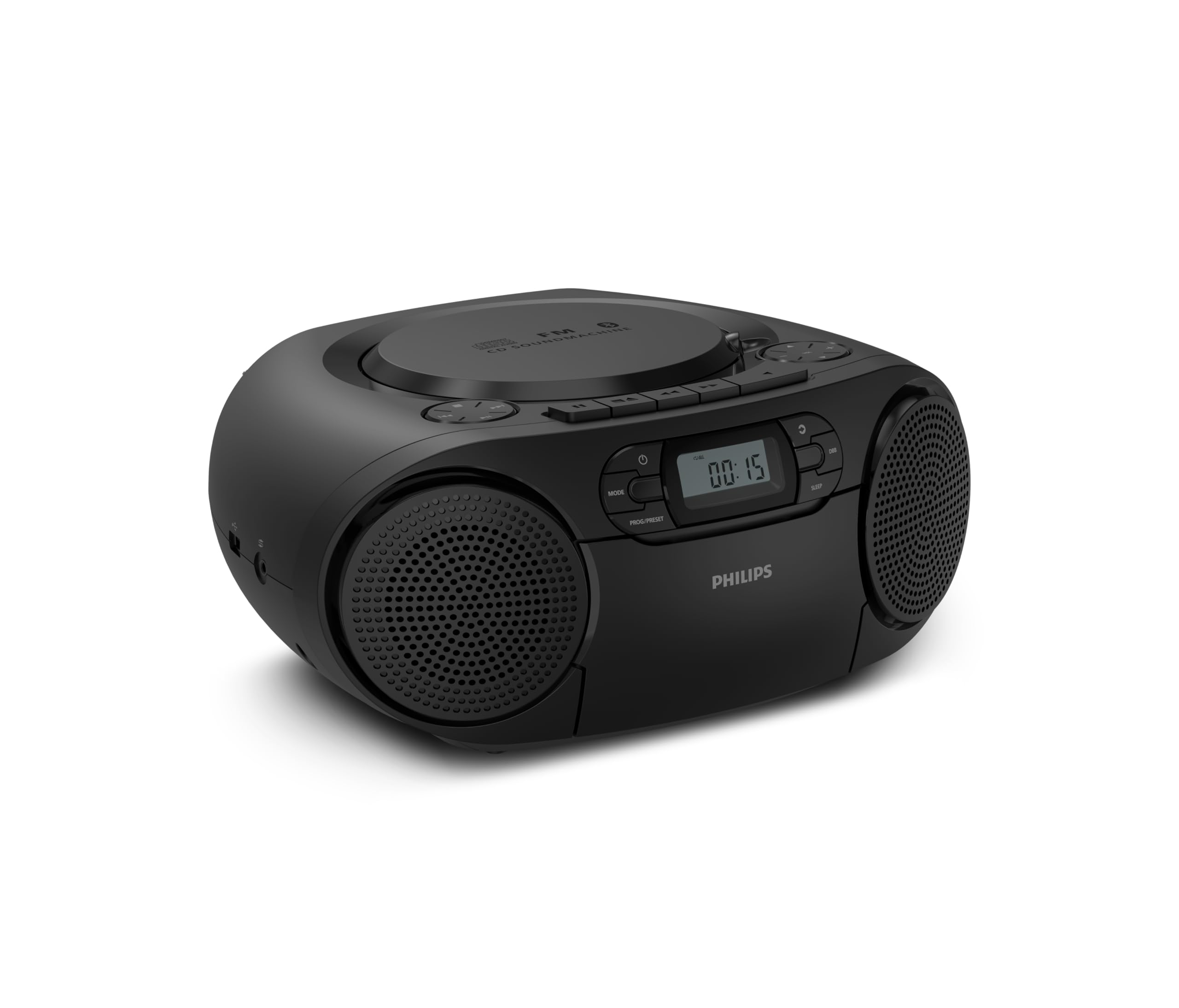
Ön view of the Philips TAZ2200 CD Soundmachine, showing the main display and control buttons.
2. Güvenlik Bilgileri
Please read these safety instructions carefully before using your device and keep them for future reference. Incorrect use may result in hazards.
- Güç Kaynağı: Yalnızca belirtilen güç adaptörünü veya pilleri kullanın. Ses seviyesinin doğru ayarlandığından emin olun.tage ünitenin gereksinimlerine uygundur.
- Su ve Nem: Cihazı yağmur, nem, damlama veya sıçramaya maruz bırakmayın. Cihazın üzerine vazo gibi sıvı dolu nesneler koymayın.
- Havalandırma: Yeterli havalandırmayı sağlayın. Havalandırma açıklıklarını kapatmayın. Yeterli havalandırma için ünitenin etrafında minimum mesafeyi koruyun.
- Sıcaklık: Üniteyi radyatör, kalorifer ızgarası, soba veya diğer cihazlar (dahil) gibi ısı kaynaklarının yakınına yerleştirmeyin. amp(ısı üreten)
- Piller: Follow correct polarity when inserting batteries. Do not mix old and new batteries, or different types of batteries. Remove batteries if the unit is not used for a long period.
- Temizlik: Temizlemeden önce cihazı elektrik prizinden çıkarın. Yumuşak, kuru bir bez kullanın. Sıvı temizleyiciler veya aerosol temizleyiciler kullanmayın.
- Servis: Bu ürüne kendiniz servis vermeye çalışmayın. Tüm servis işlemleri için kalifiye servis personeline başvurun.
3. Kutuda Neler Var?
Paketleri açtığınızda lütfen aşağıda listelenen tüm eşyaların mevcut olduğundan emin olun:
- Philips TAZ2200 CD Soundmachine
- Güç kablosu
- Hızlı başlangıç kılavuzu
- Garanti kitapçığı
- Güvenlik Formu
4. Kontroller ve Bağlantılar
Ön Panel Kontrolleri
The front panel features the main display, power button, mode selection, program/preset buttons, and dynamic bass boost (DBB) control. Playback controls for CD and USB are also located here.

Detaylı ön view showing the display, power, mode, program/preset, and DBB buttons.
Side and Rear Connections
The side of the unit provides a USB port for digital audio playback and a 3.5mm audio input jack for connecting external devices.

Taraf view illustrating the USB port and Audio Input jack.
The top of the unit houses the CD compartment and additional playback controls, while the rear features the AC power input and the FM antenna.

Tepe view showing the CD compartment and associated controls.

Arka view displaying the AC power input and the telescopic FM antenna.
5. Kurulum
5.1 Güç Kaynağı
AC Güç
- Ünitenin kapalı olduğundan emin olun.
- Connect the supplied power cable to the AC IN socket on the rear of the sound machine.
- Plug the other end of the power cable into a wall power outlet.
Pil Gücü
For portable use, the unit can operate on 6 x C-type batteries (not included).
- Ünitenin altında bulunan pil bölmesi kapağını açın.
- Insert 6 C-type batteries, ensuring correct polarity (+/-) as indicated inside the compartment.
- Pil bölmesi kapağını sıkıca kapatın.
5.2 Anten Ayarı
For optimal FM radio reception, fully extend the telescopic antenna located at the rear of the unit. Adjust its position and angle to achieve the clearest signal.
6. Kullanım Talimatları
6.1 Genel İşlem
- Güç Açma/Kapatma: Basın GÜÇ Üniteyi açmak veya kapatmak için düğmesine basın.
- Ses Kontrolü: Kullanın SES + or CİLT - ses seviyesini ayarlamak için düğmeler.
- Dinamik Bas Güçlendirme (DBB): Basın DBB button to activate or deactivate the dynamic bass boost feature for enhanced bass sound.
- Mod Seçimi: Basın MOD button repeatedly to switch between CD, Cassette, FM Radio, Bluetooth, USB, and Audio Input modes.
6.2 CD Oynatma
- Open the CD compartment cover on top of the unit.
- Place a CD (CD, CD-R, or CD-RW) with the label side facing up onto the spindle.
- CD bölmesi kapağını kapatın.
- Basın MOD CD modunu seçmek için düğmesine basın.
- Basın OYNAT/DURDUR oynatmayı başlatmak için düğmesine basın.
- Kullanın ATLAMAK düğmeler (|< or >>|Parçaları atlamak için.
- Basılı tutun |< or >>| Bir parça içinde arama yapmak.
- Basın DURMAK Oynatmayı durdurmak için düğmesine basın.
6.3 Kaset Oynatma
- Open the cassette compartment door on the front of the unit.
- Açık kenarı yukarı bakacak şekilde kaset bandını yerleştirin.
- Kaset bölmesinin kapağını kapatın.
- Basın MOD Kaset modunu seçmek için kullanılan düğme.
- Basın OYNAMAK oynatmayı başlatmak için düğmesine basın.
- Kullanın HIZLI İLERLEME or GERİ SARMA Kaseti hızlıca ileri veya geri sarmak için düğmeler.
- Basın DURMAK Oynatmayı durdurmak için düğmesine basın.
6.4 FM Radyo
- Basın MOD FM Radyo modunu seçmek için kullanılan düğme.
- Otomatik tarama: Basılı tutun PROG/PRESET button to automatically scan and store available FM stations.
- Manuel Ayarlama: Basın AYARLAMA düğmeler (|< or >>|) to manually tune to a desired frequency.
- Ön Ayarların Kaydedilmesi: After tuning to a station, press PROG/PRESET once, then use |< or >>| Önceden ayarlanmış bir sayı seçmek için basın. PROG/PRESET Tekrar onaylamak için.
- Ön Ayarların Geri Çağrılması: FM modunda, tuşuna basın. PROG/PRESET repeatedly to cycle through saved preset stations.
6.5 Bluetooth Oynatma
- Basın MOD button to select Bluetooth mode. The display will show 'BT' and flash, indicating it's in pairing mode.
- Bluetooth özellikli cihazınızda (akıllı telefon, tablet) Bluetooth'u etkinleştirin ve kullanılabilir cihazları arayın.
- Select "Philips TAZ2200" from the list of devices.
- Once paired, the unit will emit a confirmation sound, and 'BT' will stop flashing.
- Start playing audio on your connected device. The sound will be streamed to the sound machine.
6.6 USB Oynatma
- Cihazın yan tarafındaki USB bağlantı noktasına bir USB flash sürücü takın.
- Basın MOD USB modunu seçmek için düğmesine basın.
- Cihaz, uyumlu ses dosyalarını otomatik olarak algılayacak ve çalmaya başlayacaktır. files (MP3, WAV, WMA).
- Oynatma kontrollerini kullanın (OYNAT/DURDUR, ATLAMAK, DURMAK) as you would for CD playback.
6.7 Ses Girişi (AUX)
- Connect one end of a 3.5mm audio cable (not included) to the AUDIO IN jack on the side of the sound machine.
- Connect the other end of the audio cable to the headphone jack or audio output of your external device (e.g., MP3 player, turntable).
- Basın MOD button to select Audio Input mode.
- Start playing audio on your external device. The sound will be played through the sound machine.
7. Bakım
- Ünitenin Temizlenmesi: Ünitenin dışını yumuşak, hafif nemli bir bezle silin.amp bezle silin. Aşındırıcı temizleyiciler veya çözücüler kullanmayın.
- CD Çalar Bakımı: Keep the CD compartment clean. If the lens is dirty, use a specialized CD lens cleaner. Avoid touching the lens.
- Kasetçalar Bakımı: Bant başlıklarını ve sıkıştırma silindirlerini periyodik olarak pamuklu çubukla hafifçe temizleyin.ampİzopropil alkol ile yıkandı.
- Pil Değişimi: If using batteries, replace all 6 C-type batteries when the unit's performance diminishes or if the unit will not be used for an extended period.
- Depolamak: Kullanılmadığı zamanlarda, cihazı temiz, kuru bir yerde, doğrudan güneş ışığından ve aşırı sıcaklıklardan uzakta saklayın.
8. Sorun Giderme
If you encounter any issues with your Philips TAZ2200, please refer to the table below for common problems and solutions.
| Sorun | Olası Neden | Çözüm |
|---|---|---|
| Güç yok | Güç kablosu bağlı değil; piller bitmiş veya yanlış takılmış. | Check AC power connection; Replace batteries or ensure correct polarity. |
| Ses yok | Ses seviyesi çok düşük; Yanlış mod seçildi; Kulaklık bağlı. | Increase volume; Select the correct source mode (CD, FM, BT, etc.); Disconnect headphones. |
| CD çalmıyor | CD inserted incorrectly; CD is dirty or scratched; CD format not supported. | Insert CD with label side up; Clean or replace CD; Ensure CD is CD-R/RW compatible. |
| Cassette not playing | Cassette inserted incorrectly; Tape is damaged. | Insert cassette correctly; Try a different cassette. |
| Zayıf FM alımı | Anten doğru şekilde uzatılmamış veya konumlandırılmamış; Sinyal zayıf. | Teleskopik anteni tamamen uzatın ve ayarlayın; Cihazı farklı bir yere taşımayı deneyin. |
| Bluetooth bağlanmıyor | Unit not in pairing mode; Bluetooth device too far; Device already paired with another unit. | Ensure unit is in Bluetooth mode and flashing; Move device closer; Disconnect from other devices. |
| USB oynatma sorunları | USB sürücüsü doğru şekilde takılmamış; Uyumsuz file Biçimlendirme hatası; USB sürücüsü bozuldu. | USB sürücüsünü tekrar takın; Emin olun. files are MP3, WAV, or WMA; Try a different USB drive. |
9. Özellikler
| Özellik | Şartname |
|---|---|
| Marka | PHILIPS |
| Model Numarası | TAZ2200/10 |
| Bağlantı Teknolojisi | Bluetooth 6.0, USB, Audio Input (3.5mm) |
| Hoparlör Tipi | Stereo (2 speakers) |
| Çıkış Gücü | 6 Watt (maks) |
| Desteklenen Medya | CD, CD-R, CD-RW, Cassette, USB (MP3, WAV, WMA) |
| Radyo Tuner | Digital FM with 20 presets |
| Güç Kaynağı | AC (wired), 6 x C-type batteries (not included) |
| Boyutlar (UxGxY) | 24.5x28.5x12.5 cm |
| Ağırlık | 1.35 Kilogram |
| Renk | Gümüş |
10. Garanti ve Destek
10.1 Ürün Garantisi
This Philips TAZ2200 CD Soundmachine comes with a 2 yıllık garanti Satın alma tarihinden itibaren geçerlidir. Lütfen garanti talepleriniz için satın alma belgenizi saklayın. Garanti, normal kullanım koşulları altında üretim hatalarını ve arızaları kapsar.
10.2 Müşteri Desteği
For technical assistance, troubleshooting beyond this manual, or warranty service, please refer to the contact information provided in the warranty booklet included with your product. You can also visit the official Philips support website for your region for further assistance and FAQs.