
giriiş
This manual provides detailed instructions for the operation and maintenance of your RadioShack Portable CD Player Boombox. Please read this manual thoroughly before using the device to ensure proper function and to maximize your listening experience. This boombox combines classic CD playback with modern connectivity options including Bluetooth, FM radio, USB, and AUX input.
Kutuda Neler Var?

Şekil 1: Kutu İçeriği. This image displays the items included with your purchase: the boombox unit, AC power cord, remote control, and telescopic antenna.
- 1x RadioShack Portable CD Player Boombox Unit
- 1x AC Güç Kablosu
- 1x Uzaktan Kumanda
- 1x Telescopic Antenna (pre-attached)
- 1x Kullanım Kılavuzu (bu belge)
Note: 4 C batteries are required for portable operation and are not included.
Ürün Bittiview ve Özellikler
The RadioShack Portable CD Player Boombox offers multiple audio playback options and user-friendly controls.

Şekil 2: Başlıca Özellikler. This diagram highlights the boombox's main functionalities including Bluetooth 5.0, various CD formats, USB MP3 playback, FM radio, AUX input, and playback modes.
- CD Oynatma: Supports CD, CD-R, CD-RW, and CD-MP3 formats.
- Bluetooth Bağlantısı: Uyumlu cihazlardan kablosuz olarak ses akışı yapın.
- FM Radyo: Built-in tuner with telescopic antenna and 18 preset stations.
- USB Oynatma: MP3'ü oynat fileDoğrudan bir USB sürücüsünden.
- AUX Girişi: Harici ses cihazlarını 3.5 mm kablo kullanarak bağlayın.
- Oynatma Modları: Includes random, repeat, and program play functions.
- Uzaktan kumanda: Uzaktan rahat kullanım için.
Kurmak
1. Cihaza Güç Verme

Figure 3: Power Options. The boombox can be powered by the included AC cord or by 4 C batteries for portable use.
Your boombox can be powered in two ways:
- AC Gücü: Connect the included AC power cord to the AC input jack on the back of the boombox and then plug it into a standard wall outlet (110V-240V).
- Pil Gücü: For portable use, open the battery compartment on the bottom of the unit and insert 4 "C" size batteries (not included), ensuring correct polarity (+/-). Close the compartment securely.
2. Antenna Setup (FM Radio)
For optimal FM radio reception, fully extend the telescopic antenna located on the back of the unit. Adjust its position for the best signal.
Kullanım Talimatları
Genel Kontroller
- Güç düğmesi (⏻): Üniteyi AÇMAK veya KAPATMAK için basın.
- Ses Düğmesi: Sesi artırmak için saat yönünde, azaltmak için saat yönünün tersine çevirin.
- İşlev (FUNC) Düğmesi: Press to cycle through playback modes: CD, Bluetooth, FM, USB, AUX.
- Oynat durdur (⏸/⏸) Buton: Oynatmayı başlatır veya duraklatır.
- Dur (⏹) Buton: Oynatmayı durdurur.
- Skip/Search (⏮ / ⏭Düğmeler: Press briefly to skip tracks. Press and hold to search within a track.
CD Çalma
- CD bölmesinin kapağını açın.
- Place a CD (CD, CD-R, CD-RW, or CD-MP3) onto the spindle with the label side facing up.
- CD bölmesinin kapağını sıkıca kapatın.
- Basın FUNC button until "CD" mode is selected.
- CD otomatik olarak çalmaya başlayacaktır. Başlamazsa, tuşuna basın. Oynat/Duraklat düğme.
Bluetooth Eşleştirme

Figure 4: Bluetooth Streaming. Easily stream audio from your smartphone or tablet to the boombox.
- Basın FUNC button until "BT" (Bluetooth) mode is selected. The display will show "BT" and flash, indicating it's in pairing mode.
- On your Bluetooth-enabled device (smartphone, tablet), go to its Bluetooth settings and search for available devices.
- Select "RadioShack Boombox" from the list.
- Once paired, the "BT" indicator on the boombox display will stop flashing and remain solid.
- You can now play audio from your device through the boombox.
FM Radyo İşlemi

Figure 5: FM Presets and Programmed Playback. Use the SCAN button to automatically save FM stations and REP/PROG for custom playback sequences.
- Basın FUNC "FM" modu seçilene kadar düğmeye basın.
- Auto Scan and Save Presets: Basılı tutun TARAMA button (often combined with Play/Pause). The radio will automatically scan for and save up to 18 available FM stations.
- Manuel Ayarlama: Kısaca basın Atla/Ara düğmeler (⏮ / ⏭) to fine-tune the frequency.
- Ön Ayarları Seçme: Kısaca basın PROG button (often combined with Repeat) to cycle through saved preset stations.
USB Oynatma
- MP3 içeren bir USB flash sürücü takın fileUSB bağlantı noktasına takın.
- Basın FUNC button until "USB" mode is selected.
- The boombox will automatically detect and begin playing MP3 fileUSB belleğinden s.
- Kullanın Oynat/Duraklat, Durmak, Ve Atla/Ara oynatmayı kontrol etmek için düğmeler.
AUX Girişi
- 3.5 mm ses kablosunun (dahil değildir) bir ucunu boombox üzerindeki AUX IN girişine bağlayın.
- Kablo ucunun diğer ucunu harici ses cihazınızın (örneğin, MP3 çalar, akıllı telefon) kulaklık girişine veya ses çıkışına bağlayın.
- Basın FUNC "AUX" modu seçilene kadar düğmeye basın.
- Harici ses aygıtınızdan oynatmayı ve ses seviyesini kontrol edin.
Uzaktan Kumanda Kullanımı
The included remote control allows for convenient operation of most functions from a distance. Ensure the remote has working batteries (typically 2x AAA, not included) and point it towards the front of the boombox.
- Güç: Üniteyi AÇIK/KAPALI konuma getirin.
- FONK: Select input mode (CD, BT, FM, USB, AUX).
- Hacim +/-: Ses seviyesini ayarlayın.
- Play/Pause, Stop, Skip/Search: Oynatmayı kontrol et.
- REP/PROG: Access repeat and program functions.
- TARAMA: Auto-scan FM stations.
- EQ/SLEEP: Adjust equalizer settings or set sleep timer (refer to specific remote markings for details).
Playback Modes (CD/USB)
- Repeat (REP): Basın Temsilci button (on unit or remote) to cycle through repeat modes:
- Tekrar Bir: Geçerli parçayı tekrarlar.
- Repeat All: Repeats all tracks on the CD/USB.
- Repeat Folder (for MP3 CDs/USB): Repeats all tracks in the current folder.
- Program (PROG): Allows you to program a specific order of tracks for CD or USB playback.
- In CD or USB mode, with playback stopped, press the PROG düğme.
- Kullanın Atla/Ara buttons to select your desired track.
- Basmak PROG again to confirm and add the track to the program list.
- Repeat steps 2-3 to add more tracks.
- Basmak Oynat/Duraklat programlanmış oynatmayı başlatmak için.
- Random/Shuffle: Some models may have a dedicated shuffle button (often labeled "RDM" or "SHUF") or it may be part of the REP/PROG cycle. This plays tracks in a random order.
Bakım
- Temizlik: Use a soft, dry cloth to clean the exterior of the boombox. Do not use abrasive cleaners or solvents. For the CD lens, use a specialized CD lens cleaner disc.
- Depolamak: Uzun süre kullanılmadığında, sızıntıyı önlemek için pilleri çıkarın. Cihazı serin, kuru bir yerde, doğrudan güneş ışığından ve aşırı sıcaklıklardan uzakta saklayın.
- Pil Değişimi: Replace all 4 "C" batteries simultaneously when they are depleted. Do not mix old and new batteries or different types of batteries.
- CD Bakımı: CD'leri kenarlarından tutun. Temiz ve çiziksiz tutun. Kullanmadığınız zamanlarda kutularında saklayın.
Sorun giderme
| Sorun | Olası Neden | Çözüm |
|---|---|---|
| Güç yok | Şarj kablosu bağlı değil; piller bitmiş veya yanlış takılmış. | Ensure AC cord is securely plugged in. Replace batteries with new ones, checking polarity. |
| Ses yok | Volume too low; Incorrect input mode; Headphones connected. | Increase volume. Press FUNC to select correct mode. Disconnect headphones. |
| CD atlıyor veya çalmıyor | CD dirty or scratched; CD inserted incorrectly; CD compartment not closed. | Clean CD. Reinsert CD correctly. Close lid firmly. Try another CD. |
| Bluetooth eşleştirmiyor | Boombox not in BT mode; Device too far; Device already paired to another unit. | Ensure boombox is in BT mode and flashing. Move device closer. Disconnect from other devices. |
| Zayıf FM alımı | Anten doğru şekilde uzatılmamış veya konumlandırılmamış; Sinyal alanı zayıf. | Teleskopik anteni tamamen açın ve ayarlayın. Cihazı farklı bir yere taşımayı deneyin. |
| USB oynatılmıyor | USB sürücüsü doğru şekilde takılmamış; Files not MP3 format; USB drive corrupted. | Reinsert USB drive. Ensure fileBunlar MP3 dosyalarıdır. Farklı bir USB bellek deneyin. |
Özellikler
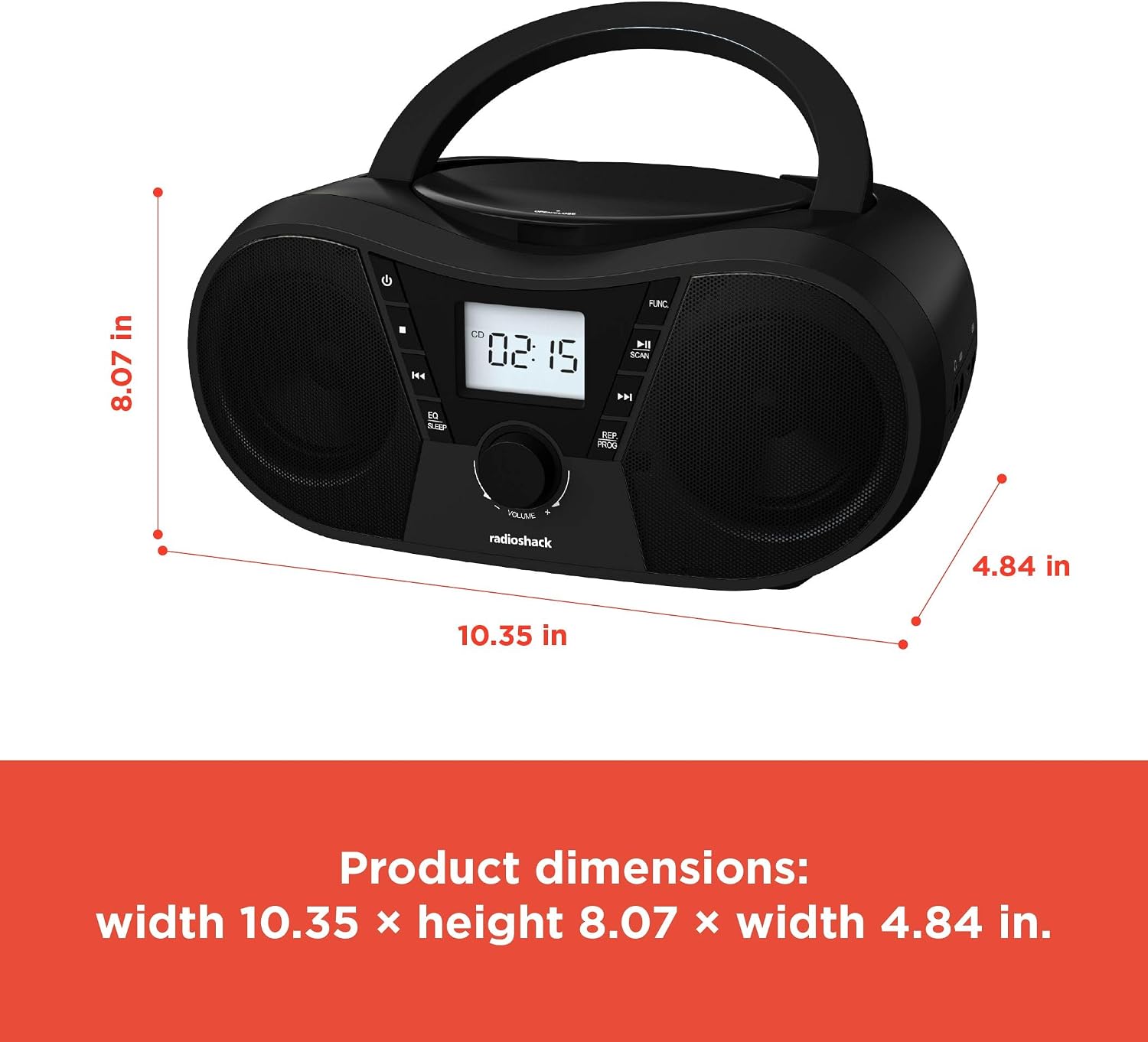
Şekil 6: Ürün Boyutları. The boombox measures approximately 10.35 inches wide, 8.07 inches high, and 4.84 inches deep.
| Özellik | Detay |
|---|---|
| Model Numarası | 1402010 |
| Güç Kaynağı | AC 110V-240V ~ 50/60Hz or 4 x "C" Batteries (DC 6V) |
| Desteklenen Medya | CD, CD-R, CD-RW, CD-MP3, USB (MP3), Bluetooth, FM Radio, AUX Input |
| Bluetooth Sürümü | 5.0 (Uyumlu) |
| FM Frekans Aralığı | 87.5 - 108 MHz |
| Ses Çıkışı Modu | Stereo |
| Konuşmacılar Sayısı | 2 (Built-in Stereo Speakers) |
| Netage | 10 watt |
| Frekans Tepkisi | 20 Hz - 20000 Hz |
| Boyutlar (G x Y x D) | Yaklaşık 10.35 x 8.07 x 4.84 inç |
| Renk | Siyah |
Garanti ve Destek
This RadioShack Portable CD Player Boombox (Model 1402010) comes with a 1 Yıllık Sınırlı Garanti Satın alma tarihinden itibaren geçerlidir. Bu garanti, normal kullanım koşullarında malzeme ve işçilik kaynaklı üretim hatalarını kapsar.
For warranty claims, technical support, or customer service inquiries, please contact RadioShack customer support through their official websatın alma belgelerinizle birlikte verilen site veya iletişim bilgileri.
Lütfen garanti amaçlı satın alma belgenizi saklayın.