
1. Giriş
The AOPUTTRIVER AP-5000Y is a versatile hot wire anemometer designed for accurate measurement of wind speed, airflow (CFM/CMM), and temperature. Its retractable, 360° revolving probe allows for precise measurements in various environments, including tight spaces like HVAC ducts. This manual provides essential information for the proper setup, operation, maintenance, and troubleshooting of your device.
2. Kutuda Neler Var?
- AP-5000Y Hot Wire Anemometer Unit
- Bez Çanta
- Kullanım Kılavuzu
- Veri Kablosu (Tip-C)

Image: Contents of the AP-5000Y package, showing the anemometer, canvas bag, instruction manual, and Type-C data cable.
3. Kurulum
Before initial use, it is crucial to connect the internal battery and fully charge the device.
- Pili bağlayın:
Locate the battery compartment on the back of the device. Use a small screwdriver to remove the battery cover. Connect the battery line interface to the corresponding port inside the compartment. Ensure a secure connection.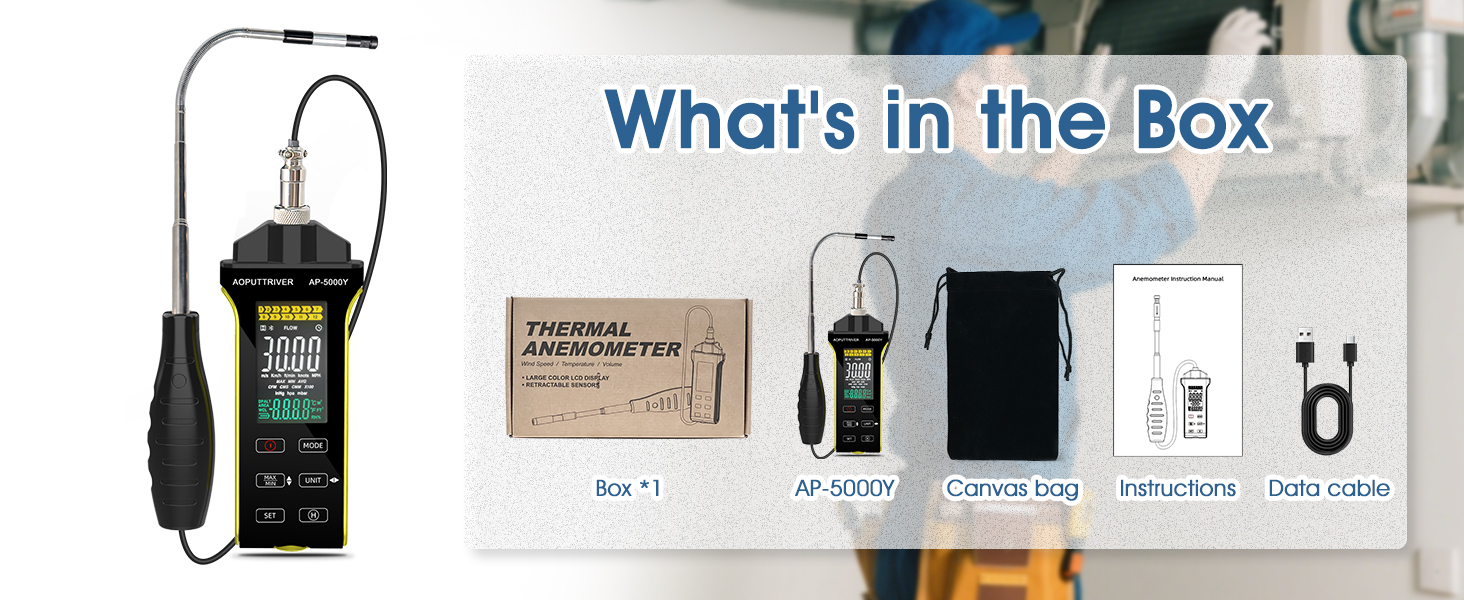
Image: Detailed steps for connecting the internal battery. This involves removing the battery cover with a screwdriver, connecting the battery cable, and then securing the cover.
- Pil Kapağını Sabitleyin:
Once the battery is connected, carefully place the battery back into its compartment and tighten the cover using the screwdriver. - Cihazı Şarj Edin:
Connect the provided Type-C data cable to the anemometer and a suitable USB power source. The device is powered by a 600mAh lithium-ion battery. The battery icon on the LCD will indicate charging status. Charge until the battery icon shows a full charge. Note: The device cannot be turned on while it is charging.
4. Kullanım Talimatları
4.1 Cihaz Bittiview ve Kontroller
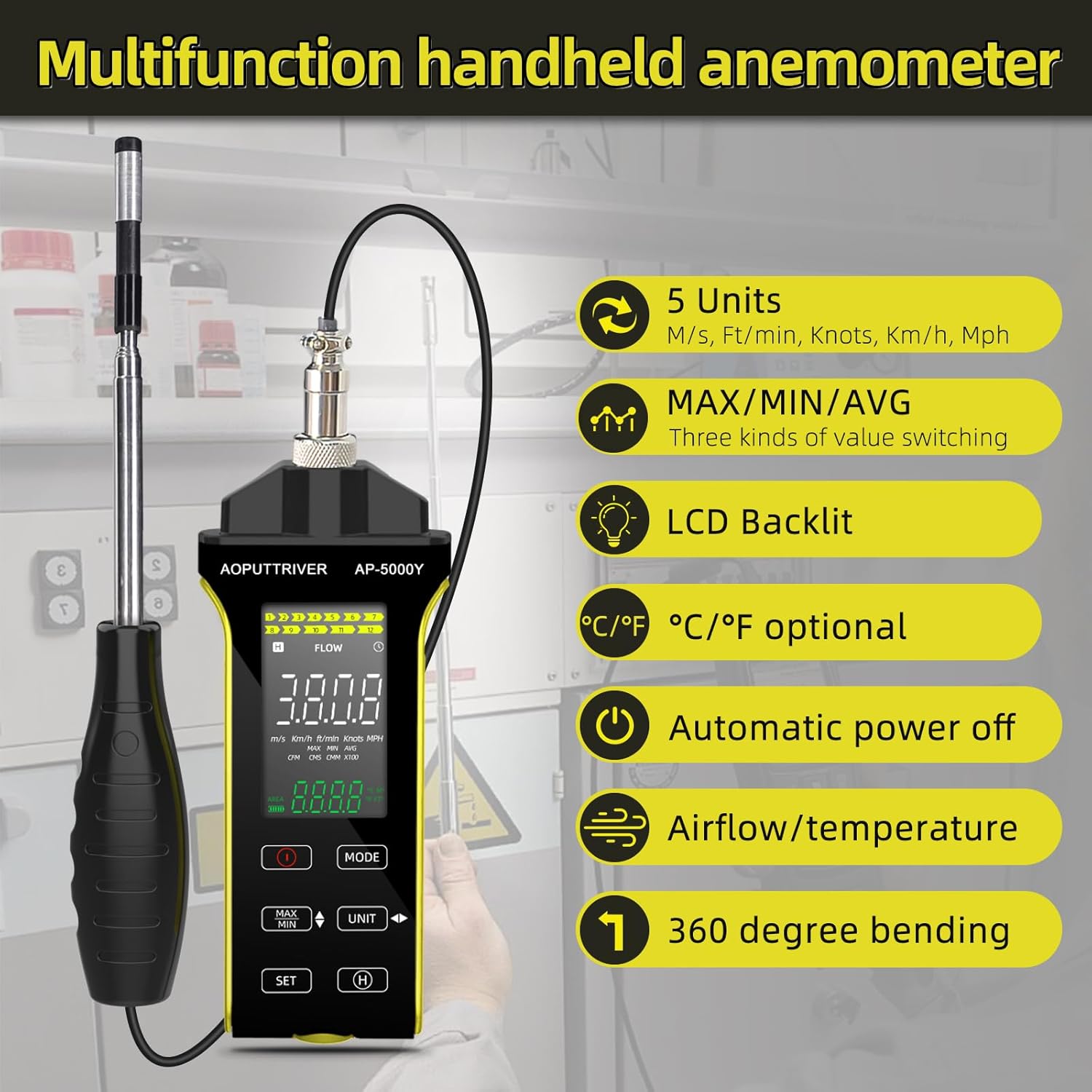
Image: Labeled diagram of the AP-5000Y anemometer, highlighting the LCD screen, power button, mode selection, unit selection, data retention, and the retractable sensor probe with its protective cover.
- Açma/Kapama Düğmesi: Press to power the device on or off.
- MOD Düğmesi: Cycles through different measurement functions (Air Speed, Air Volume, Temperature).
- BİRİM Düğmesi: Changes the measurement units for the selected function (e.g., m/s, km/h, ft/min, knots, mph for wind speed; CFM/CMM for airflow; °C/°F for temperature).
- MAX/MIN/AVG Button: Toggles between maximum, minimum, and average values recorded during a measurement session.
- Ayarlama düğmesi: Used for data retention (data hold) and other settings.
- LCD Ekran: Shows real-time measurements, units, battery status, and other indicators. Features a backlight for visibility in low-light conditions.
4.2 Ölçüm Alma
- Güç Açık: Press the On/Off button to turn on the anemometer. The LCD display will illuminate.
- Mod seç: Basın MOD button to choose between wind speed, airflow, or temperature measurement.
- Birim Seçin: Basın BİRİM button to select your desired measurement units.
- Prepare the Probe: Gently pull out the retractable probe to the desired length. Remove the sensor protective cover. The probe can be rotated and twisted 360 degrees for optimal positioning in various spaces.

Image: A user demonstrating the use of the AP-5000Y anemometer with its flexible, retractable probe extended and bent to measure airflow inside a ventilation duct.
- Probun yerini belirleyin: Place the sensor end of the probe directly into the airflow or area you wish to measure. Ensure the sensor is fully exposed to the flow for accurate readings.
- Ölçümleri Okuyun: Observe the real-time values on the LCD display. You can press the MAX / MIN / AVG düğmeye bas view the maximum, minimum, or average readings during your measurement session.
- Veri tutma: Basın AYARLAMAK Ekrandaki mevcut değeri dondurmak için düğmeye basın. Serbest bırakmak için tekrar basın.
- Kapat: After use, retract the probe and replace the sensor protective cover. Press the On/Off button to turn off the device. The anemometer also features an automatic power-off function to conserve battery.
4.3 inç Arka Aydınlatmalı LCD Ekran
The LCD display provides clear readings of wind speed, airflow, temperature, and humidity. It is equipped with a backlight for enhanced visibility in various lighting conditions. To activate or deactivate the backlight, refer to the specific instructions in the full user manual if not controlled automatically.

Image: A comparison showing the AP-5000Y's LCD display in both a well-lit room and a dark environment, demonstrating the clarity provided by its backlight feature.
5. Bakım
- Temizlik: Wipe the device and probe with a soft, dry cloth. Do not use abrasive cleaners or solvents. The probe is waterproof and dustproof, but avoid submerging the main unit in liquids.
- Sensör Bakımı: Always replace the sensor protective cover when the probe is not in use to prevent damage to the delicate hot wire sensor.
- Pil Bakım: Recharge the lithium-ion battery when the low battery indicator appears on the display. For long-term storage, ensure the battery is partially charged (around 50%) and store the device in a cool, dry place.
- Depolamak: Store the anemometer in its canvas bag to protect it from dust and physical damage.
6. Sorun Giderme
| Sorun | Olası Neden | Çözüm |
|---|---|---|
| Cihaz açılmıyor | Pil bağlı değil veya boşalmış. | Ensure the internal battery is properly connected (refer to Setup section). Charge the device using the Type-C cable. |
| Yanlış okumalar | Incorrect probe placement, wrong unit selected, sensor obstruction | Ensure the probe's hot wire sensor is fully exposed to the airflow. Verify that the correct measurement mode and units are selected. Clean the sensor if necessary. |
| Ekran boş veya loş | Low battery, backlight off | Recharge the battery. Check if the backlight needs to be manually activated (refer to Operating Instructions). |
| Cihaz şarj olmuyor | Cable issue, power source issue | Ensure the Type-C cable is securely connected. Try a different USB power adapter or port. |
7. Özellikler
| Özellik | Şartname |
|---|---|
| Hava Hız Aralığı | 0.1 ~ 30 m / sn |
| Air Velocity Units | m/s, km/sa, ft/dak, knot, mil/sa |
| Hava Sıcaklık Aralığı | 0 ~ 45 ° C (32 ~ 113 ° F) |
| Air Volume Range | 0 ~ 999900 m³/min (CFM/CMM) |
| Prob Boyutu | 298.5 x 40.84 x 23.7 mm (retractable) |
| Pil | 600 mAh Lityum İyon |
| Şarj Arayüzü | Tip-C |
| Boyutlar (Ana Ünite) | 5.74 x 2.36 x 1.1 inç |
| Ağırlık | 237 Gram |
| Malzeme | Plastik |
| Görüntülemek | Arkadan Aydınlatmalı LCD |
| Özel Özellikler | Retractable 360° revolving probe, MAX/MIN/AVG, Data Hold, Auto Power-Off, Waterproof & Dustproof Probe |
8. Garanti ve Destek
For specific warranty information regarding your AOPUTTRIVER AP-5000Y Hot Wire Anemometer, please refer to the documentation included with your purchase or contact the seller directly. Warranty terms may vary based on region and retailer.
Should you encounter any issues or require technical assistance, please contact AOPUTTRIVER customer support through their official website or the retailer from whom you purchased the product. Please have your model number (AP-5000Y) and purchase details ready when contacting support.