
1. Giriş
Thank you for choosing Monster Persona 6th ANC Active Noise Cancelling Headphones. These headphones are designed to provide a superior audio experience with advanced features such as Active Noise Cancellation, Bluetooth 6.0 connectivity, 60 hours of playtime, and three distinct music modes. This manual will guide you through the setup, operation, and maintenance of your new headphones to ensure optimal performance and longevity.
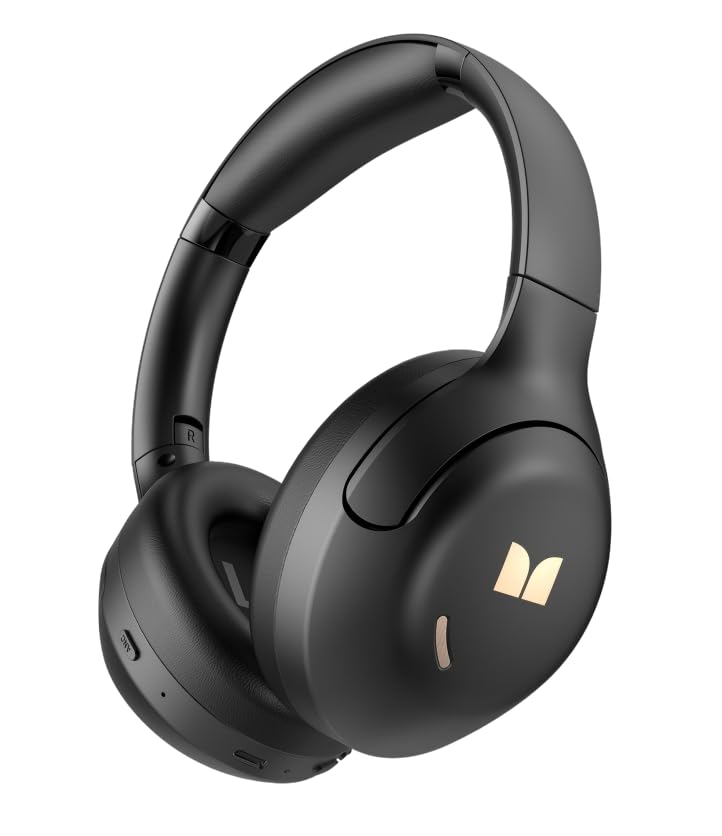
Resim 1.1: Ön view of the Monster Persona 6th ANC Active Noise Cancelling Headphones. The headphones feature a sleek, over-ear design with cushioned earcups and an adjustable headband, providing comfort for extended listening sessions.
2. Paket İçeriği
Lütfen paketi aşağıdaki öğeler açısından kontrol edin:
- Monster Persona 6th ANC Headphones × 1
- C Tipi Şarj Kablosu × 1
- Audio Cable × 1 (for wired connection)
- Kullanım Kılavuzu × 1
3. Kurulum
3.1 Kulaklıkların Şarj Edilmesi
İlk kullanımdan önce kulaklıklarınızı tamamen şarj edin. Tam şarj yaklaşık 2-3 saat sürer.
- Connect the Type-C charging cable to the charging port on the headphones.
- Kablonun diğer ucunu bir USB güç adaptörüne (dahil değildir) veya bir bilgisayarın USB portuna bağlayın.
- LED göstergesi şarj durumunu gösterecektir (örneğin, kırmızı şarj oluyor, mavi tamamen şarj oluyor).
Hızlı Şarj: 10 dakikalık şarj yaklaşık 5 saatlik oynatma süresi sağlar.
Image 3.1: Location of the Type-C charging port on the Monster Persona 6th ANC Headphones. The port is typically located on the bottom edge of one earcup, alongside other control buttons.
3.2 Açma/Kapatma
- Güç Açık: Press and hold the Power button for 3 seconds until the LED indicator flashes blue and you hear a power-on prompt.
- Kapat: Press and hold the Power button for 3 seconds until the LED indicator flashes red and you hear a power-off prompt.
3.3 Bluetooth Eşleştirme
Kablosuz ses için kulaklığınızı cihazınızla eşleştirin.
- Kulaklıkların kapalı olduğundan emin olun.
- Güç düğmesini 5-7 saniye basılı tutun; LED göstergesi dönüşümlü olarak mavi ve kırmızı yanıp sönmeye başlayacak, bu da eşleştirme modunu gösterir.
- Cihazınızda (akıllı telefon, tablet, bilgisayar) Bluetooth'u etkinleştirin ve kullanılabilir cihazları arayın.
- Select "Monster Persona 6th ANC" from the list of devices.
- Once connected, the LED indicator will flash blue slowly, and you will hear a connection prompt.
Çift Cihaz Bağlantısı: These headphones support connecting to two Bluetooth devices simultaneously. After pairing with the first device, disable Bluetooth on the first device, pair with the second, then re-enable Bluetooth on the first device. The headphones should connect to both.
4. Kulaklıkların Kullanımı
4.1 Temel Kontroller
| İşlev | Aksiyon |
|---|---|
| Güç Açık/Kapalı | Press and hold Power button for 3 seconds. |
| Oynat/Duraklat | Press the Multi-function button (often the Power button when not powering on/off). |
| Sesi Aç | Short press '+' button. |
| Sesi Azalt | Short press '-' button. |
| Sonraki Parça | Long press '+' button. |
| Önceki Parça | Long press '-' button. |
| Cevapla/Çağrıyı Sonlandır | Çok işlevli düğmeye basın. |
| Çağrıyı Reddet | Çok fonksiyonlu düğmeye uzun süre basın. |
| Sesli Asistanı Etkinleştir | Çok işlevli düğmeye iki kez basın. |
Image 4.1: Diagram illustrating the location and function of control buttons on the Monster Persona 6th ANC Headphones. Buttons typically include Power/Multi-function, Volume Up/Next Track, Volume Down/Previous Track, and an ANC mode button.
4.2 Music Modes (EQ Modes)
Your headphones feature three distinct music modes to optimize your listening experience. Press the dedicated EQ/Mode button to cycle through them:
- Aktif Gürültü Önleme (ANC) Modu: Reduces ambient noise for an immersive audio experience. Ideal for travel or noisy environments.
- Şeffaflık Modu: Sesli içeriğin keyfini çıkarırken çevrenizi de duymanızı sağlar. Şehir ortamlarında veya başkalarıyla etkileşim halindeyken farkındalığı artırmak için kullanışlıdır.
- Standart Mod: Provides a balanced, classic sound profile without active noise cancellation or transparency features.
4.3 Kablolu Bağlantı
You can use the included audio cable to connect your headphones to devices without Bluetooth capability or when the battery is depleted. Simply plug one end into the headphone's audio jack and the other into your device's 3.5mm audio output.
5. Bakım
5.1 Temizlik
- Kulaklığınızı yumuşak, kuru ve tiftiksiz bir bezle silin.
- Aşındırıcı temizleyiciler, alkol veya kimyasal çözücüler kullanmayın.
- Herhangi bir açıklıktan içeriye nem girmesini önleyin.
5.2 Depolama
- Kulaklığınızı serin, kuru, doğrudan güneş ışığından ve aşırı sıcaklıklardan uzak bir yerde saklayın.
- If storing for an extended period, charge the headphones every three months to maintain battery health.
6. Sorun Giderme
Kulaklığınızla ilgili sorunlarla karşılaşırsanız aşağıdaki yaygın çözümlere başvurun:
| Sorun | Çözüm |
|---|---|
| Kulaklık açılmıyor. | Kulaklıkların şarjının dolu olduğundan emin olun. Type-C kablosunu kullanarak bir güç kaynağına bağlayın. |
| Cihazla eşleştirilemiyor. | Ensure headphones are in pairing mode (flashing blue/red). Turn off and on Bluetooth on your device. Move headphones closer to the device. Clear previous Bluetooth connections on your device. |
| Ses yok veya ses seviyesi düşük. | Check headphone and device volume levels. Ensure headphones are properly paired. Try playing different audio sources. If using wired connection, ensure cable is fully inserted. |
| ANC etkili bir şekilde çalışmıyor. | Ensure ANC mode is activated. ANC is most effective against low-frequency, constant noise. It may not completely eliminate all sounds. |
| Bağlantı kesintisi. | Ensure no obstacles between headphones and device. Move away from strong Wi-Fi signals or other Bluetooth devices that may cause interference. Keep within the 33 feet Bluetooth range. |
7. Özellikler
| Özellik | Detay |
|---|---|
| Marka | Canavar |
| Model Adı | Monster Persona 6th ANC |
| Kulak Yerleşimi | Kulak Üstü |
| Gürültü Kontrolü | Aktif Gürültü Önleme |
| Bağlantı Teknolojisi | Wireless (Bluetooth), Wired (3.5mm Audio Cable) |
| Bluetooth Sürümü | 6.0 |
| Bluetooth Menzili | 33 Ayak (10 metre) |
| Pil Ömrü | 60 saate kadar |
| Şarj Portu | Tip-C |
| Ses Sürücüsü Boyutu | 40 Milimetre |
| Frekans Aralığı | 20Hz - 20,000Hz |
| Kontrol Türü | Düğme Kontrolü |
| Malzeme | Plastik |
| Ek Özellikler | 3 Music Modes (ANC, Transparency, Standard), Dual Device Connection, Hands-free Calling |
8. Garanti ve Destek
8.1 Garanti Bilgileri
Your Monster Persona 6th ANC Headphones come with a 180 günlük garanti Satın alma tarihinden itibaren geçerlidir. Bu garanti, normal kullanım koşullarında üretim hatalarını ve işçilik kusurlarını kapsar. Yanlış kullanım, kazalar, yetkisiz değişiklikler veya normal aşınma ve yıpranmadan kaynaklanan hasarları kapsamaz.
8.2 Müşteri Desteği
For technical assistance, warranty claims, or any questions regarding your Monster Persona 6th ANC Headphones, please contact Monster customer support through their official website or the retailer where the product was purchased. Please have your purchase receipt and product model information ready when contacting support.


