
giriiş
Thank you for choosing the GOBOULT Y1 v2.0 Wireless Earbuds. This manual provides essential information for setting up, operating, and maintaining your earbuds to ensure optimal performance and longevity. Please read it carefully before use.
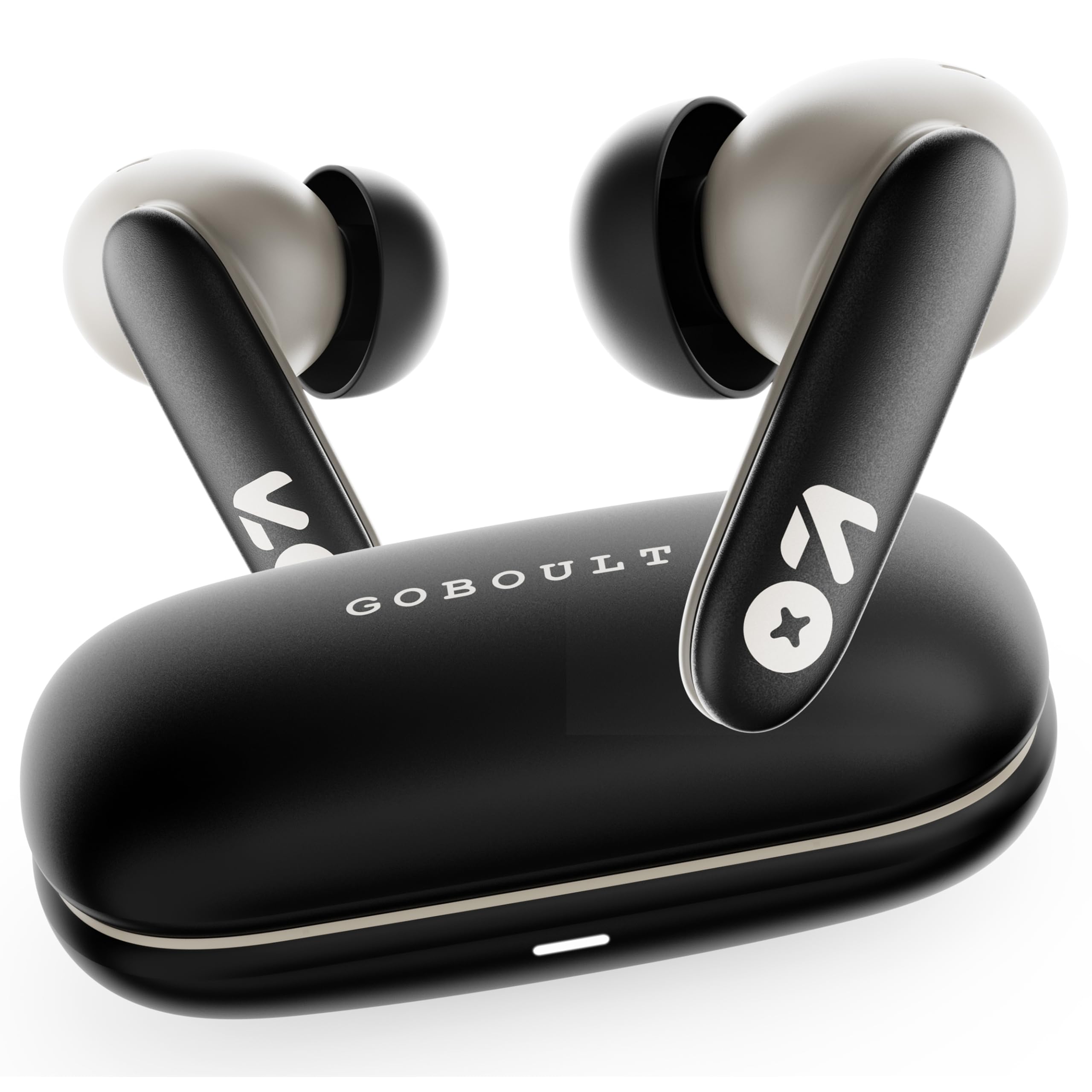
Image: GOBOULT Y1 v2.0 Wireless Earbuds and their charging case, showcasinşık tasarımı.
Kutuda Neler Var?
- GOBOULT Y1 v2.0 Wireless Earbuds
- Şarj Kutusu
- USB Type-C Şarj Kablosu
- Kulak Yastıkları (çeşitli boyutlarda)
- Kullanıcı Kılavuzu
- Garanti Kartı
Ürün Özellikleri
The GOBOULT Y1 v2.0 earbuds are designed with advanced features for an enhanced audio experience:
- Uzatılmış Çalma Süresi: Şarj kutusuyla birlikte toplamda 60 saate kadar kullanım süresi.
- Bluetooth 6.0: Ensures fast, stable, and efficient wireless connectivity.
- Zen Quad Mic ENC: Environmental Noise Cancellation with four microphones for clear calls.
- Düşük Gecikme: 45ms ultra-low latency for gaming and video synchronization.
- Dokunmatik Kontrol: Intuitive touch sensors for managing music, calls, and voice assistant.
- Çift Cihaz Eşleştirme: Connect and switch seamlessly between two devices.
- 13mm Bass Driver: Delivers powerful bass and clear audio.
- AMP Uygulama desteği: Customize audio settings and controls via the dedicated application.
- IPX5 Suya Dayanıklılık: Protection against sweat and light splashes.
- Hızlı Şarj: Type-C port for quick charging of the case.

Resim: Üzeriview of GOBOULT Y1 v2.0 features including sleek design, AMP App support, Bluetooth 6.0, 60 hours battery life, and dual device pairing.
Kurulum Kılavuzu
1. Kulaklıkları ve Kutuyu Şarj Etme
İlk kullanımdan önce kulaklıklarınızı ve şarj kutusunu tamamen şarj edin.
- Kulaklıkları şarj kutusuna yerleştirin. Yerlerine doğru şekilde oturduğundan emin olun.
- USB Type-C şarj kablosunu kasanın üzerindeki şarj portuna ve bir güç kaynağına bağlayın.
- The LED indicator on the case will show charging status. A full charge typically takes approximately 1.5-2 hours.

Image: The GOBOULT Y1 v2.0 earbuds and charging case, highlighting the 60-hour battery life and Type-C fast charging capability.
2. Initial Pairing (Single Device)
- Şarj kutusunu açın. Kulaklıklar otomatik olarak eşleştirme moduna geçecektir.
- Cihazınızda (akıllı telefon, tablet vb.) Bluetooth’u etkinleştirin.
- Arama available Bluetooth devices and select "GOBOULT Y1 v2.0".
- Bağlantı kurulduktan sonra bir onay sesi duyacaksınız.
3. Çift Cihaz Eşleştirme
The Y1 v2.0 supports connecting to two devices simultaneously.
- Pair the earbuds with your first device as described in "Initial Pairing".
- İlk cihazda Bluetooth'u devre dışı bırakın. Kulaklıklar eşleştirme moduna tekrar girecektir.
- Kulaklıkları ikinci cihazınızla eşleştirin.
- İlk cihazda Bluetooth'u yeniden etkinleştirin. Kulaklıklar her iki cihaza da otomatik olarak bağlanmalıdır.
- Cihazlar arasında geçiş yapmak için, istediğiniz cihazda sesi oynatmanız yeterlidir.

Image: The GOBOULT Y1 v2.0 earbuds connected to both a laptop and a smartphone, illustrating the dual device pairing feature.
Kullanım Talimatları
1. Dokunmatik Kontroller
The earbuds feature intuitive touch controls on their stems:
| Aksiyon | İşlev |
|---|---|
| Tek Dokunuş (Sol/Sağ) | Müzik Çal/Duraklat, Çağrıyı Cevapla/Sonlandır |
| Çift Dokunma (Sağ) | Sonraki Parça |
| Çift Dokunma (Sol) | Önceki Parça |
| Üçlü Musluk (Sol/Sağ) | Sesli Asistanı Etkinleştir |
| Uzun Basma (Sol/Sağ) | Çağrıyı Reddet |
| Uzun Basma (Sağ) | Sesi Aç |
| Uzun Basma (Sol) | Sesi Azalt |

Image: Visual representation of touch controls for music playback and call management, along with the IPX5 water resistance rating.
2. Sesli Asistan
Activate your device's voice assistant (Siri, Google Assistant) by triple-tapping either earbud. You can then issue commands like making calls or playing music.

Image: The GOBOULT Y1 v2.0 earbuds highlighting Bluetooth 6.0 for stable connection and integration with AI voice assistants like Siri and Google Assistant.
3. Oyun Modu (Düşük Gecikme Süresi)
For an optimized gaming experience, activate the 45ms ultra-low latency gaming mode. Refer to the AMP App or specific touch control gestures (if available) for activation.

Image: The GOBOULT Y1 v2.0 earbuds illustrating the 45ms ultra-low latency Gaming Mode.
4. AMP Uygulama Desteği
Download the GOBOULT AMP App to unlock advanced customization options:
- Kişiselleştirilmiş ses için Ekolayzır (EQ) ayarlarını yapın.
- Dokunmatik kontrolleri özelleştirin.
- Access additional features like Water Ejection mode.

Image: Screenshot of the GOBOULT AMP App interface, demonstrating equalizer adjustments and other customization features.
Bakım
1. Temizlik
Düzenli temizlik ses kalitesinin ve hijyenin korunmasına yardımcı olur.
- Kulaklıklarınızı ve şarj kutusunu silmek için yumuşak, kuru ve tiftiksiz bir bez kullanın.
- Kulaklık uçlarından ve hoparlör ızgarasından kulak kiri veya kalıntıları küçük bir fırça veya pamuklu çubuk kullanarak nazikçe temizleyin.
- Aşındırıcı temizleyiciler, alkol veya kimyasal çözücüler kullanmayın.
2. Suya Dayanıklılık (IPX5)
The GOBOULT Y1 v2.0 earbuds are rated IPX5 water resistant, meaning they are protected against low-pressure water jets from any direction. This makes them suitable for workouts and light rain.
- Kulaklıklarınızı suya batırmayın.
- Şarj kutusu suya dayanıklı değildir.
- Hasar görmelerini önlemek için kulaklıkları şarj kutusuna geri koymadan önce tamamen kuru olduklarından emin olun.
Sorun giderme
| Sorun | Çözüm |
|---|---|
| Kulaklıklar eşleşmiyor | Kulaklıklarınızın şarjlı olduğundan emin olun. Cihazınızın Bluetooth'unu kapatıp açın. Bluetooth ayarlarından cihazı unutun ve yeniden eşleştirin. |
| Sadece tek kulaklık çalışıyor | Place both earbuds back in the case, close it, then open again. Ensure both are charged. Reset earbuds if issue persists. |
| Düşük ses seviyesi veya zayıf ses kalitesi | Clean earbud speaker mesh. Adjust volume on both earbuds and connected device. Try different ear tip sizes for a better seal. |
| Şarj kutusu şarj olmuyor | Check USB Type-C cable and power adapter. Ensure connections are secure. |
Özellikler
| Özellik | Detay |
|---|---|
| Marka | GOBOULT |
| Model Adı | Y1 v2.0 (Airbass) |
| Kulak Yerleşimi | Kulakta |
| Gürültü Kontrolü | Çevresel Gürültü Engelleme (ENC) |
| Bluetooth Sürümü | 6.0 |
| Bluetooth Menzili | 10 Metre |
| Pil Ömrü (Toplam) | 60 Saate Kadar |
| Ses Sürücüsü Boyutu | 13 Milimetre |
| Ses Gecikmesi | 45 Milisaniye (Oyun Modu) |
| Frekans Tepkisi | 20 Hz - 20,000 Hz |
| Su Direnç Seviyesi | IPX5 |
| Kontrol Yöntemi | Dokunmatik Kontrol, Uygulama |
| Uyumlu Cihazlar | Android, iOS, Desktops, Laptops, Tablets |
| Ürün Ağırlığı | 50 Gram |

Image: A detailed comparison table showing the specifications of GOBOULT Y1 v2.0 versus the previous Y1 model, highlighting improvements.
Garanti ve Destek
The GOBOULT Y1 v2.0 Wireless Earbuds come with a 1 Yıllık Üretici Garantisi Satın alma tarihinden itibaren geçerlidir. Bu garanti, üretim hatalarını kapsar.
For warranty claims, technical support, or any product-related inquiries, please refer to the contact information provided on your warranty card or visit the official GOBOULT support webalan.