
1. Ürün Bittiview
The G-Shock Casio GD010 digital watch is engineered for durability and functionality, designed to withstand demanding conditions while providing essential timekeeping features. This timepiece incorporates bio-based resin components and a CORDURA re/cor band, reflecting a commitment to environmental considerations.
This manual provides detailed instructions for setting up, operating, maintaining, and troubleshooting your GD010 watch.
Temel Özellikler
- Shock Resistant Construction: Designed to endure impacts and vibrations.
- Carbon Core Guard Structure: Enhances durability and protection for the internal module.
- 200 Metre Su Geçirmezlik: Suitable for swimming, snorkeling, and diving (non-SCUBA).
- Uzun Pil Ömrü: Approximately 10 years on a CR2025 battery.
- Bio-based Resin Components: Case and bezel made with environmentally conscious materials.
- CORDURA re/cor Band: Durable strap made from recycled PET plastic fiber.
- Dijital gösterge: Clear and easy-to-read time and function information.
- Çoklu Fonksiyonlar: Includes alarm, chronograph (stopwatch), and timer.

Image 1.1: The G-Shock GD010 watch, showcasing its core features including shock resistance, Carbon Core Guard structure, and a 10-year battery life.
2. Başlarken: Kurulum
Düğme Fonksiyonları
Your GD010 watch features several buttons for navigation and function control. Familiarize yourself with their locations and primary roles.

Resim 2.1: Yan view of the G-Shock GD010, illustrating the location of the control buttons.
- AYARLA (Sol Üst): Ayar modlarına girip çıkmak ve ayarları onaylamak için kullanılır.
- MOD (Sol Alt): Cycles through the watch's various modes (Timekeeping, Stopwatch, Timer, Alarm).
- REVERSE (Top Right): Used to decrease values or move backward through options during setting.
- FORWARD / START (Bottom Right): Used to increase values or move forward through options during setting. Also used to start/stop stopwatch or timer.
- LIGHT (Center Bottom): Activates the backlight for illumination.
İlk Saat ve Tarih Ayarı
- Zaman Tutma Modunda, tuşuna basın ve basılı tutun AYARLAMAK button until the city code starts to flash, indicating the setting mode.
- Kullanın TERSİ Ve İLERİ buttons to select your desired Home City Code. This will automatically set the correct time zone.
- Basın MOD button to cycle through the settings: DST (Daylight Saving Time) → 12/24-hour format → Seconds → Hour → Minute → Year → Month → Day.
- Her ayar için şunu kullanın: TERSİ Ve İLERİ değeri değiştirmek için düğmeleri kullanın.
- Tüm ayarlar yapılandırıldıktan sonra, tuşuna basın. AYARLAMAK Ayar modundan çıkmak için düğmesine basın.
3. Saatinizi Çalıştırma
The GD010 offers various modes for different functions. Press the MOD Bunlar arasında geçiş yapmak için düğmeye basın.
Zaman İşleyişi Modu
Bu varsayılan moddur ve geçerli saati, haftanın gününü ve tarihi gösterir.
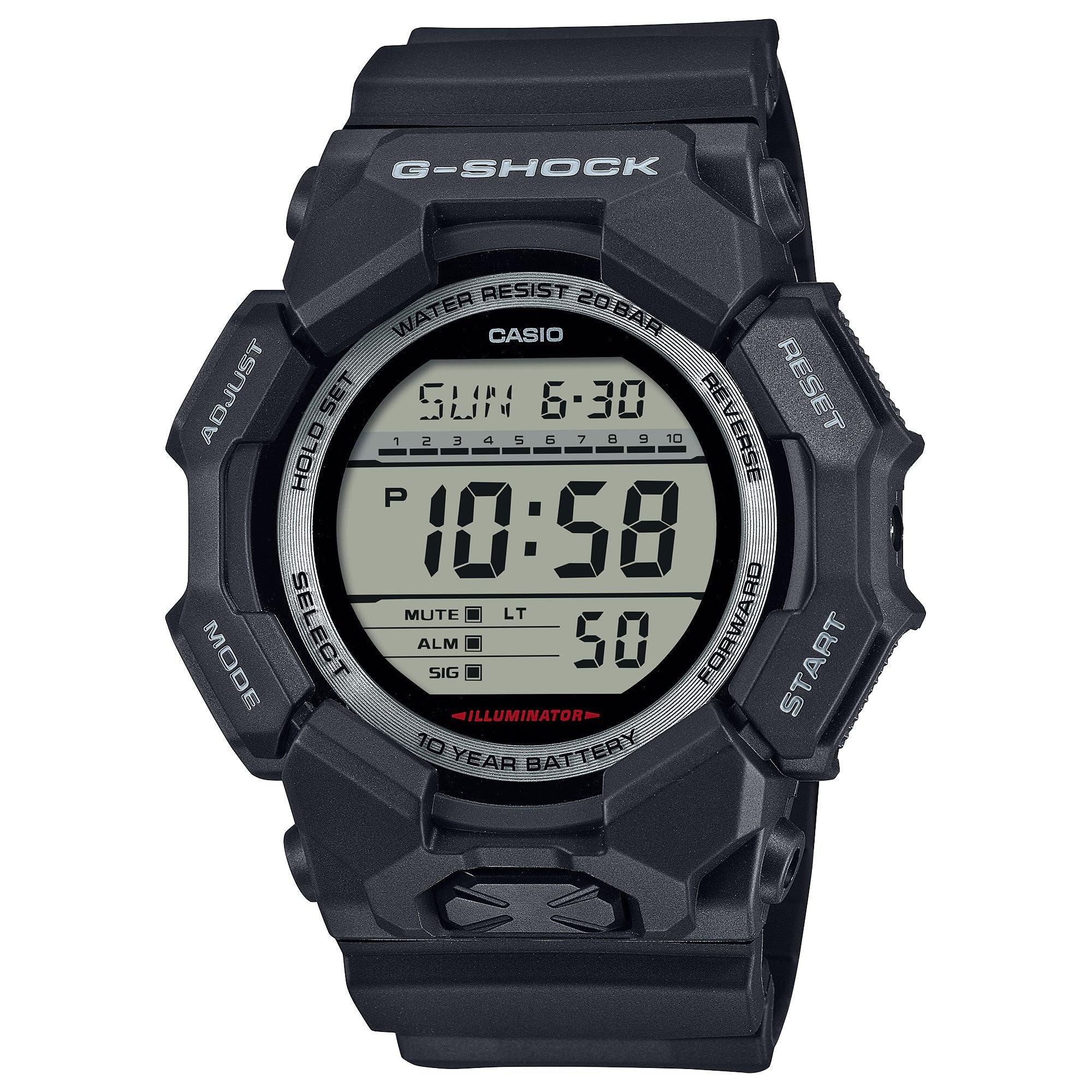
Image 3.1: The G-Shock GD010 watch face in Timekeeping Mode.
Kronometrenin (Kronograf) Kullanımı
- Zaman Tutma Modundan, tuşuna basın MOD Ekranda "STW" veya "STOPWATCH" görünene kadar düğmeye basın.
- Basın FORWARD / START Kronometreyi başlatmak için düğmeye basın.
- Basın FORWARD / START Kronometreyi durdurmak için tekrar düğmeye basın.
- Kronometreyi sıfırlamak için, tuşuna basın. TERSİ Kronometre durdurulmuşken düğmesine basın.
Geri Sayım Sayacı Ayarı
- Zaman Tutma Modundan, tuşuna basın MOD "TMR" veya "TIMER" görünene kadar düğmeye basın.
- Basılı tutun AYARLAMAK button until the current timer setting starts to flash.
- Kullanın MOD Saat veya dakika ayarını seçmek için düğme.
- Kullanın TERSİ Ve İLERİ İstediğiniz geri sayım süresini ayarlamak için butonları kullanın.
- Basın AYARLAMAK Ayar modundan çıkmak için düğmesine basın.
- Basın FORWARD / START button to start the countdown. An alarm will sound when the timer reaches zero.
Alarm Fonksiyonları
- Zaman Tutma Modundan, tuşuna basın MOD "ALM" veya "ALARM" görünene kadar düğmeye basın.
- Basılı tutun AYARLAMAK Alarm saati yanıp sönmeye başlayana kadar düğmeye basın.
- Kullanın MOD Saat veya dakika ayarını seçmek için düğme.
- Kullanın TERSİ Ve İLERİ İstediğiniz alarm saatini ayarlamak için butonlara basın.
- Basın AYARLAMAK Ayar modundan çıkmak için düğmesine basın.
- Alarmı AÇMAK/KAPATMAK için, FORWARD / START button while in Alarm Mode (without holding ADJUST).
Suya Dayanıklılık Kuralları
Your GD010 watch is rated for 200-meter water resistance. This means it is suitable for recreational diving (excluding saturation diving), swimming, snorkeling, and water sports.
- Do not operate buttons while the watch is submerged in water or wet.
- Avoid exposing the watch to hot water, steam, or extreme temperature changes, as this can compromise water resistance.
- Tuzlu suya maruz kaldıktan sonra saati bol tatlı suyla iyice durulayın ve kurulayın.
4. Bakım ve Onarım
Genel Bakım
- Kir ve nemi gidermek için saatinizi düzenli olarak yumuşak ve kuru bir bezle silin.
- Avoid exposing the watch to strong chemicals, solvents, or detergents, as these can damage the resin materials.
- Saatinizi kullanmadığınız zamanlarda, doğrudan güneş ışığından ve aşırı sıcaklıklardan uzak, serin ve kuru bir yerde saklayın.
- The watch's resin components and band are designed for durability, but prolonged exposure to UV light may cause discoloration over time.
Pil Değişimi
The GD010 watch is equipped with a CR2025 battery, providing an approximate battery life of 10 years. When the display becomes dim or functions become erratic, it may be time for a battery replacement.
Battery replacement should ideally be performed by a qualified watch technician to ensure proper sealing and maintain water resistance. Attempting to replace the battery yourself may void the warranty and compromise the watch's water resistance.
Temizlik
To clean your watch, use a soft cloth dampened with mild soap and water. Gently wipe the case and band. For stubborn dirt, a soft brush can be used. Rinse thoroughly with fresh water and dry completely with a soft cloth.
5. Sorun Giderme Kılavuzu
If you encounter issues with your GD010 watch, refer to the following common problems and their solutions.
| Sorun | Olası Neden | Çözüm |
|---|---|---|
| Ekran boş veya karanlık. | Pil zayıf. | Replace the battery (CR2025). Consult a professional watch technician. |
| Zaman yanlış. | Incorrect time zone or manual setting error. | Bölüm 2'de açıklandığı gibi saat ve tarih ayarlarını yeniden yapın. |
| Düğmeler yanıt vermiyor. | Watch is wet, or internal module error. | Ensure the watch is dry. If the problem persists, a reset may be required (consult support), or professional service. |
| Alarm çalmıyor. | Alarm is turned off or volume is too low (if adjustable). | Verify the alarm is set to ON in Alarm Mode. Check watch settings for alarm volume if applicable. |
If the problem persists after attempting these solutions, please contact G-Shock customer support for further assistance.
6. Ürün Özellikleri
| Model Adı | GD010 |
| Model Numarası | GD010-1 |
| Kasa Boyutları (U×G×Y) | 54.9 × 51.9 × 16.1 mm |
| Ağırlık | 73 g (yaklaşık 2.57 oz) |
| Case and Bezel Material | Bio-based Carbon / Bio-based Resin |
| Bant Malzeme Türü | Resin (CORDURA re/cor) |
| Yapı | Shock Resistant, Carbon Core Guard structure |
| Suya Dayanıklılık | 200 metre su geçirmezlik |
| Güç Kaynağı | CR2025 (1 Lithium Metal battery, included) |
| Yaklaşık Pil Ömrü | 10 yıl |
| Kristal | Mineral Cam |
| Görüntü Türü | Dijital |
| Hareket Türü | Japon Kuvarsı |
| Ek Özellikler | Alarm, Chronograph, Timer |
| Toka Tipi | Toka |
| Bant Rengi | Siyah |
| Kadran Rengi | Siyah |
7. Garanti ve Müşteri Desteği
Garanti Bilgileri
Your G-Shock GD010 watch comes with a Sınırlı Garanti. The terms and conditions of this warranty cover manufacturing defects under normal use. Please refer to the warranty card included with your purchase for specific details regarding coverage duration, exclusions, and how to make a claim. Keep your proof of purchase for warranty validation.
Müşteri Desteği ile İletişime Geçme
For technical assistance, warranty service, or any other inquiries regarding your G-Shock GD010 watch, please contact G-Shock customer support.
- Visit the official G-Shock website for support contact information, FAQs, and service center locations.
- Have your watch model number (GD010-1) and proof of purchase ready when contacting support.