
giriiş
The Roku Hiro 32-inch 720p HD Smart TV offers an integrated Roku streaming experience. This television features an HD display for clear picture quality and speakers with enhanced audio. It supports Bluetooth for private listening with headphones and includes Wi-Fi for internet connectivity. The Roku operating system provides a customizable home screen, access to numerous streaming channels, and automatic updates, making it suitable for various living spaces.
Kutuda Neler Var?
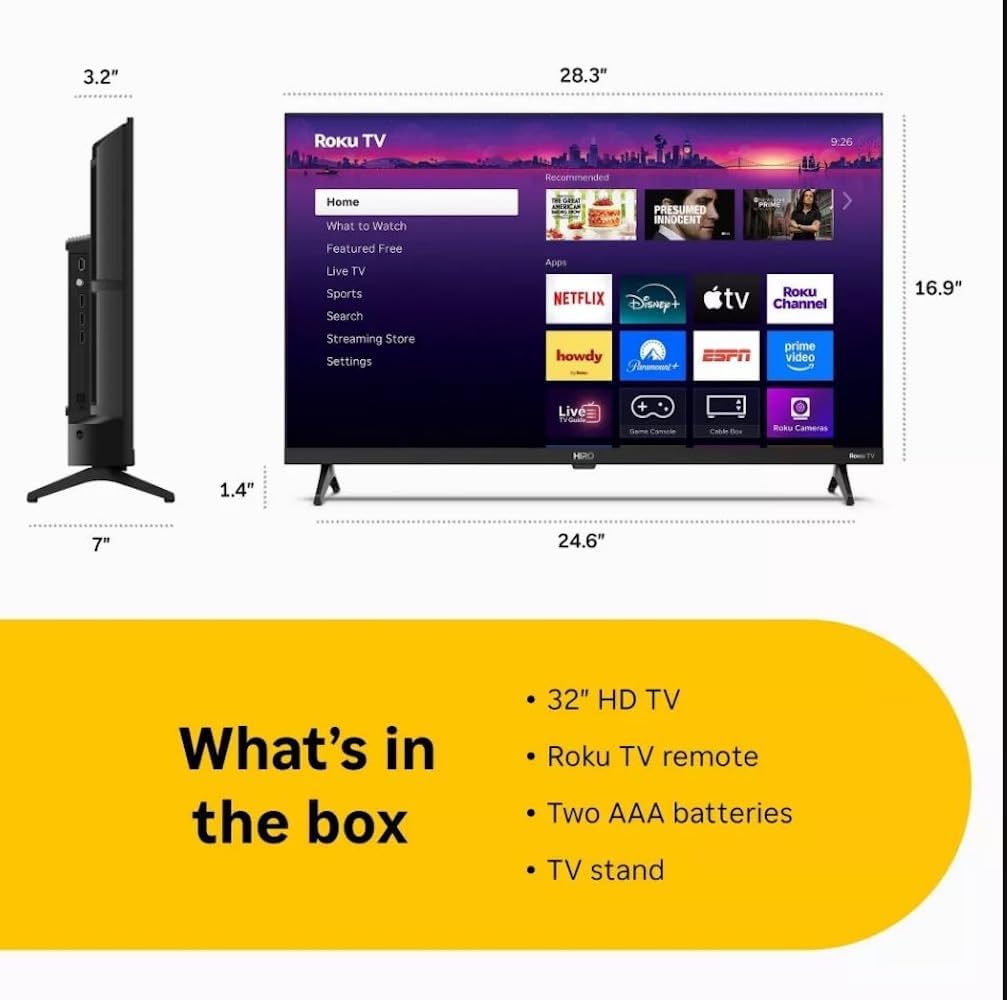
Diagram showing the dimensions of the Roku Hiro 32-inch TV and a list of included accessories: 32-inch HD TV, Roku TV remote, two AAA batteries, and TV stand.
- Hiro 32" 720p HD Smart TV Flat Screen LED Television with Roku TV
- Uzaktan kumanda
- Televizyon sehpası
- Güç kablosu
- Kullanıcı Kılavuzu
Kurmak
1. Stand Kurulumu
Carefully place the TV screen-down on a soft, clean surface to prevent damage. Align the TV stand with the designated slots on the bottom of the TV. Secure the stand using the provided screws. Ensure the stand is firmly attached before proceeding.
2. Cihazları Bağlama

Arka view of the Roku Hiro TV, showing the input/output ports including USB, HDMI, and antenna connections.
- Güç: Güç kablosunu televizyonun güç girişine ve ardından duvar prizine bağlayın.
- HDMI: Connect external devices such as Blu-ray players, game consoles, or cable boxes to the HDMI ports. This TV features 3 HDMI ports.
- USB BAĞLANTI: Use the USB port for media playback from a USB drive.
- Optik Ses: Connect an external sound system using an optical audio cable for enhanced sound.
- Anten/Kablo: Connect an antenna or cable TV feed to the RF input for over-the-air or cable channels.
3. İlk Kurulum
After connecting all necessary cables, power on the TV. Follow the on-screen instructions to:
- Dilinizi seçin.
- Wi-Fi ağınıza bağlanın.
- Roku hesabınızı etkinleştirin (veya yeni bir hesap oluşturun).
- Scan for available channels if an antenna is connected.
Kullanım Talimatları
Uzaktan Kumanda Fonksiyonları

Close-up of the Roku TV remote control, highlighting buttons for TV power, volume, mute, sleep timer, instant replay, options, and app shortcuts.
- Güç Düğmesi: Televizyonu açar veya kapatır.
- Yön Tuş Takımı (D-Pad): Menülerde gezinir ve öğeleri seçer.
- Tamam Düğmesi: Seçimleri onaylar.
- Ana menü tuşu: Roku ana ekranına geri döner.
- Geri Düğmesi: Önceki ekrana döner.
- Sesi Aç/Kapat: TV'nin ses düzeyini ayarlar.
- Sessiz tuşu: Televizyonun sesini kapatır veya açar.
- Uygulama Kısayol Düğmeleri: Direct access to popular streaming services (e.g., Netflix, Disney+, Apple TV+, Prime Video).
- Uyku Zamanlayıcısı: Sets a timer for the TV to turn off automatically.
- Anında Tekrar: Jumps back a few seconds in supported content.
- Seçenekler: Accesses additional settings or information for the current content.
Navigating the Roku OS

The Roku TV home screen interface, showing recommended content and various streaming applications.
The Roku home screen provides access to all your streaming channels, inputs, and settings. Use the D-Pad on your remote to navigate through the menu options on the left and the app grid on the right. You can customize the order of your channels by highlighting an app, pressing the * (Options) button, and selecting 'Move channel'.
Akış İçeriği
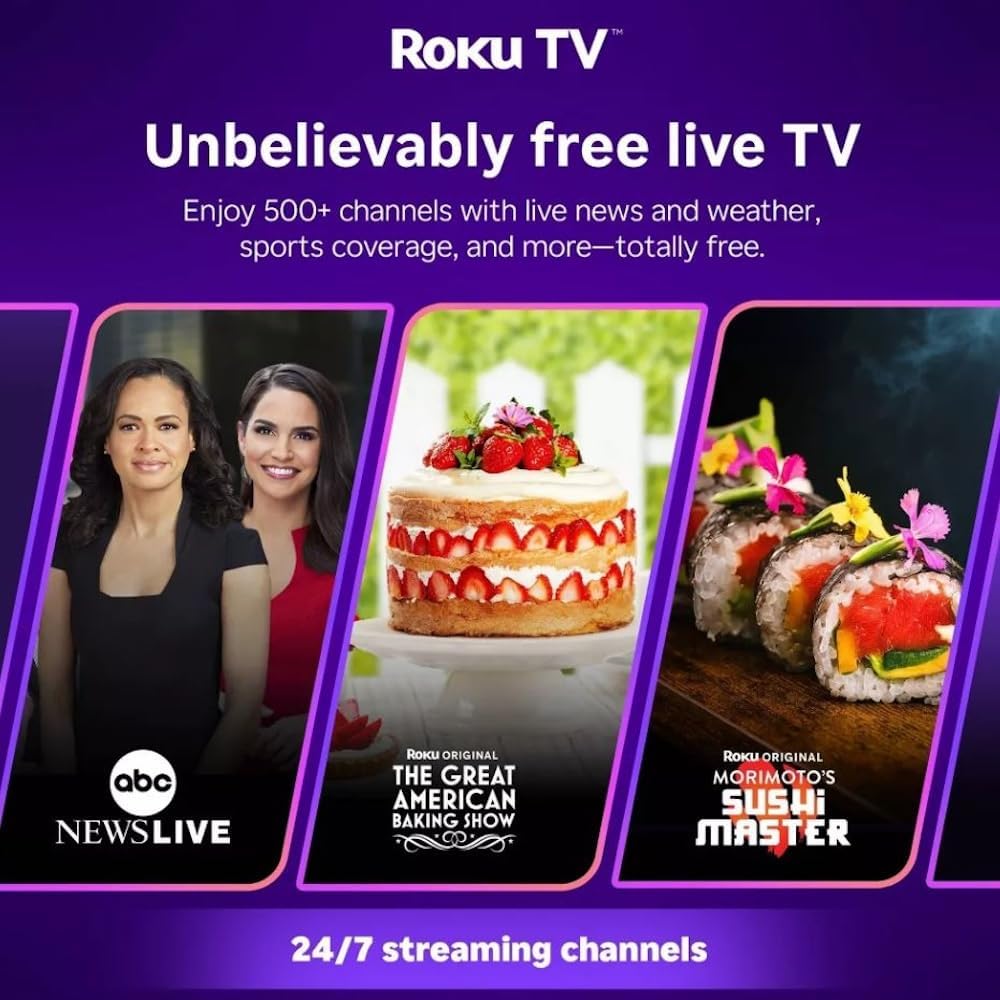
Roku TV interface promoting free live TV channels, featuring examples like ABC News Live, The Great American Baking Show, and Morimoto's Sushi Master.
Access a wide range of streaming services and free content through the Roku Channel Store. The Roku platform offers over 500 free channels, including live television, movies, and news. Use the 'Search' function on the home screen to find specific titles or channels.
Ses Özellikleri

Roku Hiro TV displaying the home screen with various streaming apps, emphasizing enhanced audio quality.
The TV features enhanced audio quality. For private listening, you can pair Bluetooth headphones directly with the TV. Navigate to Settings > Remotes & devices > Bluetooth devices > Pair new device to connect your headphones.
Bakım
TV'yi temizleme
- Televizyonu temizlemeden önce mutlaka fişini çekin.
- Ekranı ve kasayı yumuşak, tiftiksiz bir bezle nazikçe silin.
- İnatçı izler için hafifçe silinampBezi su veya hafif, aşındırıcı olmayan bir ekran temizleyicisiyle silin. Temizleyiciyi doğrudan ekrana püskürtmeyin.
- Sert kimyasallar, aşındırıcı pedler veya çözücüler kullanmaktan kaçının.
Yazılım Güncellemeleri
The Roku TV automatically checks for and installs software updates when connected to the internet. To manually check for updates, go to Ayarlar > Sistem > Yazılım güncellemesi.
Sorun giderme
| Sorun | Çözüm |
|---|---|
| Güç yok | Güç kablosunun hem TV'ye hem de çalışan bir elektrik prizine güvenli bir şekilde bağlandığından emin olun. Farklı bir priz deneyin. |
| Görüntü yok, ancak ses mevcut | Giriş kaynağını kontrol edin. Basın. Ev button on the remote and select the correct input. Ensure all HDMI cables are securely connected. |
| Ses yok ama görüntü var | Check the volume level and ensure the TV is not muted. If using external audio, verify connections and settings. |
| Wi-Fi'ye bağlanılamıyor | Wi-Fi şifrenizi doğrulayın. Yönlendiricinizi ve modeminizi yeniden başlatın. Şuraya gidin: Ayarlar > Ağ > Bağlantıyı Kur to reconfigure. |
| Uzaktan kumanda çalışmıyor | Uzaktan kumandanın pillerini değiştirin. Uzaktan kumanda ile televizyonun kızılötesi sensörü arasında herhangi bir engel olmadığından emin olun. |
Özellikler
| Model Adı | H32C2C4 |
| Ekran Boyutu | 32 inç |
| Ekran Teknolojisi | NEDEN OLMUŞ |
| Çözünürlük | 720p |
| Yenileme Hızı | 60 Hz |
| İşletim Sistemi | Roku İşletim Sistemi |
| Bağlantı Teknolojisi | Bluetooth, HDMI, Optical Audio, USB, Wi-Fi |
| Total Number of HDMI Ports | 3 |
| Toplam USB Bağlantı Noktaları | 1 |
| Ürün Boyutları (D x G x Y) | 3.2"D x 28.3"G x 16.9"Y |
| Ürün Ağırlığı | 7.5 Pound |
| Cilttage | 120 Volt (AC) |
| Montaj Tipi | Masa Montajı |
| Renk | Siyah |
Garanti Bilgileri
This Roku Hiro TV is covered by a 90-day Replacement Warranty. Please retain your proof of purchase for any warranty claims. For detailed terms and conditions, refer to the warranty documentation included with your product or visit the official Roku support webalan.
Destek
For further assistance, troubleshooting guides, or to contact customer support, please visit the official Roku support website. You can find comprehensive FAQs and contact information there.