
1. Giriş
Thank you for choosing the Sharp 40HF2265E Full HD Google TV. This manual provides essential information for setting up, operating, and maintaining your television. Featuring integrated Google TV, HDR10 support, Dolby Digital audio, and Bluetooth connectivity, your new TV offers a rich entertainment experience. Please read this manual thoroughly before use to ensure proper operation and to maximize your viewzevk.

Resim 1.1: Ön view of the Sharp 40HF2265E Full HD Google TV.
2. Kutuda Neler Var?
Televizyonunuzu dikkatlice ambalajından çıkarın ve aşağıdaki tüm öğelerin eksiksiz olduğundan emin olun:
- Sharp 40HF2265E Televizyon
- Güç kablosu
- Uzaktan Kumanda (2 adet AAA pil gerektirir, piller her zaman dahil değildir)
- Kullanım Kılavuzu (bu belge)
- Garanti Kartı
If any items are missing or damaged, please contact your retailer or Sharp customer support immediately.
3. Kurulum
3.1 Stand Kurulumu
To install the TV stand, place the TV screen-down on a soft, flat surface to prevent scratches. Align the stand feet with the corresponding slots on the bottom of the TV and secure them with the provided screws. Ensure the stand is firmly attached before placing the TV upright.

Resim 3.1: Ön view of the TV with stand feet attached.
3.2 Duvara Montaj
If you prefer to wall-mount your TV, you will need a VESA-compatible wall mount (not included). The Sharp 40HF2265E supports a VESA mounting standard of 200 x 200 mm. Refer to the wall mount's instructions for installation. Always ensure the wall can support the weight of the TV and the mount.

Resim 3.2: Arka view of the TV, highlighting VESA mounting points and ports.
3.3 Çevre Birimlerini Bağlama
Connect your external devices to the appropriate ports on the back and side of the TV. The TV features multiple HDMI, USB, and other connectivity options.
- HDMI Bağlantı Noktaları: Blu-ray oynatıcılar, oyun konsolları, set üstü kutular vb. cihazları bağlamak için.
- USB Bağlantı Noktaları: Medya oynatmak veya yazılım güncellemeleri için USB depolama aygıtlarını bağlamak için.
- Ethernet Bağlantı Noktası: Kablolu internet bağlantısı için.
- Anten/Kablo Girişi: Anten veya kablo TV sinyalini bağlamak için.
- Ses Çıkışı: Harici ses sistemlerini bağlamak için.
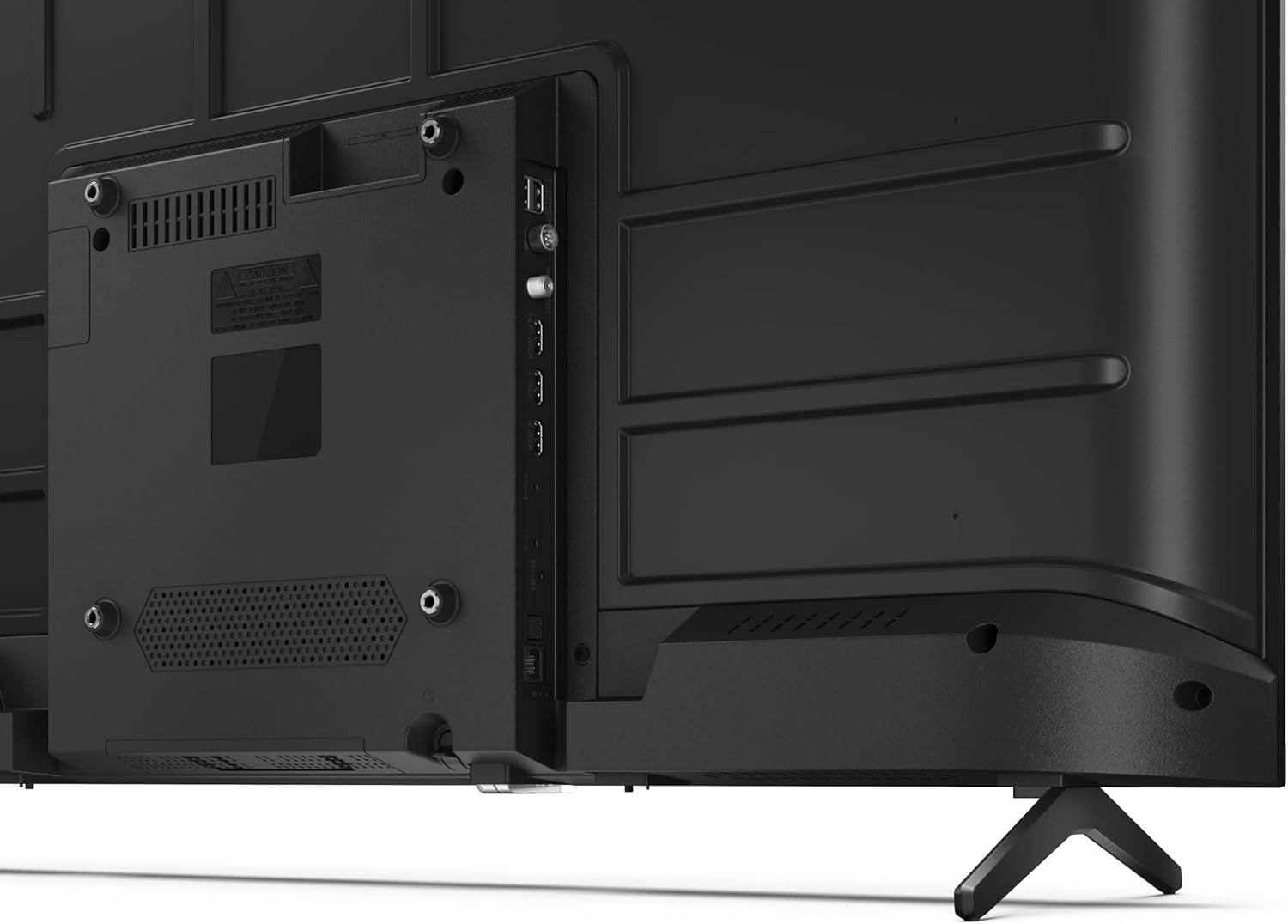
Resim 3.3: Ayrıntılı view Televizyonun bağlantı noktalarından.
3.4 İlk Açılış ve Google TV Kurulumu
After connecting all necessary cables, plug the power cable into an electrical outlet. Press the power button on the remote control or on the TV. Follow the on-screen instructions to complete the initial setup, including network connection, Google account login, and channel scanning.
4. Çalıştırma
4.1 Uzaktan Kumanda İşlevleri
The remote control allows you to navigate the TV's features. Common buttons include Power, Volume Up/Down, Channel Up/Down, Input Source, Home (Google TV), Navigation (directional arrows, OK), Back, and Google Assistant.
4.2 Google TV Arayüzü
Your Sharp TV runs on Google TV, providing a personalized home screen with content recommendations from your subscriptions. Use the remote's navigation buttons to browse movies, shows, apps, and your library.

Image 4.1: The Google TV home screen on the Sharp 40HF2265E.
4.3 Giriş Seçimi
To switch between connected devices (e.g., HDMI 1, HDMI 2, TV tuner), press the 'Input' or 'Source' button on your remote control and select the desired input from the on-screen menu.
4.4 Görüntü ve Ses Ayarları
Access the TV's settings menu to adjust picture modes (Standard, Vivid, Cinema, Game), brightness, contrast, color, and sound modes (Standard, Music, Movie, Speech). The TV supports HDR10 for enhanced contrast and color, and Dolby Digital for rich audio.

Image 4.2: Visual representation of HDR (High Dynamic Range) technology.
4.5 Google Asistan ve Chromecast
Use the built-in Google Assistant for voice control. Press the Google Assistant button on your remote and speak your commands, such as searching for content, controlling smart home devices, or getting information. Chromecast allows you to cast content directly from compatible devices like smartphones or tablets to your TV.

Image 4.3: Google Assistant integration for voice commands.
4.6 Bluetooth Bağlantısı
Pair Bluetooth-enabled devices such as headphones or soundbars with your TV for a wireless audio experience. Navigate to the TV's settings menu, select 'Remotes & Accessories', and then 'Pair new device' to connect.
5. Bakım
5.1 TV'nin temizlenmesi
Always unplug the TV before cleaning. Use a soft, dry cloth to wipe the screen and TV body. For stubborn marks, lightly dampen the cloth with water or a specialized screen cleaner. Never use abrasive cleaners, waxes, or solvents.
5.2 Yazılım Güncellemeleri
Your Google TV may receive automatic software updates. Ensure your TV is connected to the internet to receive these updates, which can improve performance and add new features. You can also manually check for updates in the settings menu.
6. Sorun Giderme
Televizyonunuzda sorunlarla karşılaşırsanız aşağıdaki yaygın çözümlere başvurun:
- Güç Yok: Güç kablosunun hem televizyona hem de duvar prizine sağlam bir şekilde takılı olduğundan emin olun. Prizin çalışır durumda olduğundan emin olun.
- Görüntü/Ses Yok: Doğru giriş kaynağının seçili olduğundan emin olun. Tüm kablo bağlantılarını (HDMI, anten) kontrol edin. Televizyonu yeniden başlatmayı deneyin.
- Uzaktan Kumanda Çalışmıyor: Pilleri değiştirin (2 adet AAA). Uzaktan kumanda ile TV'nin kızılötesi sensörü arasında herhangi bir engel olmadığından emin olun.
- Ağ Bağlantı Sorunları: For Wi-Fi, check your router and ensure the TV is within range. For wired connections, check the Ethernet cable. Try restarting your router and the TV.
- Resim Kalitesi Sorunları: Görüntü ayarlarını (parlaklık, kontrast, keskinlik) düzenleyin. Giriş kaynağının yüksek kaliteli bir sinyal sağladığından emin olun.
For more complex issues, consult the comprehensive troubleshooting section in the full digital manual or contact Sharp customer support.
7. Özellikler
Below are the technical specifications for the Sharp 40HF2265E Full HD Google TV:

Image 7.1: Dimensions of the Sharp 40HF2265E TV.
| Özellik | Şartname |
|---|---|
| Marka | Keskin |
| Model Numarası | 40HF2265E |
| Model Adı | HF Serisi |
| Model Yılı | 2025 |
| Ekran Boyutu | 40 İnç (81 Santimetre) |
| Ekran Teknolojisi | NEDEN OLMUŞ |
| Çözünürlük | 1080p (Tam HD) |
| Yenileme Hızı | 60 Hz |
| En Boy Oranı | 16:9 |
| Kontrast Oranı | 100000:1 |
| Screen Finish | Mat |
| Tepki Süresi | 8 Milisaniye |
| Arka Aydınlatma Teknolojisi | NEDEN OLMUŞ |
| Supported HDR Format | HDR10, HLG |
| Görüntü Kalitesi Geliştirme | Dynamic Contrast, HDR10, HLG |
| Motion Enhancement Technology | Motion Interpolation |
| İşletim Sistemi | Google televizyon |
| Internet Applications | Apple TV, Google TV, Hulu, Prime Video, YouTube |
| Özel Özellikler | Bluetooth, Chromecast, Dolby Digital, HD Tuner |
| Bağlantı Teknolojisi | Ethernet, USB, Wi-Fi |
| Kablosuz Teknoloji | Bluetooth |
| Bluetooth Sürümü | 5.0 |
| Screen Mirroring Technology | Chromecast, Google Cast |
| Toplam HDMI Bağlantı Noktaları | 3 |
| Total USB 2.0 Ports | 2 |
| Number of Composite Video Inputs | 1 |
| Ses Girişi | Mini composite/CVBS + audio input |
| Total Audio Output Ports | 2 |
| Ses Çıkışı Modu | Stereo |
| Ses Kodlaması | DD |
| Integrated Surround Sound Format | Dolby AC-4, Dolby Digital, Dolby Digital Plus |
| Maksimum Hoparlör Çıkış Gücü | 16 Watt (2x8W) |
| Ses Kanalı Sayısı | 2.0 |
| Yayın Sistemi | DVB-T2/C/S/S2 |
| Video Kodlama | MKV |
| Ürün Boyutları (DxGxY) | 8.4 cm genişlik x 89.2 cm uzunluk x 50.9 cm yükseklik |
| Ürün Ağırlığı | 5.4 Kilogram |
| Standsız Ağırlık | 5.4 Kilogram |
| Taban Genişliği | 765 Milimetre |
| VESA Montaj Standardı | 200x200 mm |
| Güç Tüketimi | 37 Watt |
| Cilttage | 230 Volt |
| Remote Control Battery Size | AAA |
| Remote Control Battery Quantity | 2 |
| Parental Control Technology | Kindersicherung Über Google Tv |
| EU Spare Parts Availability | 7 Yıl |
8. Garanti ve Destek
8.1 Ürün Garantisi
The Sharp 40HF2265E television comes with a 2-year manufacturer's warranty. Please refer to the included Warranty Card for detailed terms and conditions regarding coverage and service. Keep your proof of purchase for warranty claims.
8.2 Müşteri Desteği
If you require further assistance, have questions not covered in this manual, or need technical support, please contact Sharp customer service. Contact information can typically be found on the Warranty Card or the official Sharp webalan.