
1. Giriş
This manual provides essential information for setting up, operating, maintaining, and troubleshooting your vivo V70 5G smartphone. Please read this guide thoroughly to ensure optimal performance and longevity of your device.
2. Kutuda Neler Var?
Ürün ambalajınızda tüm öğelerin mevcut olduğundan emin olun:
- vivo V70 5G Smartphone
- USB kablosu
- Güç Adaptörü
- SIM Tepsisi Çıkarıcı
- Telefon Kılıfı
- Ekran Koruyucu (önceden uygulanmış veya kutuda)
3. Cihaz Düzeni
Familiarize yourself with the physical components of your vivo V70 5G.

Resim: Ön ve arka view of the vivo V70 5G smartphone, highlighting the display and camera module.
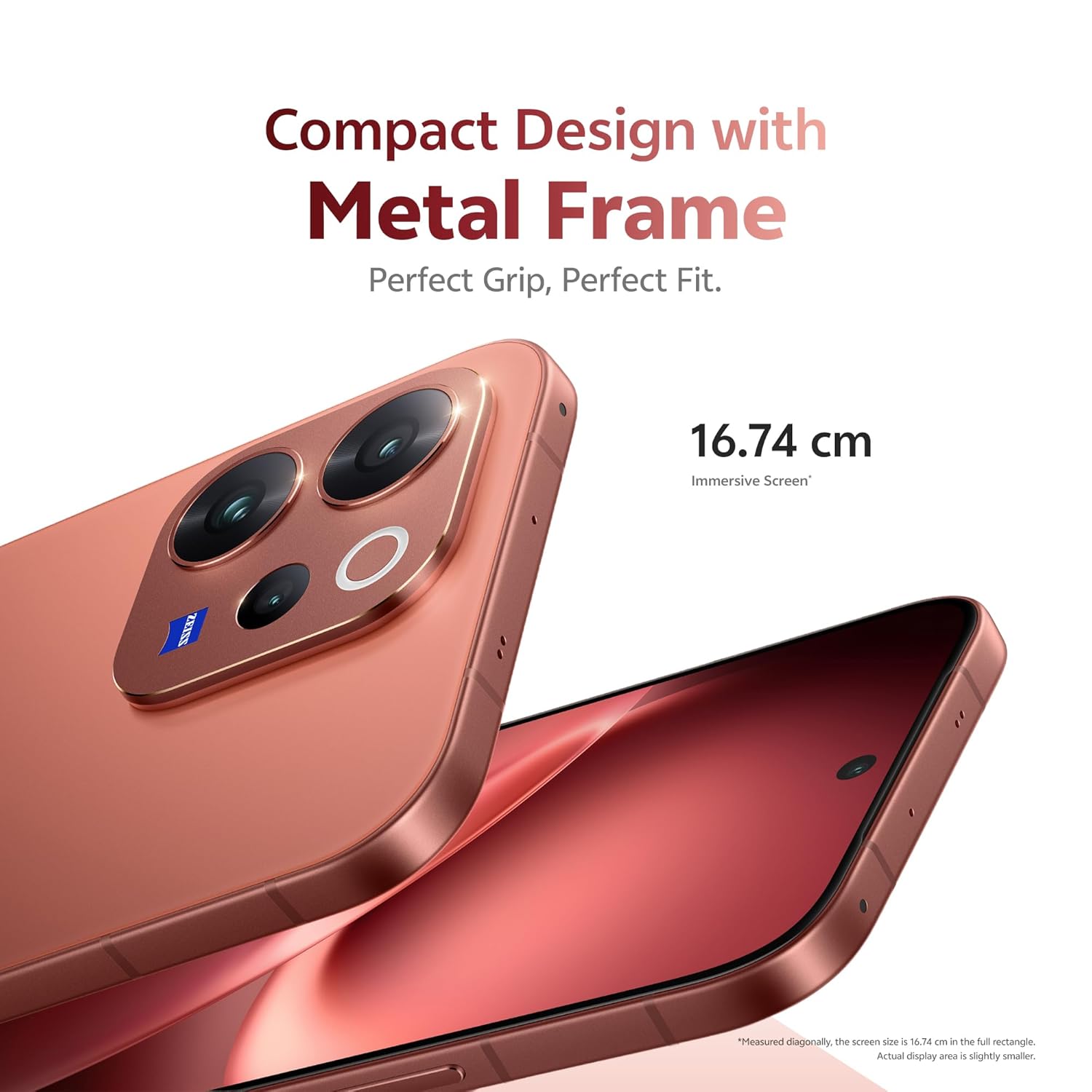
Resim: Taraf view of the vivo V70 5G, showing the power button and volume rocker.

Resim: Alt view of the vivo V70 5G, displaying the USB Type-C port, speaker grille, and SIM tray slot.
4. Kurulum
4.1. SIM Kartın Takılması
- Cihazınızın yan tarafındaki SIM tepsisini bulun.
- SIM kart tepsisi çıkarma aracını tepsinin yanındaki küçük deliğe yerleştirin ve tepsi dışarı çıkana kadar sıkıca bastırın.
- Place your Nano-SIM card(s) into the tray with the gold contacts facing down. Ensure proper orientation. The device supports Dual SIM.
- SIM tepsisini dikkatlice telefona geri takın.
4.2. İlk Güç Açma ve Kurulum
- Press and hold the Power button until the vivo logo appears.
- Ekranda beliren yönergeleri izleyerek dilinizi seçin, Wi-Fi'ye bağlanın ve Google hesabınızı kurun.
- Configure security features such as fingerprint unlock (3D Ultrasonic Fingerprint 2.0) and screen lock.
5. Cihazınızın Çalıştırılması
5.1. Ekran Özellikleri
The vivo V70 5G features a 16.74 cm (6.59 inches) 1.5K Ultra Clear OLED Display, offering vibrant visuals and smooth interactions.
- Çözünürlük: 2750 × 1260 Piksel
- Yenileme Hızı: 120Hz for fluid scrolling and gaming.
- Piksel yoğunluğu: 459 PPI for unmatched clarity.
- Parlaklık: Up to 5000 nits local peak brightness for excellent outdoor visibility.

Resim: Visual representation of the 1.5K Ultra Clear OLED Display, highlighting 459 PPI, 1.07 billion colors, 120 Hz refresh rate, and 5000 nits brightness.
5.2. Kamera Sistemi
The device features a ZEISS Professional Portrait Camera system, designed for high-quality photography.
- Arka Kamera: 50MP ZEISS OIS Main Camera (Sony IMX766), 50 MP ZEISS Super Telephoto Camera (up to 100x zoom), and an 8MP Ultra Wide-Angle lens.
- Ön Kamera: 50 MP ZEISS Group Selfie Camera with AF, f/2.0, and 92° FOV.
- ZEISS Multifocal Portraits: Capture cinematic portraits with five classic focal lengths (23mm to 100mm) and iconic ZEISS bokeh styles.

Resim: Diagram illustrating the ZEISS Professional Portrait Camera setup, including the 50 MP ZEISS Group Selfie Camera, 50 MP ZEISS OIS Main Camera, ZEISS Ultra Wide-Angle Camera, and 50 MP ZEISS Night Telephoto Camera.

Resim: Example of the 10X Zoom-In Portrait feature, showing a couple on a beach with a zoomed-in effect.
5.3. Performans
The vivo V70 5G is powered by the Next-Gen Snapdragon 7 Gen 4 processor, built on a 4nm process, ensuring efficient and powerful performance.
- CPU Performansı: 27% increase compared to the previous generation.
- GPU Performance: 30% better for graphics-intensive tasks.
- Bellek saklama alanı: Equipped with LPDDR5X RAM and UFS 4.1 Storage for faster operating speeds and data transfer.

Resim: Graphic detailing the Snapdragon 7 Gen 4 processor, highlighting its 4nm flagship chip process, 30% GPU performance increase, and 27% CPU performance increase.

Resim: Visual representation of LPDDR5X High-Performance Memory and UFS 4.1 Storage chips.
5.4. Pil ve Şarj
The device is equipped with a large 6500mAh BlueVolt Battery and supports 90W FlashCharge technology.
- Pil Kapasitesi: 6500 Miliamp Saat (mAh).
- Hızlı Şarj: 90W FlashCharge for rapid recharging.

Resim: Graphic showing the 6500mAh BlueVolt Battery and 90W FlashCharge, with estimated usage times for navigation, gaming, and 4K video recording.
5.5. Güvenlik
Unlock your phone quickly and securely with the 3D Ultrasonic Fingerprint 2.0 sensor, which functions even with wet or sweaty fingers.
5.6. Dayanıklılık
The vivo V70 5G is built with IP68 & IP69 durability ratings, providing resistance against dust and water. It can be submerged in fresh water up to 1.5 meters for 30 minutes.
5.7. Yapay Zeka Özellikleri
Explore unique AI-powered features for enhanced photography and user experience.
- AI Holi Portrait: Automatically adds vibrant, culturally celebratory elements to your photos.
- AI Floral Blessing: Integrates floral elements into images.
- AI Magic Weather: Transforms weather conditions in photos.

Resim: Before and after comparison demonstrating the AI Holi Portrait feature, adding festive colors to a photo of a couple.

Resim: Before and after comparison showing the AI Floral Blessing feature, adding floral elements to a photo of a couple on a beach.

Resim: Examples of the AI Magic Weather feature, transforming a single image into clear sky, morning glow, evening glow, and twilight scenes.
6. Bakım
6.1. Cihazınızı Temizleme
- Ekranı ve gövdeyi temizlemek için yumuşak, tiftiksiz bir bez kullanın.
- Sert kimyasallar, aşındırıcı malzemeler veya aerosol spreyler kullanmaktan kaçının.
- İnatçı lekeler için hafifçeampBezi suyla veya elektronik cihazlar için tasarlanmış bir ekran temizleyiciyle silin.
6.2. Yazılım Güncellemeleri
Regular software updates are provided to enhance security, improve performance, and introduce new features. Your vivo V70 5G is designed to receive 6 years of security updates.
- Ensure your device is connected to Wi-Fi and has sufficient battery charge before initiating an update.
- Şuraya git: Ayarlar > Sistem > Sistem Güncellemesi Mevcut güncellemeleri kontrol etmek ve yüklemek için.

Resim: Graphic indicating "6 Years of Security Updates" for the device, emphasizing long-term security and performance.
6.3. Pil Bakımı
- Pil ömrünü azaltabilecek aşırı sıcaklıklardan kaçının.
- Use only the official vivo charger and cable for optimal charging and safety.
- Uzun süreli saklama için pili yaklaşık %50'ye kadar şarj edin ve cihazı kapatın.
7. Sorun Giderme
This section addresses common issues you might encounter with your vivo V70 5G.
7.1. Cihaz Açılmıyor
- Ensure the battery is charged. Connect the device to the charger and wait a few minutes before attempting to power on.
- Yeniden başlatmayı zorlamak için Güç düğmesini en az 10-15 saniye basılı tutun.
7.2. Şarj Sorunları
- Verify that the charging cable and power adapter are securely connected to both the device and the power outlet.
- Farklı bir elektrik prizi veya farklı bir uyumlu şarj cihazı ve kablo kullanmayı deneyin.
- Inspect the USB Type-C port on your phone for any debris or damage.
7.3. Kamera Çalışmıyor
- Kamera uygulamasını yeniden başlatın.
- Clear the cache and data of the camera app via Settings > Apps > Camera > Storage.
- Kamera lenslerinin önünde herhangi bir fiziksel engel bulunmadığından emin olun.
- Telefonunuzu yeniden başlatın.
7.4. Ağ Bağlantı Sorunları
- Uçak Modu'nun etkin olup olmadığını kontrol edin. Etkinse devre dışı bırakın.
- Telefonunuzu yeniden başlatın.
- Reinsert your SIM card to ensure it is properly seated.
- Ağ ayarlarını şu şekilde sıfırlayın: Ayarlar > Sistem > Sıfırlama seçenekleri > Wi-Fi, mobil ve Bluetooth'u sıfırla.
If issues persist, please refer to the Support section for further assistance.
8. Özellikler
| Özellik | Detay |
|---|---|
| Marka | canlı |
| Örnek | V70 5G |
| İşletim Sistemi | OriginOS 6 |
| Kurulu RAM Bellek Boyutu | 12 GB |
| Bellek Depolama Kapasitesi | 256 GB |
| Ekran Boyutu | 6.59 inç |
| Renk | Tutku Kırmızısı |
| SIM Kart Yuvası Sayısı | Çift SIM |
| Bağlayıcı Türü | USB Tip C |
| Su Direnç Seviyesi | Waterproof (IP68 & IP69) |
| Ön Fotoğraf Sensörü Çözünürlüğü | 50 MP |
| Rear Facing Camera Photo Sensor Resolution | 50 MP (Main) |
| Pil Kapasitesi | 6500 Miliamp Saat |
| Ürün Ağırlığı | 194 Gram |
| Ürün Boyutları | 15.8 x 7.4 x 0.8 Santimetre |
| Maksimum Ekran Çözünürlüğü | 2750 × 1260 Piksel |
| Yenileme Hızı | 120 Hz |
| Görüntü Türü | AMOLED |
| Hücresel Teknoloji | 5G |
| Model Yılı | 2026 |
| Menşei ülke | Hindistan |
9. Garanti ve Destek
9.1. Garanti Bilgileri
Your vivo V70 5G comes with a 1 yıllık üretici garantisi for the device and 6 ay garanti for in-box accessories from the date of purchase.
Garanti talepleri için lütfen satın alma belgenizi saklayın.
9.2. Üreticiyle İletişim
For technical support, service, or warranty inquiries, please contact vivo Mobile India Pvt Ltd.
- Üretici: vivo Mobile India Pvt Ltd
- Adres: Plot No 08, Sector 24, Yamuna Expressway Area, Gautam Buddha Nagar, Uttar Pradesh, 201310
Visit the official vivo website for the most up-to-date support contact information and service center locations.