
1. Giriş
This manual provides detailed instructions for the installation, operation, and maintenance of your ANJIELO SMART 4-Wire Video Door Intercom System. Please read this manual thoroughly before installation and use to ensure proper function and safety. Keep this manual for future reference.
2. Ürün Bittiview
The ANJIELO SMART 4-Wire Video Door Intercom System offers enhanced security and convenience for your home. It features a 7-inch WiFi-enabled monitor and a 1080p outdoor doorbell camera. Key functionalities include two-way audio communication, remote monitoring via the Tuya app, night vision, and multiple unlocking methods.
Temel Özellikler:
- İki Yönlü Ses: Communicate with visitors at your door from the indoor monitor or your smartphone.
- 7-Inch Touch Monitor: High-resolution display with touch controls and hands-free function.
- 1080p Doorbell Camera: Features a 120° wide-angle lens, built-in infrared sensor for night vision, and an IP65 waterproof and dustproof rating.
- Tuya WiFi Smart Home Compatible: Seamless integration with the Tuya app for remote monitoring and control.
- 3-in-1 Unlock Methods: Unlock your door using an IC card, the Tuya app, or directly from the indoor monitor.
- Genişletilebilir Sistem: Supports up to 1 outdoor unit and 4 indoor monitors, allowing internal communication between monitors.

Resim: Üzeriview of the ANJIELO SMART 4-Wire Video Door Intercom System, highlighting its main components and smart home integration.
3. Kutuda Neler Var?
Kutuyu dikkatlice açın ve tüm ürünlerin eksiksiz ve sağlam olduğundan emin olun. Herhangi bir ürün eksik veya hasarlıysa, lütfen müşteri desteğiyle iletişime geçin.
- Outdoor Doorbell Unit
- 7 inç İç Mekan Monitörü
- Güç Adaptörü (15V 1.2A)
- Kullanım Kılavuzu
- Unlock Cable
- 4-Pinli Kablo
- Screws and Rubber Plugs for mounting
- Hanging Plate for monitor
- IC Cards (7 included)

Image: All components included in the product package, such as the outdoor doorbell, indoor monitor, cables, power supply, mounting hardware, and IC cards.
4. Kurulum ve Kurulum
The system uses a 4-wire connection for communication between the outdoor doorbell and the indoor monitor. Ensure power is disconnected before beginning installation.
4.1 Mounting the Outdoor Doorbell
- Choose a suitable location near your entrance, approximately 1.5 meters (5 feet) from the ground, avoiding direct sunlight or rain exposure (though the unit is IP65 rated).
- Use the provided screws and rubber plugs to securely mount the doorbell unit.
- Kameranın net ve engelsiz bir görüşe sahip olduğundan emin olun view girişin.

Image: The outdoor doorbell camera providing a 120-degree ultra-wide-angle view giriş alanının.
4.2 İç Mekan Monitörünün Montajı
- Select a convenient indoor location for the monitor, such as a wall in your living room or kitchen.
- Attach the hanging plate to the wall using screws.
- Connect the wiring to the monitor as per the wiring diagram (refer to the included instruction manual for detailed diagram).
- Mount the monitor onto the hanging plate.
4.3 Kablo Bağlantıları
Connect the outdoor doorbell unit to the indoor monitor using the provided 4-pin cable. Ensure correct polarity and secure connections. If connecting an electronic lock, use the unlock cable and refer to the detailed wiring diagram in the included manual.
4.4 Güç Bağlantısı
Connect the 15V 1.2A power adapter to the indoor monitor and plug it into a standard power outlet. The system will power on automatically.
4.5 Tuya App Setup
- Download the Tuya Smart or Smart Life app from your smartphone's app store.
- Hesabınıza kaydolun veya giriş yapın.
- Follow the in-app instructions to add your ANJIELO SMART monitor to the app. This typically involves putting the monitor into pairing mode and connecting it to your home WiFi network.
5. Kullanım Talimatları
5.1 Bir Çağrıyı Yanıtlama
When a visitor presses the doorbell button, the indoor monitor(s) will ring, and a live video feed from the outdoor camera will appear. Your smartphone (if connected via Tuya app) will also receive a notification.
- Monitörden: Tap the 'Answer' icon on the screen to initiate two-way audio communication.
- Akıllı Telefondan: Open the Tuya app and tap the notification to view the live feed and communicate.

Image: Illustration of the two-way video intercom function, demonstrating communication between a visitor at the doorbell and a resident using the indoor monitor.
5.2 Kapının Kilidinin Açılması
You have three methods to unlock a connected electronic lock:
- İç Mekan Monitörü Aracılığıyla: Bir görüşme sırasında veya viewing the live feed, tap the 'Unlock' icon on the monitor screen.
- Via Tuya App: canlı yayından view in the app, tap the 'Unlock' button.
- Via IC Card: Present a pre-programmed IC card to the card reader on the outdoor doorbell unit.
5.3 Uzaktan İzleme
Using the Tuya app on your smartphone, you can view the live feed from the outdoor doorbell camera anytime, anywhere, as long as your monitor is connected to WiFi and your phone has internet access.

Image: Users accessing the video intercom system remotely via their smartphones, enabling two-way audio and viewing from different locations.
5.4 Surveillance Footage Oynatma
The system supports 24-hour real-time monitoring and recording. You can review recorded video clips directly from the indoor monitor or through the Tuya app.
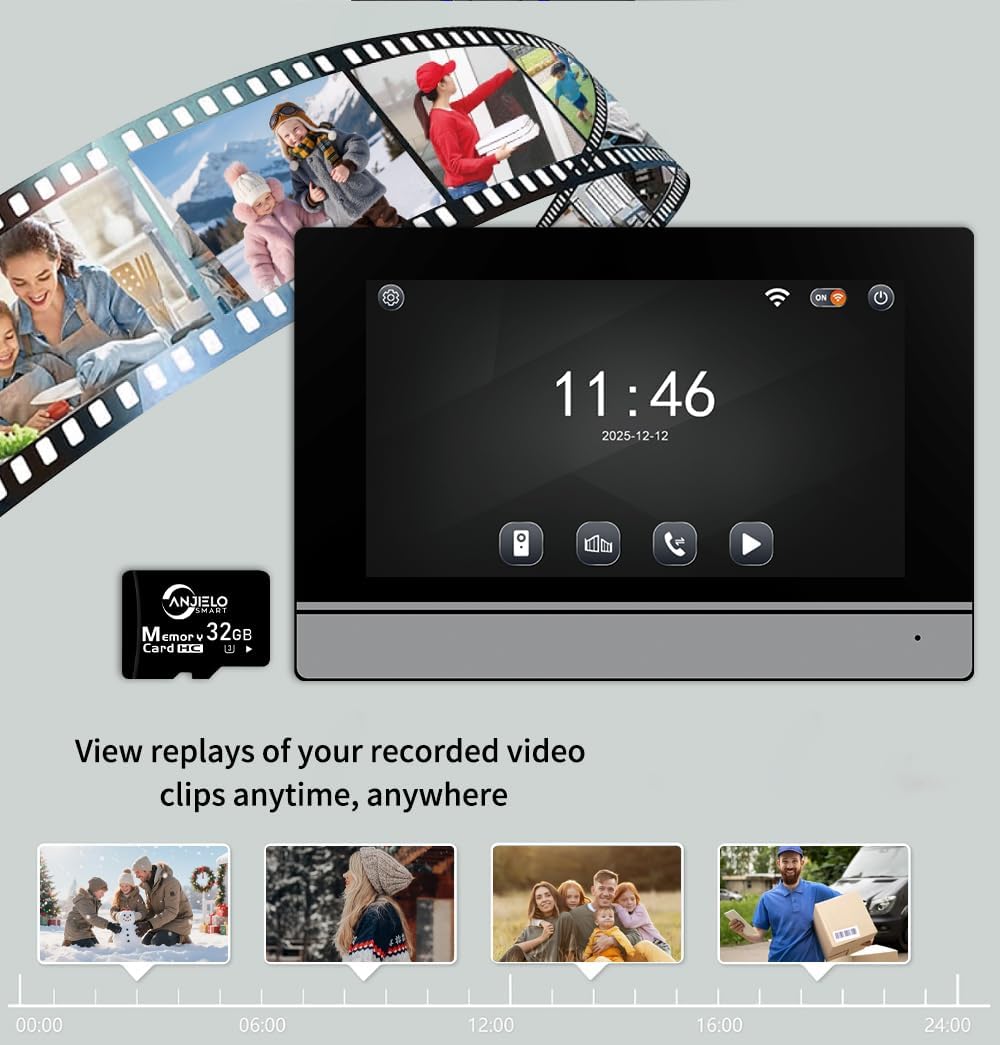
Image: The indoor monitor screen showing a timeline for playback of recorded surveillance footage, demonstrating 24-hour monitoring.
5.5 Internal Communication (Multi-Monitor Systems)
If you have multiple indoor monitors, they can communicate with each other (audio only). Refer to the detailed instructions in the included manual for initiating internal calls.

Image: A diagram illustrating the system's capability to support one outdoor unit and up to four indoor units, with internal communication between monitors.
6. Bakım
Düzenli bakım, interkom sisteminizin uzun ömürlü olmasını ve optimum performans göstermesini sağlar.
- Temizlik: Yumuşak bir d kullanınamp cloth to clean the outdoor doorbell camera lens and the indoor monitor screen. Avoid abrasive cleaners or solvents.
- Bağlantı Kontrolü: Tüm kablo bağlantılarını periyodik olarak kontrol ederek sağlam olduklarından ve korozyondan arınmış olduklarından emin olun.
- Yazılım Güncellemeleri: Keep the Tuya app updated to the latest version. Check the app or manufacturer's website for any firmware updates for the monitor or doorbell.
- Çevre Koruma: While the outdoor unit is IP65 rated, extreme weather conditions can still affect performance. Ensure proper installation to minimize exposure to harsh elements.

Image: The outdoor doorbell unit, showcasing its IP65 protection rating, indicating resistance to dust and water.
7. Sorun Giderme
Sisteminizde sorun yaşarsanız, aşağıdaki yaygın sorunlar ve çözümlerine bakın:
| Sorun | Olası Neden | Çözüm |
|---|---|---|
| No video on monitor/app | Gevşek kablolama, güç sorunu, kamera arızası. | Check all 4-wire connections. Ensure power adapter is plugged in. Restart the system. |
| Arama sırasında ses yok. | Mikrofon/hoparlör sorunu, kablolama problemi. | Verify wiring. Check monitor volume settings. |
| Cannot unlock door | Electronic lock not connected, wiring issue, IC card not programmed. | Ensure electronic lock is properly wired. Program IC cards as per manual. |
| Wi-Fi bağlantısı kararsız | Weak WiFi signal, incorrect password, router issue. | Ensure monitor is within WiFi range. Re-enter WiFi password. Restart router. |
| Gece görüşü çalışmıyor | Infrared sensor blocked or faulty. | Clean the camera lens. Ensure no obstructions. |
If the problem persists after attempting these solutions, please contact ANJIELO SMART customer support.
8. Özellikler
| Özellik | Detay |
|---|---|
| Marka | ANJIELO AKILLI |
| Model Numarası | 64008F-B+67024C-B |
| Güç Kaynağı | Kablolu Elektrikli (15V 1.2A) |
| Bağlantı Teknolojisi | Kablolu (4 telli), WiFi (uygulama için) |
| Video Yakalama Çözünürlüğü | 1080p |
| Kapı Zili Kamerası Açısı | 120° Geniş Açı |
| Kontrol Yöntemi | Uygulama, Dokunmatik |
| Uyumlu Cihazlar | Smartphone (Tuya App) |
| Maksimum Menzil | 100 Meters (wired connection) |
| Ürün Boyutları (U x G x Y) | 5.9 x 1.9 x 8.6 inç (yaklaşık) |
| Protection Rating (Outdoor Unit) | IP65 Toza ve Suya Dayanıklı |
| Çalışma Sıcaklığı | -30°C ile +60°C arası |
| Kurulum Yöntemi | Vidalama |
9. Garanti ve Destek
For warranty information and customer support, please refer to the warranty card included in your product package or visit the official ANJIELO SMART webSite üzerinden satıcıyla doğrudan iletişime geçerek de yardım alabilirsiniz. Ayrıca, satın alma platformunuz aracılığıyla da satıcıyla iletişime geçebilirsiniz.
Üretici: ANJIELO AKILLI
ASIN: B0GL212P4W


