
1. Giriş
Thank you for choosing the AIYIMA S4000 Active Bookshelf Speakers. These speakers are designed to deliver high-fidelity audio with versatile connectivity options, suitable for various applications including home entertainment, PC audio, and professional studio monitoring. Please read this manual thoroughly before use to ensure proper setup and operation.
2. Güvenlik Talimatları
Yangın, elektrik çarpması veya ürün hasarını önlemek için lütfen aşağıdaki güvenlik yönergelerine uyun:
- Bu cihazı yağmura veya neme maruz bırakmayın.
- Vazo gibi sıvı dolu nesneleri cihazın üzerine koymayın.
- Uygun havalandırmayı sağlayın. Havalandırma açıklıklarını kapatmayın.
- Radyatörler, kalorifer ızgaraları, sobalar veya diğer cihazlar (dahil) gibi herhangi bir ısı kaynağının yakınına kurmayın. amp(ısı üreten)
- Güç kablosunun, özellikle fişlerde, prizlerde ve cihazdan çıktıkları yerlerde üzerine basılmasını veya sıkışmasını önleyin.
- Sadece üretici tarafından belirtilen aparatları/aksesuarları kullanın.
- Bu cihazın şimşekli havalarda veya uzun süre kullanılmadığında fişini çekin.
- Tüm servis işlemleri için kalifiye servis personeline başvurun. Cihaz herhangi bir şekilde hasar gördüğünde servis gereklidir.
3. Paket İçeriği
Lütfen kutuda tüm ürünlerin mevcut olduğundan emin olun:
- AIYIMA S4000 Studio Monitors (2 units)
- RCA Ses Kablosu
- XLR Audio Cable
- Kullanım Kılavuzu (bu belge)
- Magnetic Grilles (2 units)
- Rubber Feet (8 units)
- Güç kablosu
- Kablosuz Kızılötesi Uzaktan Kumanda
4. Ürün Bittiview
4.1 Ön Panel
The front panel features the horn-loaded tweeter and the 4-inch woofer, along with a multi-function rotary control for volume and input selection.

Resim: Ön ve arka view of the AIYIMA S4000 speakers. The front shows the tweeter and woofer, while the rear displays all input/output ports and controls.
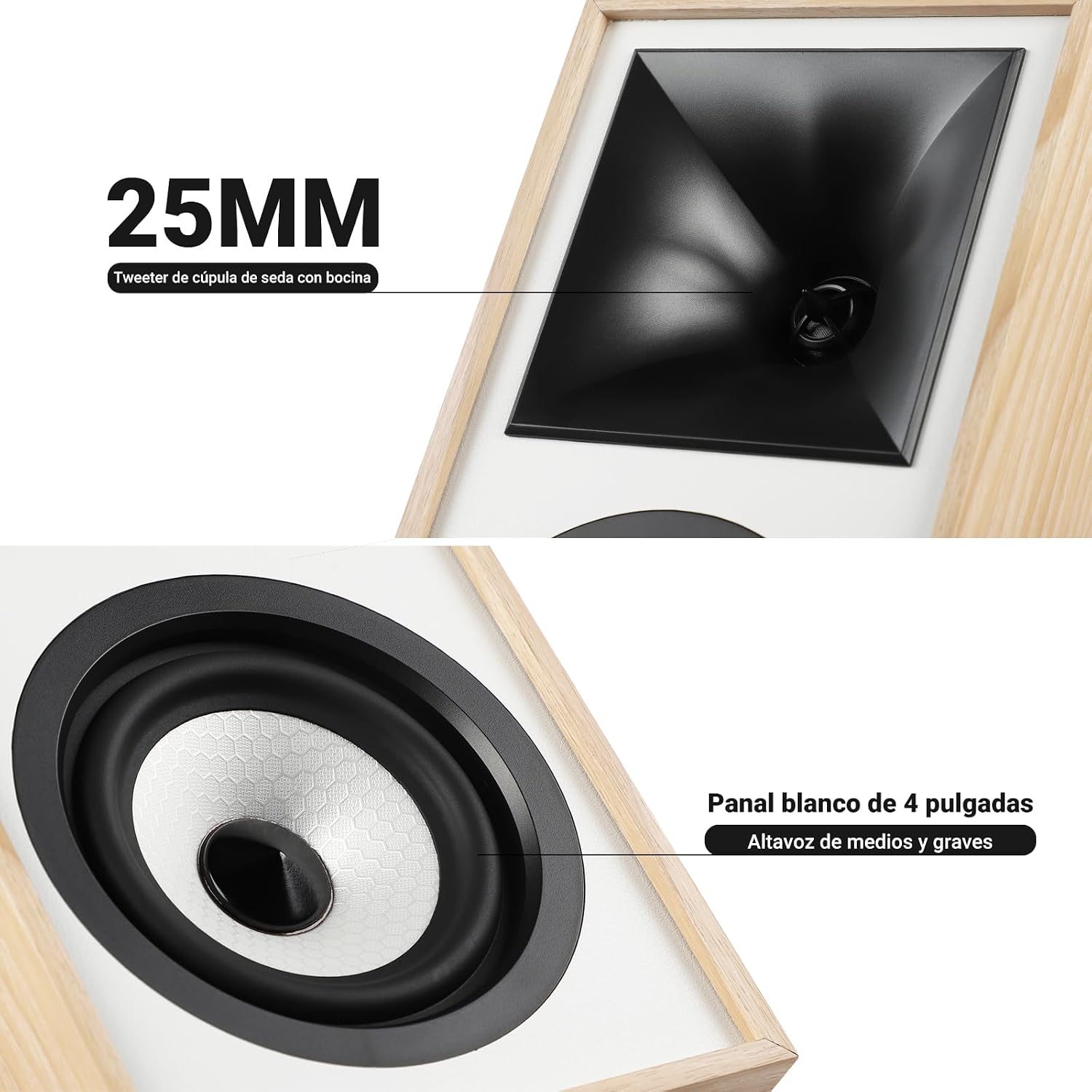
Resim: Yakın çekim view of the 25mm horn-loaded silk dome tweeter and the 4-inch white cone woofer on the AIYIMA S4000 speaker.
The S4000 incorporates a 1.25-inch horn-loaded tweeter for enhanced vocal clarity and a 4-inch woofer for deep bass. The cabinet is constructed from 15mm high-density MDF to reduce resonance and distortion.
4.2 Arka Panel
The rear panel houses all connectivity ports and additional controls.
Resim: Ayrıntılı view of the rear panel of the AIYIMA S4000 speaker, showing the volume, treble, and bass knobs, RCA and XLR inputs, SUB OUT, power switch, and power input.
- Volume/Input Selector: Rotary knob for volume adjustment and input source selection (Bluetooth, RCA, XLR).
- Tiz Kontrolü: Knob to adjust high frequencies.
- Bas Kontrolü: Knob to adjust low frequencies.
- RCA Girişi: For connecting devices via RCA cables.
- XLR Girişi: Professional balanced input for mixers, audio interfaces, etc.
- ALT ÇIKIŞ: Output for connecting an external active subwoofer.
- Güç düğmesi: To turn the speakers on or off.
- AC Güç Girişi: For connecting the power cable (AC 100V-240V).
- SPK-L OUT: Output to connect the passive left speaker.
5. Kurulum
5.1 Hoparlör Yerleşimi
For optimal sound quality, place the speakers on a stable surface, such as a bookshelf or speaker stands. Position them at ear level and equidistant from your listening position. Ensure there is adequate space behind the speakers for the L-shaped bass reflex port to function effectively.

Image: AIYIMA S4000 speakers positioned on a wooden cabinet, demonstrating a typical home setup with a turntable.
5.2 Ses Kaynaklarını Bağlama
The S4000 offers multiple input options:
- RCA Girişi: Connect your audio source (e.g., CD player, TV, PC) to the RCA ports on the rear panel using the provided RCA cable.
- XLR Girişi: For professional audio equipment like mixers or audio interfaces, use XLR cables to connect to the balanced XLR inputs. This input is resistant to interference.
- Bluetooth 5.0: Kablosuz bağlantı için, Bluetooth eşleştirme talimatları için 6.4 bölümüne bakın.

Image: AIYIMA S4000 speaker shown connected to a laptop and electronic keyboard, highlighting the professional balanced input capabilities.
5.3 Connecting an External Subwoofer (SUB OUT)
To enhance bass performance, you can connect an active subwoofer to the SUB OUT port on the rear panel. The system will automatically adjust the crossover frequency, converting your setup into a 2.1 audio system.

Image: AIYIMA S4000 speakers set up with a television and an external subwoofer, illustrating the SUB OUT functionality for a 2.1 home cinema experience.
5.4 Güç Bağlantısı
Connect the provided power cable to the AC Power Input on the rear panel of the active speaker, then plug it into a wall outlet (AC 100V-240V). Connect the active speaker to the passive speaker using the SPK-L OUT port.
6. Kullanım Talimatları
6.1 Güç Açma/Kapatma
Flip the Power Switch on the rear panel to the "ON" position to turn on the speakers. Flip it to "OFF" to power them down.
6.2 Volume Control and Input Selection
The multi-function rotary control on the front panel adjusts the volume. Press the knob to cycle through input sources: Bluetooth (BT), RCA, and XLR. The current input will be indicated by an LED.
6.3 Bas ve Tiz Ayarı
Use the independent Bass and Treble knobs on the rear panel to fine-tune the sound according to your preference and audio source. Adjustments range from -6dB to +6dB.
6.4 Bluetooth Eşleştirme
- Turn on the speakers and select Bluetooth input using the front panel knob or remote control. The Bluetooth indicator light will flash.
- Cihazınızda (akıllı telefon, tablet, bilgisayar) Bluetooth'u etkinleştirin ve "AIYIMA S4000" araması yapın.
- Select "AIYIMA S4000" to pair. Once connected, the Bluetooth indicator light will stop flashing and remain solid.
- Artık cihazınızdan kablosuz olarak ses dosyaları oynatabilirsiniz.

Image: AIYIMA S4000 speaker in a room setting, illustrating its Bluetooth 5.0 connectivity for wireless audio streaming.
6.5 Uzaktan Kumanda Kullanımı
The included wireless IR remote control allows you to adjust volume, select input modes, and control playback (play/pause, next/previous track for Bluetooth) from up to 20 meters away without requiring line-of-sight.

Image: Composite image showing the AIYIMA S4000 speakers, a close-up of the 15mm MDF cabinet construction, an internal view of the L-shaped bass reflex port, and the wireless remote control.
7. Bakım
- Temizlik: Use a soft, dry cloth to clean the speaker cabinets. Do not use liquid cleaners or abrasive materials.
- Depolamak: Hoparlörleri uzun süre saklayacaksanız, güç kaynağından ayırın ve tercihen orijinal ambalajında, serin ve kuru bir yerde saklayın.
- Menfezler: The magnetic grilles can be removed for cleaning or for a different aesthetic. Handle them gently to avoid damage.
8. Sorun Giderme
| Sorun | Olası Neden | Çözüm |
|---|---|---|
| Ses yok |
|
|
| Bozuk ses |
|
|
| Bluetooth bağlantı sorunları |
|
|
| Uzaktan kumanda çalışmıyor |
|
|
If the problem persists, please contact AIYIMA customer support.
9. Özellikler

Image: Diagram showing the dimensions of the AIYIMA S4000 speakers: 280mm (11.02 inches) height, 185mm (7.28 inches) depth, and 145mm (5.70 inches) width.
| Özellik | Şartname |
|---|---|
| Model Adı | S4000 |
| Marka | AYIMA |
| Hoparlör Tipi | Bookshelf, Active, 2-way, Surround Sound |
| Ses Kanalı | 2.1 (with SUB OUT) |
| Maksimum Çıkış Gücü | 80 Watts RMS (2x40W RMS: 2x25W Bass/Mid, 2x15W Treble) |
| Frekans Tepkisi | 45 Hz - 20 kHz |
| Woofer Çapı | 4 inç |
| Tweeter Tipi | 1.25-inch Horn-loaded Silk Dome |
| Bağlantı Teknolojisi | Bluetooth 5.0, RCA, XLR |
| Bluetooth Menzili | Up to 20 meters (wireless remote also 20m) |
| Kontrol Yöntemi | Touch (front knob), Remote Control |
| Dolap Malzemesi | 15mm High-density MDF |
| Güç Kaynağı | AC 100V-240V (Power Cable) |
| Ürün Boyutları (D x G x Y) | 18.5 x 14.5 x 28 cm (7.28 x 5.70 x 11.02 inç) |
| Ürün Ağırlığı | 6.9 kg (çift) |
| Renk | Brown (wood finish) |
| Önerilen Kullanımlar | Home Entertainment, PC Audio, Recording Studios, Home Cinema |
10. Garanti ve Destek
AIYIMA products come with a standard manufacturer's warranty. For detailed warranty information, please refer to the warranty card included in your package or visit the official AIYIMA webalan.
For technical support, troubleshooting assistance, or service inquiries, please contact AIYIMA customer support through their official channels. Please have your product model number (S4000) and purchase information ready when contacting support.
Üretici: AYIMA