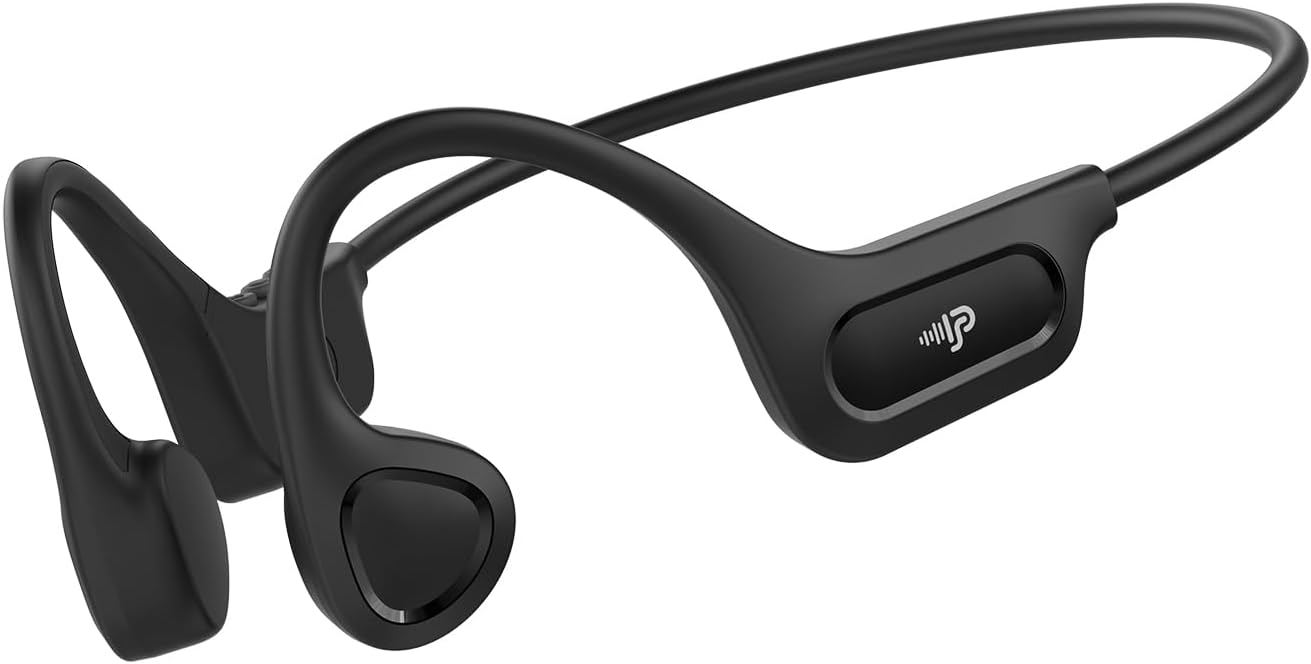
The PSIER X18 Bone Conduction Headphones offer an innovative audio experience by transmitting sound through your cheekbones, leaving your ears open to ambient sounds. This design enhances situational awareness, making them ideal for outdoor activities, sports, and office environments. Featuring Bluetooth 6.0 connectivity, a lightweight design, and IPX5 waterproofing, these headphones are built for comfort and durability.
Temel Özellikler:
Kemik İletimi Teknolojisi: Delivers audio through bone vibrations, keeping ear canals open.
Açık Kulak Tasarımı: Maintains awareness of surroundings for enhanced safety during activities.
Bluetooth 6.0: Provides stable and low-latency wireless connectivity.
Hafif Konfor: Weighs only 23g with a flexible memory-titanium frame for a secure fit.
IPX5 Su geçirmez: Resistant to sweat and rain, suitable for various weather conditions (not for swimming).
Uzatılmış Çalma Süresi: Tek şarjla 10 saate kadar müzik çalma.
Video: Bittiview of PSIER Bone Conduction Headphones, highlighting their suitability for active lifestyles and outdoor use, demonstrating the open-ear design and secure fit.
2. Kutuda Neler Var?
The package for your PSIER X18 Bone Conduction Headphones includes all necessary items to get started and ensure a comfortable experience.
PSIER X18 Bone Conduction Earbuds (1 pair)
Adjustable Strap (1)
Kulak tıkaçları (1 çift)
Tip-C Şarj Kablosu (1)
Kullanıcı Kılavuzu (1)
3. Kurulum Kılavuzu
3.1 İlk Ücretlendirme
Before first use, fully charge your headphones. Connect the provided Type-C charging cable to the charging port on the headphones and plug the other end into a USB power source. The LED indicator will show charging status and turn off when fully charged.
Image: PSIER X18 headphones connected to a Type-C charging cable.
3.2 Güç Açma/Kapatma
Güç Açık: Press and hold the multi-function button (usually the middle button on the control panel) for 2 seconds until the LED indicator flashes blue and a voice prompt says "Power On".
Kapat: Press and hold the multi-function button for 3 seconds until the LED indicator flashes red and a voice prompt says "Power Off".
3.3 Bluetooth Eşleştirme
Kulaklıkların kapalı olduğundan emin olun.
Press and hold the multi-function button for 5 seconds until the LED indicator flashes red and blue alternately, and a voice prompt says "Pairing". This indicates the headphones are in pairing mode.
Bağlantı kurulduktan sonra, LED göstergesi yavaşça mavi renkte yanıp sönecek ve "Bağlandı" şeklinde bir sesli uyarı verilecektir.
Video: Demonstrates powering on and pairing the PSIER Bone Conduction Headphones with a mobile device. The user presses the power button, then navigates to Bluetooth settings on their phone to connect to "X12" (note: model name in video is "X12", product is "X18").
3.4 Kulaklıkların Takılması
Place the headphones with the transducers resting on your cheekbones, just in front of your ears. The neckband should rest comfortably behind your head. Adjust the fit using the included adjustable strap if needed to ensure a snug and secure fit, especially during active use.
Image: A person demonstrating the secure and comfortable fit of the PSIER X18 Bone Conduction Headphones during a run.
4. Kullanım Talimatları
4.1 Müzik Oynatma
Oynat/Duraklat: Çok işlevli düğmeye bir kez basın.
Sonraki Parça: Çok fonksiyonlu düğmeye iki kez basın.
Önceki parça: Çok fonksiyonlu düğmeye üç kez basın.
Sesi aç: Ses + düğmesine basın.
Sesi kıs: Ses kısma düğmesine (-) basın.
4.2 Çağrı Yönetimi
Çağrıyı Cevapla/Sonlandır: Çok işlevli düğmeye bir kez basın.
Çağrıyı Reddet: Çok işlevli düğmeyi 2 saniye basılı tutun.
Voice Assistant'ı etkinleştirin: Press the multi-function button twice quickly when not on a call.
4.3 Situational Awareness
The open-ear design allows you to hear your audio while remaining aware of your surroundings. This is crucial for safety during outdoor activities like running or cycling, where hearing traffic or other warnings is important.
Image: A person cycling with PSIER X18 headphones, highlighting the open-ear design for environmental awareness.
5. Bakım
5.1 Temizlik
Kulaklıkları yumuşak bir bezle silin.amp Her kullanımdan sonra, özellikle egzersizlerden sonra, ter ve kiri temizlemek için bir bezle silin. Aşındırıcı temizleyiciler kullanmayın veya kulaklıkları suya batırmayın.
5.2 Depolama
Store the headphones in a cool, dry place away from direct sunlight and extreme temperatures. Avoid placing heavy objects on them to prevent damage to the frame.
5.3 Suya Dayanıklılık (IPX5)
The PSIER X18 headphones are IPX5 rated, meaning they are protected against low-pressure water jets from any direction. This makes them suitable for use during light rain and sweaty workouts. They are not designed for submersion in water or for swimming.
Image: PSIER X18 headphones being splashed with water, demonstrating their IPX5 water resistance.
6. Sorun Giderme
6.1 Güç Yok
Kulaklığın tam şarjlı olduğundan emin olun.
Try using a different charging cable and power adapter.
6.2 Cihazla Eşleştirme Yapılamıyor
Make sure the headphones are in pairing mode (LED flashing red and blue alternately).
Ensure Bluetooth is enabled on your device and it is within range (up to 10 meters).
Forget "X18" from your device's Bluetooth list and try pairing again.
Hem kulaklığınızı hem de cihazınızı yeniden başlatın.
6.3 Low Sound Quality or No Sound
Hem kulaklığınızın hem de bağlı cihazınızın ses seviyesini ayarlayın.
Transdüserlerin elmacık kemikleriniz üzerinde doğru konumlandırıldığından emin olun.
Check for any obstructions between the transducers and your skin.
Girişimden kaçınmak için bağlı cihazınıza yaklaşın.
If using earplugs, ensure they are inserted correctly to enhance sound perception.
The PSIER X18 Bone Conduction Headphones come with a 1-year manufacturer's warranty covering defects in materials and workmanship. Please retain your proof of purchase for warranty claims.
8.2 Müşteri Desteği
For further assistance, troubleshooting, or warranty inquiries, please contact PSIER customer support through the retailer's platform or visit the official PSIER webiletişim bilgileri için site.
Ask a question about this manual
Ask about setup, troubleshooting, compatibility, parts, safety, or missing instructions. Manuals+ will review the question and use this page’s manual context to help answer it.