
1. Giriş
This manual provides detailed instructions for the setup, operation, and maintenance of your LEFFOT H618 Plus Android 14.0 TV Box. This device transforms your television into a smart entertainment hub, offering access to streaming services, apps, and media content. Please read this manual thoroughly before using the device to ensure proper functionality and safety.
2. Paket İçeriği
Aşağıda listelenen tüm öğelerin paketinizde bulunduğunu doğrulayın:
- LEFFOT H618 Plus Android 14.0 TV Box
- Güç Adaptörü
- HD Kablo (HDMI Kablosu)
- Uzaktan kumanda
- Kullanım Kılavuzu (bu belge)
3. Ürün Bittiview
The LEFFOT H618 Plus is a 4K UHD streaming device powered by Android 14.0. It features an Allwinner H618 Quad-core ARM Cortex-A53 CPU and Mali G31 GPU, providing smooth performance for streaming and applications. This model includes 2GB RAM and 16GB ROM for system operations and app storage.
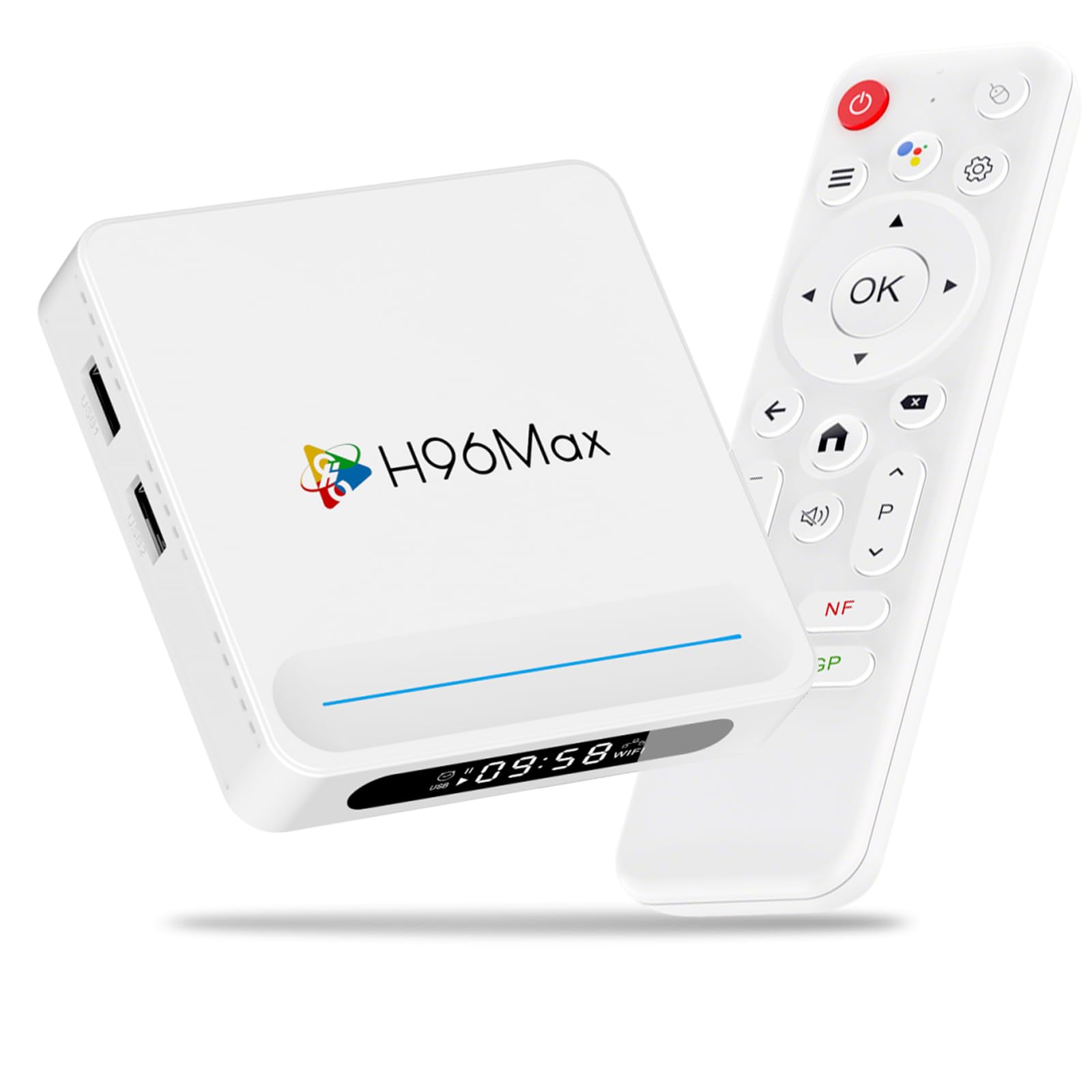
Şekil 3.1: Ön view of the LEFFOT H618 Plus Android TV Box, showcasing its compact design and various ports for connectivity. The included remote control is also visible.
Bağlantı Noktaları ve Bağlantılar
- HDMI 2.0a Output: Connects to your TV or display for 4K video output.
- USB 2.0 Bağlantı Noktaları (x2): For connecting external storage devices, keyboards, mice, or other USB peripherals.
- AV Çıkışı: For connecting to older televisions using an analog cable.
- DC Güç Girişi: Connects the power adapter to the device.
- Ethernet Port (100M): İstikrarlı bir kablolu ağ bağlantısı için.
4. Kurulum Kılavuzu
Follow these steps to set up your LEFFOT H618 Plus TV Box:
- Televizyona bağlanın: Connect one end of the provided HD cable (HDMI) to the HDMI port on the TV Box and the other end to an available HDMI input on your television.
- Gücü bağlayın: Plug the power adapter into the DC power input port on the TV Box, then plug the adapter into a wall outlet.
- Güç Açık: Cihaz otomatik olarak açılmalıdır. Açılmazsa, uzaktan kumandadaki güç düğmesine basın.
- Girişi Seçin: On your television, select the correct HDMI input source using your TV's remote control.
- İlk kurulum: Follow the on-screen instructions to complete the initial setup, which typically includes selecting your language, connecting to a Wi-Fi network (or using Ethernet), and signing in with your Google account.
5. Kullanım Talimatları
Uzaktan Kumandalı Navigasyon
Use the included remote control to navigate the Android interface:
- Yön Tuşu: Use the up, down, left, and right arrows to move between menu items and options.
- Tamam Düğmesi: Press to select an item or confirm an action.
- Geri Düğmesi: Önceki ekrana veya menüye döner.
- Ana menü tuşu: Ana ekrana döner.
- Ses Düğmeleri: Ses çıkış ses seviyesini ayarlar.
- Güç Düğmesi: Turns the device on or off (standby mode).
Uygulamalara Erişim
From the home screen, you can access pre-installed applications or download new ones from the Google Play Store. Navigate to the 'Apps' section or the Google Play Store icon and select it to browse and install applications.
6. Bağlantı
Wi-Fi Bağlantısı
The device supports 2.4G/5G Dual-Band Wi-Fi 6 for fast and stable wireless internet access. To connect:
- Git Ayarlar > Ağ ve İnternet.
- Seçme Wifi ve açın.
- İstediğiniz Wi-Fi ağını listeden seçin.
- İstenirse Wi-Fi şifresini girin ve seçin. Bağlamak.
Ethernet Bağlantısı
For a more stable connection, connect an Ethernet cable from your router to the Ethernet port on the TV Box. The device will automatically detect and use the wired connection.
Bluetooth 5.0
The TV Box features Bluetooth 5.0, allowing you to connect compatible wireless accessories such as headphones, game controllers, or keyboards.
- Git Ayarlar > Bağlı Cihazlar > Yeni cihazı eşleştir.
- Bluetooth aksesuarınızı eşleştirme moduna getirin.
- Select the accessory from the list on your TV screen to pair.
7. Ses Kontrolü
The LEFFOT H618 Plus integrates with Google Assistant for convenient voice control. If your remote control has a dedicated microphone button, press it to activate voice commands.
- Arama İçeriği: Say "Find action movies" or "Play [Movie Title]".
- Uygulamaları Başlat: Say "Open YouTube" or "Launch Netflix".
- Oynatmayı Kontrol Et: Say "Pause", "Play", "Fast forward", or "Rewind".
- Sesi Ayarla: Say "Volume up" or "Volume down".
8. Ekran Yansıtma
The device supports AirPlay and Miracast, allowing you to wirelessly cast content from your iOS or Android devices to your television.
Using AirPlay (for iOS devices)
- Ensure your iOS device and the TV Box are connected to the same Wi-Fi network.
- On your iOS device, open the Control Center (swipe down from the top-right corner on newer iPhones/iPads, or swipe up from the bottom on older models).
- Musluk Ekran Yansıtma or Hava Oynat.
- Select the LEFFOT H618 Plus from the list of available devices.
Using Miracast (for Android devices)
- Ensure your Android device and the TV Box are connected to the same Wi-Fi network.
- On your Android device, look for a feature like Döküm, Ekran Yansıtma, Akıllı View, veya Kablosuz Ekran in your quick settings or display settings.
- Activate the feature and select the LEFFOT H618 Plus from the list of available devices.
9. Özellikler
Detailed technical specifications for the LEFFOT H618 Plus Android 14.0 TV Box (2GB-16GB model):
| Marka | SOL |
| Model Numarası | 2GB-16GB |
| İşletim Sistemi | Android 14.0 |
| İşlemci | Allwinner H618 Dört Çekirdekli ARM Cortex-A53 |
| Grafik işlemcisi | Mali G31 |
| Veri deposu | 2 GB |
| ROM | 16 GB |
| Çözünürlük | 4K UHD |
| Wifi | 2.4G/5G Dual-Band Wi-Fi 6 |
| Bluetooth | Bluetooth 5.0 |
| Ethernet | 100M |
| Limanlar | HDMI 2.0a, 2x USB 2.0, AV Out, DC In, Ethernet |
| Özel Özellikler | HDR10, AirPlay, Miracast, Voice Control (Google Assistant) |
| Boyutlar | 3.93 x 3.93 x 0.76 inç |
| Ağırlık | 4.1 ons (115 Gram) |
10. Sorun Giderme
If you encounter issues with your LEFFOT H618 Plus TV Box, refer to the following common problems and solutions:
- Güç Yok:
- Güç adaptörünün cihaza ve çalışan bir elektrik prizine güvenli bir şekilde bağlandığından emin olun.
- Başka bir elektrik prizini deneyin.
- Televizyonda Sinyal Yok:
- HDMI kablosunun hem TV kutusuna hem de televizyona sağlam bir şekilde bağlı olduğundan emin olun.
- Televizyonunuzun doğru HDMI giriş kaynağına ayarlandığından emin olun.
- Televizyonunuzda farklı bir HDMI kablosu veya HDMI portu deneyin.
- Wi-Fi Connection Issues / Spotty Wi-Fi:
- Wi-Fi yönlendiricinizin düzgün çalışıp çalışmadığını kontrol edin.
- Ensure the TV Box is within range of your Wi-Fi router.
- Try restarting both the TV Box and your Wi-Fi router.
- Consider using a wired Ethernet connection for better stability.
- Slow Performance / Buffering:
- Gereksiz arka plan uygulamalarını kapatın.
- Clear the cache of frequently used apps (Settings > Apps > [App Name] > Clear Cache).
- Ensure you have a stable and fast internet connection.
- Cihazı yeniden başlatın.
- Uzaktan Kumanda Yanıt Vermiyor:
- Uzaktan kumandanın pillerini kontrol edin ve değiştirin.
- Uzaktan kumanda ile TV kutusu arasında herhangi bir engel olmadığından emin olun.
- Uygulama Uyumluluk Sorunları:
- Some applications may not be fully optimized for Android TV Box environments. Check the app's requirements or look for alternative versions.
11. Bakım
To ensure the longevity and optimal performance of your TV Box:
- Temizlik: Cihazı temizlemek için yumuşak ve kuru bir bez kullanın. Sıvı temizleyiciler veya aerosoller kullanmayın.
- Atama: Place the device on a stable, flat surface with adequate ventilation. Avoid placing it near heat sources or in direct sunlight.
- Kapat: If not in use for an extended period, disconnect the power adapter.
- Yazılım Güncellemeleri: En son özelliklere ve güvenlik yamalarına sahip olduğunuzdan emin olmak için cihaz ayarlarınızda sistem güncellemelerini düzenli olarak kontrol edin.
12. Güvenlik Bilgileri
Lütfen aşağıdaki güvenlik önlemlerine uyun:
- Cihazı suya, neme veya aşırı sıcaklıklara maruz bırakmayın.
- Cihazı kendiniz açmaya veya onarmaya çalışmayın. Tüm servis işlemlerini yetkili personele yaptırın.
- Yalnızca ürünle birlikte verilen güç adaptörünü kullanın. Yetkisiz adaptörlerin kullanılması cihaza zarar verebilir ve garantiyi geçersiz kılabilir.
- Cihazı çocuklardan ve evcil hayvanlardan uzak tutunuz.
13. Garanti ve Destek
For warranty information or technical support, please refer to the documentation provided with your purchase or contact LEFFOT customer service through their official website or the retailer where the product was purchased. Please have your model number (2GB-16GB) and purchase details ready when contacting support.