
1. Giriş
Satın aldığınız için teşekkür ederizasing the Sharp PS-916 Bluetooth Party Speaker System. This system includes two identical portable Bluetooth speakers designed to deliver powerful audio with versatile connectivity options. Please read this manual carefully before using the product to ensure proper operation and to maximize your listening experience.
Paket İçeriği:
- 2 x Sharp PS-916 Party Speakers
- 1 x Şarj Kablosu
- 1 x Uzaktan Kumanda
- 1 x Kullanım Kılavuzu

Image: The Sharp PS-916 system includes two speakers for a complete stereo experience.
2. Kurulum
2.1 Hoparlörlerin Şarj Edilmesi
The PS-916 speakers are equipped with rechargeable batteries, providing up to 12 hours of playback. Before initial use, fully charge both speakers.
- Connect the charging cable to the DC IN port on the rear of each speaker.
- Plug the other end of the charging cable into a suitable power adapter (not included) or USB power source.
- The charging indicator light will illuminate. It will change color or turn off once charging is complete.
2.2 Açma/Kapatma
To power on or off each speaker, press and hold the ON/STAND BY INPUT Kontrol panelinde bulunan buton.
2.3 Bluetooth Eşleştirme (Tek Hoparlör)
- Ensure the speaker is powered on and in Bluetooth mode. The Bluetooth indicator will flash, indicating it is ready for pairing.
- Mobil cihazınızda Bluetooth'u etkinleştirin ve mevcut cihazları arayın.
- Select "Sharp PS-916" from the list of devices.
- Bağlantı kurulduktan sonra, Bluetooth göstergesi yanıp sönmeyi bırakacak ve sabit kalacaktır.
2.4 Gerçek Kablosuz Stereo (TWS) Eşleştirme (İki Hoparlör)
TWS allows you to connect two PS-916 speakers wirelessly for a stereo sound experience.
- Power on both PS-916 speakers.
- Ensure neither speaker is currently connected to a Bluetooth device.
- On one of the speakers (this will be the primary speaker), press the TWS button. The speaker will enter TWS pairing mode.
- The primary speaker will automatically search for the secondary speaker. Once connected, you will hear an audible confirmation, and the TWS indicator lights on both speakers will illuminate.
- Şimdi, mobil cihazınızı 2.3 bölümünde açıklandığı gibi Bluetooth aracılığıyla ana hoparlöre bağlayın. Ses, her iki hoparlörden de stereo olarak çalacaktır.
3. Çalıştırma
3.1 Kontrol Paneli Üstüview

Image: Main control panel for the Sharp PS-916 speaker.
- ON/STAND BY INPUT: Power on/off, switch input modes (Bluetooth, USB, TF, AUX, FM).
- PLAY/PAUSE (►/∕∕): Ses oynatmayı oynatın veya duraklatın.
- PREVIOUS (◀◀): Önceki parçaya atlayın.
- NEXT (▶▶): Bir sonraki parçaya atlayın.
- SES DÜĞMESİ: Ses seviyesini ayarlamak için döndürün.
- : Initiate or disconnect True Wireless Stereo pairing.
- EKOLAYZER: Cycle through preset equalizer modes.
- BAS: Activate or deactivate bass boost.
- IŞIK: Change or turn off the LED light effects.
- MIC CONTROL: Adjust microphone volume or echo (if applicable).
3.2 Giriş Bağlantı Noktaları
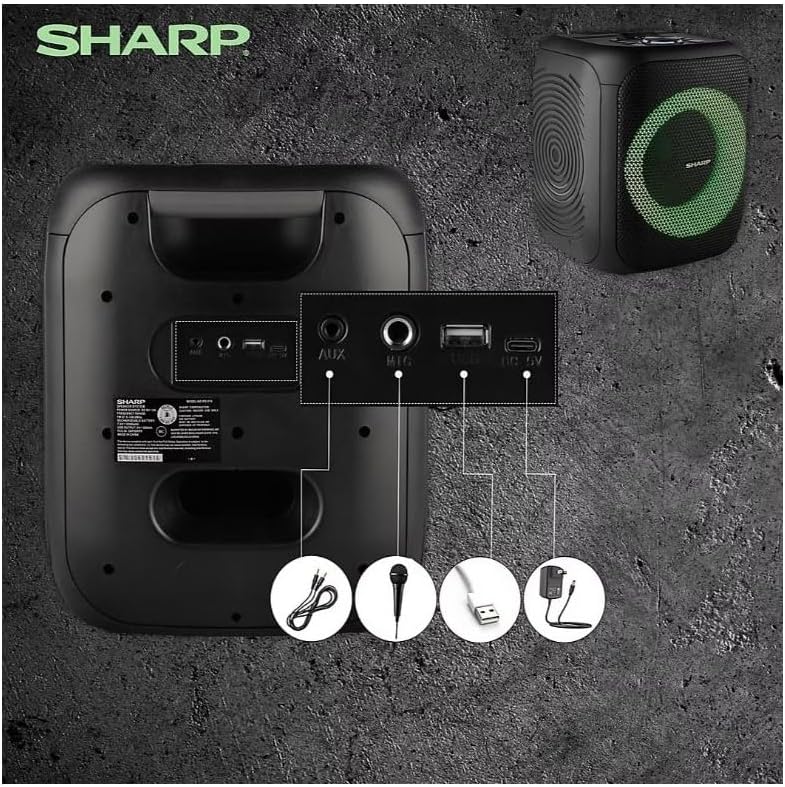
Image: Rear panel with various input and charging ports.
- AUX GİRİŞİ: Harici ses aygıtlarını 3.5 mm ses kablosu kullanarak bağlayın.
- MİKROFON GİRİŞİ: Connect a microphone (sold separately) for karaoke or announcements.
- USB BAĞLANTI: Ses dosyalarını oynatmak için bir USB flash sürücü takın.
- TF KARTI: Insert a TF (microSD) card for audio playback.
- DC IN: Connect the charging cable to power and charge the speaker.
3.3 Playing Audio from USB/TF Card
- Insert a USB flash drive or TF card into the corresponding port.
- Basın ON/STAND BY INPUT button repeatedly until the display shows the USB or TF mode.
- Oynatma otomatik olarak başlayacaktır. Kullanın OYNAT/DURDUR, ÖNCESİ, Ve SONRAKİ oynatmayı kontrol etmek için düğmeler.
3.4 AUX Girişini Kullanma
- Connect one end of a 3.5mm audio cable to the AUX IN port on the speaker.
- Diğer ucunu harici cihazınızın kulaklık girişine veya ses çıkışına bağlayın.
- Basın ON/STAND BY INPUT button repeatedly until the display shows AUX mode.
- Harici cihazınızdan oynatmayı ve ses seviyesini kontrol edin.
3.5 FM Radyo Çalışması

Image: The PS-916 features an integrated FM Tuner.
- Basın ON/STAND BY INPUT button repeatedly until the display shows FM mode.
- Basılı tutun OYNAT/DURDUR Mevcut FM istasyonlarını otomatik olarak tarayıp kaydetmek için düğme.
- Kullanın ÖNCESİ Ve SONRAKİ Kayıtlı istasyonlar arasında gezinmek için düğmeler.
3.6 LED Light Effects
Basın IŞIK button to cycle through different LED light modes or to turn the lights off.
4. Bakım
4.1 Temizlik
- Always power off the speaker and disconnect it from the power source before cleaning.
- Dış yüzeyleri silmek için yumuşak ve kuru bir bez kullanın.
- Yüzey kaplamasına veya iç bileşenlere zarar verebileceğinden, sıvı temizleyiciler, aerosoller veya çözücüler kullanmayın.
4.2 Depolama
- Hoparlörleri serin, kuru ve doğrudan güneş ışığından ve aşırı sıcaklıklardan uzak bir yerde saklayın.
- Uzun süre saklayacaksanız, pilin sağlığını korumak için birkaç ayda bir pili yaklaşık %50'ye kadar şarj edin.
5. Sorun Giderme
If you encounter issues with your Sharp PS-916 speakers, please refer to the following common problems and solutions:
| Sorun | Olası Çözüm |
|---|---|
| Hoparlör açılmıyor. | Pilin şarjlı olduğundan emin olun. Şarj kablosunu bağlayın ve tekrar deneyin. |
| Hoparlörden ses gelmiyor. | Hem hoparlörün hem de bağlı cihazınızın ses seviyesini kontrol edin. Doğru giriş modunun seçili olduğundan emin olun. |
| Bluetooth cihazı eşleştirilemiyor. | Ensure the speaker is in Bluetooth pairing mode (indicator flashing). Move your device closer to the speaker. Disconnect from other Bluetooth devices. |
| TWS eşleştirmesi başarısız. | Ensure both speakers are powered on and not connected to any other Bluetooth devices. Try initiating TWS pairing again. |
| Bozuk ses. | Hem hoparlörün hem de bağlı cihazın ses seviyesini düşürün. Ses kaynağının bozulmadığından emin olun. |
6. Özellikler
| Özellik | Detay |
|---|---|
| Marka | Keskin |
| Model Adı | PS-916 |
| Hoparlör Yapılandırması | 8" Woofer, 1" Tweeter (per speaker) |
| En Yüksek Çıkış Gücü | 400 Watt (hoparlör başına) |
| RMS Çıkış Gücü | 40 Watt (hoparlör başına) |
| Bağlantı Teknolojisi | Bluetooth |
| Ek Girişler | USB, TF Card, 3.5mm AUX, Microphone Input |
| Pil Ömrü | 12 Saate Kadar |
| Özel Özellikler | True Wireless Stereo (TWS) Pairing, Bass Boost, LED Light Effects, FM Tuner |
| Renk | Siyah |
| Ürün Ağırlığı | 6.5 pound (hoparlör başına) |
| UPC | 728434122111 |
| GTIN | 728434122111 |
7. Garanti ve Destek
7.1 Garanti Bilgileri
This Sharp PS-916 product comes with a 90-day limited warranty. This warranty covers manufacturing defects under normal use. It does not cover damage caused by misuse, accidents, unauthorized modifications, or normal wear and tear.
7.2 Müşteri Desteği
For technical assistance, warranty claims, or further inquiries, please refer to the contact information provided with your purchase documentation or visit the official Sharp support webalan.