
1. Giriş
The JONR X1 Max is an advanced robot vacuum and mop cleaner designed to provide comprehensive floor cleaning. It features powerful suction, intelligent navigation, and an all-in-one self-cleaning station for a hands-free cleaning experience. This manual will guide you through the setup, operation, and maintenance of your device.
Temel Özellikler:
- 20000 Pa Emiş Gücü: Effectively removes hair, dust, and debris from various floor types.
- TroboWave DuoBrush System: Anti-tangle design to minimize hair entanglement and maintenance.
- 30 mm Obstacle Climbing: Easily navigates over thresholds and carpets.
- 3D LiDAR Navigation with RGB Technology: Precise room mapping and intelligent obstacle avoidance.
- Hepsi Bir Arada İstasyon: Automatic dust collection, hot water mop washing (75°C), and hot air mop drying (45°C).
- Akıllı Kontrol: App control and voice command compatibility (Alexa, Google Home).
- Uzun Pil Ömrü: Up to 150 minutes of cleaning, covering over 200 m².
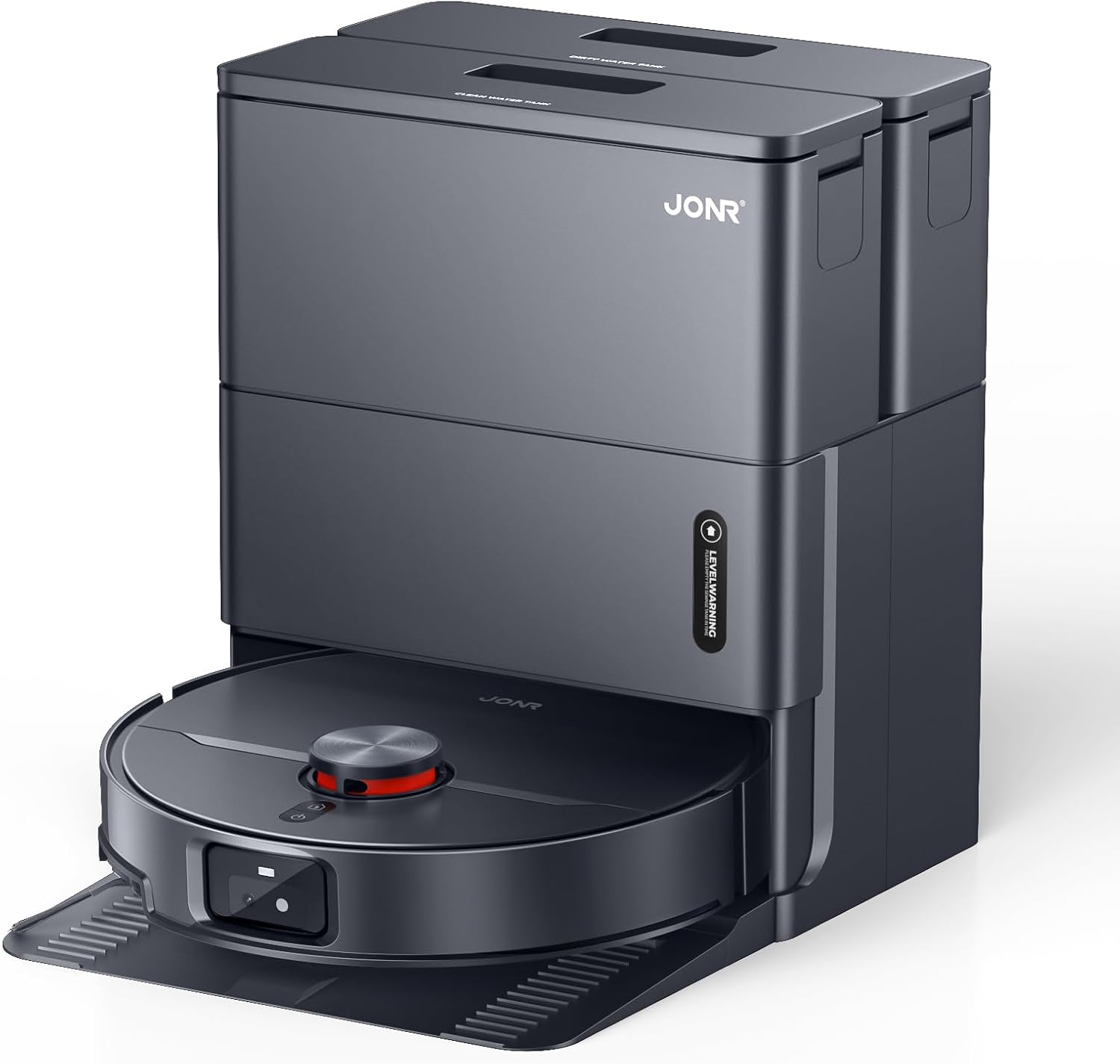
Image: The JONR X1 Max robot vacuum demonstrating its powerful 20000 Pa suction, effectively lifting dust and pet hair from various surfaces.
2. Kurulum
2.1 Paketin Açılması ve Bileşen Kontrolü
Tüm bileşenleri ambalajından dikkatlice çıkarın. Aşağıda listelenen tüm öğelerin mevcut olduğundan emin olun.
- JONR X1 Max Robot Vacuum and Mop Cleaner
- All-in-One Docking Station
- Güç Adaptörü
- Paspas Pedleri (önceden takılı veya ayrı)
- Kullanım Kılavuzu (bu belge)
- Dust Bag (pre-installed in station or separate)
- Clean Water Tank (4.2 L)
- Dirty Water Tank (3.8 L)
2.2 Bağlantı İstasyonu Yerleşimi
Place the docking station on a hard, level surface against a wall. Ensure there is at least 0.5 meters of clear space on both sides and 1.5 meters in front of the station for the robot to navigate freely. Connect the power adapter to the station and plug it into a wall outlet.

Image: The JONR X1 Max robot vacuum and its all-in-one docking station. The station is designed for automatic dust collection, mop washing, and drying.
2.3 İlk Şarj
Place the robot onto the docking station. Ensure the charging contacts on the robot align with those on the station. The robot will automatically begin charging. For first-time use, fully charge the robot before operation (approximately 2.5 hours).
2.4 Uygulama Kurulumu ve Eşleştirme
- Download the "JONR" app from your smartphone's app store (iOS or Android).
- Uygulamayı açın ve bir hesap oluşturun veya giriş yapın.
- Follow the in-app instructions to add your JONR X1 Max device. This typically involves connecting to the robot's Wi-Fi hotspot temporarily and then connecting the robot to your home Wi-Fi network.
- Once paired, you can control the robot, set cleaning schedules, and view maps from the app.
3. Kullanım Talimatları
3.1 Temizleme Döngüsünü Başlatma
You can start a cleaning cycle using one of the following methods:
- Robot Düğmesi: Press the power button on the robot once to start a general cleaning cycle.
- JONR App: Open the app, select your device, and tap "Start Cleaning." You can choose specific cleaning modes (Vacuum, Mop, Vacuum & Mop) and areas.
- Ses Kontrolü: If integrated with Amazon Alexa or Google Home, use commands like "Alexa, start JONR robot" or "Hey Google, tell JONR to clean."
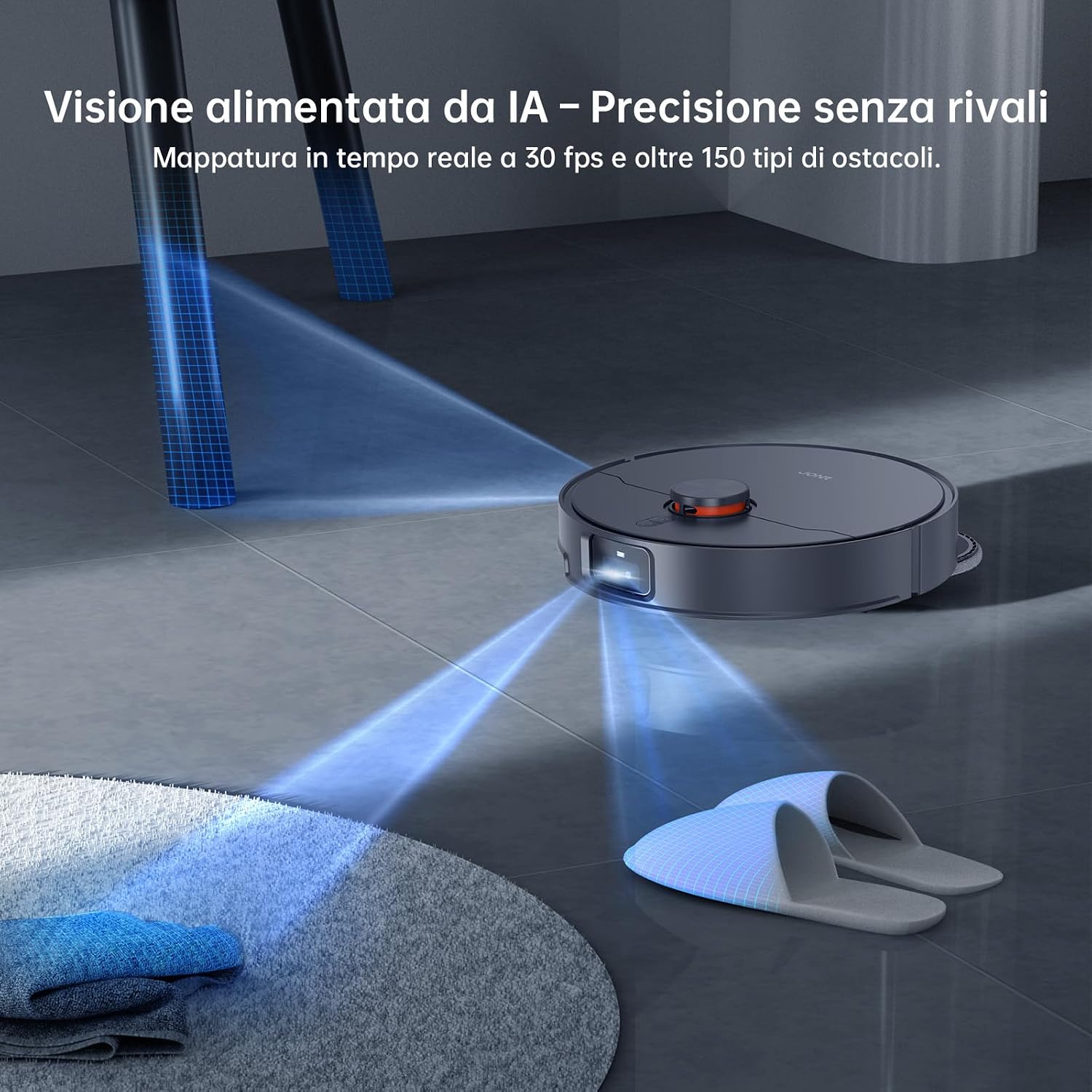
Image: The JONR X1 Max robot vacuum navigating a room, demonstrating its AI-powered obstacle avoidance system to detect and bypass objects like slippers.
3.2 Temizleme Modu
- Vakum Modu: The robot will only vacuum, suitable for carpets or dry debris.
- Paspas Modu: The robot will only mop, suitable for hard floors. Ensure water tanks are filled.
- Vakum ve Paspas Modu: The robot will vacuum and mop simultaneously. This is the default and recommended mode for most hard floors.
- Bölge Temizliği: Robotun temizleyeceği belirli alanları tanımlamak için uygulamayı kullanın.
- Nokta Temizleme: Direct the robot to a specific spot for intensive cleaning.

Image: The JONR X1 Max robot vacuum demonstrating its edge-to-edge cleaning capability, with extendable mop pads ensuring thorough coverage near walls and furniture.
3.3 Engelleri Aşma
The JONR X1 Max is equipped with a lifting roller design, allowing it to overcome obstacles up to 30 mm, such as door thresholds and thick carpets. Its 3D LiDAR navigation and RGB technology enable precise mapping and real-time obstacle avoidance.

Image: The JONR X1 Max robot vacuum demonstrating its ability to climb over obstacles up to 30mm high, such as floor transitions or rugs, compared to a standard robot's 8mm capability.
3.4 All-in-One Station Functions
The docking station provides automated maintenance for the robot:
- Automatic Dust Emptying: After each cleaning cycle, the robot's dustbin is automatically emptied into a 3L dust bag within the station.
- Sıcak Su Paspas Yıkama: The mop pads are washed with 75°C hot water to remove dirt and grime effectively.
- Sıcak Havalı Paspas Kurutma: Yıkama işleminden sonra mop pedleri küf ve koku oluşumunu önlemek için 45°C sıcak hava ile kurutulur.
- Automatic Water Refill/Drain: The station manages the clean and dirty water tanks, refilling the robot's water tank and draining dirty water as needed.

Image: The JONR X1 Max docking station actively cleaning the robot's mop pads with 75°C hot water, ensuring thorough sanitation and removal of stubborn stains.
4. Bakım
Regular maintenance ensures the optimal performance and longevity of your JONR X1 Max.
4.1 Dust Bag Replacement (Docking Station)
- The 3L dust bag in the docking station typically lasts up to 2.5 months, depending on usage.
- When the app indicates the dust bag is full, open the station's top cover, remove the full bag, and replace it with a new one.
4.2 Water Tank Maintenance (Docking Station)
- Temiz Su Tankı (4.2 L): Refill with clean tap water as needed. Do not add detergents or cleaning solutions unless specifically designed for robot vacuums and approved by JONR.
- Kirli Su Tankı (3.8 L): Empty the dirty water tank regularly to prevent odors and ensure proper mop washing. Clean the tank with water if necessary.
4.3 Mop Pad Cleaning and Replacement
- The docking station automatically washes and dries the mop pads.
- Periodically inspect the mop pads for wear and tear. Replace them when they become excessively worn or no longer clean effectively.
4.4 Ana Fırça ve Yan Fırça Temizliği
- Ana Fırça: The TroboWave DuoBrush system is designed to reduce hair entanglement. However, periodically remove the main brush and clean any accumulated hair or debris using the cleaning tool provided.
- Yan Fırçalar: Check side brushes for tangled hair or damage. Remove and clean them. Replace if bristles are bent or broken.

Resim: Yakın çekim view of the JONR X1 Max's patented helical blade design, illustrating its anti-tangle technology that significantly reduces hair obstructions and minimizes maintenance requirements.
4.5 Filtre Temizleme
- The robot uses a sponge filter. Remove the filter from the dustbin (after automatic emptying) and tap it gently to remove dust. Do not wash the filter with water unless specified.
- Kullanıma bağlı olarak filtreyi 3-6 ayda bir değiştirin.
4.6 Sensör Temizleme
- Wipe the cliff sensors, wall sensors, and charging contacts on the robot and docking station with a clean, dry cloth periodically to ensure proper navigation and charging.
5. Sorun Giderme
| Sorun | Olası Neden | Çözüm |
|---|---|---|
| Robot başlamıyor veya yanıt vermiyor. | Pil zayıf; Güç düğmesi kapalı; Robot sıkıştı. | Robotu şarj edin; Güç düğmesinin açık olduğundan emin olun; Herhangi bir engeli kaldırın. |
| Zayıf temizleme performansı. | Çöp haznesi dolu; Filtre tıkalı; Fırçalar/paspas pedleri aşınmış. | Empty dustbin/replace dust bag; Clean/replace filter; Clean/replace brushes/mop pads. |
| Robot cannot return to docking station. | Station obstructed; Robot too far; Charging contacts dirty. | Clear area around station; Manually place robot on station; Clean charging contacts. |
| Uygulama bağlantı sorunları. | Incorrect Wi-Fi password; Router too far; Robot offline. | Verify Wi-Fi credentials; Move robot closer to router; Restart robot and app. |
| Paspas pedleri etkili temizlik yapmıyor. | Dirty water tank full; Clean water tank empty; Worn mop pads. | Empty dirty water tank; Refill clean water tank; Replace mop pads. |
6. Özellikler
| Özellik | Detay |
|---|---|
| Marka | JONR |
| Model Adı | X1 MAX |
| Emiş Gücü | 20,000 Pa |
| Obstacle Climbing Capability | 30 mm |
| Sıcak Su Paspas Yıkama Sıcaklığı | 75 °C |
| Hot Air Mop Drying Temperature | 45 °C |
| Pil Ömrü | 2.5 saate kadar (150 dakika) |
| Pil Bileşimi | Lityum Polimer |
| Temiz Su Tankı Kapasitesi | 4.2 Litre |
| Kirli Su Tankı Kapasitesi | 3.8 Litre |
| Toz Torbası Kapasitesi | 3 Litre |
| Kontrol Türü | Düğme Kontrolü, Uygulama Kontrolü, Ses Kontrolü |
| Uyumlu Cihazlar | Amazon Echo, Google Home, Akıllı Telefonlar |
| Filtre Türü | Sünger |
| Boyutlar (U x G x Y) | 33U x 34G x 55Y cm |
| Ürün Ağırlığı | 12 Kilogram |
| Gürültü Seviyesi | 70 Desibel |
| Önerilen Yüzeyler | Tiles, Hard Floors, Carpets |
7. Garanti ve Destek
JONR provides 365-day customer service for the X1 Max robot vacuum and mop cleaner. For warranty claims, technical support, or any inquiries regarding your product, please contact JONR customer service through the official webSite veya satın alma belgelerinizde belirtilen iletişim bilgileri.
Lütfen garanti amaçlı satın alma belgenizi saklayın.