
Memorex MXTAB11
Memorex MXTAB11 11-inch Android 14 Tablet Bundle User Manual
Model: MXTAB11
1. Giriş
The Memorex MXTAB11 11-inch Android 14 Tablet Bundle is designed for versatile use, supporting work, streaming, gaming, and learning. This tablet offers premium performance with an A523 ARM 8-core Cortex processor, optimized graphics, and comes with essential accessories for immediate use.

Image 1: The Memorex MXTAB11 tablet set up with its Bluetooth keyboard and wireless headphones on a wooden table, ready for use.
Temel Özellikler:
- Güçlü Performans: A523 ARM 8-core Cortex processor (up to 2.0GHz) with optimized graphics for smooth multitasking and responsive app performance.
- Canlı Ekran: 11-inch FHD IPS display with 1920 x 1200 pixel resolution for clear visuals.
- AmpDosya Depolama: 128GB internal storage for apps, photos, and files.
- Verimli Bellek: 4GB RAM for smooth operation.
- Modern OS: Runs on Android 14.
- Dayanıklı Tasarım: Features a metal body for enhanced durability.
- Bağlantı: Supports 802.11a/b/g/n/ac/ax wireless types.
2. Kutuda Neler Var?
Your Memorex MXTAB11 Tablet Bundle includes the following items:
- Memorex 11” Tablet
- Bluetooth Klavye
- Kablosuz Kulaklıklar
- Standlı Koruyucu Kılıf
- AC Adapter Charger & Cable
- Kullanım Kılavuzu
- Hızlı Başlangıç Kılavuzu
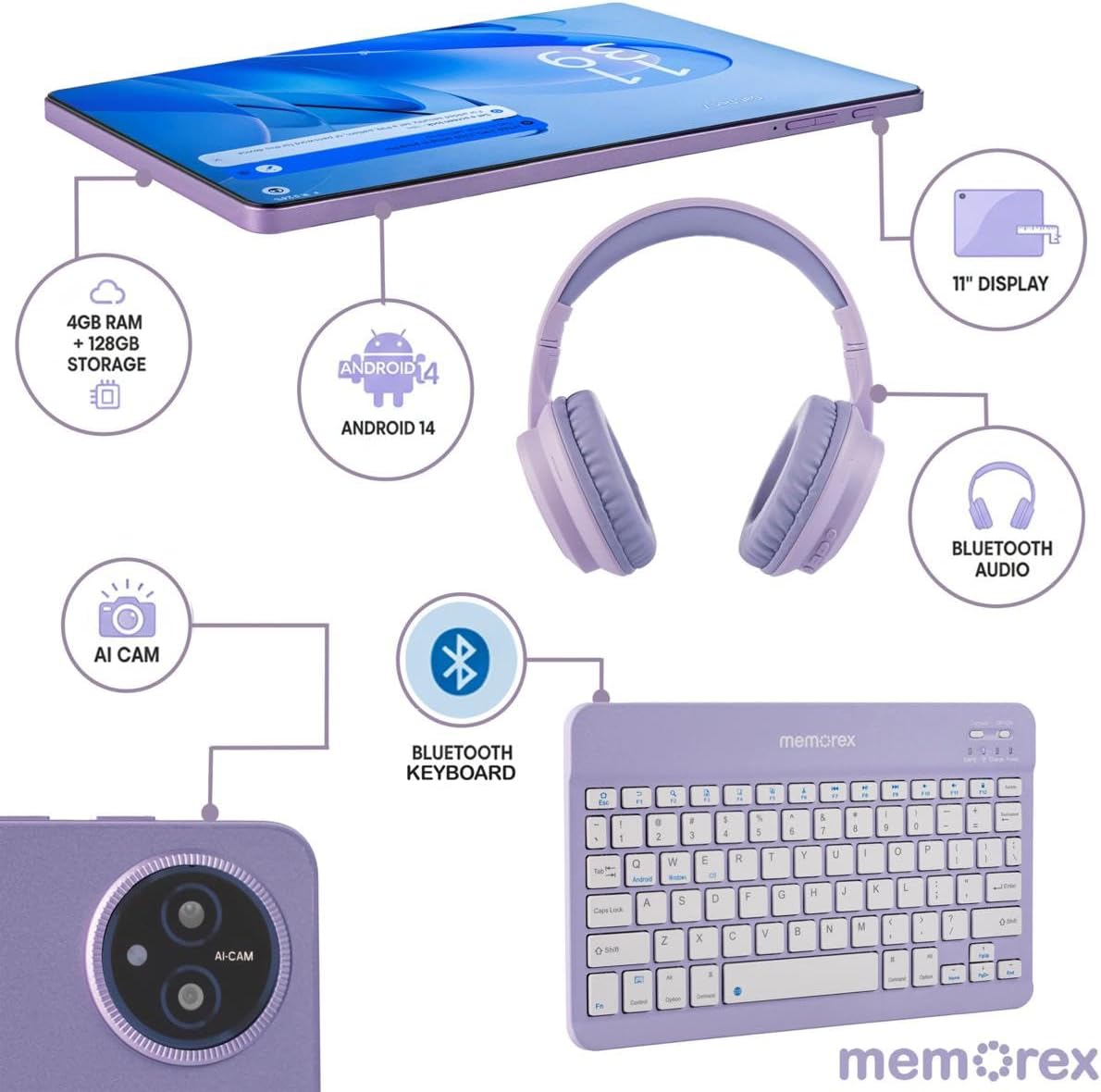
Image 2: A visual breakdown of the Memorex MXTAB11 tablet's features and included accessories, such as 4GB RAM, 128GB storage, Android 14, 11-inch display, AI camera, Bluetooth keyboard, Bluetooth audio, and wireless headphones.
3. Kurulum
3.1 İlk Güç Açma ve Yapılandırma
- Tableti Şarj Edin: Before first use, connect the tablet to the AC adapter charger and cable provided. Allow it to charge fully.
- Güç Açık: Press and hold the power button (usually located on the side or top edge) until the Memorex logo appears on the screen.
- Ekrandaki Komutları Takip Edin: Tablet, aşağıdakiler de dahil olmak üzere ilk kurulum sürecinde size rehberlik edecektir:
- Dilinizi seçin.
- Bir Wi-Fi ağına bağlanma.
- Signing in with your Google account (or creating one).
- Ekran kilidini ayarlama (PIN, desen, parola).
3.2 Connecting Bluetooth Keyboard and Wireless Headphones
- Bluetooth'u etkinleştir: On your tablet, swipe down from the top of the screen to open the Quick Settings panel. Tap the Bluetooth icon to turn it on. Alternatively, go to Ayarlar > Bağlı cihazlar > Bluetooth.
- Pair Bluetooth Keyboard:
- Turn on the Bluetooth keyboard (refer to the keyboard's quick start guide for specific instructions).
- On your tablet's Bluetooth settings, tap 'Pair new device'.
- Select the keyboard from the list of available devices. Follow any on-screen prompts to complete pairing.
- Pair Wireless Headphones:
- Put your wireless headphones into pairing mode (refer to the headphones' quick start guide).
- On your tablet's Bluetooth settings, tap 'Pair new device'.
- Select the headphones from the list of available devices. Follow any on-screen prompts to complete pairing.
4. Tabletin Çalıştırılması
4.1 Temel Gezinme
- Ana Ekran: Uygulamalarınız ve araçlarınız için merkezi kontrol noktası.
- Uygulama Çekmecesi: Yüklü tüm uygulamalara erişmek için ekranın altından yukarı doğru kaydırın.
- Hızlı Ayarlar ve Bildirimler: Swipe down from the top of the screen to access quick settings (Wi-Fi, Bluetooth, brightness) and view bildirimler.
- Geri, Ana Sayfa, Son Uygulamalar: Use the navigation buttons at the bottom of the screen to go back, return to the home screen, or view Son zamanlarda başvurular açıldı.
4.2 Uygulamaları Kullanma
The tablet comes pre-loaded with essential Google applications and allows you to download more from the Google Play Store.
- Google Play Mağazası: Tap the Play Store icon to browse and download new apps, games, movies, and books.
- Web Gözatma: Use the pre-installed Chrome browser to access the internet.
- Kamera: Tap the Camera icon to take photos or record videos using the tablet's dual cameras.
- Takvim: Manage your schedule and events.
- Files: Access and organize your documents, images, videos, and other files.

Image 3: A person comfortably using the Memorex MXTAB11 tablet with its Bluetooth keyboard and wireless headphones, demonstrating its suitability for various activities like work or entertainment.
5. Bakım
- Temizlik: Use a soft, lint-free cloth to clean the screen and body of the tablet. Avoid harsh chemicals or abrasive materials.
- Yazılım Güncellemeleri: En iyi performans ve güvenliği sağlamak için sistem güncellemelerini düzenli olarak kontrol edin ve yükleyin. Ayarlar > Sistem > Sistem güncellemesi.
- Pil Bakım: Pil ömrünü uzatmak için aşırı sıcaklıklardan kaçının ve pilin sık sık tamamen bitmesine izin vermeyin.
- Depolama Yönetimi: Gereksiz olanları periyodik olarak temizleyin fileDepolama alanını boşaltmak ve performansı korumak için uygulamalar ve uygulamalar.
6. Sorun Giderme
6.1 Yaygın Sorunlar ve Çözümler
- Tablet Açılmıyor: Ensure the tablet is charged. Connect it to the charger and wait a few minutes before attempting to power it on again.
- Yavaş Performans: Close unused applications, clear cache, or restart the tablet. Check for available system updates.
- Wi-Fi Bağlantı Sorunları: Wi-Fi yönlendiricinizi ve tabletinizi yeniden başlatın. Tablet ayarlarında ağı unut seçeneğini işaretleyin ve yeniden bağlanın.
- Bluetooth Eşleştirme Başarısız: Ensure both devices are in pairing mode and within range. Restart Bluetooth on the tablet and try pairing again.
- Uygulamalar Çöküyor: Uygulamanın önbelleğini veya verilerini şu yolla temizleyin: Settings > Apps > [App Name] > Storage > Clear Cache/Data. Reinstall the app if the issue persists.
7. Özellikler
| Ekran Boyutu | 11 inç |
| Ekran Çözünürlüğü | 1920 x 1200 piksel (FHD IPS) |
| İşlemci | A523 ARM Cortex-A523 Octa-Core Processor, up to 2.0 GHz |
| Veri deposu | 4 GB |
| Flaş Bellek Boyutu | 128 GB |
| İşletim Sistemi | Android 14 |
| Kablosuz Tip | 802.11a, 802.11ac, 802.11ax, 802.11b, 802.11g, 802.11n |
| Ürün Ağırlığı | 5 pound |
| Ürün Boyutları | 10 x 4 x 13 inç |
| Renk | Mavi |
8. Garanti ve Destek
8.1 İade Politikası
Ürün, satın alma tarihinden itibaren 30 gün içinde iade veya değişim hakkına sahiptir.
8.2 Koruma Planları
Genişletilmiş teminatlar için isteğe bağlı koruma planları mevcuttur:
- 2 Yıllık Koruma Planı: 30.99$'lık tek seferlik ödeme.
- Tam Koruma: Monthly payment of $16.99, covering all eligible past and future purchases.
For further support or inquiries, please refer to the contact information provided in your Quick Start Guide or visit the official Memorex support webalan.
Ask a question about this manual
Ask about setup, troubleshooting, compatibility, parts, safety, or missing instructions. Manuals+ will review the question and use this page’s manual context to help answer it.