
1. Giriş
Satın aldığınız için teşekkür ederizasing the ULTIMEA Aura A60 U2621 7.1ch Dolby Atmos Soundbar System. This manual provides essential information for setting up, operating, and maintaining your new sound system. Please read this manual thoroughly before use to ensure proper functionality and to maximize your audio experience.

Figure 1.1: Immersive audio experience with the ULTIMEA Aura A60 system.
2. Güvenlik Bilgileri
To reduce the risk of electric shock, fire, or damage to your device, please observe the following safety precautions:
- Bu cihazı yağmura veya neme maruz bırakmayın.
- Cihazın üzerine vazo gibi sıvı dolu nesneler koymayın.
- Uygun havalandırmayı sağlayın. Havalandırma açıklıklarını kapatmayın.
- Radyatörler, kalorifer ızgaraları, sobalar veya diğer cihazlar (dahil) gibi herhangi bir ısı kaynağının yakınına kurmayın. amp(ısı üreten)
- Güç kablosunun, özellikle fişlerde, prizlerde ve cihazdan çıktığı noktalarda üzerine basılmasını veya sıkışmasını önleyin.
- Sadece üretici tarafından belirtilen aparatları/aksesuarları kullanın.
- Yıldırımlı havalarda veya uzun süre kullanılmayacaksa bu cihazın fişini çekin.
- Tüm bakımları yetkili servis personeline yaptırın.
3. Paket İçeriği
Lütfen tüm ürünlerin mevcut ve iyi durumda olduğundan emin olun:
- ULTIMEA Aura A60 Soundbar
- Wireless Subwoofer (4-inch, BassMX Technology)
- 4 x Surround Speakers (2 front, 2 rear)
- Uzaktan kumanda
- HDMI Kablosu
- Power Adapter/Cables
- Kullanım Kılavuzu (bu belge)
4. Ürün Bittiview
The ULTIMEA Aura A60 U2621 is a 7.1ch Dolby Atmos soundbar system designed to deliver an immersive home theater audio experience. It features a main soundbar unit, a powerful wireless subwoofer with BassMX technology, and four surround speakers.
4.1 Main Soundbar Unit
The main soundbar unit houses 3 main channels for clear dialogue and primary audio. It serves as the central hub for all audio connections.

Figure 4.1: Main soundbar unit with front surround speakers.
4.2 Kablosuz Subwoofer
The dedicated 4-inch wireless subwoofer incorporates BassMX technology to enhance low frequencies, providing deep and resonant bass for a more impactful audio experience.

Figure 4.2: Wireless subwoofer with BassMX technology.
4.3 Surround Hoparlör
The system includes four surround speakers: two front and two rear. The rear speakers connect wirelessly to the soundbar, minimizing cable clutter and allowing flexible placement to create an expansive acoustic space.

Figure 4.3: Diagram of 7.1ch sound distribution.
4.4 Giriş/Çıkış Portları
The soundbar features multiple input options for versatile connectivity:
- HDMI eARC: For high-quality audio transmission and seamless TV integration.
- Optik: Dijital ses girişi.
- YARDIMCI: Analog ses girişi.
- USB BAĞLANTI: Medya oynatımı için.
- Bluetooth: Wireless audio streaming.

Figure 4.4: Rear panel connections, including HDMI eARC.
5. Kurulum
5.1 Fiziksel Yerleştirme
En iyi ses deneyimi için ses sistemi bileşenlerinizin en uygun şekilde yerleştirilmesi çok önemlidir.
- Ses çubuğu: Ses çubuğunu televizyonunuzun altına, tam ortaya yerleştirin. Engellenmediğinden emin olun.
- Subwoofer: Position the wireless subwoofer on the floor near the soundbar. Experiment with placement to find the best bass response for your room.
- Ön Çevre Hoparlörleri: Place the two wired front surround speakers to the left and right of your TV, ideally at ear level when seated.
- Arka Çevre Hoparlörleri: Position the two wireless rear surround speakers behind your primary listening position, to the left and right. These speakers will automatically connect wirelessly to the soundbar once powered on.

Figure 5.1: Recommended speaker placement for Dolby Atmos.
5.2 Bağlantılar
Ses çubuğu sisteminizi bağlamak için şu adımları izleyin:
- Güç Bağlantısı: Connect the power cables to the soundbar, subwoofer, and surround speakers, then plug them into a power outlet.
- HDMI eARC (Önerilir): Connect one end of the provided HDMI cable to the HDMI eARC port on your soundbar and the other end to the HDMI eARC/ARC port on your TV. This connection supports Dolby Atmos and allows for TV remote control of the soundbar.
- Optik Bağlantı (Alternatif): If your TV does not have an HDMI eARC/ARC port, connect an optical cable (not included) from your TV's optical output to the OPTICAL input on the soundbar.
- AUX Connection (Alternative): For analog audio sources, connect a 3.5mm AUX cable (not included) from your device's audio output to the AUX input on the soundbar.
- USB Bağlantısı: Insert a USB drive into the USB port on the soundbar for direct media playback.
- Bluetooth Eşleştirme: To connect a Bluetooth device, select the Bluetooth input on the soundbar. On your device, search for 'ULTIMEA Aura A60' and pair.
6. Kullanım Talimatları
6.1 Güç Açma/Kapatma
Ses sistemini açmak veya kapatmak için ses çubuğundaki veya uzaktan kumandadaki Güç düğmesine basın.
6.2 Giriş Seçimi
Use the 'Input' button on the remote control or the soundbar to cycle through available input sources: HDMI eARC, Optical, AUX, USB, and Bluetooth.

Figure 6.1: Remote control for easy operation.
6.3 Ses Kontrolü
Adjust the master volume using the 'Volume Up' and 'Volume Down' buttons on the remote control or the soundbar. You can also adjust subwoofer and surround speaker levels independently.
6.4 Sound Modes and EQ Presets
The Aura A60 offers various sound modes and EQ presets to optimize audio for different content and preferences.
- Dedicated Modes: Select from 6 specialized modes: Movie, Music, Voice, Sports, Game, and Night.
- EQ Ön Ayarları: Access 121 professional EQ presets for genres like Bass, Pop, Classical, and Rock via the ULTIMEA app.

Figure 6.2: 121 preset EQ matrix for customized audio.
6.5 Uygulama Kontrolü
Download the ULTIMEA app to your smartphone for advanced control and customization options, including a 10-band EQ and access to all EQ presets.
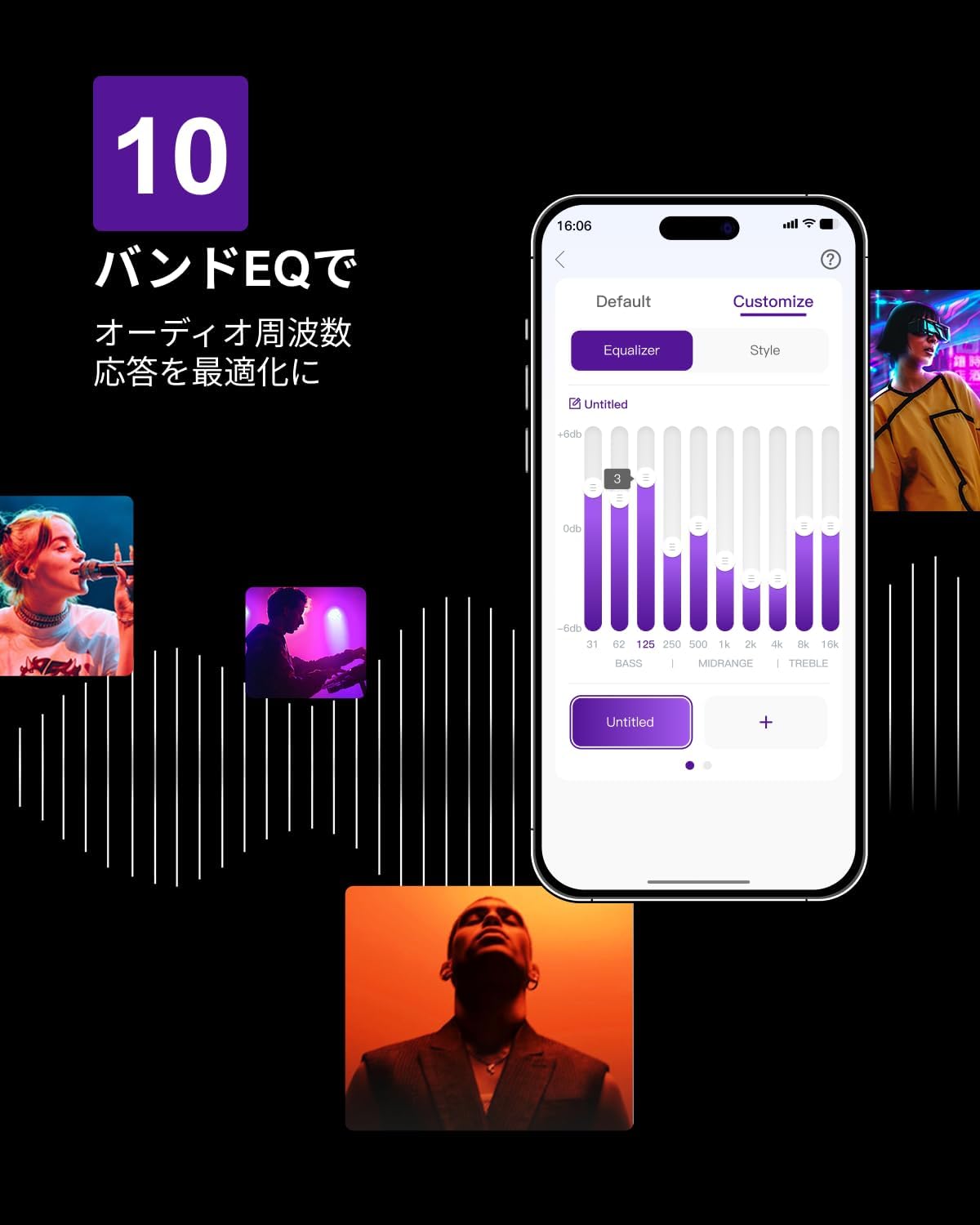
Figure 6.3: ULTIMEA mobile application interface.
7. Bakım
To ensure the longevity and optimal performance of your ULTIMEA Aura A60 soundbar system, follow these simple maintenance guidelines:
- Temizlik: Use a soft, dry cloth to wipe the surfaces of the soundbar, subwoofer, and speakers. Do not use liquid cleaners or abrasive materials, as they may damage the finish.
- Havalandırma: Ensure that all ventilation openings remain clear and unobstructed to prevent overheating.
- Depolamak: Sistemi uzun süre saklayacaksanız, güç kaynağından ayırın ve doğrudan güneş ışığından ve aşırı sıcaklıklardan uzak, serin ve kuru bir yerde saklayın.
8. Sorun Giderme
If you encounter issues with your soundbar system, refer to the following common problems and solutions:
| Sorun | Olası Neden | Çözüm |
|---|---|---|
| Soundbar'dan ses gelmiyor. | Yanlış giriş seçildi, ses seviyesi çok düşük, kablolar düzgün bağlanmamış. | Verify the correct input source. Increase volume. Check all cable connections (HDMI, Optical, AUX). Ensure the soundbar is powered on. |
| No sound from subwoofer/surround speakers. | Subwoofer/speakers not paired or powered on, volume too low. | Ensure subwoofer and surround speakers are powered on. They should automatically pair. If not, refer to the pairing instructions in the full manual (if available) or contact support. Increase their individual volume levels. |
| Bozuk veya düşük ses kalitesi. | Incorrect audio settings, poor source quality, interference. | Adjust EQ settings or try different sound modes. Ensure the audio source is high quality. Check for nearby electronic devices causing interference. |
| Bluetooth bağlantı sorunları. | Device out of range, not in pairing mode, interference. | Ensure the soundbar is in Bluetooth pairing mode. Move your device closer to the soundbar. Disconnect and re-pair the device. |
If the problem persists after trying these solutions, please contact ULTIMEA customer support.
9. Özellikler
| Özellik | Detay |
|---|---|
| Marka | GEÇEN |
| Model Adı | Aura A60 |
| Model Numarası | U2621 |
| Hoparlör Tipi | Soundbar with 7.1ch Surround Sound |
| Ses Teknolojisi | Dolby Atmos, BassMX Technology |
| Bağlantı | HDMI eARC, Bluetooth, Optical, AUX, USB |
| Subwoofer | 4-inch Wired Subwoofer (integrated BassMX) |
| Çevresel Hoparlörler | 4 (2 wired front, 2 wireless rear) |
| Kontrol | Remote Control, ULTIMEA App |
| Renk | Siyah |
| Boyutlar (D x G x Y) | 9 cm x 40 cm x 7 cm (Soundbar, approximate) |
| Menşei ülke | Çin |
10. Garanti ve Destek
ULTIMEA is committed to providing high-quality products and customer satisfaction. Your Aura A60 U2621 soundbar system comes with comprehensive support.
10.1 Garanti Bilgileri
Specific warranty details may vary by region. Please refer to the warranty card included with your product or visit the official ULTIMEA webEn güncel garanti şartları ve koşulları için lütfen siteyi ziyaret edin.
10.2 Müşteri Desteği
For any questions, technical assistance, or troubleshooting not covered in this manual, please contact our dedicated support team:
- 365-Day Support: Our expert staff is available year-round to assist you.
- Canlı Sohbet: Instant responses are available via live chat on our webalan.
- İade: We offer a 30-day return policy with free shipping for your peace of mind.

365-Day Expert Support

Instant Live Chat

30 Günlük Ücretsiz İade
Daha fazla yardım için lütfen şu adresi ziyaret edin: ULTIMEA Brand Store.